Data fetching, setting up a subscription, and manually changing the DOM in React components are all examples of side effects.
데이터 가져오기, 구독(subscription) 설정하기, 수동으로 리액트 컴포넌트의 DOM을 수정하는 것까지 이 모든 것이 side effects입니다.
There are two common kinds of side effects in React components: those that don’t require cleanup, and those that do.
이러한 side effect를 크게 두가지로 분류 할 수 있습니다 : clean up 이 필요한 것과 필요하지 않은 것!
Network requests, manual DOM mutations, and logging are common examples of effects that don’t require a cleanup. We say that because we can run them and immediately forget about them.
네트워크 리퀘스트, DOM 수동 조작, 로깅 등은 정리(clean-up)가 필요 없는 경우들입니다. 이러한 예들은 실행 이후 신경 쓸 것이 없기 때문입니다.
logging(로깅) 이란?
시스템 동작 시 시스템 상태/작동 정보를 시간의 경과에 따라 기록하는 것을 로깅이라고 하고, 그 기록을 로그라고 합니다.
In React class components, the render method itself shouldn’t cause side effects. It would be too early.
클래스 컴포넌트에서의 render함수 자체로는 side effect를 실행 시킬 수가 없어요. 우리가 원하는 건 React가 DOM을 다 업데이트 시키고 (side)effect가 실행되기를 원하는 데 그게 안되고 너무 빨리 실행되어 버릴수 있습니다.
This is why in React classes, we put side effects into componentDidMount and componentDidUpdate.
그래서 클래스 컴포넌트는 Lifecycle Methods들을 이용해서 side effect를 실행시킵니다.
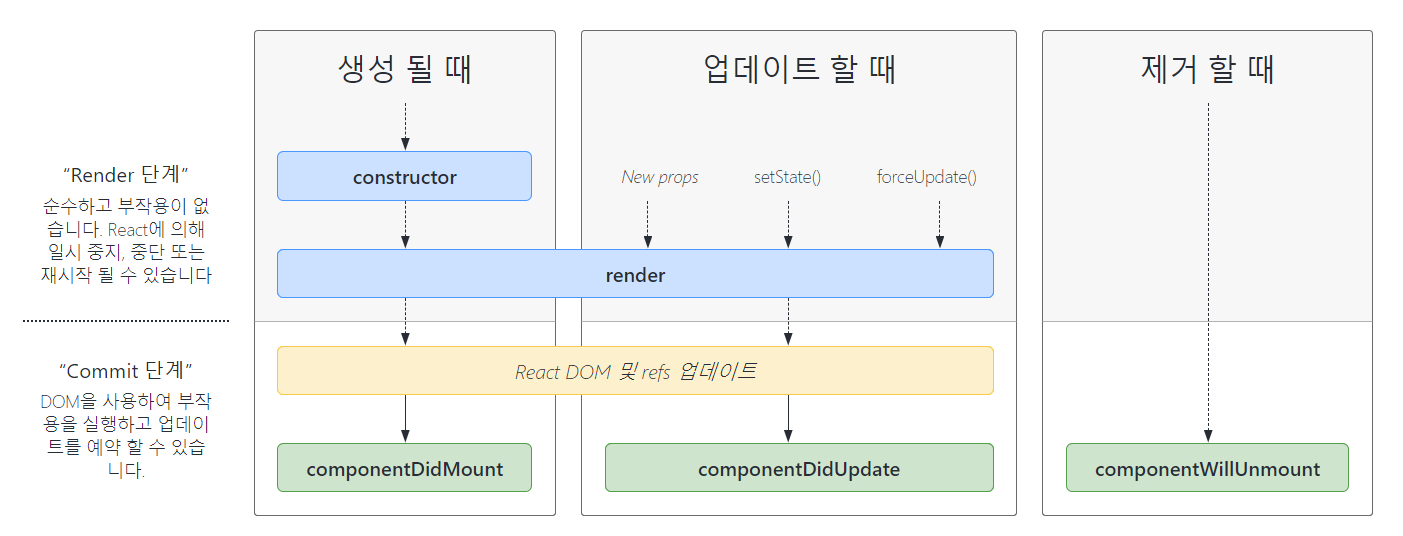
React공식 문서에서 제공하는 Lifecycle diagram.
Mounting : adding nodes to the DOM (처음으로 render 함수를 실행하는 거라고 생각하면 됨)
Unmounting : removing nodes from the DOM (mount 되었던 nodes 들을 없애는 것)
Re-rendering or Updating : making changes to nodes already in the DOM (원래 있던 node를 업데이트 시키는 것 = rerendering)
- class component with lifecycle methods
class Example extends React.Component {
  constructor(props) {
    super(props);
    this.state = {
      count: 0
    };
  }

  componentDidMount() {
    document.title = `You clicked ${this.state.count} times`;
  }
  componentDidUpdate() {
    document.title = `You clicked ${this.state.count} times`;
  }

  render() {
    return (
      <div>
        <p>You clicked {this.state.count} times</p>
        <button onClick={() => this.setState({ count: this.state.count + 1 })}>
          Click me
        </button>
      </div>
    );
  }
}
👀 This is because in many cases we want to perform the same side effect regardless of whether the component just mounted, or if it has been updated. Conceptually, we want it to happen after every render — but React class components don’t have a method like this.
저희가 원하는 건 mount든 업데이트 될 때든, render함수가 실행될 때마다 side effect가 실행되길 원하는데 클래스 컴포넌트에는 이러한 함수가 없어서 이렇게 똑같은 side effect를 다른 함수에서 두번씩 선언해야 합니다😥
- useEffect
import React, { useState, useEffect } from 'react';

function Example() {
  const [count, setCount] = useState(0);

  useEffect(() => {
    document.title = `You clicked ${count} times`;
  });

  return (
    <div>
      <p>You clicked {count} times</p>
      <button onClick={() => setCount(count + 1)}>
        Click me
      </button>
    </div>
  );
}-
What does useEffect do?
useEffect는 React한테 "render함수 실행 이후에 여기 선언된 side effect(위의 예에선 documents.title) 를 실행시켜줘" 라고 말합니다. React는 이 side effect를 기억하고 DOM을 업데이트 시킨 후 실행시킵니다. -
Why is
useEffectcalled inside a component?useEffect를 component안에 두는 이유는 위의 예제에서count같은 state variable에 바로 접근할 수 있기 때문입니다.❓ Javascript 에서의 closure ❓ closure는 함수와 함수가 선언된 어휘적 환경의 조합입니다. 이 환경은 클로저가 생성된 시점의 유효 범위 내에 있는 모든 지역 변수로 구성됩니다. 이러한 javascript closure기능을 hook 이 가지고 있음으로써
useEffect가 실행될 때마다 업데이트된count를 참조 할 수 있다는 걸 설명하고 있습니다.참고: https://developer.mozilla.org/ko/docs/Web/JavaScript/Closures
- Does useEffect run after every render?
useEffect는 default로 첫 render와 모든 update이후 실행됩니다. 클래스 컴포넌트에서 처럼 mounting과 updating을 나눠 생각하지 않고, 그냥 render함수 실행될 때마다 (side)effects가 발행한다고 생각하면 됩니다!!
For example, we might want to set up a subscription to some external data source. In that case, it is important to clean up so that we don’t introduce a memory leak!
cleanup이 필요한 대표적인 예시가 구독 설정입니다. 구독 설정을 했을 땐 어떤 정보가 바뀔 때마다 알 수 있습니다. 그럼 바뀌기 이전의 정보는 더 이상 정보로서의 가치가 없어집니다. 또한 구독을 멈춘다면 그 전에 구독했던 정보도 필요 없어 집니다. 이러한 불필요한 정보는 지워줘야 메모리를 효율적으로 잘 쓸 수 있습니다.
-
class component with lifecycle methods
이 그림을 다시 보면 우리는 subscription의 set up 즉 설정을
componentDidMount와componentWillUnmount로 할 수 있다는 걸 알 수 있습니다. cleanup 과정을componentWillUnmount로 하는 겁니다!
예를 들어, 친구의 온라인 상태를 알 수 있게 해주는 ChatAPI module있다고 생각 했을 때
class FriendStatus extends React.Component {
    constructor(props) {
        super(props);
        this.state = { isOnline: null };
        this.handleStatusChange = this.handleStatusChange.bind(this);
    }

    componentDidMount() {
        ChatAPI.subscribeToFriendStatus(
        this.props.friend.id,
        this.handleStatusChange
        );
    }
    componentWillUnmount() {
        ChatAPI.unsubscribeFromFriendStatus(
        this.props.friend.id,
        this.handleStatusChange
        );
    }
    handleStatusChange(status) {
        this.setState({
        isOnline: status.isOnline
        });
    }

    render() {
        if (this.state.isOnline === null) {
        return 'Loading...';
        }
        return this.state.isOnline ? 'Online' : 'Offline';
    }
}
코드에서 보면 알 수 있듯이 거의 비슷한 작업을
componentDidMount와componentWillUnmount로 나눠서 하고 있습니다.
-
useEffect
한 행위에 대해서 더하고 제거하는 건 완전히 연관되어 있는 거라 따로 분리해놓기 보단 useEffect를 사용해서 하나로 묶어놓는게 좋습니다.
If your effect returns a function, React will run it when it is time to clean up:
useEffect의 결과값으로 함수를 반환하면, 그 함수를 cleanup 단계에서 실행시킬 수 있습니다!
import React, { useState, useEffect } from 'react';

function FriendStatus(props) {
  const [isOnline, setIsOnline] = useState(null);

  useEffect(() => {
    function handleStatusChange(status) {
      setIsOnline(status.isOnline);
    }
    ChatAPI.subscribeToFriendStatus(props.friend.id, handleStatusChange);
    // Specify how to clean up after this effect:
    return function cleanup() {
      ChatAPI.unsubscribeFromFriendStatus(props.friend.id, handleStatusChange);
    };
  });

  if (isOnline === null) {
    return 'Loading...';
  }
  return isOnline ? 'Online' : 'Offline';
}
이렇게 useEffect를 통해 관련된 작업을 하나로 묶을 수 있고, 이런 cleanup함수를 정의함으로서 다음 차례의 effect를 실행하기 전에 이전의 렌더링에서 파생된 effect 또한 정리 할 수 있습니다. useEffect는 render함수가 실행 될때 마다 같이 실행되므로 이러한 cleanup 작업도 때마다 실행이 되어야 버그도 방지할 수 있습니다.
👀 만약에 다른 친구의 온라인 상태를 알려고 하면 어떻게 될까요? 클래스 컴포넌트의 경우 원래 구독하고 있던 친구를 unsubscribe하고 새로운 친구를 subscribe 하기위해 componentDidUpdate까지 추가해 주어야 합니다.
하지만 useEffect를 이용하면 앞서 설명한 코드와 동일합니다.
// Mount with { friend: { id: 100 } } props
ChatAPI.subscribeToFriendStatus(100, handleStatusChange);     // Run first effect

// Update with { friend: { id: 200 } } props
ChatAPI.unsubscribeFromFriendStatus(100, handleStatusChange); // Clean up previous effect
ChatAPI.subscribeToFriendStatus(200, handleStatusChange);     // Run next effect

// Update with { friend: { id: 300 } } props
ChatAPI.unsubscribeFromFriendStatus(200, handleStatusChange); // Clean up previous effect
ChatAPI.subscribeToFriendStatus(300, handleStatusChange);     // Run next effect

// Unmount
ChatAPI.unsubscribeFromFriendStatus(300, handleStatusChange); // Clean up last effect
이와 같은 복잡한 과정을
useEffect(() => {
    // ...
    ChatAPI.subscribeToFriendStatus(props.friend.id, handleStatusChange);
    return () => {
      ChatAPI.unsubscribeFromFriendStatus(props.friend.id, handleStatusChange);
};useEffect를 이렇게 사용하면 한번에 가능합니다!!
1. Use Multiple Effects to Separate Concerns
예를 들어 cleanup이 굳이 필요하지 않았던 counter와 cleanup이 필요한 subscribe를 같이 사용하려면 어떻게 해야할까요?
- class component with lifecycle methods
class FriendStatusWithCounter extends React.Component {
 constructor(props) {
   super(props);
   this.state = { count: 0, isOnline: null };
   this.handleStatusChange = this.handleStatusChange.bind(this);
 }

 componentDidMount() {
   document.title = `You clicked ${this.state.count} times`;
   ChatAPI.subscribeToFriendStatus(
     this.props.friend.id,
     this.handleStatusChange
   );
 }

 componentDidUpdate() {
   document.title = `You clicked ${this.state.count} times`;
 }

 componentWillUnmount() {
   ChatAPI.unsubscribeFromFriendStatus(
     this.props.friend.id,
     this.handleStatusChange
   );
 }

 handleStatusChange(status) {
   this.setState({
     isOnline: status.isOnline
   });
 }
// ...- useEffect
function FriendStatusWithCounter(props) {
  const [count, setCount] = useState(0);
  useEffect(() => {
    document.title = `You clicked ${count} times`;
  });

  const [isOnline, setIsOnline] = useState(null);
  useEffect(() => {
    function handleStatusChange(status) {
      setIsOnline(status.isOnline);
    }

    ChatAPI.subscribeToFriendStatus(props.friend.id, handleStatusChange);
    return () => {
      ChatAPI.unsubscribeFromFriendStatus(props.friend.id, handleStatusChange);
    };
  });
  // ...
}
⭐ 이렇게 Hook을 사용하면 lifecycle이 아닌 어떤 일을 수행하는 지에 초점을 두고 코드를 작성할 수 있어요!!
2. Optimizing Performance by Skipping Effects
rerendering이 될 때마다 useEffect가 실행되서 effect를 추가하거나 제거하는게 퍼포먼스 문제를 일으킬 수 있습니다. 그래서 우리는 특정 부분이 변할 때만 effect를 실행하도록 조건을 설정 할 수 있습니다.
useEffect(() => {
  function handleStatusChange(status) {
    setIsOnline(status.isOnline);
  }

  ChatAPI.subscribeToFriendStatus(props.friend.id, handleStatusChange);
  return () => {
    ChatAPI.unsubscribeFromFriendStatus(props.friend.id, handleStatusChange);
  };
}, [props.friend.id]); // Only re-subscribe if props.friend.id changes
❗ 이 최적화 방법을 사용할 때는 배열이 컴포넌트 범위내에서 바뀌는 값들과 effect에 의해 사용되는 값들을 모두 포함해야합니다. 그렇지 않으면 이전 렌더링 값을 참고하게 됩니다.