
An open-source CLI that helps developers identify security vulnerabilities, performance bottlenecks, configuration issues, and best-practice violations across modern web applications.


DevShield enhances your development workflow by providing automated security analysis, performance diagnostics, and best-practice validation for modern web applications from a single command.
- Scans your project for security vulnerabilities, configuration issues, and framework-specific misconfigurations, helping you identify problems before deployment.
- Analyzes project structure, dependencies, Docker configuration, CI/CD workflows, and performance bottlenecks, providing actionable recommendations to improve code quality.
- Generates comprehensive reports in multiple formats, making it easier to integrate security and quality checks into your development pipeline.
- Automatically applies safe fixes for supported rules when manual intervention is not required.
To understand the motivation, architecture, and rule system, refer to the documentation.
DevShield is built around an extensible plugin architecture, allowing developers to add custom scanners
- Detect exposed secrets
- Debug mode detection
- Weak CORS configurations
- Missing security headers
- Session cookie validation
- JWT security checks
- Environment variable validation
- Dangerous permissions
- OWASP-inspired rules
- Oversized Docker images
- Large frontend bundles
- Duplicate dependencies
- Missing caching
- Slow build configurations
- Static asset optimization
- Image optimization checks
- Missing documentation
- Missing tests
- Dependency health
- Project structure validation
- Git configuration checks
- CI/CD workflow validation
- Version consistency
Current support includes:
- Laravel
- Node.js
- React
- Next.js
- Express
- Docker
Upcoming:
- Django
- Flask
- FastAPI
- NestJS
- Spring Boot
- ASP.NET Core
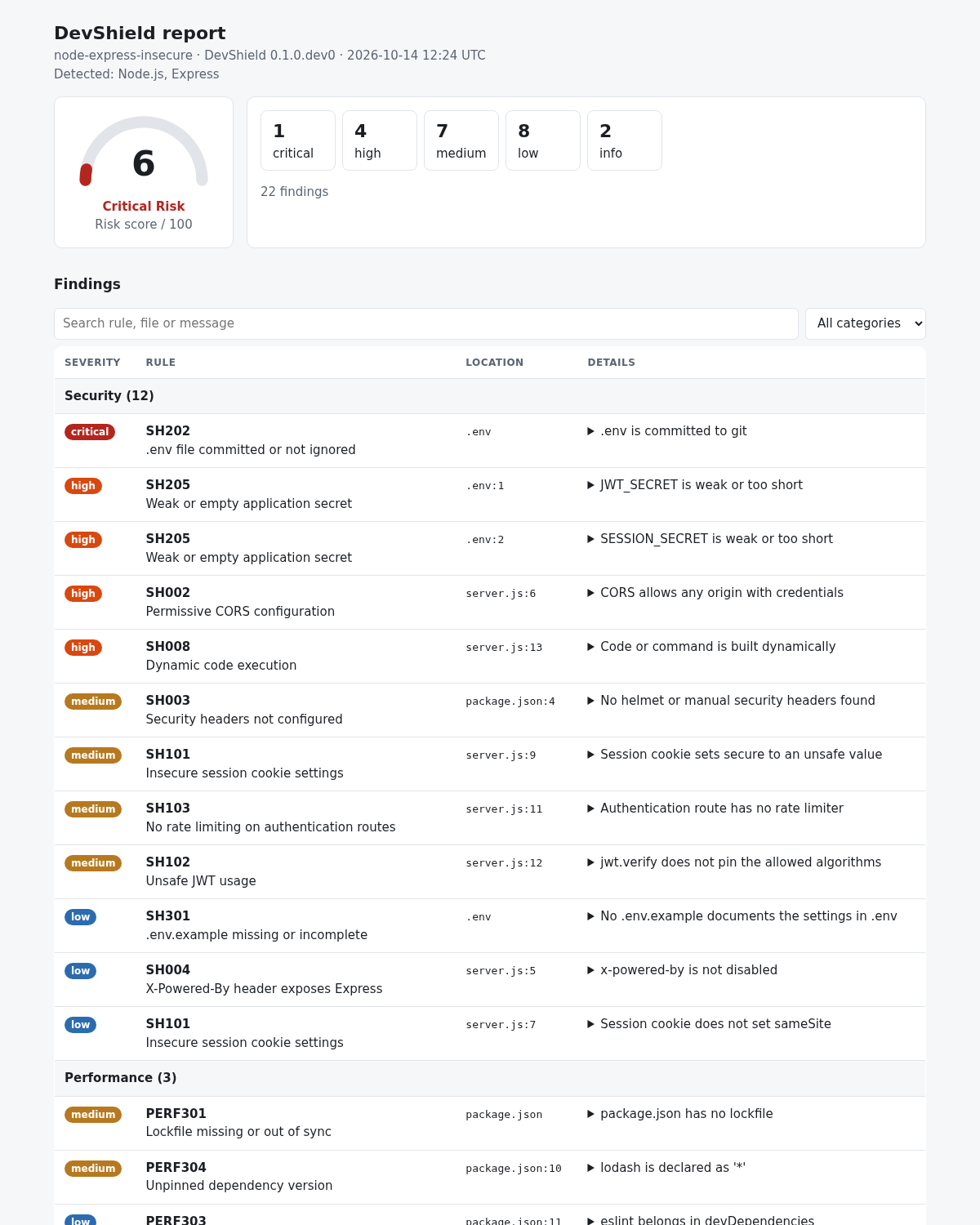
A single self-contained file with a risk gauge, search and category filters, and no external requests.
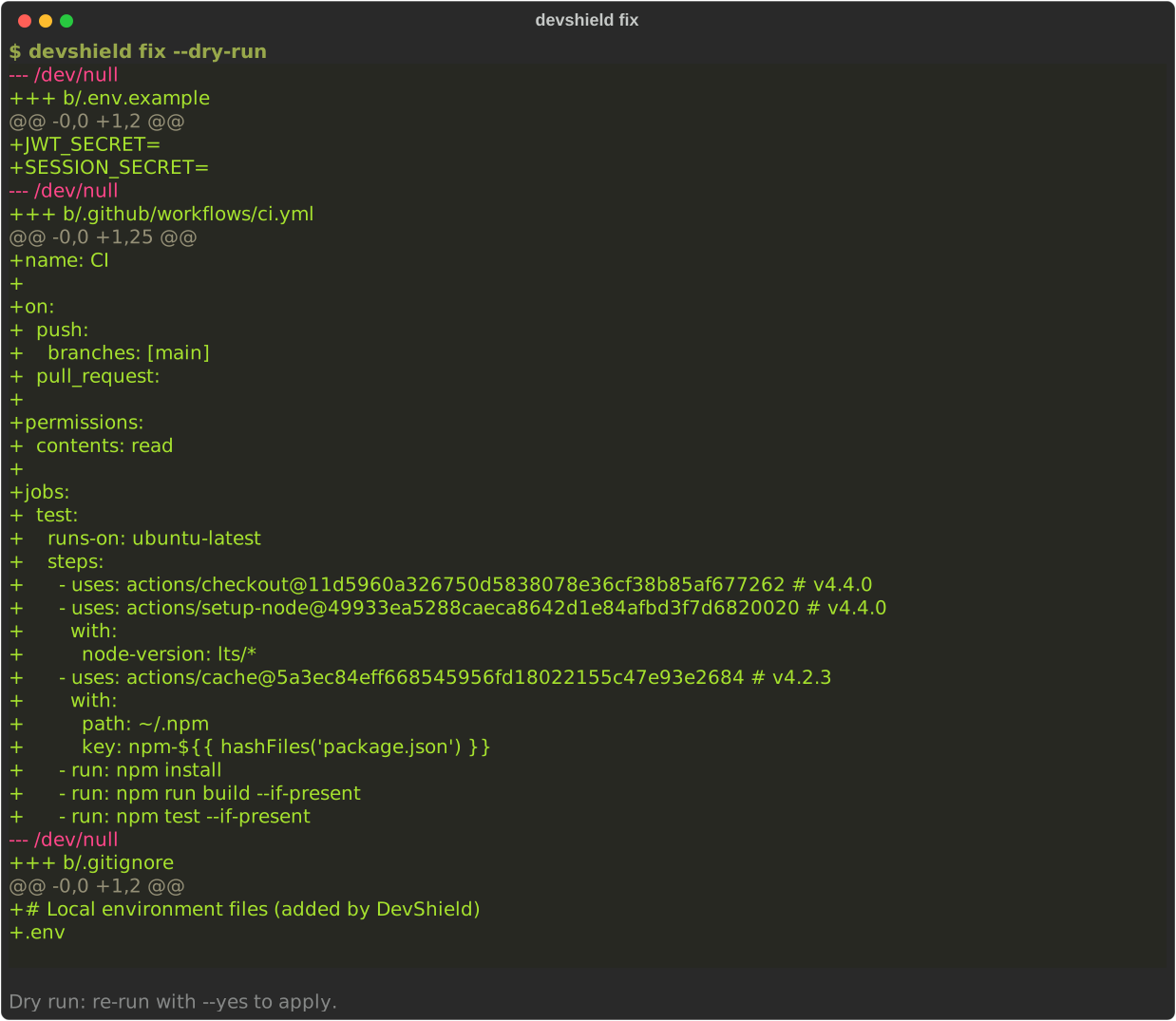
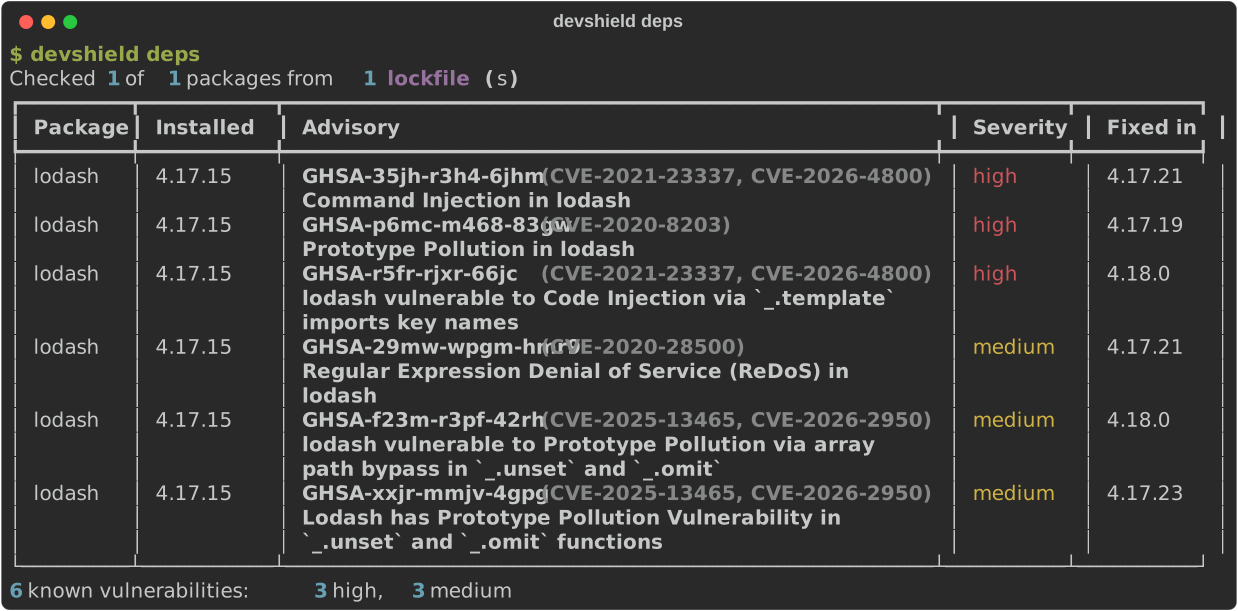
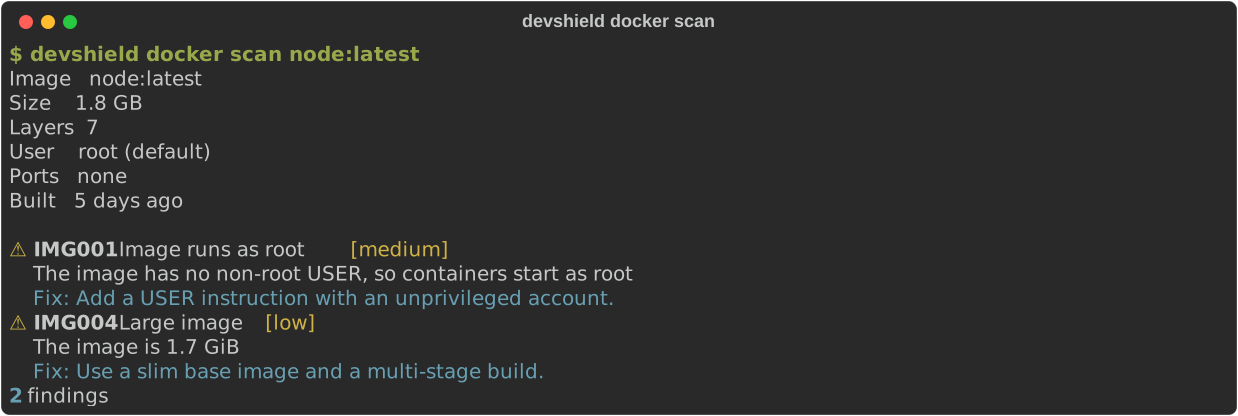
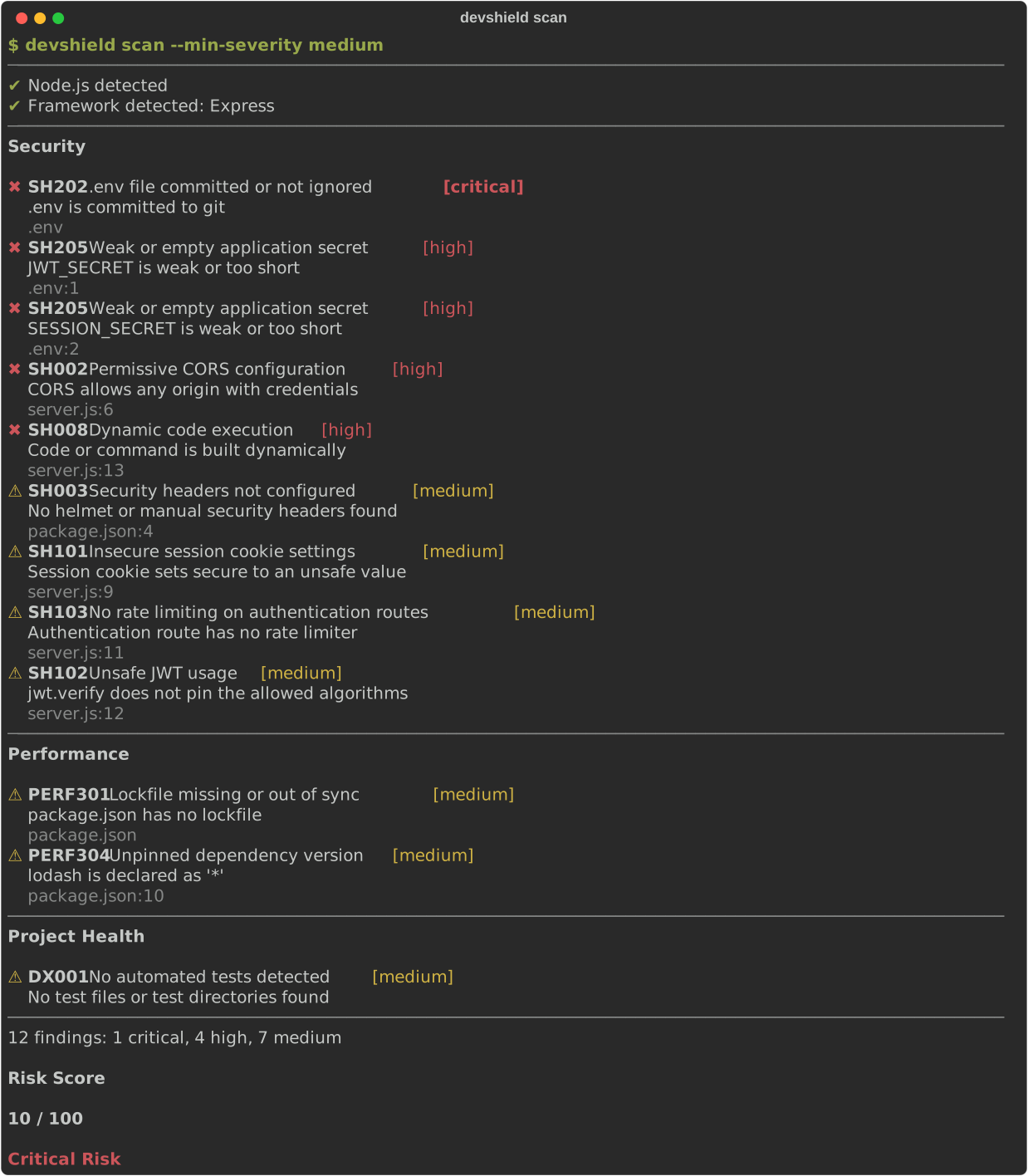
Regenerate them with python scripts/gen_screenshots.py.
pipx install devshield-cli      # recommended: isolated, with `devshield` on your PATH
pip install devshield-cli       # into the current environment
docker run --rm -v "$PWD:/project" ghcr.io/bytegigs-labs/devshield scan .
Full documentation: https://bytegigs-labs.github.io/DevShield-CLI/
or, from source
git clone https://github.com/ByteGigs-Labs/DevShield-CLI

cd DevShield-CLI

pip install -e ".[dev]"Navigate to your project.
cd my-projectRun
devshield scanExample output
──────────────────────────────────────────────

✔ Framework detected: Laravel

✔ Docker detected

✔ GitHub Actions detected

──────────────────────────────────────────────

Security

✔ HTTPS enforced

⚠ APP_DEBUG is enabled

✖ Missing Content Security Policy

✔ Secure session cookies

⚠ Rate limiting not configured

──────────────────────────────────────────────

Performance

✔ Optimized Dockerfile

⚠ Large JavaScript bundle

✔ Compression enabled

──────────────────────────────────────────────

Project Health

✔ README present

⚠ No automated tests detected

✔ CI workflow found

──────────────────────────────────────────────

Risk Score

72 / 100

Medium Risk

Run:

devshield fix

to automatically resolve supported issues.
Scan a project
devshield scan [PATH]Useful options
devshield scan --json                  # machine-readable output
devshield scan -o report.json          # write JSON to a file
devshield scan --only SH,PERF101       # run selected rules or prefixes
devshield scan --exclude-rule DX,DOC   # skip rules or prefixes
devshield scan --min-severity medium   # hide lower severities
devshield scan --fail-on high          # exit 1 at this severity or above
devshield scan --history               # also scan recent git history for secrets
devshield scan -v                      # show fixes and passed rules
Validate .env files (debug flags, exposure, weak secrets, missing keys)
devshield envBrowse rules
devshield rules list
devshield rules show SH001
Create a starter config
devshield initExit codes
| Code | Meaning |
|---|---|
| 0 | No findings at or above --fail-on (default high) |
| 1 | Findings at or above --fail-on |
| 2 | Usage or configuration error |
| 3 | Internal error |
Every rule has a page under docs/rules. Silence a rule in
devshield.yml, or on one line with a comment: devshield-ignore: SH201.
devshield deps reads package-lock.json, yarn.lock, pnpm-lock.yaml and composer.lock,
and checks every package against OSV.dev. Each advisory is listed with its
GHSA/CVE IDs, severity and the nearest fixed version.
devshield deps                  # exits 1 for findings at or above --fail-on (default high)
devshield deps --json           # machine-readable output
devshield deps --offline        # use only the on-disk cache
devshield deps --refresh        # ignore cached results
devshield deps --prod-only      # skip development dependencies
Results are cached for 24 hours in ~/.cache/devshield (override with --cache-dir or
DEVSHIELD_CACHE_DIR). If OSV.dev cannot be reached, stale cached results are used and the
run exits with code 3 when some packages stay unchecked. Accept an advisory in devshield.yml:
deps:
  ignore: [GHSA-xxxx-xxxx-xxxx]
cache_ttl_hours: 24devshield docker scan <image> inspects a local image with docker image inspect and
docker history. It never pulls images and never runs them.
| Rule | Checks |
|---|---|
| IMG001 | Image runs as root |
| IMG002 | Secrets in ENV or the build history |
| IMG003 | Sensitive ports exposed (SSH, databases, Docker API) |
| IMG004 | Image larger than 1 GiB |
| IMG005 | More than 40 layers |
| IMG006 | Image not rebuilt for more than 180 days |
Without Docker, or with a stopped daemon, the command prints a clear message and exits with code 2.
devshield update refreshes the cached OSV results for packages you scanned before (add a project
path to include its lockfiles), downloads additional secret-pattern data, and checks PyPI for a
newer DevShield. It downloads data only: pattern data is validated (size limits, no backreferences,
lookarounds or nested quantifiers, a speed probe) and DevShield never fetches or runs rule code.
devshield update
devshield update . --no-patterns --no-check-versiondevshield fix applies the fixes that are safe to automate. A fix is always a plain file edit or
a new file, never a command, so git checkout and git clean undo it.
devshield fix                # shows a diff; without a terminal this never writes
devshield fix --dry-run      # diff only
devshield fix --yes          # apply, then re-scan to confirm the findings are gone
devshield fix --only SH301   # limit to some rules
Applying refuses when the Git tree has uncommitted changes (or the project is not a Git
repository) unless you pass --force. Running it twice changes nothing the second time.
| Rule | Fix |
|---|---|
| SH202 | Add the file to .gitignore (a file git already tracks needs git rm --cached) |
| SH001 | Set APP_DEBUG=false in the env file |
| SH301 | Create .env.example from the keys in .env, without values, or add the missing keys |
| PERF103 | Create .dockerignore from a framework template |
| PERF102 | Add USER node to Dockerfiles based on the official node image |
| DX003 | Add permissions: contents: read to workflows that do not need write access |
| DX002 | Create a starter .github/workflows/ci.yml with pinned actions |
Turn fixes off globally or per rule in devshield.yml:
auto_fix:
  enabled: true
  rules:
DX002: falseDevShield writes reports in several formats, and more than one in a single run.
| Format | Flag | Notes |
|---|---|---|
| Terminal | (default for scan) |
Colored, grouped by category |
| JSON | --json |
Stable, versioned. Schema: docs/schema |
| HTML | --html |
One self-contained file: risk gauge, filters and search, no external requests |
| Markdown | --md |
Collapsible sections, suited to pull request comments |
| SARIF 2.1.0 | --sarif |
For GitHub code scanning |
devshield report --html report.html --md report.md --sarif devshield.sarif --json report.json
devshield report --json -          # print to stdout
devshield report                   # HTML, or the format set in devshield.yml
report accepts the same filters as scan and exits with the same codes.
Adopting DevShield on an existing project? Record today's findings once, then only fail on new ones.
devshield baseline                                  # writes devshield-baseline.json
devshield scan --baseline devshield-baseline.json   # reports and fails on new findings only
or set it once in devshield.yml:
baseline: devshield-baseline.jsonFindings are matched by rule, file and message, not by line number, so moving code does not resurface old findings. Commit the baseline file and regenerate it when you fix things.
Integrate DevShield into your CI pipeline.
name: Security Scan

on:
  push:
  pull_request:

jobs:
  devshield:

    runs-on: ubuntu-latest

    steps:

      - uses: actions/checkout@v4

      - uses: actions/setup-python@v5

      - run: pip install devshield-cli

      - run: devshield scan
The official action installs DevShield, uploads SARIF and can comment on pull requests (see packaging/devshield-action):
      - uses: ByteGigs-Labs/devshield-action@v1
        with:
          fail-on: high
Or upload findings to GitHub code scanning yourself:
      - run: devshield report --sarif devshield.sarif --fail-on critical
      - uses: github/codeql-action/upload-sarif@v3
        if: always()
        with:
sarif_file: devshield.sarifCreate a configuration file.
# devshield.yml

ignore:

  - SH001

  - PERF004

severity:

  minimum: medium

report:

  format: html

auto_fix:

enabled: true| Stack | Detected from | Highlights |
|---|---|---|
| Laravel | artisan, laravel/framework |
debug mode, CORS, cookies, rate limiting |
| Node, Express | package.json |
CORS, headers, JWT, sessions, dynamic code |
| React, Next.js | package.json |
XSS sinks, secrets in the bundle, CSP, bundle size |
| NestJS | @nestjs/core |
helmet, ValidationPipe, CORS |
| Django | django, manage.py |
DEBUG, ALLOWED_HOSTS, SECRET_KEY, SECURE_*, CSRF, cookies |
| FastAPI | fastapi |
CORS, /docs exposure, secrets, SQL injection |
| Flask | flask |
debug=True, SECRET_KEY, cookies, CSRF, Flask-CORS |
| Spring Boot | pom.xml, Gradle |
Actuator, application.properties secrets, CSRF, permitAll, ddl-auto |
| ASP.NET Core | Microsoft.NET.Sdk.Web |
developer exception page, appsettings.json secrets, CORS, Swagger |
| Terraform, CloudFormation | *.tf, templates |
public S3, IAM *, open security groups, unencrypted or public databases |
| Docker, GitHub Actions | Dockerfile, workflows |
root user, pinned actions, token permissions |
See docs/frameworks.md for the rules that apply to each stack.
| Rules | Category |
|---|---|
| SH001–SH099 | Security |
| SH100–SH199 | Authentication |
| SH200–SH299 | Secrets |
| SH300–SH399 | Configuration |
| SH400–SH499 | Cloud and infrastructure as code |
| PERF001–PERF099 | Performance |
| PERF100–PERF199 | Docker |
| PERF200–PERF299 | Frontend |
| PERF300–PERF399 | Dependencies |
| DX001–DX099 | Developer Experience |
| DOC001–DOC099 | Documentation |
See docs/rule-ids.md for the numbering scheme.
----------|------------------------| | SH001 | Security | | SH002 | Authentication | | SH003 | Secrets | | SH004 | Configuration | | PERF001 | Performance | | PERF002 | Docker | | PERF003 | Frontend | | PERF004 | Dependencies | | DX001 | Developer Experience | | DOC001 | Documentation |
devshield/

├── cli/

├── scanners/

│   ├── laravel/

│   ├── react/

│   ├── docker/

│   ├── node/

│   └── aws/

├── rules/

├── reports/

├── core/

├── fixers/

├── plugins/

├── tests/

└── docs/
repos:
  - repo: https://github.com/ByteGigs-Labs/DevShield-CLI
    rev: v1.0.0
    hooks:
- id: devshieldThird parties can ship rules as ordinary Python packages. DevShield finds them through the
devshield.rules entry-point group.
from devshield import Category, Finding, ProjectContext, Rule, Severity


class CustomRule(Rule):
    id = "ACME001"  # SH, PERF, DX and DOC are reserved for built-in rules
    title = "Example rule"
    severity = Severity.MEDIUM
    category = Category.SECURITY

    def check(self, ctx: ProjectContext):
        for file in ctx.source_files:
            if "TODO(security)" in (ctx.read_text(file) or ""):
                yield self.finding("Unresolved security TODO", file=file)
devshield plugins list # installed plugins and their rules
devshield rules list # rules show where they come fromA crashing plugin produces a warning, never a failed scan. See the plugin guide, the example plugin and the stability promise.