
Turn the commands your LLM conversation agent keeps handling into reviewed, local Assist sentences, so they run instantly without the LLM.
Before: "It's too dark in here" goes to your LLM every time. That takes a few seconds, and costs money if it's a cloud model. After: once you've said it a couple of times and approved it, Home Assistant's own local matcher handles it immediately, in whichever room you say it.
Assist Learner writes one file, config/custom_sentences/<language>/assist_learner.yaml. That file is plain Home Assistant custom-sentence YAML, so it keeps working even if you uninstall the integration.
- You talk to your usual LLM agent (OpenAI, Anthropic, Google, Ollama, and so on). Its configuration doesn't change.
- Assist Learner watches the conversation log. When a single-turn command succeeds using only action tools (turn on, set brightness, and so on), it records the wording and the actions.
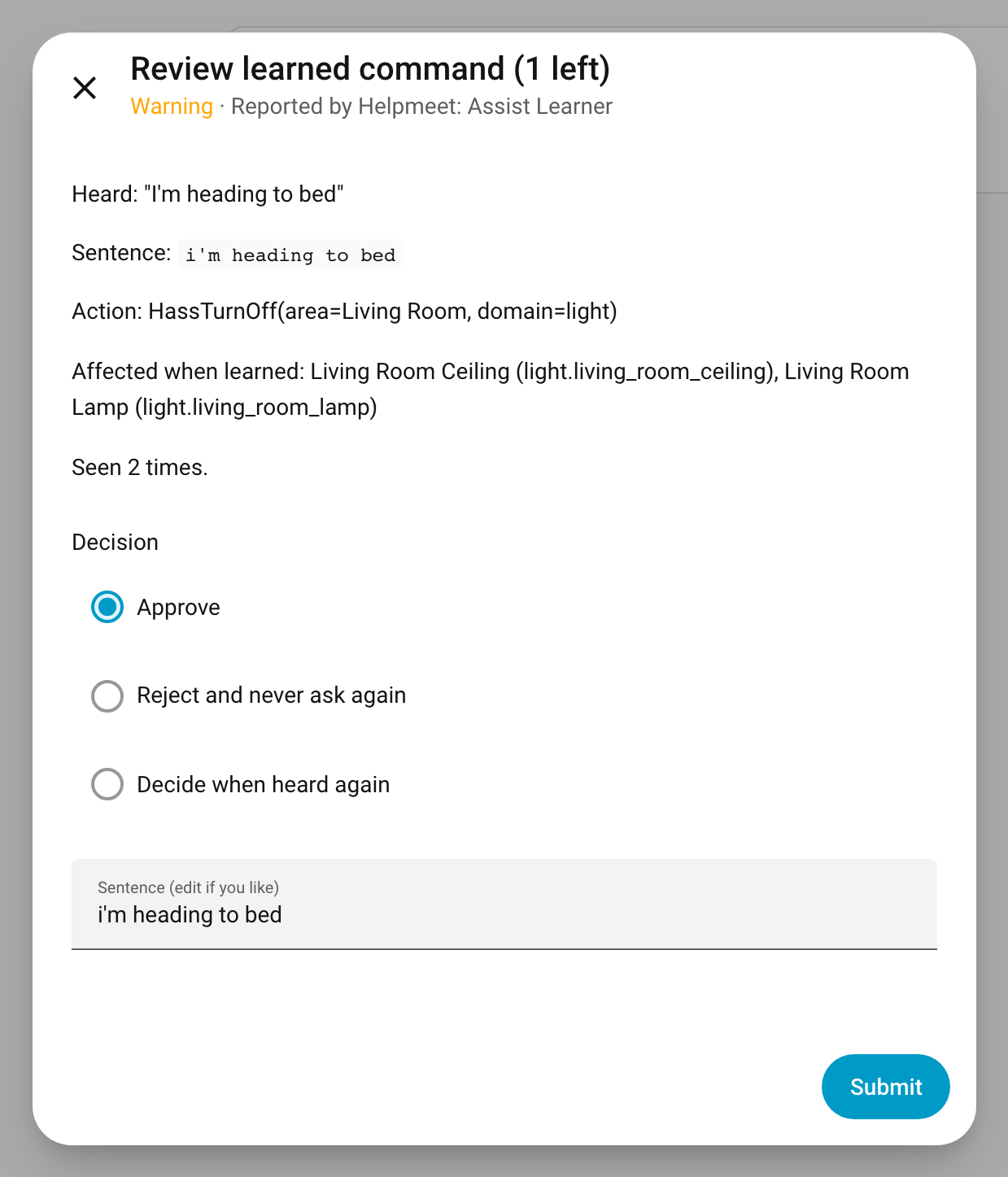
- Once the same wording has produced the same actions twice (configurable), it appears in Settings > Repairs as a learned command to review. The review shows the entities it actually affected.
- You approve it (optionally editing the wording), reject it (it will never be proposed again), or choose Decide when heard again, which removes it from Repairs until you say it again. It then comes back with its updated count.
- Approved commands are validated and written to the sentences file, and Assist reloads. From then on, with Prefer handling commands locally turned on in your Assist pipeline, the local matcher answers before the LLM is ever called.
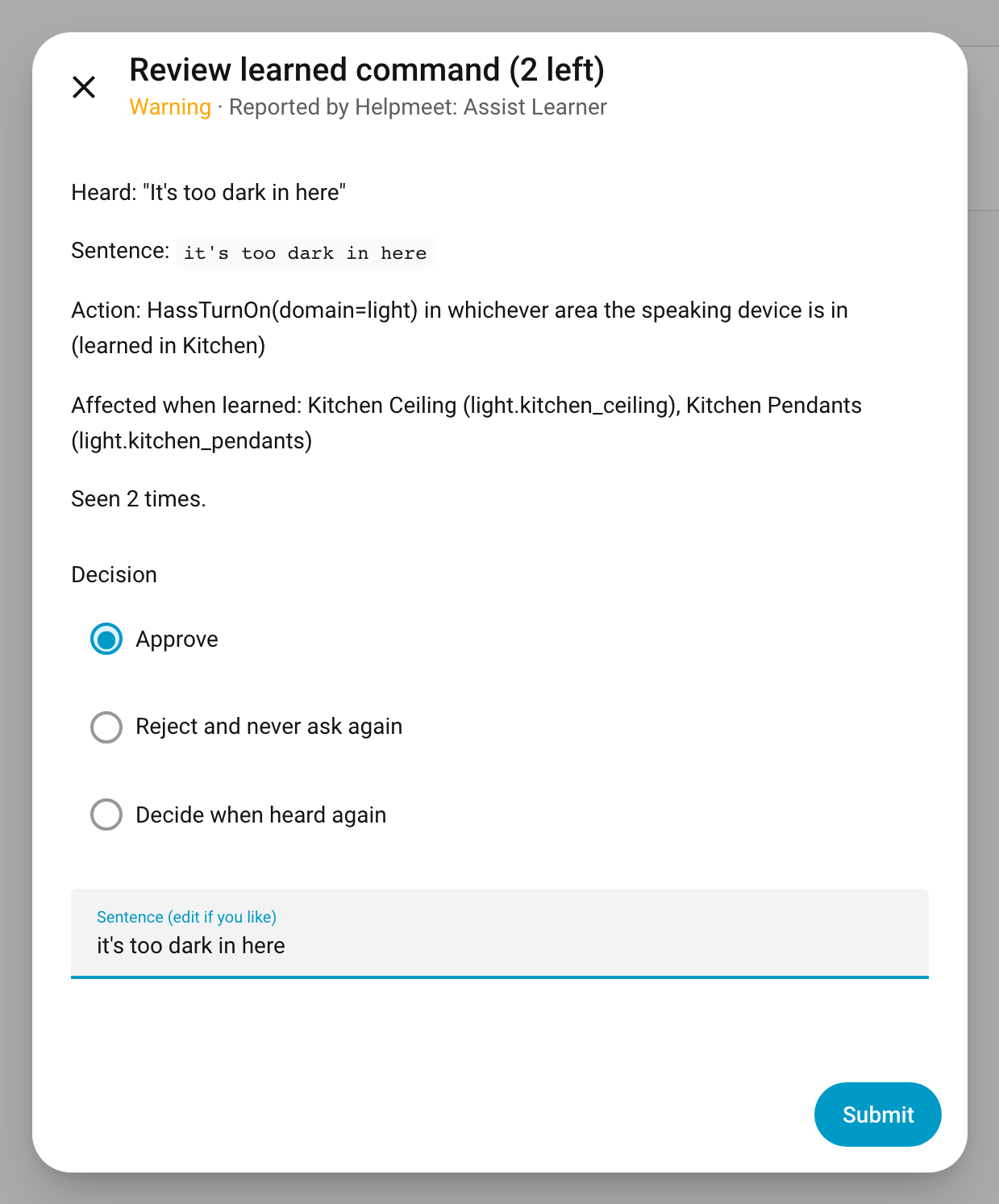
Room-relative commands stay room-relative. If you said "it's too dark in here" to the kitchen speaker and the LLM turned on the kitchen lights, the learned sentence turns on the lights in whichever room's device hears it. On a device with no area it matches nothing, rather than turning on every light in the house.
- Commands that read state or answer questions ("what's the temperature?"), or that used any read tool.
- Follow-ups and corrections ("no, the other one"), clarifying questions, and commands that partly failed.
- Anything that touched a lock, alarm panel, valve, or garage or gate cover. This floor can't be turned off. You can add more domains in the options.
- Utterances with fewer than 3 words, stop phrases ("okay", "do it"), sentence-template characters, or numbers that don't map to a slot.
Commands that can't be written as one ordinary sentence (several actions, or scripts) can still be learned if you turn on Also learn multi-step commands and scripts (see below).
- Home Assistant 2026.9 or newer.
- At least one LLM conversation agent.
- An Assist pipeline that uses that agent with Prefer handling commands locally turned on. Without it, learned sentences are written but the LLM still answers first.
- In HACS, add this repository as a custom repository (type: Integration) and install Helpmeet: Assist Learner.
- Restart Home Assistant.
- Go to Settings > Devices & services > Add integration > Helpmeet: Assist Learner.
The single setup screen has these options:
| Option | Default | Meaning |
|---|---|---|
| Agreeing runs before proposing | 2 | How many times the same wording must produce the same actions |
| Extra domains to never learn | none | Added to the built-in floor |
| Language | your HA language | Used when a conversation didn't report one |
| Also learn multi-step commands and scripts | off | Replays approved commands that do several things or run a script, locally |
Want to see it work right away? Say a command to your LLM agent once, then run the assist_learner.learn_last action. That sends the command straight to Repairs for review.
sensor.assist_learner_status is listening, paused, or error. Its attributes have counts of candidates, proposed, deferred, approved, rejected, and stale commands, plus the last export time, the last error, and why the most recent command was skipped.
| Action | What it does |
|---|---|
assist_learner.approve |
Approve by candidate_id, with an optional replacement sentence |
assist_learner.reject |
Reject by candidate_id. The wording is never proposed again |
assist_learner.forget |
Delete by candidate_id and remove it from the file. It can be learned again |
assist_learner.learn_last |
Send the most recent learnable command to review without waiting for repeats |
Repair issues tell you when something needs attention:
- learned commands to review: open it to step through proposals.
- stopped learning: Home Assistant changed the internals Assist Learner relies on (see below). Learned sentences keep working.
- hasn't learned anything in a week: conversations are happening but no LLM actions were recognized. This usually means the same kind of change as above.
- couldn't write some sentences: an approved command failed validation, so it was left out and your existing local commands are untouched.
- pipeline uses the removed Replay agent: an Assist pipeline still points at the conversation agent that earlier versions asked you to set up. Switch it back to your LLM agent.
Some approved commands can't be an ordinary sentence: several actions at once ("movie time" dims the living room and turns on the TV lamp), or scripts. Turn on Also learn multi-step commands and scripts and they're written to the same sentences file, pointing at an intent Assist Learner handles. Your pipeline and its LLM agent stay exactly as they are; the local matcher picks these up the same way it does learned sentences. When one is heard, Assist Learner:
- Runs the approved actions through a fresh Assist tool session built from the current request. Room-relative actions target the room you're in now.
- Rechecks the denylist against the entities the command would affect right now, and refuses if any are blocked.
- Answers "Done." without calling the LLM. If a room-relative command is said on a device with no area, it doesn't match, so your LLM answers as usual.
Commands with a spoken number (like "set it to 40 percent") aren't replayed yet.
- Files written: only
config/custom_sentences/<language>/assist_learner.yaml. Writes are atomic: a temp file is validated, then swapped in. Every sentence is parsed with hassil and must recognize its original utterance before it's included. The merged result is checked the same way the built-in agent loads it, so a bad entry can't break your other local commands. - Hand edits: you can edit the YAML. Assist Learner never rewrites an entry you've edited, and keeps any entries you add yourself.
- Stored data: raw utterances, the actions taken, and the affected entity IDs are kept in
config/.storage/assist_learner. Diagnostics downloads redact utterances and entity IDs. Debug logging, which is off by default, writes utterances, tool calls, and the agent's full system prompt tohome-assistant.logunredacted. - Internal APIs: Home Assistant's public chat-log events don't include the tool-call arguments LLM agents send, or the request's language or device. Assist Learner reads them from the conversation integration's internal
current_chat_logwhile the agent runs. All of that code is incontext_adapter.pyand checked against a minimum version. If a Home Assistant update changes it, capture pauses with a repair issue instead of guessing. CI runs against both Home Assistant stable and beta weekly.
Turn on debug logging to see exactly what your LLM agent did with each request, whether or not it was learned. Either use Enable debug logging on the Assist Learner integration page (lasts until restart), or add this to configuration.yaml:
logger:
  logs:
    custom_components.assist_learner: debug
Each finished turn then writes to home-assistant.log:
- A
Turn:line of JSON: the utterance, the device and area it came from, the agent, every tool call with its arguments and full result (including which entities it matched), the final reply, and the tools the agent was offered. System prompt for conversation …: the full prompt the agent was given, including the exposed-entity list it chose from.- Why the turn was or wasn't learned, what each export did, and what each multi-step command replayed or why it refused.
Remove the integration from Devices & services, then uninstall it in HACS. custom_sentences/<language>/assist_learner.yaml is left in place on purpose, so your learned sentences keep working. Multi-step commands and scripts need the integration to run, so turn that option off before removing it, or they'll answer with an error. Delete that file (and call conversation.reload or restart) if you want them gone too.
Bug reports and pull requests are welcome. See CONTRIBUTING.md for the development setup and what to include in a bug report, and SECURITY.md for reporting vulnerabilities privately.
Much of this integration's code, tests, and documentation was written with the help of AI coding assistants, then reviewed, tested, and directed by a human maintainer. Its behavior is covered by end-to-end tests that run against both Home Assistant stable and beta. If something looks wrong, please open an issue.
MIT. Assist Learner is part of Helpmeet, a family of Home Assistant integrations.