
A highly customizable, draggable, and resizable overlay window widget for Flutter. Perfect for creating floating panels, tool windows, and multi-window interfaces with full programmatic control.


Desktop recordings of the basic window: opening it, dragging it, and resizing it.

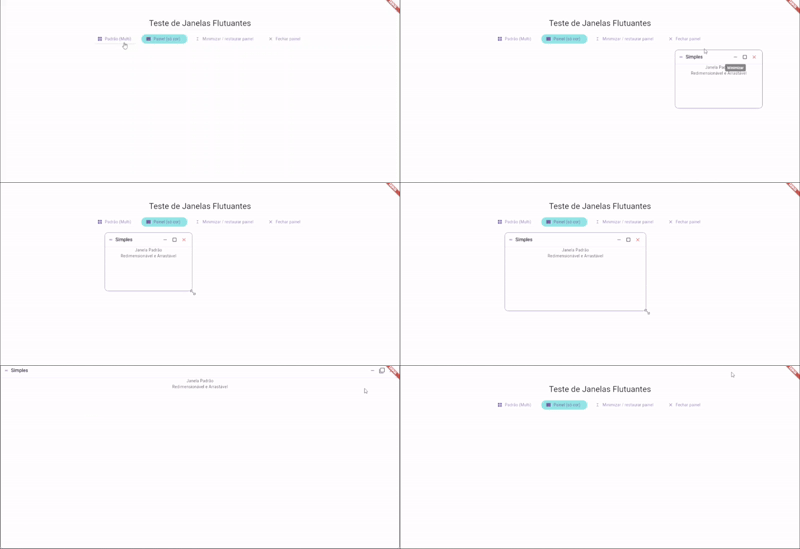
New in 1.1.0: maximize and restore sizing, independent resize axes, optional headerless windows, and configurable open/close/minimize/restore/maximize animations.
Maximize/Restore - Fill the enabled axes, then restore the previous window frame
Per-action animations - Configure duration, curve, opacity, scale, and size transitions independently
✨ Draggable Windows - Move windows freely across the screen
🔄 Resizable - Resize from all edges and corners, or lock a single axis (width or height)
🎨 Optional header - Drop the title bar and drive close, minimize, and restore from your own widgets
📦 Minimize/Restore - Built-in minimize and restore functionality
🎯 Focus Management - Automatic z-index management with focus system
🎨 Highly Customizable - Extensive styling and configuration options
📱 Responsive - Works on all platforms (mobile, web, desktop)
🎮 Programmatic Control - Full API for controlling windows via controller
🔔 Event Callbacks - Rich set of callbacks for all window events
⚡ Performance Optimized - Smooth interactions with no lag
Add this to your package's pubspec.yaml file:
dependencies:
  draggable_overlay_window: ^1.1.1
Then run:
flutter pub getimport 'package:flutter/material.dart';
import 'package:draggable_overlay_window/draggable_overlay_window.dart';
class MyApp extends StatefulWidget {
@override
State<MyApp> createState() => _MyAppState();
}
class _MyAppState extends State<MyApp> {
late final DraggableWindowController _controller;
@override
void initState() {
super.initState();
_controller = DraggableWindowController(
initialPosition: const Offset(100, 100),
initialSize: const Size(400, 300),
);
}
@override
void dispose() {
_controller.dispose();
super.dispose();
}
@override
Widget build(BuildContext context) {
return Scaffold(
body: OverlayWindowStack(
windows: [
DraggableOverlayWindow(
key: ValueKey(_controller.windowId),
controller: _controller,
title: 'My Window',
icon: Icons.window,
content: Center(
child: Text('Window Content'),
),
),
],
child: Center(
child: ElevatedButton(
onPressed: () => _controller.toggle(),
child: Text('Toggle Window'),
),
),
),
);
}
}Customize your window appearance and behavior:
DraggableWindowConfig(
  // Size
  initialWidth: 400.0,
  initialHeight: 300.0,
  minWidth: 200.0,
  minHeight: 150.0,
  maxWidth: 800.0,
  maxHeight: 600.0,
  minimizedHeight: 48.0,

  // Appearance
  borderRadius: 12.0,
  elevation: 8.0,
  focusedElevation: 16.0,
  borderWidth: 1.0,
  focusedBorderWidth: 2.0,
  showFocusBorder: true,

  // Colors
  windowBackgroundColor: Colors.white,
  headerBackgroundColor: Colors.blue.shade50,
  borderColor: Colors.grey.shade300,
  focusedBorderColor: Colors.blue,
  headerIconColor: Colors.blue.shade700,
  headerButtonsColor: Colors.blue,
  dividerColor: Colors.grey.shade300,

  // Behavior
  resizable: true,
  resizeWidth: true, // false locks the width
  resizeHeight: true, // false locks the height
  showHeader: true, // false removes the title bar
  enableScrolling: true,

  // Divider
  showDivider: true,
  dividerHeight: 1.0,

  // Padding
  contentPadding: EdgeInsets.all(16),
  headerPadding: EdgeInsets.symmetric(horizontal: 12, vertical: 8),

  // Icons
  minimizeIcon: Icons.remove,
  maximizeIcon: Icons.open_in_full,
  windowMaximizeIcon: Icons.crop_square,
  windowRestoreIcon: Icons.filter_none,
  closeIcon: Icons.close,
  dragHandleIcon: Icons.drag_handle,
)You can create windows without title or icon:
DraggableOverlayWindow(
  key: ValueKey(_controller.windowId),
  controller: _controller,
  // No title or icon - only drag handle will be shown
  content: MyContent(),
)DraggableOverlayWindow(
key: ValueKey(_controller.windowId),
controller: _controller,
title: 'Fixed Size',
config: DraggableWindowConfig(
resizable: false,
initialWidth: 400,
initialHeight: 300,
),
content: MyContent(),
)resizeWidth and resizeHeight are independent. Set one to false to keep that side fixed while the other still resizes. Both default to true. They only apply when resizable is true.
Width only:
DraggableWindowConfig(
  resizeWidth: true,
  resizeHeight: false,
)
Height only:
DraggableWindowConfig(
  resizeWidth: false,
  resizeHeight: true,
)
With a single axis, only the matching edges are draggable (left/right for width, top/bottom for height). Corners appear only when both axes are enabled.
Set showHeader: false to render only the content — a solid color, for example, with no title, close, or minimize bar. The surface itself is draggable. Close, minimize, and restore stay on the controller, so your own buttons can call them:
final controller = DraggableWindowController(
  initialSize: const Size(220, 140),
);

// Somewhere else in your UI
ElevatedButton(
  onPressed: controller.toggleMinimize,
  child: const Text('Minimize'),
);
ElevatedButton(
  onPressed: controller.hide,
  child: const Text('Close'),
);

DraggableOverlayWindow(
  key: ValueKey(controller.windowId),
  controller: controller,
  config: const DraggableWindowConfig(
    showHeader: false,
    enableScrolling: false,
    contentPadding: EdgeInsets.zero,
    windowBackgroundColor: Color(0xFF00897B),
    borderWidth: 0,
    showFocusBorder: false,
  ),
  content: const SizedBox.expand(),
);
Without a header, a minimized window is not drawn. Call controller.restore() or controller.toggleMinimize() from your button to bring it back.
The DraggableWindowController provides full programmatic control:
final controller = DraggableWindowController(
  initialPosition: const Offset(100, 100),
  initialSize: const Size(400, 300),
);

controller.show();
controller.hide();
controller.toggle();
controller.minimize();
controller.restore();
controller.toggleMaximize();
controller.maximize();
controller.unmaximize();
Maximize fills the enabled resize axes and hides their resize handles. Unmaximize restores the saved frame, adjusted to fit the current screen. A minimized window keeps its content mounted; hide() closes the window and removes it after its close transition.
The controller also exposes the current state and frame:
final bool isVisible = controller.isVisible;
final bool isMinimized = controller.isMinimized;
final bool isMaximized = controller.isMaximized;
final Offset position = controller.position;
final Size size = controller.size;

controller.setPosition(const Offset(200, 200));
controller.setSize(const Size(500, 400));Open, close, minimize, restore, maximize, and unmaximize each have their own transition. Dragging and resizing stay immediate.
WindowTransitionStyle controls one action:
duration—Duration.zerodisables that actioncurvebeginOpacity/endOpacitybeginScale/endScalescaleAlignment— which point the scale grows fromanimateRect— interpolate position and size (most useful for minimize, restore, maximize, and unmaximize)
const DraggableWindowConfig(
  animations: DraggableWindowAnimations(
    open: WindowTransitionStyle(
      duration: Duration(milliseconds: 240),
      curve: Curves.easeOutCubic,
      beginOpacity: 0,
      beginScale: 0.92,
      endScale: 1,
      animateRect: false,
    ),
    close: WindowTransitionStyle(
      duration: Duration(milliseconds: 180),
      endOpacity: 0,
      animateRect: false,
    ),
    minimize: WindowTransitionStyle(
      duration: Duration(milliseconds: 300),
      curve: Curves.easeOutCubic,
      scaleAlignment: Alignment.topCenter,
    ),
    restore: WindowTransitionStyle(
      duration: Duration(milliseconds: 300),
      curve: Curves.easeOutCubic,
      scaleAlignment: Alignment.topCenter,
    ),
    maximize: WindowTransitionStyle(
      duration: Duration(milliseconds: 360),
      curve: Curves.easeInOutCubic,
    ),
    unmaximize: WindowTransitionStyle(
      duration: Duration(milliseconds: 360),
      curve: Curves.easeInOutCubic,
    ),
  ),
);
Set a transition duration to Duration.zero to disable just that action. Use DraggableWindowAnimations.none to disable all transitions. The onClose callback runs after the close transition finishes.
Rich set of callbacks for all window events:
DraggableOverlayWindow(
  key: ValueKey(_controller.windowId),
  controller: _controller,
  title: 'Event Monitor',

  // Window events
  onFocus: () => print('Window focused'),
  onClose: () => print('Window closed'),
  onMinimized: () => print('Window minimized'),
  onRestored: () => print('Window restored'),

  // Position & size changes
  onPositionChanged: (offset) => print('Position: $offset'),
  onSizeChanged: (size) => print('Size: $size'),

  content: MyContent(),
)Manage multiple windows with automatic z-index:
OverlayWindowStack(
  windows: [
    DraggableOverlayWindow(
      key: ValueKey(_controller1.windowId),
      controller: _controller1,
      title: 'Window 1',
      content: Content1(),
    ),
    DraggableOverlayWindow(
      key: ValueKey(_controller2.windowId),
      controller: _controller2,
      title: 'Window 2',
      content: Content2(),
    ),
    DraggableOverlayWindow(
      key: ValueKey(_controller3.windowId),
      controller: _controller3,
      title: 'Window 3',
      content: Content3(),
    ),
  ],
  child: YourMainContent(),
)DraggableWindowConfig(
headerTextStyle: TextStyle(
fontSize: 16,
fontWeight: FontWeight.bold,
color: Colors.white,
),
headerBackgroundColor: Colors.deepPurple,
windowBackgroundColor: Colors.grey.shade100,
focusedBorderColor: Colors.deepPurple,
headerIconColor: Colors.white,
headerButtonsColor: Colors.white,
)Use calculators for responsive sizing:
DraggableWindowConfig(
  widthCalculator: (context) => MediaQuery.of(context).size.width * 0.5,
  heightCalculator: (context) => MediaQuery.of(context).size.height * 0.6,
)| Platform | Supported |
|---|---|
| Android | ✅ |
| iOS | ✅ |
| Web | ✅ |
| Windows | ✅ |
| macOS | ✅ |
| Linux | ✅ |
Check out the example directory for a complete working example with multiple windows and all features demonstrated.
Contributions are welcome! Please feel free to submit a Pull Request.
This project is licensed under the MIT License - see the LICENSE file for details.
Created with ❤️ by [JnNetto]
See CHANGELOG.md for a list of changes.