

Send every Strapi email through the right account: several SMTP and API accounts, routing rules, quotas, failover that never doubles a mail, an outbox with retries, templates and delivery tracking, all inside the Strapi admin.





Live docs: https://schero94.github.io/Magic-Mail/
Your code keeps calling strapi.plugin('email').service('email').send(). Strapi's password-reset mail and every Users & Permissions mail go through MagicMail without changes. MagicMail picks the account, reserves its quota, logs the mail and tells you what happened to it.
MagicMail sends email only. It is MIT licensed, with no license key, tiers or usage limits.
- Eight providers. Gmail, Microsoft 365 and Yahoo with OAuth 2.0, any SMTP server (optional DKIM), SendGrid, Mailgun, Brevo and Amazon SES (API v2, any commercial or GovCloud region). Credentials are encrypted with AES-256-GCM and never reach the browser.
- Routing rules. Choose the account by email type, recipient, subject, template or a custom value, with a fallback account per rule.
- Quotas and safe failover. Hourly and daily limits per account, reserved atomically. When an account fails, the next one is tried only if the error proves the provider did not take the mail, so a mail is never delivered twice by failover.
- Outbox with retries. Opt-in per send or for every failed send: 3 retries by default (after 1, 5 and 15 minutes, configurable from 1 to 10), idempotency keys, and an Outbox tab where you retry, discard or mark uncertain mails as sent.
- Delivery webhooks. Verified SendGrid, Mailgun, Brevo and Amazon SES (SNS) webhooks record bounces, blocks, complaints, deferrals, deliveries and unsubscribes on the delivery log, feed the suppression list and emit events other plugins can listen to.
- Templates. A visual editor (Unlayer) or plain HTML and text, Mustache variables, versions with restore, import and export, plus the Users & Permissions reset and confirmation mails.
- Provider templates. Keep designing in SendGrid, Mailgun, Brevo or Amazon SES: their templates appear read-only in MagicMail, with preview, test send, language versions and the same template data your code already passes. Routing, failover and logs stay in MagicMail, and the password-reset, confirmation and admin password-reset mails can use them too (core emails).
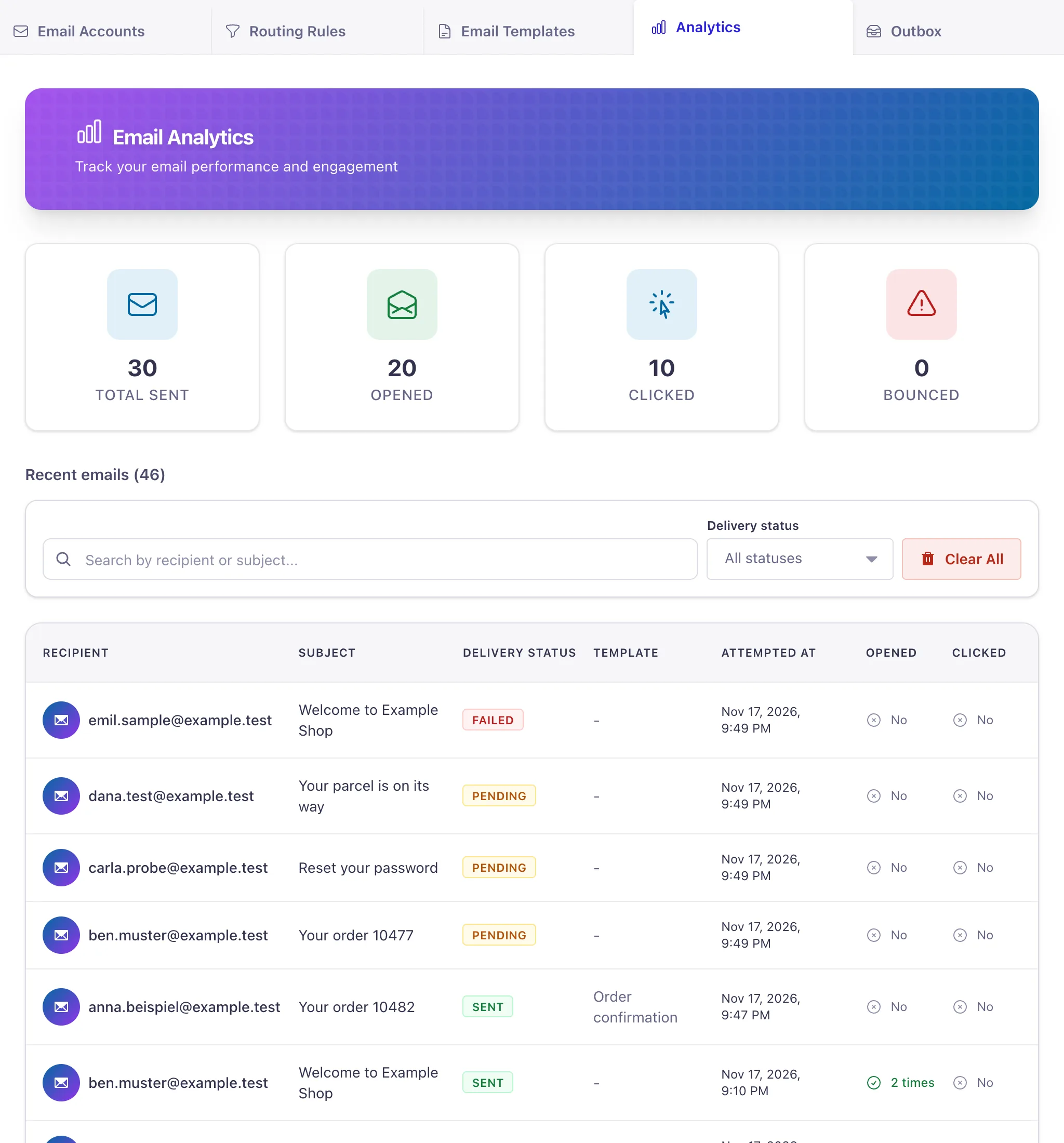
- Analytics. A delivery log with server-side search, open and click tracking with truncated IPs and configurable retention.
- Several instances. Railway replicas or pm2 workers on one database work without sticky sessions or Redis.
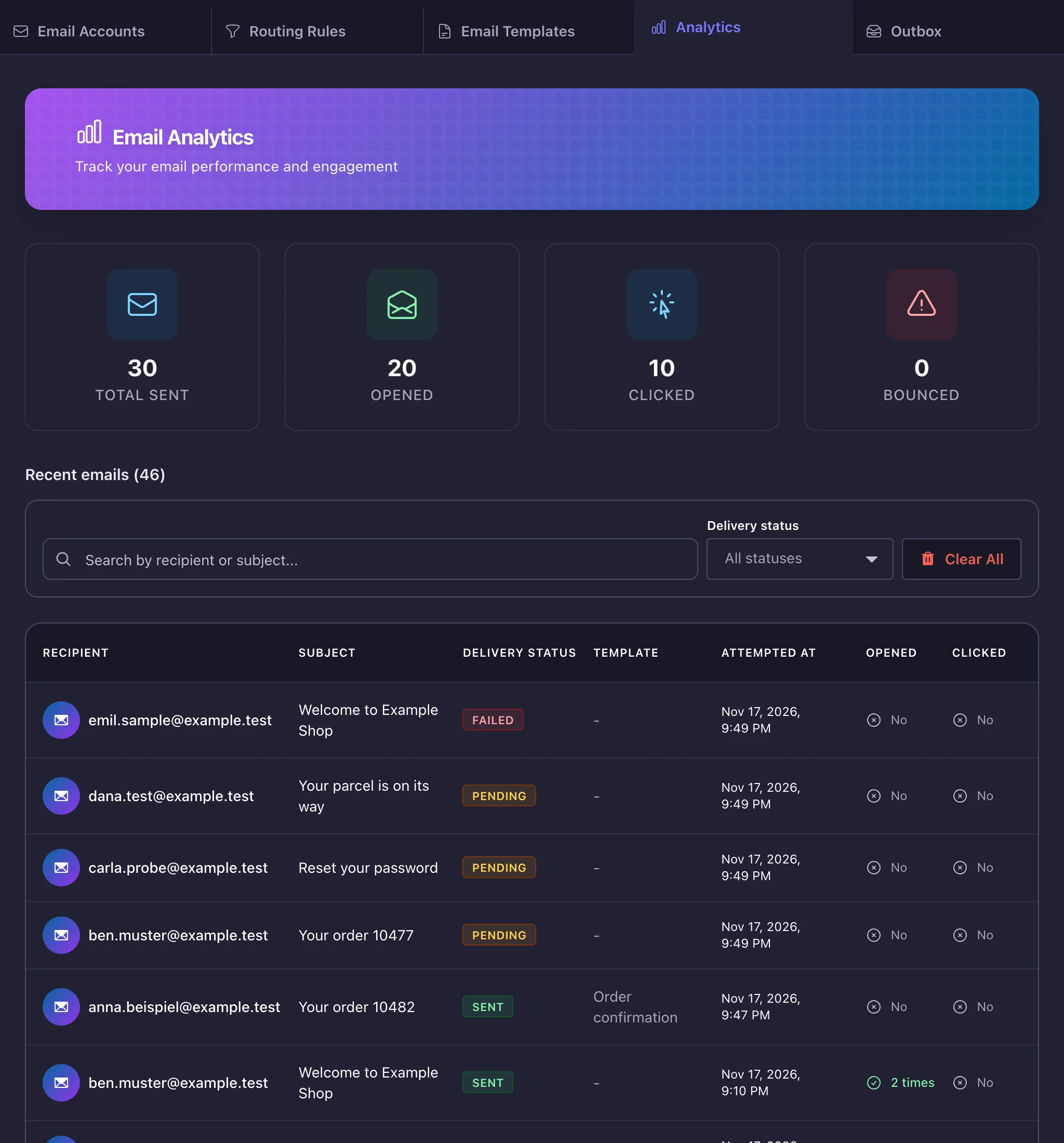
- Admin in five languages. English, German, French, Spanish and Portuguese, in light and dark mode.
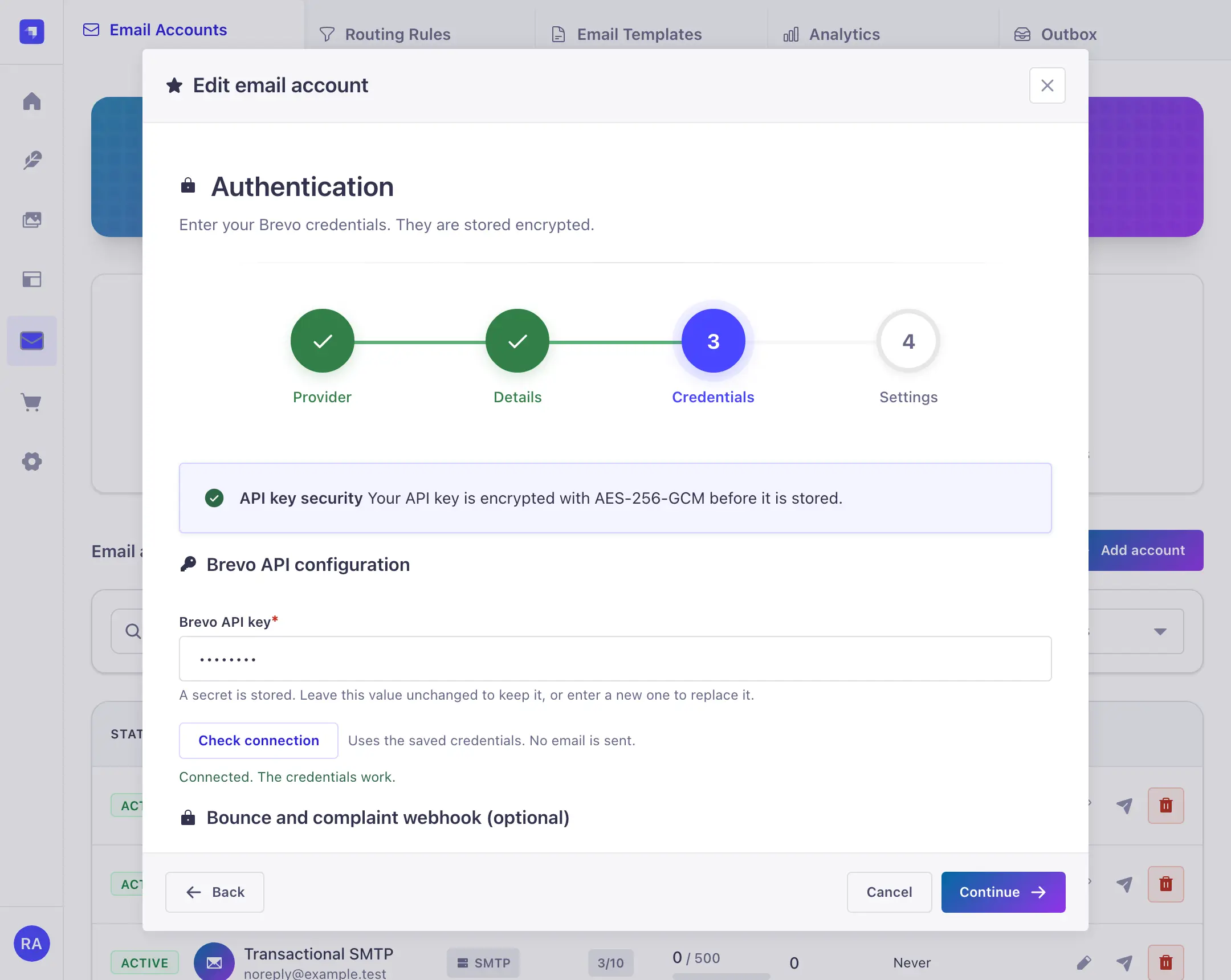
- Brevo and Amazon SES accounts: send, check the connection without sending, sync their templates and receive bounces, complaints and deliveries (Brevo with a MagicMail webhook token, SES through SNS with signature checks) (Brevo, Amazon SES).
- Language versions of provider templates: map
de,fr,pt-BR… to translated templates; MagicMail picks the version fromlocaleor the user's stored locale, falling back to the language and then the default (details). - Opens and clicks for provider templates: with Count provider opens and clicks on, the provider tracks the mails it renders and its open and click events appear in Email Analytics (details).
- SendGrid EU regional subusers: choose region EU in the account to send through
api.eu.sendgrid.com(setup). - Fewer provider rejections: duplicate recipients, SendGrid-reserved headers and oversized messages are handled before the request, with a clear error instead of a bare HTTP status.
- No double tracking: when MagicMail tracks opens and clicks, SendGrid and Mailgun tracking is switched off for that mail, so links are wrapped once.
- Mailgun metadata: email type and priority as variables plus a tag, so Mailgun logs and webhooks can be filtered.
- Mailgun domains are checked when you save the account. A pasted
https://or trailing slash is removed for you; a value that is not a domain name is flagged right in the form instead of failing later when mail is sent. - Failed account tests say what to fix: wrong API key, missing Mail Send permission, unverified sender, wrong Mailgun region, or a sandbox recipient that is not authorized yet.
- Clearer key setup: the wizard recommends keys that can only send mail (SendGrid Custom Access with Mail Send, Mailgun Domain Sending Key).
- SendGrid and Mailgun webhooks record more outcomes: deferred, delivered and provider unsubscribes, besides bounces and complaints (setup).
- Provider hard bounces feed the suppression list when Block hard-bounced recipients is on.
- Analytics counts bounces again, and SendGrid blocks are no longer shown as bounces.
- SendGrid batches up to 768 KB are accepted (limit 1 MB,
webhooks.maxBodyBytes).
- What's new
- Screenshots
- Quick start
- Compatibility
- Sending email
- Permissions
- Environment variables
- Security and privacy
- Documentation
- Contributing
- Showcase your company
All screenshots show synthetic data (example.test addresses) on an isolated Strapi 5.62.0 host, captured at 1080 px wide and 2x pixel density so the text stays readable in a narrow column.
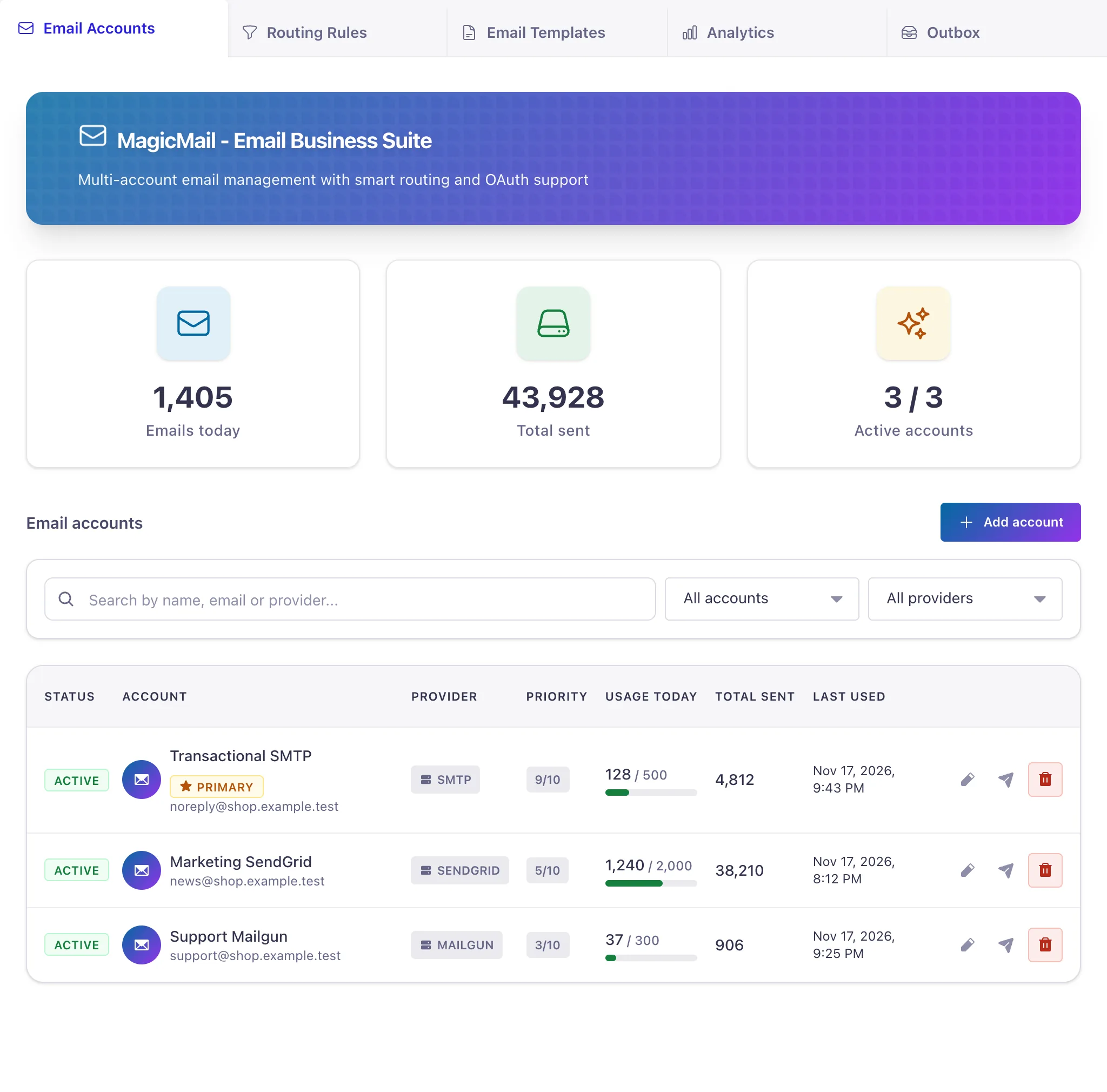
Email accounts: status, provider, priority, today's usage against the daily limit, total sent and last use, with edit, test and delete per account.
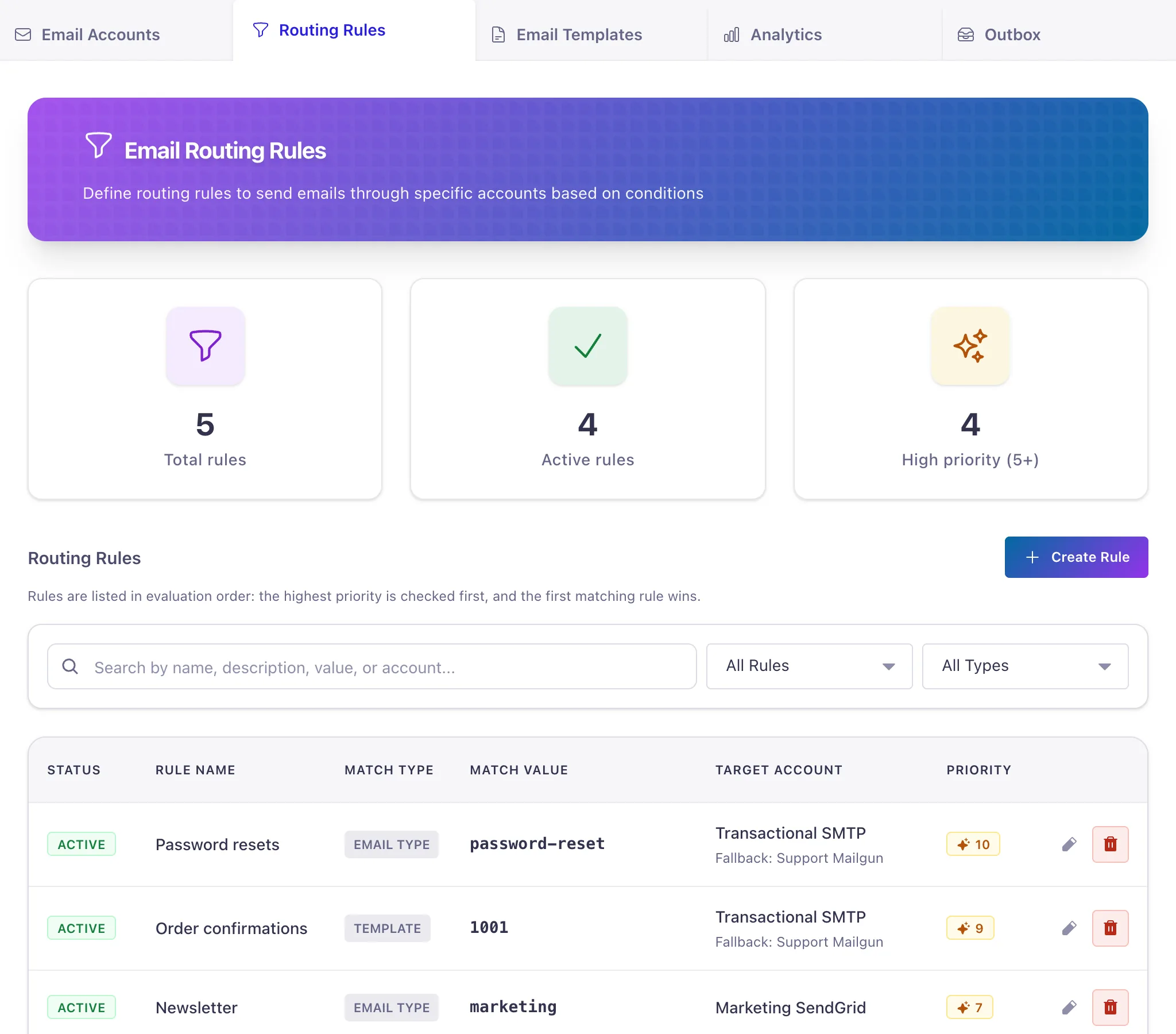
Routing rules: rules in evaluation order with match type and value, target and fallback account, and priority.
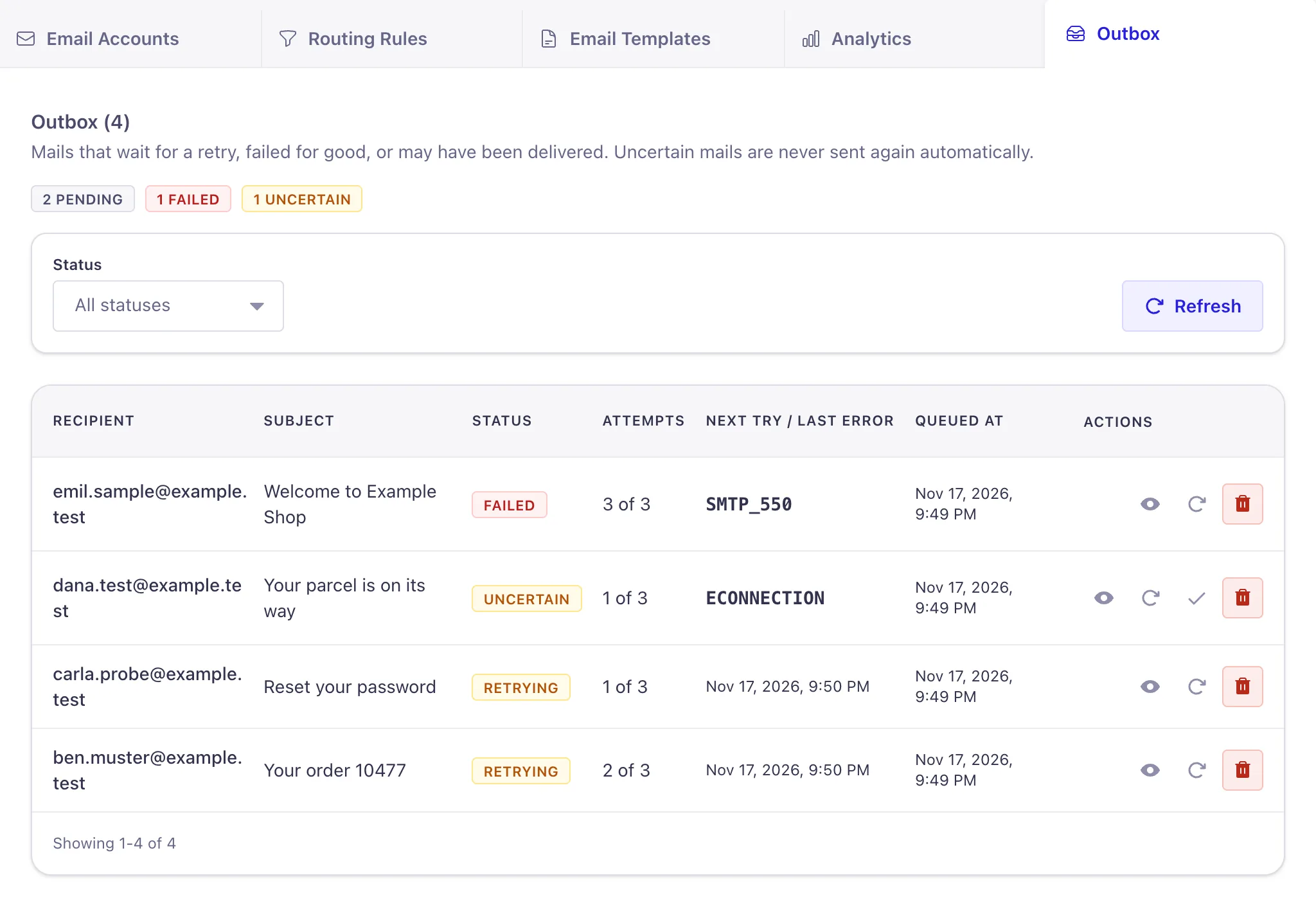
Outbox: mails waiting for a retry, failed for good, or uncertain, with attempts and the next try or last error code. Retry, mark as sent and discard per row.
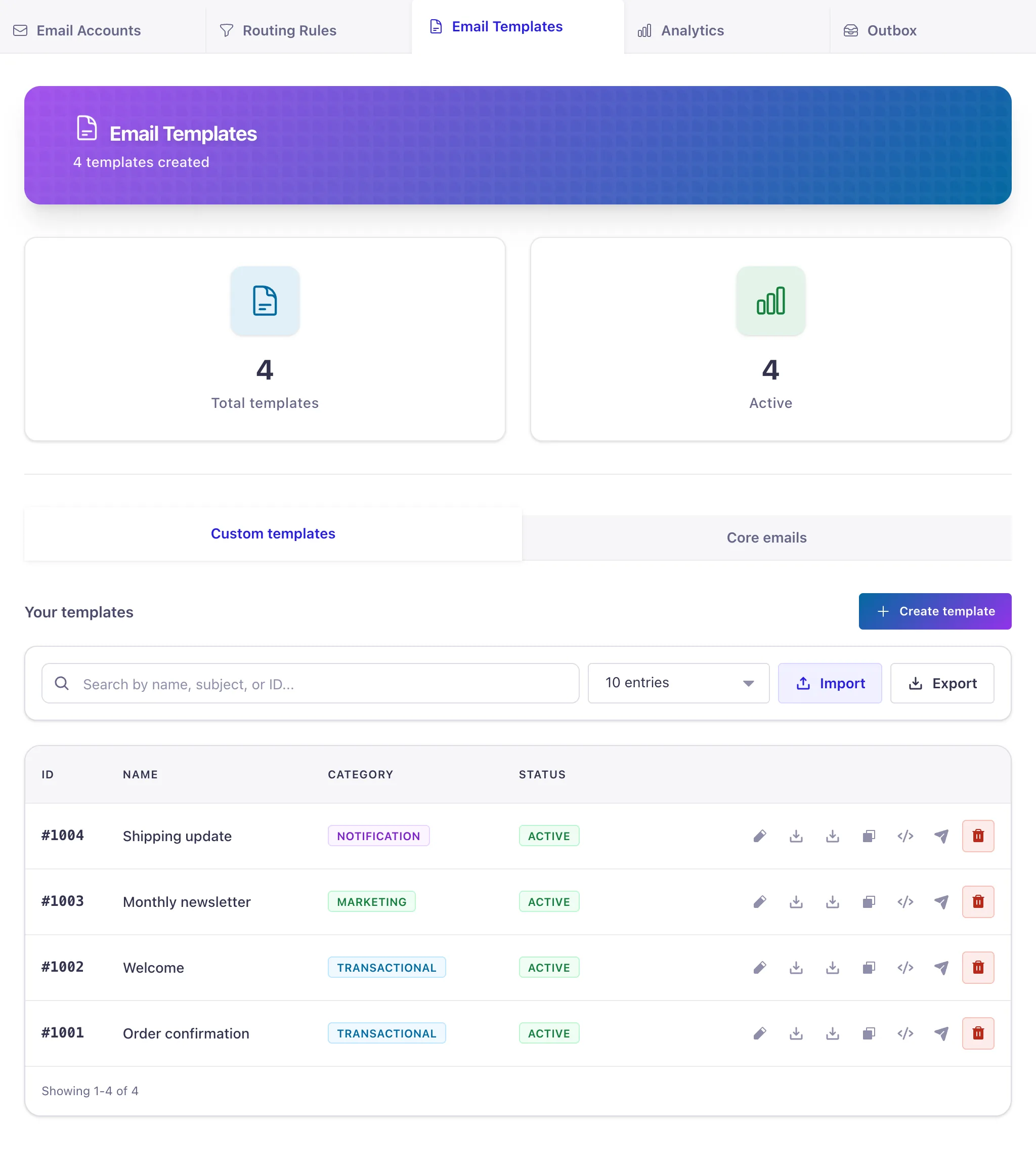
Templates: Reference ID, category and status; edit in the visual or HTML editor, download, duplicate, code snippets, test send.
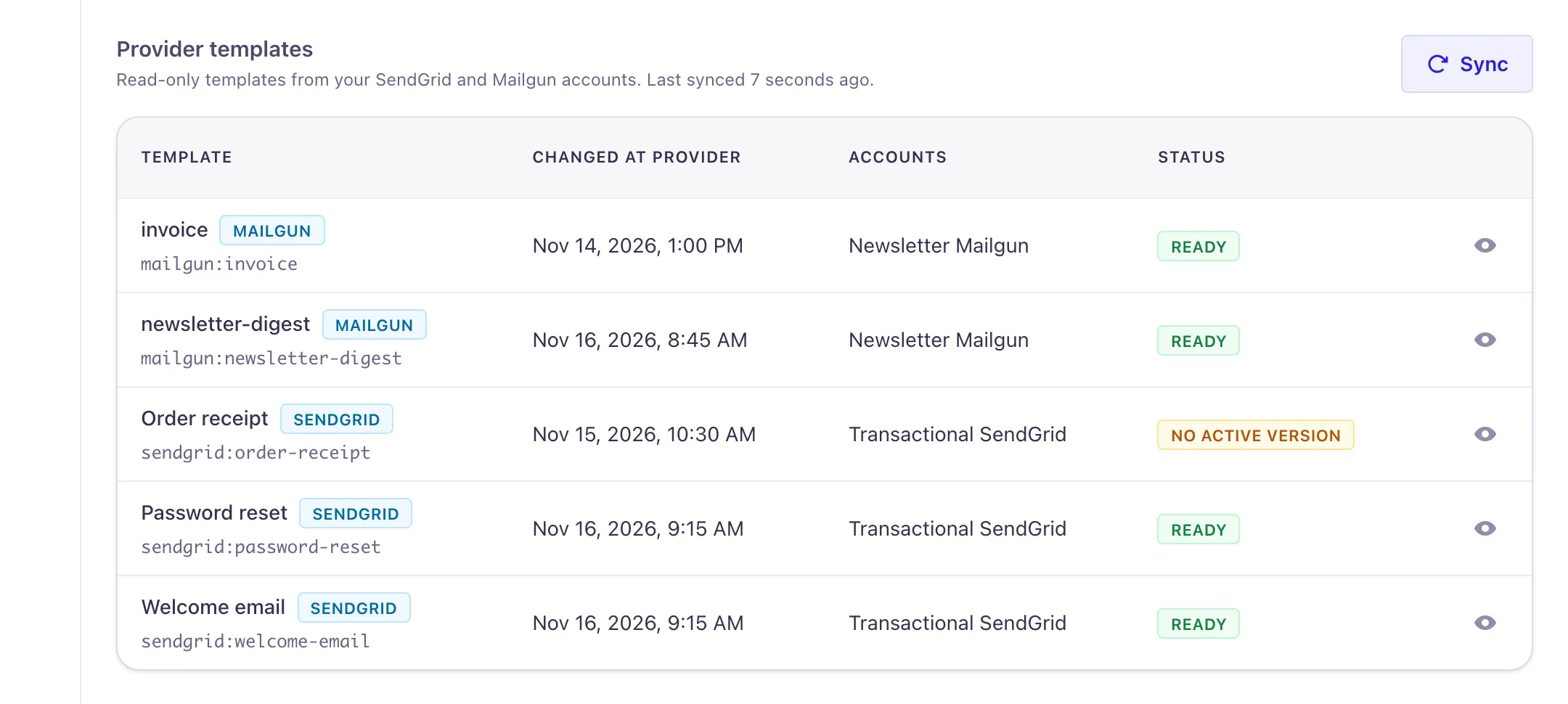
Provider templates: with a SendGrid or Mailgun account, their templates appear under your own, with the provider, the change date there, the accounts that have them and their status.
Brevo and Amazon SES accounts: the wizard asks only for what the provider needs, checks the connection without sending and shows the webhook URL and setup steps (Amazon SES and language versions have their screenshots in the sending guide).
Analytics: totals and the delivery log with server-side search, delivery status, opens and clicks per email.
Dark mode: every screen follows the Strapi admin theme.
More screens (account wizard, outbox details, template editor, settings, mobile) are in the gallery on the docs site.
About a minute in an existing Strapi 5 project:
npm install strapi-plugin-magic-mail
# yarn add strapi-plugin-magic-mail  |  pnpm add strapi-plugin-magic-mail
// config/plugins.js (config/plugins.ts: export default () => ({ ... }))
module.exports = () => ({
'magic-mail': { enabled: true },
});# Outside development and test MagicMail needs an encryption key. Generate it once and keep it.
node -e "console.log(require('crypto').randomBytes(32).toString('hex'))"
# .env
MAGIC_MAIL_ENCRYPTION_KEY=<the generated value>npm run build
npm run developOpen MagicMail → Email Accounts, click Add account, pick a provider (see Provider setup) and use the account's Test action with your own address. From now on every strapi.plugin('email') call goes through MagicMail.
Keep the encryption key stable: without it the stored account credentials cannot be read. Super admins see MagicMail right away; other roles need the permissions access and read.
| MagicMail | Strapi | Node.js | Databases |
|---|---|---|---|
| 4.x | ^5.57.0 (acceptance host: Strapi 5.63.0) |
>=22.12.0 <=26.x.x (CI runs Node 22, 24 and 26) |
PostgreSQL, MySQL 8, SQLite. Several processes: PostgreSQL tested, MySQL not load-tested |
| 3.1 | ^5.57.0 |
>=20.19.0 <=26.x.x |
as Strapi |
- Peer dependencies:
@strapi/strapi,@strapi/plugin-users-permissions(every default Strapi app has it; the email log links to its users),react,react-dom,react-router-domandstyled-componentsas in acreate-strapi-appproject.@strapi/design-system,@strapi/iconsandreact-intlare optional peers, which the Strapi admin provides. - The packed plugin installs with npm into a Strapi 5.63.0 project without plugin warnings, and its admin builds there (checked 2026-11-18). The yarn 1 and pnpm install check dates from Strapi 5.61.
- The minimum Strapi version is 5.57.0, the first release whose admin ships Design System 2.2.4, the version the MagicMail admin uses. CI also installs that floor (Strapi 5.57.0 with Design System 2.2.4) and runs the tests and the build against it.
MagicMail wraps the provider of @strapi/email at startup, so existing code keeps working:
await strapi.plugin('email').service('email').send({
  to: 'user@example.com',
  subject: 'Welcome to Example Shop',
  text: 'Thanks for signing up!',
  html: '<h1>Welcome!</h1><p>Thanks for signing up!</p>',
});
Both send() and sendTemplatedEmail() are routed, including Strapi's admin password-reset email and the Users & Permissions emails. When no MagicMail account is active, or every eligible account is over its quota, the mail goes through the Strapi email provider you configured before. Once a MagicMail account has attempted delivery, an error is returned instead, so nothing goes out twice.
Need a specific account, a template or the outbox? Use the router service:
await strapi.plugin('magic-mail').service('email-router').send({
  to: 'customer@example.com',
  subject: 'Order confirmation',
  html: '<h1>Your order #12345</h1>',
  accountName: 'Transactional SMTP', // case-insensitive; never replaced by another account
  type: 'transactional',
});
// → { success: true, accountUsed: 'Transactional SMTP', messageId: '<…>', emailId: '…' }
Designed your email in SendGrid, Mailgun, Brevo or Amazon SES? Send the synced template with the same data a MagicMail template gets (only accounts that have the template send it):
await strapi
  .plugin('magic-mail')
  .service('email-router')
  .send({
    to: 'customer@example.com',
    providerTemplate: 'sendgrid:welcome-email', // key shown in Email Templates → Provider templates
    data: { name: 'Ada', user: { email: 'customer@example.com' } },
    locale: 'de', // optional: picks the German language version when one is set
  });
All send options, attachments, unsubscribe headers, provider setup, routing rules, templates and provider templates: Sending guide. HTTP routes: API reference.
MagicMail registers six admin actions under Settings → Administration Panel → Roles → Plugins → MagicMail:
| Action | Grants |
|---|---|
plugin::magic-mail.access |
The MagicMail menu entry and page. No API access by itself |
plugin::magic-mail.read |
Read accounts, routing rules, templates, analytics and settings; render and export templates; the settings link |
plugin::magic-mail.manage |
Create, update and delete accounts, rules, templates, logs and settings; OAuth setup |
plugin::magic-mail.test-send |
Send test emails (account test, Strapi-service test, template and provider-template test) and run the read-only Brevo/SES connection check; 10 per minute per admin |
plugin::magic-mail.queue.read |
The Outbox tab and queue statistics (no mail content) |
plugin::magic-mail.queue.manage |
Retry, discard, mark as sent and delete outbox mails |
Typical roles:
- Read-only:
access+read - Editor:
access+read+manage - Tester:
access+read+test-send
When upgrading to 4.4, every role that already had read gets queue.read and every role with manage gets queue.manage, once at startup. Super admins always have both.
Editing the Users & Permissions templates also needs the users-permissions email-template permissions; uploading images in the visual editor needs Media Library → Create (upload). Details: permission migration guide.
| Variable | Required | Purpose |
|---|---|---|
MAGIC_MAIL_ENCRYPTION_KEY |
yes, unless NODE_ENV is unset, development or test |
Credential encryption key (32+ bytes). Keep it stable and backed up |
MAGIC_MAIL_ENCRYPTION_KEY_PREVIOUS |
no | Previous key during a rotation (decrypt only; saving an account re-encrypts it) |
MAGIC_MAIL_OAUTH_STATE_SECRET |
no | OAuth state signing secret (default: derived from the encryption key) |
MAGIC_MAIL_TRACKING_SECRET |
no | Tracking hash secret (default: derived from the encryption key) |
MAGIC_MAIL_TRACKING_SECRET_PREVIOUS |
no | Comma-separated old tracking secrets that stay valid |
URL |
no | Legacy override of the OAuth callback base URL (default: server.url) |
MAGIC_MAIL_ENABLE_DEBUG_ENDPOINT |
no | true enables GET /magic-mail/analytics/debug outside production |
Without MAGIC_MAIL_ENCRYPTION_KEY, a development key derived from ADMIN_JWT_SECRET/APP_KEYS is used only when NODE_ENV is unset, development or test; rotating those secrets then makes stored credentials unreadable. Any other environment (for example staging) refuses to start without the key.
Also set Strapi's server.url to your public URL (OAuth redirects, tracking links) and server.proxy.koa: true behind a reverse proxy.
Every plugin config key, the admin settings and the multi-instance setup are in the configuration guide.
- Credentials. SMTP passwords, API keys, AWS secret access keys, webhook tokens, OAuth tokens and DKIM keys are encrypted with AES-256-GCM (key derived from
MAGIC_MAIL_ENCRYPTION_KEYwith HKDF). The admin API returns the placeholder********instead of a secret, and changing the host, user, provider or OAuth client requires the secret again. - Admin routes. Every route needs an authenticated administrator plus the capability listed in Permissions.
accessonly shows the menu entry. - Content API. The send routes accept API tokens only (users-permissions roles only with
contentApi.allowUserRoles), reject unknown fields, file-path and URL attachments, and share 60 requests per minute per token across all instances. Never enable them for the Public role. - What goes out. HTML is sanitised,
fromis pinned to the sending account's address, custom headers are allowlisted, and SMTP requires TLS 1.2 or newer with certificate checks (unlessallowInsecureis set on a non-production or loopback host). - OAuth. Callbacks are public but use a signed, single-use state with PKCE, bound to the admin who started the flow and stored in the database.
- Webhooks. SendGrid and Mailgun requests are verified with the provider signature and a one-hour timestamp window; Brevo requests need the account's random webhook token (compared in constant time; shown only to admins with
managein a browser session, every reveal is audit-logged); Amazon SES (SNS) messages need the configured topic ARN and a valid SNS signature from an AWS SNS certificate host; replays are ignored and bodies are capped (1 MiB by default). Provider messages are not stored; addresses only as a keyed hash plus a masked form (suppression list) or a masked form (events for cc/bcc recipients). - Tracking. Open and click events keep IPs truncated to /24 or /48 and no location, and expire after 90 days (links after 180 days). Authentication links are never tracked. Mention tracking in your privacy notice.
- Outbox. Queued mails are stored encrypted and deleted once sent or discarded; the admin API and the Outbox tab never show mail content.
forgetRecipient(address)removes a recipient's queued mails. - Logs. MagicMail's log lines carry error names and codes, not recipient addresses or message content.
- Third parties. Mails go only to the providers you configure. The visual template editor loads Unlayer's editor in the admin's browser (see the visual editor and privacy); the plain HTML editor needs no third party.
- Supply chain. Releases are published from GitHub Actions with npm provenance.
Reporting a vulnerability: use GitHub private vulnerability reporting. Please do not open a public issue for security problems.
| Guide | What it covers |
|---|---|
| Docs site | Overview, screenshot gallery, install, outbox, several instances |
| Sending, providers, routing and templates | Send options, attachments, Gmail/Microsoft 365/Yahoo/SMTP/SendGrid/Mailgun/Brevo/Amazon SES setup, routing rules, quotas, failover, templates, the visual editor and its CSP |
| Tracking, bounces and the outbox | Open and click tracking, retention, bounce webhooks and mailbox monitoring, recipient checks, retries and the outbox |
| Content API and Admin API | Every route with request, response and error examples |
| Configuration and several instances | Every config key, admin settings, account fields, service API, Railway replicas and pm2 clusters |
| Troubleshooting and FAQ | Mail not received, OAuth errors, 400/403/429 responses, CSP, DMARC |
| Live webhook checks | Checking the SendGrid and Mailgun webhooks against your real accounts: test buttons, a real bounce, what to expect |
| Upgrading | Migration notes for every release since 4.0.0 |
| Permission migration | Granting the 4.x admin capabilities |
| Changelog | Every release |
Bug reports, fixes and documentation improvements are welcome.
- Bug? Open a bug report with your Strapi, Node.js and MagicMail versions and the
[magic-mail]log lines (remove addresses and secrets first). - Idea? Open a feature request.
- Security issue? See Security and privacy.
Development setup:
npm ci --ignore-scripts
npm run lint
npm run format:check
npm test
npm run test:admin
npm run build
npm run verify
npm run verify:runtime
npm run test:live runs the opt-in live suites against the real SendGrid and Mailgun APIs: the send paths (tests/live/provider-send.live.test.js), the provider-template flows (tests/live/provider-templates.live.test.js) and the rest of the SendGrid integration (tests/live/sendgrid-account.live.test.js: restricted API keys, template versions, read-only account checks; it creates temporary magic-mail-live-* API keys and templates and deletes them again, so its key needs full access). SendGrid runs in sandbox mode and Mailgun in test mode, so nothing is delivered (Mailgun bills test-mode messages). Credentials come only from ~/.config/magic-mail-live/.env and are never printed. LIVE_PROVIDERS (environment variable or a line in that file) picks the providers as a comma-separated list of sendgrid, mailgun, brevo and ses; without it, every provider whose required variables are complete runs. Tests of a provider that is not selected are skipped with the reason. For SendGrid only: LIVE_PROVIDERS=sendgrid npm run test:live. Required per provider: SendGrid needs SENDGRID_API_KEY, SENDGRID_FROM, LIVE_TEST_RECIPIENT and, for the template suite, SENDGRID_TEMPLATE_ID; Mailgun needs MAILGUN_API_KEY, MAILGUN_DOMAIN, MAILGUN_REGION, LIVE_TEST_RECIPIENT and, for the template suite, MAILGUN_TEMPLATE. Optional: SENDGRID_REGION, SENDGRID_EU_API_KEY, SENDGRID_EU_FROM, MAILGUN_FROM, MAILGUN_EU_DOMAIN, MAILGUN_EU_API_KEY. Without the file, or when a selected provider misses a variable, the template suite fails with the file name and the missing variable names (the send suite reports those tests as skipped). Brevo (tests/live/brevo.live.test.js, sandbox header X-Sib-Sandbox: drop, nothing delivered) needs BREVO_API_KEY, BREVO_FROM, BREVO_TO and optionally BREVO_TEMPLATE_ID; Amazon SES (tests/live/ses.live.test.js, only the SES mailbox simulator success@ and bounce@simulator.amazonses.com) needs SES_REGION, SES_ACCESS_KEY_ID, SES_SECRET_ACCESS_KEY, SES_FROM and optionally SES_CONFIGURATION_SET, SES_TEMPLATE_NAME; both skip with the missing names when their variables are not set. It never runs in CI. Never commit that file.
npm run test:admin renders every admin entry point (the five sections of the MagicMail page with their dialogs, the template editor, the Plugin Settings page) inside React.StrictMode with the providers of the Strapi admin, in jsdom with a fake network. It fails on a mutation sent twice, a read repeated without aborting the first one, an interval, listener, connection or observer left after unmount, and any console error or warning. A separate CI job runs the same tests against React 19 for information only: the plugin's peer range is React 18, like the Strapi 5 admin.
npm run test:multi-instance runs the multi-process suite (set MAGIC_MAIL_TEST_PG_URL for PostgreSQL). npm run watch (or npm run watch:link with yalc) rebuilds the admin and the server bundle on change. CI runs the same checks on Node 22 and 24 for every pull request and every push to main. Use Conventional Commits (fix:, feat:, docs:); releases are cut from main by semantic-release.
Dependabot proposes updates weekly, after a cooldown (7 days, 14 for majors). .github/workflows/dependency-auto-merge.yml handles its pull requests with the rules in .github/scripts/dependency-gate.mjs. The script is the same in every Magic plugin repository; its unit tests run with node --test .github/scripts/dependency-gate.test.mjs and in CI.
- Merged automatically (squash merge by
github-actions): an explicit patch or minor update, after the repository's own checks pass, the gate finds nothing below, and every other check on the PR head commit has finished green: every CI job and matrix entry (for example Node versions, peer floor, React 19 StrictMode) and CodeQL where present. The merge is bound to that exact commit (--match-head-commit). - Held for review (label
needs-reviewplus a comment with the reasons, never merged automatically) when:- a changed package's
engines.nodeno longer covers a Node version this plugin supports, or itspeerDependenciesno longer match the installed tree or this plugin's peer floor; - the PR body or release notes mention a breaking change;
- the published surface changes: the
npm packfile list (content hashes ignored),exports,peerDependencies,engines, or the exports of the built entry files; - a runtime dependency on 0.x gets a minor bump;
- dependency review reports a vulnerability of moderate or higher, or a license outside the allowlist (MIT, MIT-0, ISC, BSD, Apache-2.0, 0BSD, BlueOak-1.0.0, CC0-1.0, Unlicense, Python-2.0, Zlib; MPL-2.0 and CC-BY for development dependencies only);
npm audit signaturesreports a missing or invalid registry signature or provenance attestation;- the lockfile adds a package with an install script, more than 15 packages that are new to the tree, or a package that does not resolve from
registry.npmjs.org; - a check fails, or the CI does not finish within 75 minutes.
- a changed package's
- Major updates get the
major-updatelabel and a comment; a person reads the changelog and merges by hand.
The gate script runs from the default branch and reads lockfiles and reports as data; it never runs code from the pull request. Only the surface job installs (without lifecycle scripts) and builds the pull request, with a read-only token. Merges made with GITHUB_TOKEN do not start release.yml, so a dependency update ships with the next regular release.
Dependency audits. Run npm audit from your Strapi project root to check the complete installed tree; npm applies overrides from the root project only. MagicMail validates every request with its own zod (^4.6.7) and bounds all collections. Strapi itself ships other zod copies inside @strapi/* packages; if npm audit in your project reports one of them, the fix comes with a Strapi update.
Maintenance status. Actively maintained. Releases follow semantic versioning and support the Strapi 5 line.
Languages. The admin UI is available in English, German, French, Spanish and Portuguese.
Using MagicMail in production? Add your company to the "Used by" section of the documentation site. The form asks for the company name, the website, a logo (PNG, JPEG or WebP, uploaded to the issue) and an optional one-line description.
A maintainer reviews every request and approves it with the showcase-approved label. .github/workflows/showcase.yml then validates the issue with .github/scripts/showcase.mjs, converts the logo to a WebP of at most 320 x 160 pixels and opens a docs: pull request that changes docs/site/showcase.json. The logo appears on the site after that pull request is merged. Website links carry rel="ugc noopener". To remove an entry, open an issue that names the company; a maintainer then applies the showcase-remove label.
MIT License, Copyright © 2025 Schero D. See LICENSE.
Built with Strapi, Nodemailer, Unlayer / react-email-editor, Heroicons and styled-components.