

See who is signed in to your Strapi 5 app, end any session in one click, and stop password guessing before it reaches your users.
Magic Session Manager records every sign-in through Users & Permissions as a session. Admins see who is online, end single sessions or all sessions of a user, block accounts and review sign-in history. Your app gets logout routes, a "my devices" list for users, failed-login lockout and optional country rules. It works with Strapi's native refresh-token sessions and with several server processes on one database. A separate Admin panel view shows who is signed in to the Strapi admin panel itself and signs an admin out of one browser or everywhere.
Free and open source under the MIT license. Every feature works without an account, key or activation, and the plugin sends nothing to its author.





Live docs: https://schero94.github.io/Magic-Sessionmanager/ · npm · Changelog · Report a bug · Discussions
- Features
- Quick start (1 minute)
- Screenshots
- Core concepts
- Screens
- Compatibility
- Install
- Session management modes
- Configuration
- Location data and GeoIP
- Login protection
- Alerts
- Content API
- Examples
- Optional route policy:
session-required - Admin API and permissions
- Running several instances (Railway replicas, pm2 cluster)
- Performance
- Security and privacy
- Troubleshooting
- FAQ
- Migration and upgrading
- Development and tests
- Contributing
- Maintenance status
- Languages
- Showcase your company
- License
| Area | What you get |
|---|---|
| Overview | A sessions dashboard with Active, Idle and Ended counts, search, filters, CSV and JSON export, and a details dialog per session (device, browser, IP address, location, security score). |
| Control | End one session, end all sessions of a user, delete a record, or block a user. Ended sessions are rejected on the next request with 401 and a reason header. |
| Your users | Content API routes for "my sessions", "current session", log out, log out everywhere and log out other devices. Each user only ever sees their own sessions. |
| Login protection | Temporary IP lockout after failed sign-ins, Content API rate limits, optional rejection of VPN, proxy or low-score sign-ins, and country allow or block lists. |
| Location | IP location from a local MaxMind GeoLite2 database (no third party in the sign-in path) or from ipapi.co, or turned off. |
| Alerts | Security emails to the user through Strapi's Email plugin and sign-in notifications to Discord or Slack. |
| Admin integration | A Sessions panel next to each user in the Content Manager and an Online users widget on the Strapi homepage. |
| Admin panel sessions | Who can use the Strapi admin panel, who is signed in, on which browser and since when. Sign an admin out of one browser or everywhere; it takes effect on their next click. |
| Native Strapi sessions | Works with jwtManagement: 'refresh' (Strapi's own sessions and refresh tokens) and with 'legacy-support'. |
| Several processes | Lockout, rate limits, jobs and settings stay consistent across pm2 workers and Railway replicas that share one database. |
| Privacy | Stored tokens are encrypted (AES-256-GCM) and never returned. Retention deletes old history automatically. No telemetry. |
npm install strapi-plugin-magic-sessionmanager// config/plugins.ts
export default () => ({
'magic-sessionmanager': { enabled: true },
});# a stable key for token encryption (startup fails without it in production)
echo "SESSION_ENCRYPTION_KEY=$(node -e "console.log(require('crypto').randomBytes(32).toString('base64'))")" >> .env
npm run build && npm run developSign in to your app as an end user (POST /api/auth/local), open Session Manager in the admin menu and the new session is listed as Active. End it, and the same token gets 401 on its next request.
Yarn and pnpm work the same way (yarn add strapi-plugin-magic-sessionmanager, pnpm add strapi-plugin-magic-sessionmanager).
All screenshots use synthetic data: users *.example.test, IP addresses from the documentation range 203.0.113.0/24, Strapi 5.61. The full gallery on the project site also shows Analytics, dark mode, every settings tab, the untracked sign-in dialogs and more mobile views.

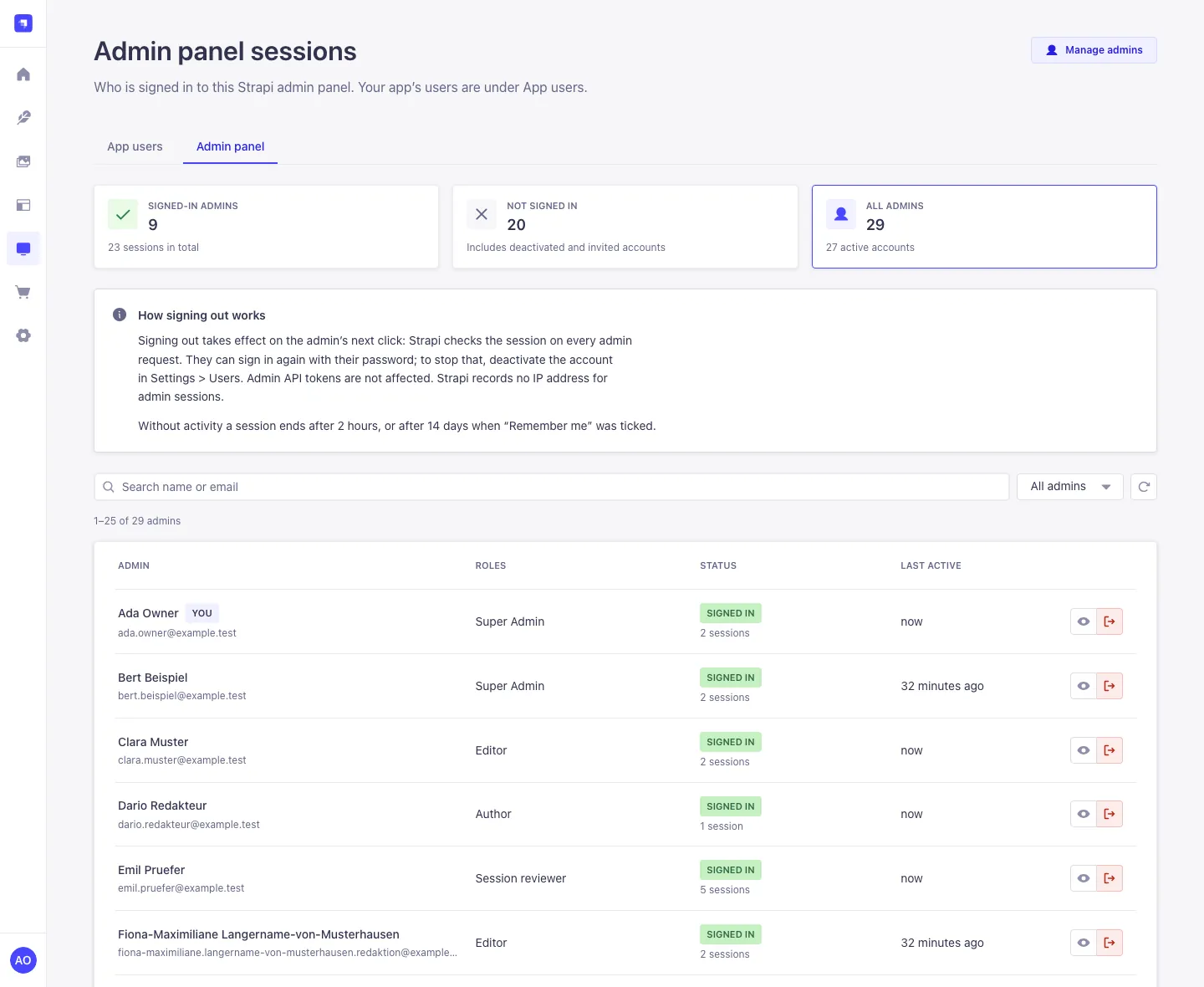
Strapi 5.62, synthetic admins *.example.test. The gallery also shows the sessions dialog, the sign-out confirmation, what the signed-out admin sees, dark mode and the phone layout.
Session. One sign-in of a user on one device, from sign-in until it ends. Every session has a session record with times, device, IP address and location.
A session is in one of three states:
| State | Meaning |
|---|---|
| Active | Open and used within the inactivity timeout. |
| Idle | Open, but not used for longer than the inactivity timeout. It ends on its next request or at the next idle check. A token refresh makes it active again. |
| Ended | The session can no longer be used. The user has to sign in again on this device. |
An ended session always shows its end reason:
| End reason | Stored value | Meaning |
|---|---|---|
| Logged out | logout |
The user signed out. |
| Timed out | idle |
Not used for longer than the inactivity timeout. |
| Expired | expired |
Reached the maximum session age. |
| Ended manually | manual |
Ended from the Strapi admin, or by the user from another of their devices. |
| User blocked | blocked |
Ended because the user account was blocked. |
| Reason not recorded | (none) | No end reason was stored, for example because the session ended in Strapi's own session store or was recorded by an older plugin version. |
Three verbs, three meanings:
- End a session: it stops working, the record stays in the history.
- Delete record: the record is removed from history, statistics and exports. If the session is still open, it also ends. Its token stays revoked.
- Block a user: the user cannot sign in, and all open sessions end. Unblock allows sign-in again but does not restore ended sessions.
Online describes users, never sessions: a user is online when at least one of their sessions is Active. The dashboard, the widget and the user panel all use this one rule, based on the configured inactivity timeout.
| Where | Name | Answers |
|---|---|---|
| Main menu | Session Manager (page title "Sessions") | Which sessions exist, and which need action? |
| Dialog on the dashboard | Session details | What is this session, and why is it in this state? |
| Content Manager, User edit view | Sessions panel | What access does this user have, and how do I cut it off? |
| Strapi homepage | Online users widget | Who is online right now? |
| Session Manager › Admin panel | Admin panel sessions | Who is signed in to this admin panel, and how do I sign someone out? |
| Settings › Session Manager | Configuration | How should sessions and sign-ins behave? |
| Settings › Session Manager | Analytics | How are sessions used over time and by device? |
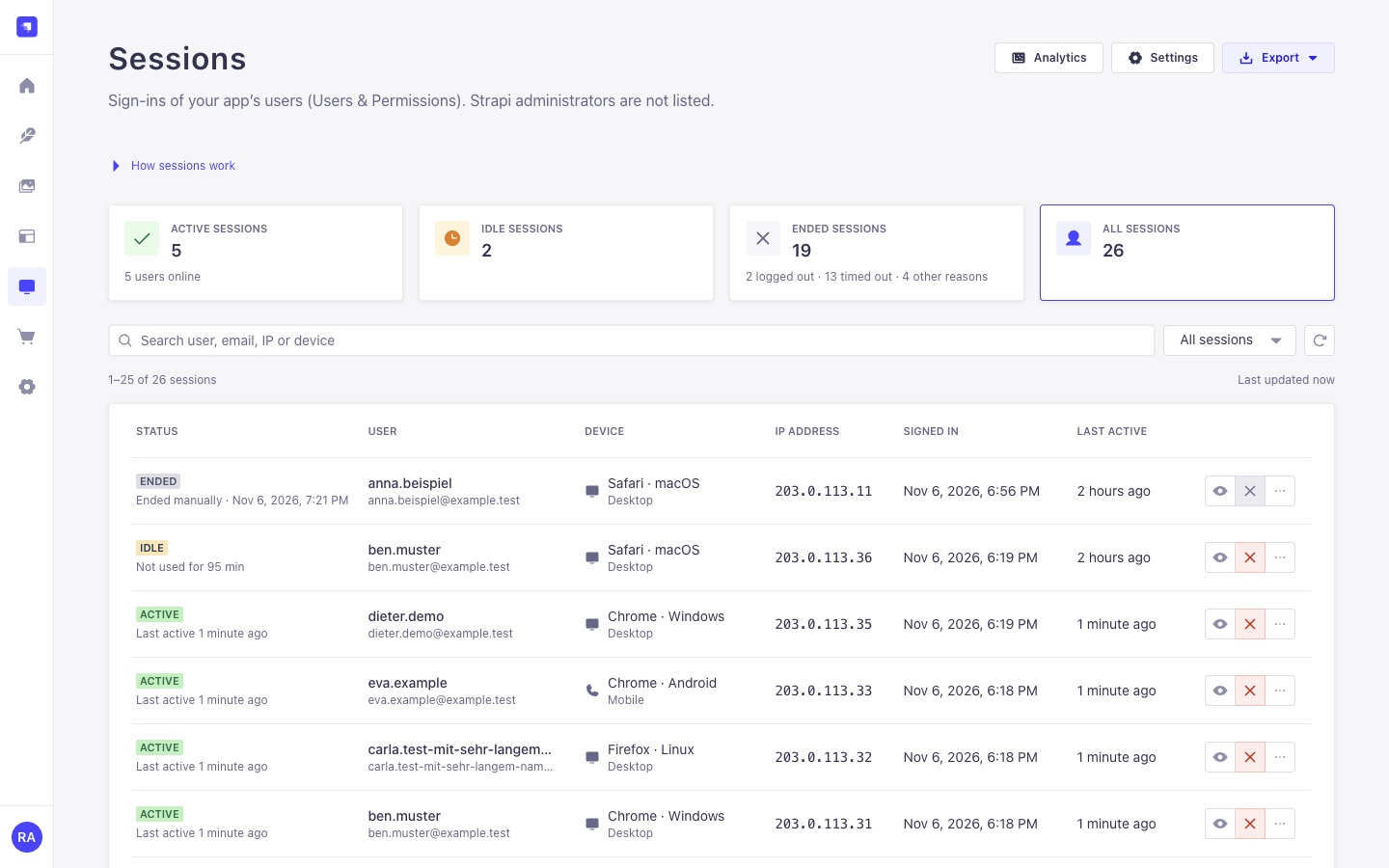
- Header: title "Sessions", the links Analytics and Settings (opens Configuration), and Export (CSV or JSON of every session that matches the filter, up to 50,000 newest, with an "End reason" column and never any tokens).
- How sessions work: a collapsed legend of the three states.
- Four stat cards that set the status filter: Active ("{n} users online"), Idle, Ended ("{a} logged out · {b} timed out · {c} other reasons") and All.
- Action bar: search by user, email, IP or device; Status filter (All sessions, Open, Active, Idle, Ended); an End reason filter when Ended is selected; Refresh. "Last updated" shows when the list was loaded; it also refreshes every 10 minutes.
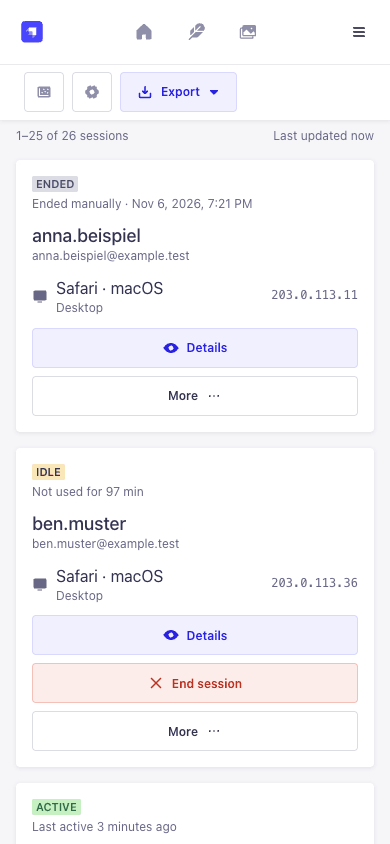
- Table: Status (badge and a second line, for example "Ended manually · {date}"), User, Device, IP address, Signed in, Last active and the row actions View details, End session (disabled on ended rows) and More actions › Delete record. Clicking a row opens the details.
- Filters, search, page and page size are kept in the URL, so
?search=<email>is a shareable link. - Search, filters, sorting and paging run on the server, so the list, the counts and the page numbers cover every session, however many there are. Only the 25 to 100 rows on the screen are loaded.
- In
refreshmode, a notice above the cards counts untracked Strapi sign-ins: refresh tokens Strapi still accepts that have no session details from this plugin. They are not in the list and are not active or online sessions; each user's sessions panel lists them. The notice is neutral when all of them were created before this plugin started tracking, and a warning ("Possible tracking gap") when any was created afterwards. Why? opens a count-only summary; End these sessions ends them after a confirmation. See Untracked Strapi sessions. - Below the large breakpoint the IP address and Signed in columns are hidden; below the medium breakpoint the table becomes a card list.
Open Session Manager and switch to Admin panel (the switch below the title; shown only to roles with "Read admin panel sessions"). The view lists Strapi admin accounts, not your app's users, and none of its numbers appear on the App users dashboard, the widget or Analytics.
- Cards: Signed-in admins (with the number of signed-in browsers), Not signed in (including deactivated and invited accounts) and All admins (with the number of active accounts). Each card filters the list.
- How signing out works: signing out takes effect on the admin's next click, because Strapi checks the admin session on every admin request. The admin can sign in again with their password; to stop that, deactivate the account in Settings › Users (Manage admins in the header). The card also shows the idle timeouts your host runs with (
admin.auth.sessions). - Search and filter: name or email; All admins, Signed in, Not signed in. Search, filter and paging run on the server and live in the URL.
- Table (cards below 768 px): Admin (with a You badge), Roles, Status (Signed in · "{n} sessions", Not signed in, Deactivated, Invited), Last active, and the actions View sessions and Sign out everywhere.
- Sessions of an admin: one entry per signed-in browser with Strapi's device label (for example "Chrome on macOS"), This browser, Remember me, Signed in, Last active and Ends at the latest. Sign out ends that browser, Sign out everywhere ends all of them, Manage in Settings opens the admin in Settings › Users.
- Confirmation: every sign-out asks first. Signing yourself out of the browser you are using shows a warning; you are then taken to the login page.
- Protection: an admin without the Super Admin role cannot sign out a Super Admin, so the last active Super Admin can never be signed out by someone else. The view explains this instead of showing a disabled button.
- Strapi stores no IP address and no full user agent for admin sessions, so the view shows none. "Last active" is the last time the browser renewed its access token (Strapi's own signal), not every click.
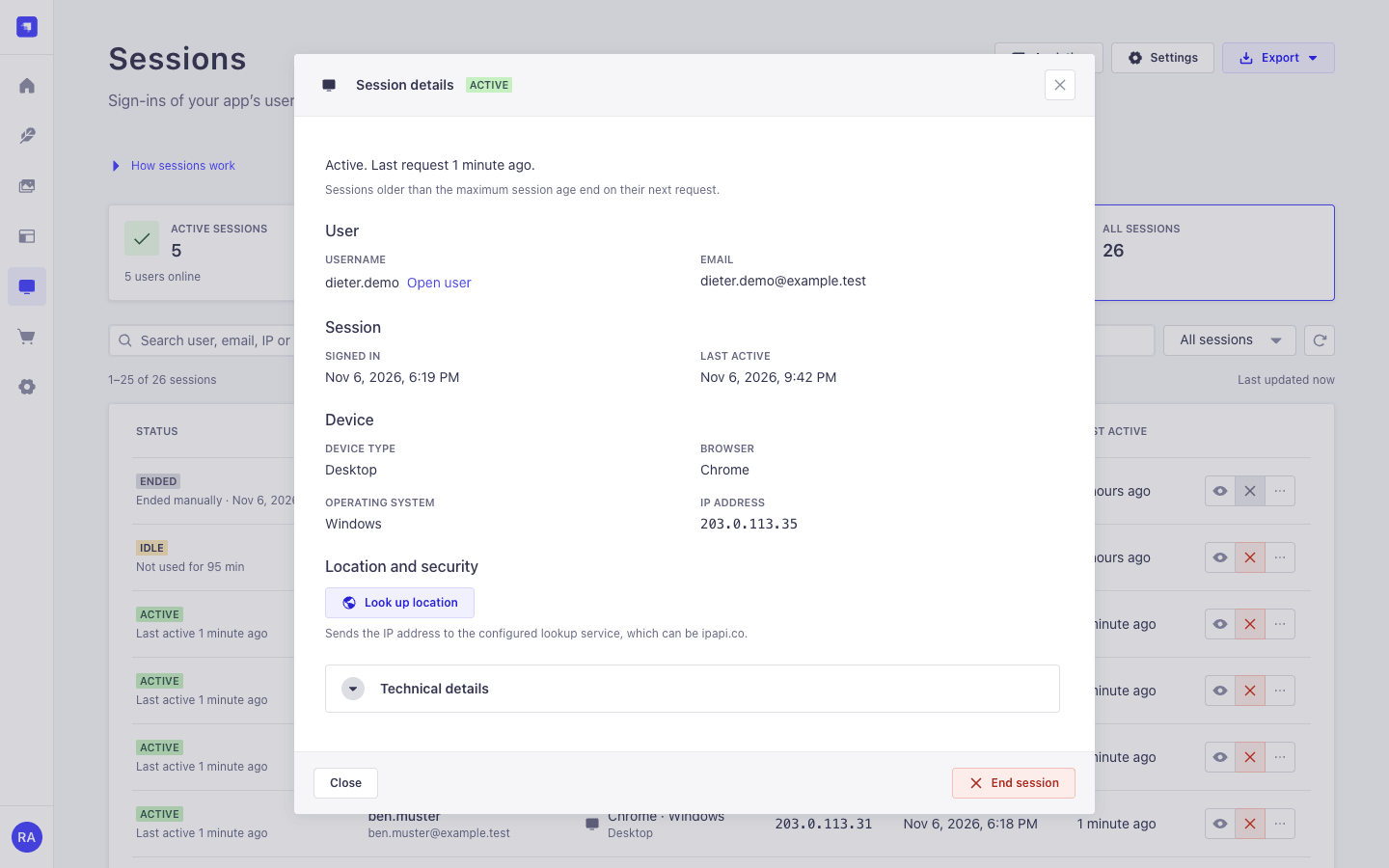
- A state sentence that explains why the session is in its state, for example "Ended {time} · Ended manually."
- User (with an Open user link to the Content Manager), Session (Signed in, Last active, Ended at, End reason), Device (type, browser, operating system, IP address), Location and security (country, city, time zone, security score "{score}/100", VPN and proxy).
- Look up location for sessions without a stored location. The lookup runs only when you click it, because it can send the IP address to ipapi.co.
- Technical details (collapsed): record ID with a copy button and the raw user agent.
- Footer: End session with confirmation on open sessions; ended sessions show "This session has already ended."
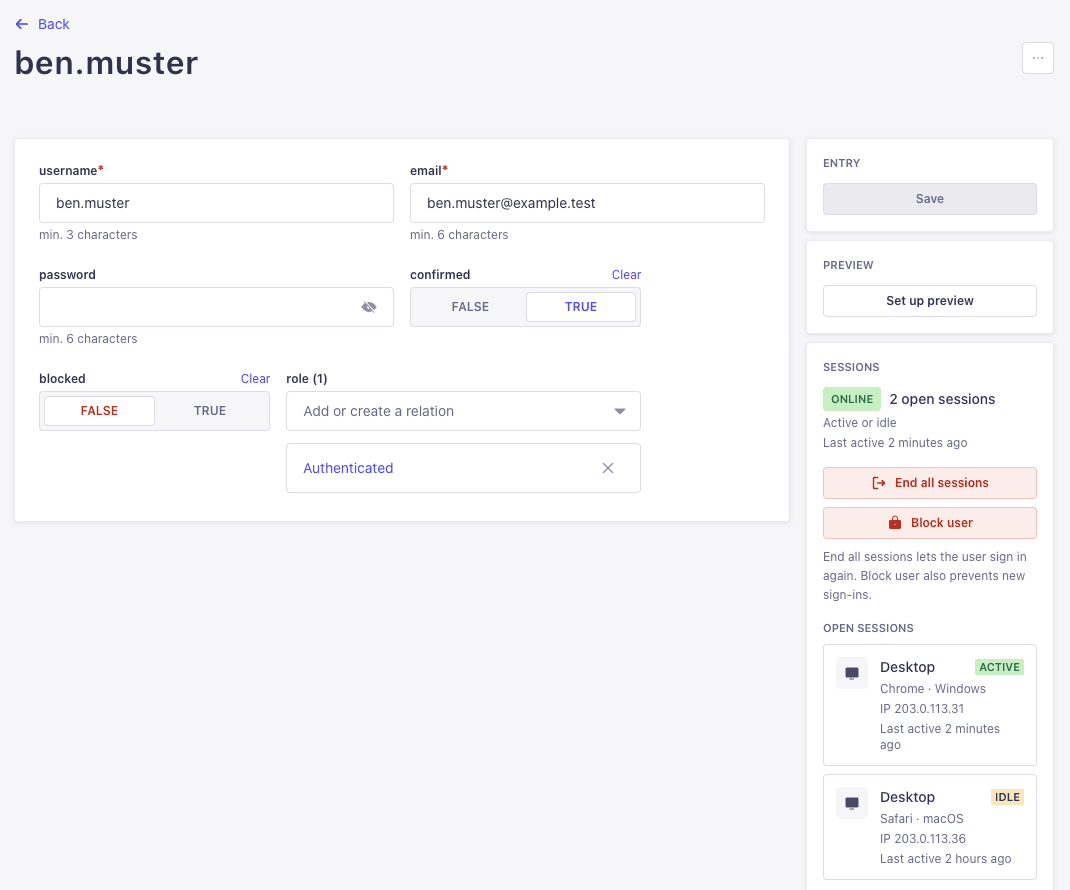
Shown on the edit view of a Users & Permissions user only.
- Online or Not online, "{n} open sessions" (active or idle) and the last activity.
- End all sessions: signs the user out on every device. The user can sign in again unless the account is blocked.
- Block user / Unblock user: blocking ends all open sessions and prevents sign-in. The open form's Blocked field is updated, so a later Save does not undo it. Setting the native Blocked field and saving has the same effect.
- Up to five open sessions, then Show all sessions, which opens the dashboard filtered by the user's email.
- For an unsaved user the panel only says "Save this user before you can manage sessions."
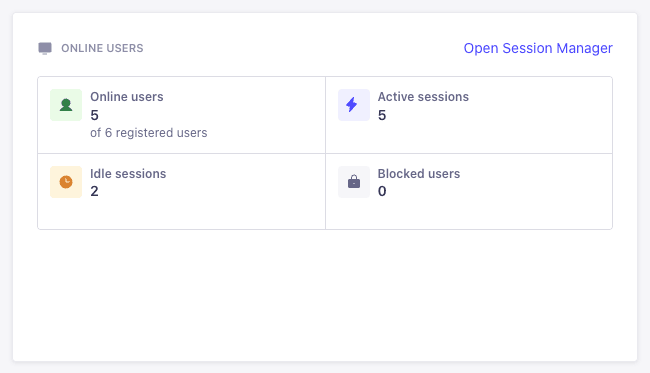
Part of every supported Strapi version (the widgets API exists since Strapi 5.13). Four tiles: Online users (of all registered users), Active sessions, Idle sessions and Blocked users, plus a link Open Session Manager. The widget refreshes every 30 seconds.
Two links: Configuration and Analytics.
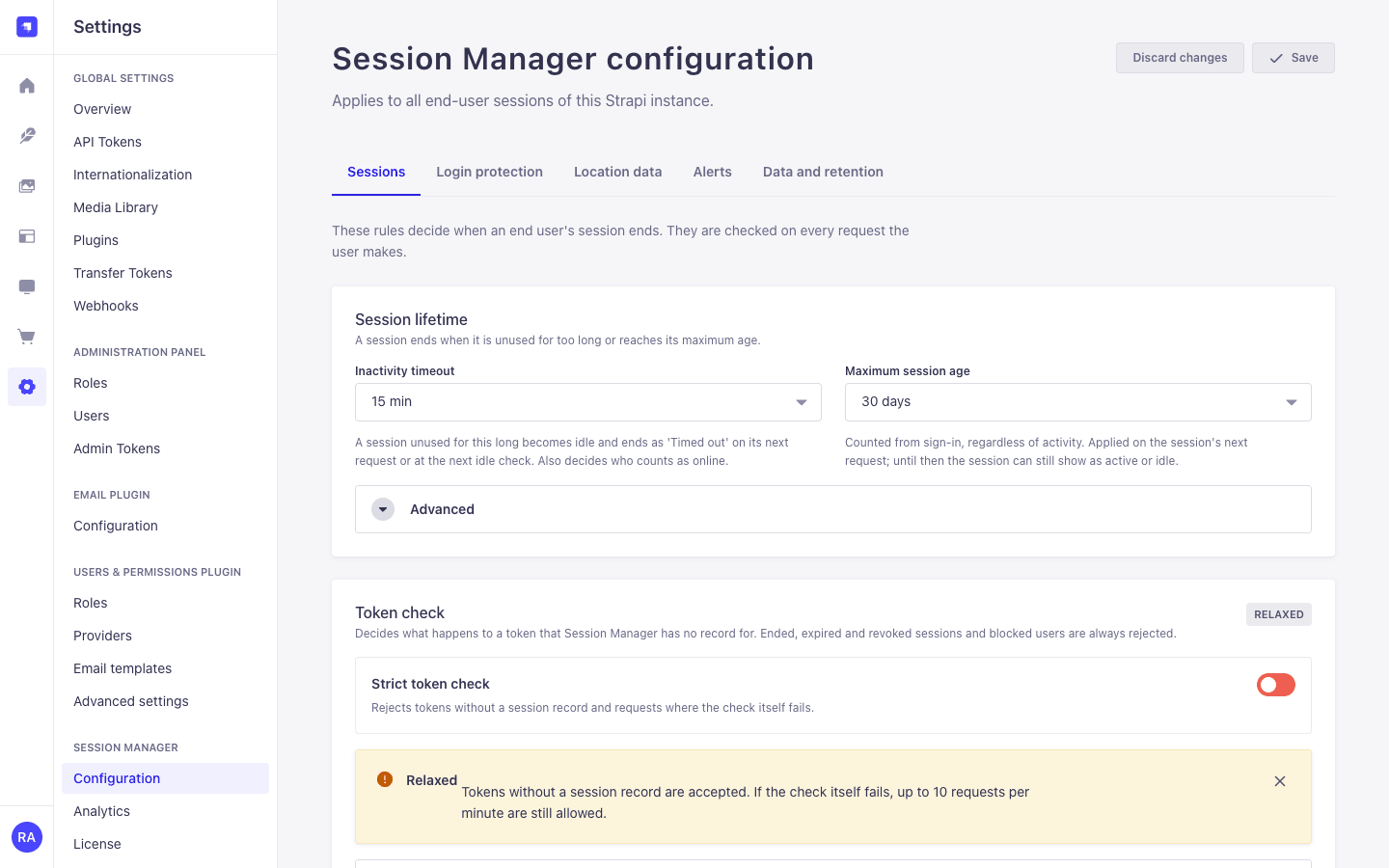
Configuration has five tabs, deep-linkable with ?tab=sessions|login-protection|location-data|alerts|data-retention:
| Tab | Question | Contents |
|---|---|---|
| Sessions | How long does a session stay valid? | Inactivity timeout, maximum session age; Advanced: "Last active" update interval, idle check interval and method. Token check (Strict / Relaxed); Advanced: grace period after sign-in, token encryption key generator. A read-only card on what your app receives when a session is rejected. |
| Login protection | Which sign-ins are refused, and why? | Temporary IP lockout, Trust proxy headers, Reject suspicious sign-ins, If the location cannot be determined, Country rules (Allow only listed countries / Reject listed countries), a read-only card on why sign-ins are refused. |
| Location data | Where do IP location and risk data come from? | IP location lookup, Security scoring, Provider, GeoIP database status, MaxMind credentials, Update database / Force download. |
| Alerts | Who is told about sign-ins? | Security emails to users (with email templates) and Team notifications to Discord or Slack. |
| Data and retention | How long is session history kept? | Keep ended sessions for, and Delete ended sessions. |
Save applies the whole form; Discard changes re-loads the stored values (it does not restore defaults). Leaving with unsaved changes asks first. Settings are saved in the database; other server processes apply them within 30 seconds.
Analytics shows All sessions, Active sessions, Sign-ins in the last 24 hours and in the last 7 days (rolling windows), sessions by device and by browser, and the average session length, computed on the server over every session (cached for 30 seconds).
| Item | Supported |
|---|---|
| Strapi | 5.50.0 and later 5.x (@strapi/strapi peer range ^5.50.0). Tested in CI on 5.50.0 (floor) and 5.63.0 (acceptance host). Strapi 5.0 to 5.49 are not supported, see Upgrading › Strapi older than 5.50. |
| Node.js | ^22.22.2 || >=24.15.0 (engines.node) |
| Users & Permissions | jwtManagement: 'refresh' and 'legacy-support' |
| Homepage widget | Included (Strapi's widgets API exists since 5.13). |
| Admin panel sessions | Uses Strapi's session manager (strapi.sessionManager('admin')) and the device label in admin::session metadata, both available from Strapi 5.50.0; tested on 5.50.0 and 5.62.0. |
| Required peers | @strapi/strapi ^5.50.0, @strapi/plugin-users-permissions ^5.50.0, react / react-dom ^18.0.0, react-router-dom ^6.0.0, styled-components ^6.0.0. A new Strapi 5 app already has all of them. |
| Optional peers | @strapi/design-system ^2.0.0, @strapi/icons ^2.0.0, react-intl ^6.0.0. Strapi's admin brings them; they are marked optional so npm, Yarn and pnpm do not warn. |
| Package managers | npm, Yarn 1 and pnpm. Installing into a fresh Strapi 5.61 app prints no warning about this plugin. |
| Databases | PostgreSQL, MySQL, SQLite (several processes need PostgreSQL or MySQL, see Running several instances). |
npm install strapi-plugin-magic-sessionmanagerEnable it in config/plugins.ts:
export default () => ({
  'magic-sessionmanager': {
    enabled: true,
  },
});
Set the encryption key (required when NODE_ENV=production, see Security and privacy), then rebuild and start:
npm run build
npm run develop
Open the Strapi admin and select Session Manager in the main menu. Super Admins have access automatically; for other admin roles, grant Plugins › Session Manager › Access the Session Manager plugin under Settings › Administration Panel › Roles.
Session Manager supports Users & Permissions end-user sessions in both the native refresh mode and the legacy-support mode.
'users-permissions': {
  config: {
    jwtManagement: 'refresh',
  },
}
In this mode Strapi issues, rotates and revokes native sessions. Session Manager uses that state for end-user sessions and keeps its own metadata and history (device, IP address, location, security score). It does not issue or rotate a second token family. Rows created natively without a Session Manager record can appear with a native_ ID; the admin marks them as "Strapi session", and their device, IP address and location are shown as "—" ("Not recorded").
Strapi keeps its own session table (admin::session). The plugin links each Users & Permissions session it sees to a session record. A session without a record is untracked: its refresh token still works until it expires (Strapi defaults: 14 days idle, 30 days at most), but it is not in the dashboard list and never counts as active or online. The dashboard notice shows how many there are; the number counts unexpired refresh tokens, not people.
Which sign-ins are linked (tested with Strapi 5.61 on SQLite and PostgreSQL, /api and a custom api.rest.prefix):
| How the session is created | Linked |
|---|---|
POST /auth/local, /auth/local/register, GET /auth/:provider/callback, POST /auth/refresh (the rotated session), /auth/change-password, /auth/reset-password |
Yes, under any REST prefix |
GET /auth/email-confirmation |
Creates no session (redirects) |
GraphQL login, register, emailConfirmation mutations |
Yes |
Custom routes or other plugins that call strapi.sessionManager('users-permissions') or the refresh-mode jwt.issue() and return the token in the response (jwt) |
Yes, from the access token in the response |
| Code that does not return the token in the response that created it (token sent by email or another channel, stored server-side, created by a cron job or script) | No. The plugin cannot see which client holds it. It stays untracked. |
| Sessions created before this plugin started linking sessions | No; they expire on their own |
For the last two rows: return Strapi's { jwt, refreshToken } (or the refresh cookie) from custom login code so the plugin can link it, or end untracked sessions from the dashboard.
Reading the summary (GET /magic-sessionmanager/sessions/native-only/summary, also behind Why?):
beforeTracking/afterTracking: created before or aftertrackingSince, the date from which the plugin links sessions (stored once at startup as the login time of the oldest linked session, or the first start of this version). OnlybeforeTracking> 0: legacy rows, nothing to do; they disappear within the refresh-token lifetime.afterTracking> 0 and growing: a sign-in path the plugin does not see.bySource:signInrows carry Strapi's sign-in details (local, register, provider callback, GraphQL login),passwordChangerows come from a password change or reset,tokenOnlyrows fromjwt.issue()or custom code. A growingafterTrackingwithtokenOnlypoints at custom code or another plugin; withsignIn, at a login route on a path the plugin does not intercept that does not return the token.byMonth,earlier,byDevice(desktop, mobile, unknown, from Strapi's device label over at most 2,000 rows),expiring.within7Days/within30Days.
Ending them (POST /magic-sessionmanager/sessions/native-only/end, End these sessions) deletes untracked Users & Permissions rows from Strapi's session table, so their refresh tokens stop working; access tokens already issued run out within Strapi's access-token lifetime (10 minutes by default). Strapi administrator sessions, sessions listed in the plugin and sessions younger than two minutes are never touched. At most 5,000 per request; the response says how many remain.
With jwtManagement: 'legacy-support', Session Manager keeps its plugin-owned session behavior. It does not switch the host to refresh mode or migrate existing session records.
In both modes the existing Magic endpoints keep their paths, methods, permissions and response envelopes. The plugin does not change the host application's authentication configuration or migrate existing session records. Strapi administrator-account sessions are not managed by this plugin. The default Content API permission setup targets only the Authenticated role and never adds these actions to Public. If an administrator saves the Authenticated role before the first protected request, the plugin keeps that role's permission choices.
Settings come from two places:
- Static config in
config/plugins.ts(configbelow). Time values are in milliseconds. - Admin settings (Settings › Session Manager › Configuration), stored in the plugin store in user-facing units (minutes, seconds, days). A value saved in the admin overrides the static config. Once the Configuration page has been saved, every field shown there comes from the stored settings.
// config/plugins.ts
export default () => ({
  'magic-sessionmanager': {
    enabled: true,
    config: {
      inactivityTimeout: 15 * 60 * 1000, // ms
      lastSeenRateLimit: 30 * 1000, // ms
      cleanupInterval: 30 * 60 * 1000, // ms
      maxSessionAgeDays: 30,
      retentionDays: 90, // -1 keeps ended sessions forever
      strictSessionEnforcement: false,
      geoIpProvider: 'auto', // 'auto' | 'local-mmdb' | 'ipapi' | 'disabled'
      geoLookupFailureMode: 'auto', // 'auto' | 'allow' | 'block'
    },
  },
});Static defaults from server/src/config/index.js; admin units and ranges from the settings validation in server/src/controllers/settings.js. Out-of-range admin values are rejected with a field error, not clamped silently.
| Key | Default | Admin unit and range | Configuration tab | Meaning |
|---|---|---|---|---|
inactivityTimeout |
15 min (900000 ms) |
min, 1 to 1440 | Sessions | Unused this long, a session becomes idle and then ends as "Timed out". Also decides who counts as online. |
maxSessionAgeDays |
30 | days, 1 to 365 | Sessions | Maximum age from sign-in, regardless of activity. Applied on the session's next request. |
lastSeenRateLimit |
30 s (30000 ms) |
s, 5 to 300 | Sessions › Advanced | Minimum interval between "Last active" updates. |
cleanupInterval |
30 min (1800000 ms) |
min, 5 to 1440 | Sessions › Advanced | How often the idle check runs. It ends idle sessions and deletes nothing. It also runs at server start; with several instances only one runs it per interval. |
cleanupUseDbDirect |
false |
boolean | Sessions › Advanced | Idle check with one SQL update instead of the Document Service (skips lifecycle hooks). |
strictSessionEnforcement |
false (Relaxed) |
boolean | Sessions | Strict rejects tokens without a session record and requests where the check itself fails. Ended, expired and revoked sessions and blocked users are rejected in both modes. |
sessionCreationGraceMs |
5000 |
ms, 0 to 30000 (shown in seconds) | Sessions › Advanced | Window after sign-in in which a token is accepted while its record is being created. |
maxFailedLogins |
5 | 0 to 100, 0 = off | Login protection | Temporary IP lockout threshold (failed sign-ins from one IP within 15 minutes). |
trustedProxies |
off | boolean | Login protection | Read the client IP from proxy headers. Only behind a proxy you control. |
blockSuspiciousSessions |
false |
boolean | Login protection | Reject suspicious sign-ins. |
geoLookupFailureMode |
'auto' |
auto, allow, block | Login protection | What happens when the location cannot be determined. |
enableGeofencing |
false |
boolean | Login protection | Use country rules. |
allowedCountries / blockedCountries |
[] |
ISO 3166-1 alpha-2 codes | Login protection | Allow only listed countries / Reject listed countries. |
enableGeolocation |
true |
boolean | Location data | IP location lookup at sign-in. Required by country rules, suspicious-sign-in checks and alerts. |
enableSecurityScoring |
true |
boolean | Location data | Apply the security score thresholds (below 70: suspicious-sign-in email, below 50: rejection if enabled). |
geoIpProvider |
'auto' |
auto, local-mmdb, ipapi, disabled | Location data | Where location data comes from. |
geoIpDatabasePath |
MAGIC_SESSIONMANAGER_GEOIP_DATABASE or '' |
file name | Location data › Advanced | Local MaxMind-compatible database. |
enableEmailAlerts |
false |
boolean | Alerts | Security emails to users. |
alertOnSuspiciousLogin / alertOnNewLocation / alertOnVpnProxy |
true |
boolean | Alerts | Which events send an email. |
enableWebhooks |
false |
boolean | Alerts | Team notifications. |
discordWebhookUrl / slackWebhookUrl |
'' |
https URL on discord.com / discordapp.com, or hooks.slack.com | Alerts | Any other host is rejected. |
retentionDays |
90 | days, 1 to 365 or -1 (forever) | Data and retention | How long records of ended sessions are kept. Checked once a day across all instances, the first time about 5 minutes after the server starts. Open sessions are never deleted by retention. |
rateLimitWriteMax / rateLimitReadMax / rateLimitWindowSeconds |
10 / 120 / 60 | 1 to 1000 / 1 to 10000 / 10 to 3600 | not shown | Content API rate limits. Not editable in the UI; Save keeps the stored values. The write limit can only be made stricter than the route floor. |
emailTemplates |
empty | subject ≤ 200, HTML ≤ 10,000 (sanitised), text ≤ 5,000 characters | Alerts › Edit email templates | As soon as any template has content, only stored templates are used. Fill in all three, or none. |
| Variable | Purpose |
|---|---|
SESSION_ENCRYPTION_KEY |
Key for AES-256-GCM encryption of stored tokens. Required when NODE_ENV=production (startup fails without it). Keep it stable. |
MAGIC_SESSIONMANAGER_GEOIP_DATABASE |
Path of a local MaxMind-compatible database (also GEOIP_DATABASE_PATH, GEOLITE2_CITY_MMDB, GEOIP_CITY_DATABASE_PATH, GEOLITE2_COUNTRY_MMDB, GEOIP_COUNTRY_DATABASE_PATH). |
MAXMIND_ACCOUNT_ID, MAXMIND_LICENSE_KEY |
MaxMind credentials for database updates. They take precedence over credentials stored in the admin. |
MAXMIND_EDITION_ID |
Edition for the CLI updater, for example GeoLite2-City. |
IP geolocation is enabled by default and the default provider is auto. When no local database is available, auto sends the session IP address to ipapi.co for a lookup. If a local lookup fails, auto can also send the IP address to ipapi.co. With geoLookupFailureMode: 'block', a failed local lookup does not fall back to ipapi.co. This setting does not prevent the remote lookup when no local database is available.
| Provider | Behavior |
|---|---|
auto |
Local database when available, with the remote fallback described above. |
local-mmdb |
Local MaxMind-compatible database only. |
ipapi |
Always sends the IP address to ipapi.co. |
disabled |
No lookup. |
To avoid remote IP lookups, choose local-mmdb, which uses a local database and does not fall back to ipapi.co. Choose disabled for no GeoIP lookup, or set enableGeolocation: false for no GeoIP lookup. Country rules, suspicious-sign-in checks and alerts need location data, so these choices also affect them.
The MaxMind database download is a separate authenticated network request; the MaxMind database download does not send end-user session IP addresses. Local lookups use the downloaded database without contacting MaxMind.
A local GeoLite2 City database avoids remote lookups in the sign-in path and gives country, city, region, time zone and coordinates. GeoLite2 Country databases are supported as a country-only fallback. Free GeoLite databases do not detect VPNs or proxies, and local results always score 100.
- Create a free MaxMind account: https://dev.maxmind.com/geoip/geolite2-free-geolocation-data/
- In Configuration › Location data, choose the provider Local database, enter the MaxMind account ID and license key, and click Update database. The license key is stored in the plugin store and never returned to the browser.
Or use the CLI updater with environment variables:
export MAXMIND_ACCOUNT_ID=your_account_id
export MAXMIND_LICENSE_KEY=your_license_key
export MAXMIND_EDITION_ID=GeoLite2-City
npx strapi-magic-sessionmanager-geoip          # in a Strapi project
npm run geoip:update                           # in the plugin repository
The updater checks MaxMind's Last-Modified header and skips the download when the local copy is current; add --force to download anyway. Schedule it weekly or twice weekly. MaxMind requires GeoLite databases to stay current and limits GeoLite users to 30 downloads per day.
Configuration › Login protection checks new sign-ins only. Existing sessions are not affected, and refused sign-ins are not recorded.
| Rule | Response | Notes |
|---|---|---|
| Temporary IP lockout | 429 with Retry-After |
After maxFailedLogins failed sign-ins from one IP address within 15 minutes, that address is refused for 15 minutes. User accounts are not blocked. Shared by all server processes. Each attempt is counted before the password check, so a parallel burst cannot exceed the limit; when more attempts from one address are running at once than the limit, the extra ones get 429 with Retry-After: 1 and no lock. |
| Reject suspicious sign-ins | 403 | VPN, proxy or known threat address, or, with security scoring on, a score below 50. |
| Country rules | 403 | Allow only listed countries, or reject listed countries. With "Allow only listed countries", an empty list allows every country. |
| Location cannot be determined | 403 "Login temporarily unavailable" | When geoLookupFailureMode says reject (auto rejects only when "Reject suspicious sign-ins" is on). |
Requests with an ended session get 401 with the header X-Session-Terminated-Reason (logout, manual, idle, expired or blocked).
Configuration › Alerts. Both kinds are sent only when location data is available for the sign-in.
- Security emails to users go to the end user's own email address, not to administrators: suspicious sign-in, sign-in from a new country (differs from the user's last 50 sessions), VPN or proxy. They use Strapi's Email plugin, so configure an email provider first (for example
@strapi/provider-email-nodemailer). - Team notifications post every sign-in to Discord or Slack as
login.suspicious, otherwiselogin.new_location, otherwiselogin.success. Onlyhttps://discord.com,https://discordapp.comandhttps://hooks.slack.comURLs are accepted; Save rejects any other URL with a field error, and an empty field clears the URL.
Example email provider configuration:
// config/plugins.ts
export default ({ env }) => ({
  email: {
    config: {
      provider: 'nodemailer',
      providerOptions: {
        host: env('SMTP_HOST'),
        port: env.int('SMTP_PORT', 587),
        auth: { user: env('SMTP_USER'), pass: env('SMTP_PASSWORD') },
      },
      settings: {
        defaultFrom: env('SMTP_DEFAULT_FROM'),
        defaultReplyTo: env('SMTP_DEFAULT_REPLY_TO'),
      },
    },
  },
  'magic-sessionmanager': { enabled: true },
});Prefix /api/magic-sessionmanager. Every route requires a Users & Permissions JWT (Authorization: Bearer <JWT>), works on the caller's own sessions only and is rate-limited (writes 10, reads 120 requests per minute by default; 429 with Retry-After).
| Method | Path | Purpose | Response |
|---|---|---|---|
| GET | /my-sessions |
Own sessions (up to 200), current session first | { data: [...], meta: { count, active, hasMore, limit } } |
| GET | /current-session |
The session of the current token | { data: {..., isCurrentSession: true } }; 404 when none |
| GET | /user/:userId/sessions |
Sessions of a user; only your own userId |
403 for another user |
| POST | /logout |
End the current session (reason logout) |
{ message, terminated } |
| POST | /logout-all |
End all own sessions (reason logout) |
{ message, terminatedCount } |
| POST | /logout-others |
End all own sessions except the current one | { message, terminatedCount, currentSessionPreserved } |
| DELETE | /my-sessions/:sessionId |
End one own session that is not the current one (reason manual) |
{ message, success, alreadyTerminated }; 400 for the current session, 404 for unknown or foreign IDs |
POST /api/auth/logout also ends the current session; the plugin mounts it when Users & Permissions does not provide it.
Session objects contain id, documentId, sessionId, ipAddress, userAgent, loginTime, lastActive, logoutTime, isActive, terminationReason, deviceType, browserName, osName, geoLocation, securityScore, isTrulyActive (Active rather than Idle), minutesSinceActive and isCurrentSession. Tokens and token hashes are never returned. Use id / documentId (or the native_ ID of a native-only row) for DELETE /my-sessions/:sessionId.
Example:
{
  "data": [
    {
      "id": "k2v8m1x0q9w7e5r3t1y6u4i2",
      "documentId": "k2v8m1x0q9w7e5r3t1y6u4i2",
      "sessionId": "sess_m5k2h_8a3b1c2d_f9e8d7c6",
      "ipAddress": "203.0.113.24",
      "loginTime": "2026-11-06T10:30:00.000Z",
      "lastActive": "2026-11-06T13:45:00.000Z",
      "logoutTime": null,
      "isActive": true,
      "deviceType": "desktop",
      "browserName": "Chrome",
      "osName": "macOS",
      "isTrulyActive": true,
      "minutesSinceActive": 2,
      "isCurrentSession": true
    }
  ],
  "meta": { "count": 1, "active": 1, "hasMore": false, "limit": 200 }
}All examples use a synthetic host https://api.example.test and a placeholder token.
A "Your devices" list in your app. Load the caller's sessions; the current one comes first.
const res = await fetch('https://api.example.test/api/magic-sessionmanager/my-sessions', {
  headers: { Authorization: `Bearer ${jwt}` },
});
const { data, meta } = await res.json();
// data[0].isCurrentSession === true, meta.active = number of open sessions
Sign out one other device (not the current one):
curl -X DELETE https://api.example.test/api/magic-sessionmanager/my-sessions/k2v8m1x0q9w7e5r3t1y6u4i2 \
  -H "Authorization: Bearer <JWT>"
# {"message":"...","success":true,"alreadyTerminated":false}
Sign out everywhere except here (for example after a password change):
curl -X POST https://api.example.test/api/magic-sessionmanager/logout-others \
  -H "Authorization: Bearer <JWT>"
# {"message":"2 other session(s) terminated","terminatedCount":2,"currentSessionPreserved":true}
React to an ended session in the client. A request with an ended session gets 401 and the header X-Session-Terminated-Reason. Browsers only let cross-origin JavaScript read that header when CORS exposes it:
// config/middlewares.js
module.exports = [
  // ...
  { name: 'strapi::cors', config: { expose: ['X-Session-Terminated-Reason'] } },
  // ...
];
async function api(path, jwt) {
const res = await fetch(`https://api.example.test${path}`, {
headers: { Authorization: `Bearer ${jwt}` },
});
if (res.status === 401) {
const reason = res.headers.get('X-Session-Terminated-Reason'); // logout, manual, idle, expired, blocked
if (reason === 'blocked') showMessage('This account is blocked.');
else if (reason) showMessage('You were signed out. Please sign in again.');
redirectToLogin();
}
return res.json();
}You do not need this policy for session revocation. The plugin wraps the Users & Permissions JWT check for every Content API request, so an ended, expired or revoked session is rejected on all routes without configuration. No plugin route attaches the policy.
The policy is opt-in for an explicit, per-route check on your own routes. It follows the same Token check setting as the global check, so it cannot make a single route stricter than the rest.
// src/api/order/routes/order.js
const { factories } = require('@strapi/strapi');

module.exports = factories.createCoreRouter('api::order.order', {
  config: {
    find: { policies: ['plugin::magic-sessionmanager.session-required'] },
    findOne: { policies: ['plugin::magic-sessionmanager.session-required'] },
  },
});| Case | Strict token check | Relaxed token check |
|---|---|---|
| No authenticated user on the request (public route, API token) | allowed; the route's own auth decides | allowed |
User cannot be resolved to a documentId |
401 | allowed |
No Authorization: Bearer token |
401 | allowed |
jwtManagement: 'refresh' and Strapi verified no native session id |
401 | allowed |
| A matching session row is open | allowed | allowed |
| The matching session row is ended | 401 "Session terminated" | 401 "Session terminated" |
| No session row matches | 401 | allowed, with a warning in the log |
| Settings or the session lookup fail | 401 | allowed |
Prefix /magic-sessionmanager (Strapi admin API). Every route requires an authenticated Strapi admin and the permission plugin::magic-sessionmanager.access ("Access the Session Manager plugin"). The same permission controls the menu link, the settings links, the widget and the user panel. Admin responses never contain tokens or the internal sessionId of a Users & Permissions session.
The Admin panel sessions routes need two more permissions, which only the Super Admin role has by default (Settings › Administration Panel › Roles › Plugins › Session Manager › Admin panel):
| Permission | Name in the role editor | Allows |
|---|---|---|
plugin::magic-sessionmanager.admin-sessions.read |
Read admin panel sessions | The Admin panel view and its two GET routes |
plugin::magic-sessionmanager.admin-sessions.revoke |
Sign out admins | Sign out and Sign out everywhere (also needs read) |
| Method | Path | Admin UI action |
|---|---|---|
| GET | /sessions |
Sessions dashboard: ?page=&pageSize= (1-100), status, reason, search, sort; see below |
| GET | /sessions/active |
Active sessions only; same paging parameters |
| GET | /sessions/stats |
Dashboard cards and widget: counts only, cached 5 seconds per process |
| GET | /sessions/native-only/summary |
Why? on the untracked-session notice: counts only, no query parameters (400 otherwise) |
| POST | /sessions/native-only/end |
End these sessions: empty body; signed-in administrators only (admin API tokens get 403); 5 per minute |
| GET | /sessions/analytics |
Analytics page: counts and grouped counts over every session, cached 30 seconds |
| GET | /sessions/export |
Export batches of up to 1,000 rows, newest first; follow meta.nextCursor |
| GET | /user/:userId/sessions |
Sessions panel |
| POST | /sessions/:sessionId/terminate |
End session (reason manual; in refresh mode the Strapi session is revoked first; the record stays) |
| DELETE | /sessions/:sessionId |
Delete record (record removed, token stays revoked; an open session also ends) |
| POST | /sessions/clean-inactive |
Delete ended sessions (all users; open and idle sessions are not affected; does not run the idle check) |
| POST | /user/:userId/terminate-all |
End all sessions (reason manual) |
| POST | /user/:userId/toggle-block |
Block user / Unblock user |
| GET | /users/stats |
Widget totals (totalUsers, blockedUsers) |
| GET | /geolocation/:ipAddress |
Look up location |
| GET | /geoip/status |
GeoIP database status |
| PUT | /geoip/credentials |
Save or remove ({ "clear": true }) MaxMind credentials |
| POST | /geoip/update |
Update database / Force download |
| GET, PUT | /settings |
Configuration (PUT validates every field and returns error.details.errors on invalid input) |
| POST | /sessions/:sessionId/simulate-timeout |
Development only; removed when NODE_ENV is production or staging |
| GET | /admin-sessions/admins |
Admin panel view: ?page=&pageSize= (1-100), search (up to 100 characters, name or email), filter (all, signed-in, not-signed-in); needs admin-sessions.read |
| GET | /admin-sessions/admins/:adminId/sessions |
View sessions: one entry per signed-in browser; needs admin-sessions.read |
| POST | /admin-sessions/admins/:adminId/sessions/:sessionId/sign-out |
Sign out one browser; needs admin-sessions.revoke; signed-in administrators only; 10 per minute |
| POST | /admin-sessions/admins/:adminId/sign-out-everywhere |
Sign out everywhere; needs admin-sessions.revoke; signed-in administrators only; 10 per minute |
Session list parameters. page (from 1), pageSize (1-100), status (all, open, active, idle, ended), reason (with status=ended: logout, idle, expired, manual, blocked, unrecorded), search (up to 100 characters; matches email, username, IP address, browser, operating system and device type) and sort (loginTime:desc, loginTime:asc, lastActive:desc, lastActive:asc). The response is { data, meta: { pagination: { page, pageSize, total, pageCount } } } with exact totals. Unknown or out-of-range parameters return 400. Pages that start after the first 50,000 matching sessions return 400; narrow the filter or use the export, which walks every row with a cursor. Without page and pageSize, GET /sessions keeps the 4.x response (latest 1,000 rows, meta.truncated) for existing scripts.
Both untracked-session routes use the same plugin::magic-sessionmanager.access permission as End session; the plugin has no separate read-only permission. POST /sessions/native-only/end returns { data: { ended, remaining, limit } } and writes one log line with the counts only, 409 while another clean-up runs.
The list, statistics, analytics, export, untracked-session summary and /users/stats routes share the read rate limit (120 requests per minute per admin, raise it with rateLimitReadMax).
Block / unblock (toggle-block): send { "blocked": true } or { "blocked": false }. This sets the state, is safe to retry and is what the admin UI sends. A request without a body still toggles, but is deprecated, because a retry after a lost response can reverse the intended state. A non-boolean blocked returns 400. The response contains blocked and mode (explicit or toggle). Blocking ends all open sessions with the reason blocked; if that fails, the response is 500 and the request can be retried.
Admin panel sessions. GET /admin-sessions/admins returns { data: [{ id, name, email, roles: [{ name, superAdmin }], account, self, sessionCount, lastActiveAt, canSignOut, protectedReason }], meta: { supported, pagination, stats: { signedInAdmins, activeSessions, activeAccounts, totalAdmins }, policy, truncated } }. account is active, deactivated or invited. GET …/sessions returns { data: [{ id, device, signedInAt, lastActiveAt, endsAt, rememberMe, current }], meta: { admin, policy } }; id is the Strapi session id of the browser's newest session record (32 hexadecimal characters). No token, refresh token, device id or password field is ever returned. Both sign-out routes return { data: { ended, signedOutSelf } }: signedOutSelf is true when the browser that sent the request was signed out. Answers: 404 for an unknown admin, and for a session id that is not a live session of that admin (no probing of other admins' sessions); 403 with error.details.reason super-admin-protected when an admin without the Super Admin role tries to sign out a Super Admin, or browser-session-required for admin API tokens; 429 after 10 sign-outs per minute per admin; 503 when the Strapi version has no session manager (meta.supported: false on the GET routes). Each sign-out writes one log line, [magic-sessionmanager] Admin sign-out: actor=<admin id> target=<admin id> scope=one|all ended=<n>, at info level (no email, session id or token), and emits the Strapi event magic-sessionmanager.admin-sessions.signed-out with the same fields.
How a sign-out works (Strapi 5.62). The plugin deletes Strapi's own session records of that browser (strapi.sessionManager('admin').invalidateRefreshToken(adminId, deviceId), the same call Strapi's logout makes) or of every browser (invalidateRefreshToken(adminId)). Strapi's admin authentication checks the session record on every admin request (isSessionActive), so the admin's next request returns 401 and the admin panel cannot renew its token: it shows the login page. There is no waiting period for the 30-minute access token (accessTokenLifespan). The plugin deletes every record of the browser, not only the newest one: an older access token belongs to an older, rotated record, and deleting just the newest record (revokeSessionById) would leave that token working until it expires. The integration suite proves both. Admin API tokens (Settings › Admin tokens) are separate from sessions and are not affected.
Errors use Strapi's { data: null, error } envelope: 400 for invalid input, 404 for unknown IDs, 500 for server-side failures, 502 for a failed MaxMind download, 409 for a settings save based on an outdated revision.
The plugin works with several Strapi processes that share one database, for example 2 Railway replicas with 4 pm2 cluster workers each (8 processes). No sticky sessions are needed (Railway does not offer them) and no extra infrastructure: the database is the single source of truth.
| State | How it stays consistent across processes |
|---|---|
| Session validity (end, block, revoke, idle, expiry) | Read from magic_sessions on every request. State changes are conditional updates (UPDATE … WHERE isActive = …), so a stale read on one process can never revive a terminated session or overwrite a manual / blocked reason set by another one. |
Failed-login lockout (maxFailedLogins) |
One counter per client IP (stored as a SHA-256 hash) in magic_sm_counters, updated with a single atomic UPDATE. A lock or a successful sign-in applies on every process at once and survives restarts. |
| Content API rate limits | Same shared counters, keyed by route template and caller. The configured limit is the limit for the whole cluster, not per process. |
| Idle cleanup, retention | A job lease in magic_sm_leases: every process keeps its timer, but only the process that takes the lease runs the job. Cleanup runs about once per cleanupInterval, retention once per day (first run about 5 minutes after a start). |
| Permission setup, session indexes, plugin-store writes (settings, GeoIP credentials) | A cluster-wide critical section: pg_advisory_xact_lock on PostgreSQL, a lease row on SQLite and MySQL. Duplicate Core Store rows and duplicate Authenticated-role permissions left by older versions are removed automatically. |
| Settings cache | Each save bumps a shared revision. Every process checks it at most every 2 seconds and reloads when it changed, so a new policy applies everywhere within about 2 seconds. |
| Concurrent settings saves | The admin sends the revision it loaded. If another administrator saved in between, the save is refused with 409 and nothing is overwritten. API clients that send no revision keep the previous behaviour. |
| ipapi.co results and back-off | Shared through magic_sm_cache (IP stored only as a hash), so one lookup or one HTTP 429 serves all processes. |
SESSION_ENCRYPTION_KEY |
Each process compares an HMAC check value of its key (never the key) at start and logs an error when instances use different keys. |
The three magic_sm_* tables are created at startup with portable statements (PostgreSQL, MySQL, SQLite 3.24+). The database user needs the CREATE privilege once. Strapi leaves tables it does not manage untouched.
What stays per process, by design: the fail-open error budget in Relaxed token check mode (10 errors per minute per process; Strict mode never fails open), short in-process caches in front of the shared state, and the GeoIP database file (see below).
-
One PostgreSQL (or MySQL) database for all instances. SQLite works only when all processes run on one machine and share the file.
-
Identical secrets on every instance. On Railway, define them as shared variables:
SESSION_ENCRYPTION_KEY,APP_KEYS,JWT_SECRET,ADMIN_JWT_SECRET,API_TOKEN_SALT,TRANSFER_TOKEN_SALT,ENCRYPTION_KEY, andNODE_ENV=production. DifferentSESSION_ENCRYPTION_KEYvalues make stored tokens unreadable on the other instances; the plugin logs an error at startup when it detects that. -
The real client IP. Railway and most platforms put a proxy in front of the app. Turn on Koa's proxy mode identically everywhere, otherwise lockout and rate limits see the proxy address:
// config/server.js
module.exports = ({ env }) => ({
  host: env('HOST', '0.0.0.0'),
  port: env.int('PORT', 1337),
  app: { keys: env.array('APP_KEYS') },
  proxy: { koa: env.bool('IS_PROXIED', true), maxIpsCount: env.int('MAX_IPS_COUNT', 1) },
});
With
proxy.koaon, the plugin reads the client IP from the proxy headers (CF-Connecting-IP,X-Real-IP, then the firstX-Forwarded-Forentry). Only enable it behind a proxy you control. -
pm2 in cluster mode (one container or VM):
// ecosystem.config.js
module.exports = {
  apps: [
    {
      name: 'strapi',
      script: 'node_modules/@strapi/strapi/bin/strapi.js',
      args: 'start',
      instances: 4,
      exec_mode: 'cluster',
      env: { NODE_ENV: 'production' },
    },
  ],
};
Start it with
pm2-runtime start ecosystem.config.jsin containers. -
Start one process first after a schema change. Strapi itself syncs its database schema at every start. On an empty database, several processes starting at the same moment race on Strapi's own tables (
strapi_migrationsalready exists / duplicate key inpg_type) and crash; we reproduced this with 4 processes on PostgreSQL 16 and Strapi 5.61. This is Strapi core behaviour, not the plugin's. For the first deploy and for deploys that change content types, start a single process once (for example a Railway pre-deploy command or one replica withinstances: 1), then scale out. The plugin's own start-up work is safe to run in parallel. -
GeoIP database file on every instance. Railway replicas cannot use volumes (Railway docs), and the file is local to each container. With
local-mmdb, download it during the build or before pm2 starts, so every replica has it:# build or start command, before pm2 forks the workers npx strapi-magic-sessionmanager-geoip && pm2-runtime start ecosystem.config.js
with
MAXMIND_ACCOUNT_ID,MAXMIND_LICENSE_KEYandMAXMIND_EDITION_ID=GeoLite2-Cityset. Update database in the admin downloads the file only on the instance that answered; the GeoIP status reportsscope: "instance"and a non-reversibleinstancefingerprint so you can tell instances apart. The pm2 workers of one container share the file.
// config/plugins.js
module.exports = () => ({
  'magic-sessionmanager': {
    enabled: true,
    config: {
      coordination: {
        enabled: true, // false = per-process state, the behaviour before 4.10
        counterStore: null, // optional: Redis (or other) store for lockout and rate-limit counters
      },
    },
  },
});
The database store needs nothing else. If you already run Redis and want the counters there, pass an object with four async methods (hit must return the count written by that call, as the Lua script below does) and an optional release. Example with node-redis (npm i redis); when Redis fails, the plugin falls back to the database for that call:
// config/plugins.js
const { createClient } = require('redis');

const redis = createClient({ url: process.env.REDIS_URL });
redis.connect();

const HIT = `
local start = tonumber(redis.call('HGET', KEYS[1], 's') or '0')
local now, win = tonumber(ARGV[1]), tonumber(ARGV[2])
if start <= now - win then redis.call('HSET', KEYS[1], 'h', 1, 's', now)
else redis.call('HINCRBY', KEYS[1], 'h', 1) end
if redis.call('PTTL', KEYS[1]) < win then redis.call('PEXPIRE', KEYS[1], win) end
return redis.call('HMGET', KEYS[1], 'h', 's', 'b')`;

const toState = ([h, s, b]) =>
  h === null && b === null
    ? null
    : { hits: Number(h || 0), windowStart: Number(s || 0), blockedUntil: Number(b || 0) };

module.exports = () => ({
  'magic-sessionmanager': {
    config: {
      coordination: {
        counterStore: {
          hit: async (key, windowMs) =>
            toState(
              await redis.eval(HIT, {
                keys: [`msm:${key}`],
                arguments: [String(Date.now()), String(windowMs)],
              })
            ),
          peek: async (key) => toState(await redis.hmGet(`msm:${key}`, ['h', 's', 'b'])),
          block: async (key, untilMs) => {
            await redis.hSet(`msm:${key}`, 'b', String(untilMs));
            // Keep the key at least until the block ends (-1 = no expiry yet).
            if ((await redis.pTTL(`msm:${key}`)) < untilMs - Date.now()) {
              await redis.pExpireAt(`msm:${key}`, untilMs);
            }
          },
          clear: async (key) => {
            await redis.del(`msm:${key}`);
          },
          // Optional: gives back one hit (a login that ended with a 5xx or
          // was turned away as over the limit). Without it the hit stays.
          release: async (key) => {
            await redis.hIncrBy(`msm:${key}`, 'h', -1);
          },
        },
      },
    },
  },
});npm run test:concurrency starts 8 Node processes against one database and checks exact shared counts (every hit also reports its own count), a single job-lease winner, lock-protected read-modify-write, no duplicate check-then-create rows, exact revision bumps and a cluster-wide lockout. It runs on SQLite by default and also on PostgreSQL with MSM_TEST_PG_URL=postgres://user@host:5432/db. A control step does the same check-then-create without the lock and reports the duplicates that Strapi's Core Store produces in that case.
Measured over HTTP on an isolated Strapi 5.61 host with one PostgreSQL 16 database (synthetic users and IPs, outbound network blocked), once with 4 separate processes and once with pm2 cluster mode (4 workers): 48 parallel wrong passwords from one IP let exactly maxFailedLogins (5) reach the password check, after which every process answers 429; 48 parallel logout-others calls with a limit of 10 allowed exactly 10; 50 parallel refreshes with one refresh token produced exactly one new token and one active session; 60 parallel partial settings saves lost no field; 20 saves with the same revision gave one 200 and nineteen 409; a settings change reached the other processes within 2.5 seconds; idle cleanup ran exactly once per interval and retention once. The same suite passed on SQLite with one process. Not covered: MySQL, the Redis counter store over HTTP, and Railway itself.
The plugin sits in the request path of every authenticated Content API call, so it keeps that path short:
| Work | How it is kept cheap |
|---|---|
| Session check per request | One lookup by token hash. Startup creates the indexes idx_magic_sessions_token_hash and idx_magic_sessions_refresh_hash if they are missing. |
| Admin list and counts | Paged in SQL with exact COUNT totals; indexes on login_time, last_active, is_active combinations, termination_reason and native_session_id. Measured on PostgreSQL 16 with 50,000 sessions: a dashboard page in about 7-10 ms, page plus counts in about 12-16 ms. |
| "Last active" updates | At most one write per session per lastSeenRateLimit (30 seconds by default), as a conditional update. |
| Settings | Cached for 30 seconds per process; a shared revision is checked at most every 2 seconds (one primary-key read). |
| User lookups | Resolving a user's documentId is cached for 5 minutes per process. |
| ipapi.co lookups | Results are cached for 24 hours (failures for 5 minutes) and shared across processes, with the IP stored only as a hash. A local MaxMind database avoids the network call entirely. |
| Admin lists | Only the visible page (25-100 rows) is loaded and enriched. Counts for the cards and the widget are cached 5 seconds per process, Analytics 30 seconds. GET /my-sessions returns at most 200. |
| Idle cleanup | Runs on one process per interval (job lease). In legacy-support mode, cleanupUseDbDirect: true ends idle sessions with a single SQL update instead of one Document Service call per session. |
| Old history | Retention deletes ended sessions older than retentionDays (90 by default) once a day, so the table does not grow without bound. |
-
Encryption key. Stored tokens are encrypted with AES-256-GCM using
SESSION_ENCRYPTION_KEY. In production, startup fails without it. Outside production a derived development key is used with a warning. Changing the key makes existing encrypted tokens unreadable, so keep it stable. Generate one in Configuration › Sessions › Advanced ("Copy for .env" copiesSESSION_ENCRYPTION_KEY="…"; nothing is saved in Strapi) or with:node -e "console.log(require('crypto').randomBytes(32).toString('base64'))" -
Ownership. Content API routes only return or end the caller's own sessions. A foreign session ID answers exactly like a missing one, so IDs cannot be probed.
-
Revocation. Ended, expired and revoked sessions and blocked users are rejected on every Content API request, in both token check modes. Tokens of deleted records stay on a revocation list.
-
Password reset. A successful password reset ends every older session of the user in both JWT modes.
-
Privacy. Session records contain IP addresses, user agents and location data. With the
autooripapiprovider, IP addresses can be sent to ipapi.co; uselocal-mmdbor turn off IP location lookup to avoid that. The details dialog never looks up a location unless you click Look up location. Set Keep ended sessions for to match your retention policy, and use Delete ended sessions or Delete record to remove history. -
What leaves your server. Only what you turn on: IP lookups at ipapi.co (provider
autowithout a local database, oripapi), Discord or Slack webhooks (Team notifications), emails through your own Email provider (Security emails) and the MaxMind database download when you click Update database or run the updater. There is no telemetry, no install ping and no license check. -
Reporting a vulnerability. Please do not post exploit details in a public issue. Open an issue that asks for a private contact, or use the email address on the maintainer's GitHub profile, and you will get a reply before anything is published.
-
Secrets. MaxMind license keys are never returned to the browser. Webhook URLs grant posting rights to your channel; treat them as secrets. Exports never contain tokens.
-
Admin panel sessions. The Admin panel view reads Strapi's own
admin::sessionrecords (originadmin) and stores nothing of its own: no IP address, user agent or sign-in history. Only Super Admin can see or sign out admins until another role is grantedadmin-sessions.read/admin-sessions.revoke; a delegated role cannot sign out a Super Admin. Sign-outs need a signed-in administrator (not an admin API token), are rate limited and logged with admin ids and counts only.
| Problem | Fix |
|---|---|
| No Session Manager menu item | Check config/plugins.ts, run npm run build, restart, hard-refresh the browser. For non-Super-Admin roles, grant "Access the Session Manager plugin". |
| No Admin panel switch on the Session Manager page | Your role needs "Read admin panel sessions" (Settings › Roles › Plugins › Session Manager). Super Admin has it by default. |
| No sessions appear | Only end-user sign-ins through Users & Permissions are recorded on this dashboard; Strapi admin sign-ins are under Admin panel. Check the Strapi log. |
Startup fails with SESSION_ENCRYPTION_KEY is required in production |
Set the variable and restart. |
| 401 on every request after a sign-in | Check the X-Session-Terminated-Reason header. With Strict token check, tokens without a session record are rejected. |
| 429 on sign-in | Temporary IP lockout. Wait 15 minutes or raise maxFailedLogins. Behind a proxy, turn on Trust proxy headers so the lockout targets the real client. With Retry-After: 1: more sign-ins from one address were running at once than maxFailedLogins; retry after a second. |
| Location is always "—" | IP location lookup is off, the provider is disabled, or local-mmdb has no database. See Configuration › Location data. |
| Notice "Strapi sign-ins are not tracked" | These are unexpired Strapi refresh tokens without session details, not online users. Open Why?: only "Before tracking" means legacy rows that expire on their own; a growing "After tracking" means a sign-in path that does not return its token. See Untracked Strapi sessions. |
| Numbers differ from 4.x | The widget and Analytics now count Active and Idle by the configured inactivity timeout; "Online now" is now "Active sessions". |
The plugin stores sessions in the magic_sessions table and revocations in its own revoked-token table.
Does it manage Strapi admin accounts?
It shows who is signed in to the Strapi admin panel and signs admins out (Admin panel view). It does not create, edit or deactivate admin accounts; that stays in Strapi's Settings › Users. Everything else in the plugin is about end users of Users & Permissions (plugin::users-permissions.user).
When does signing out an admin take effect? On the admin's next request, usually their next click: Strapi 5.62 checks the session record on every admin request. They can sign in again with their password unless you deactivate the account in Settings › Users.
Do I need a license key, account or activation? No. Everything is free under MIT, and the plugin does not contact any license or telemetry server. The only key you may add is your own MaxMind key for the GeoLite2 database.
Do I have to add the session-required policy to my routes?
No. Revocation works on every Content API route without configuration. The policy is an optional, explicit per-route check.
Does it work with jwtManagement: 'refresh'?
Yes. Strapi issues, rotates and revokes its own sessions; the plugin adds device, IP address, location and history, and ends the native session when you end it in the admin.
Can I run it on Railway with several replicas, or with pm2 in cluster mode? Yes, with PostgreSQL or MySQL shared by all processes. See Running several instances. No sticky sessions or Redis are needed.
Does it send my users' IP addresses anywhere?
Only if location lookup uses ipapi.co: provider ipapi, or auto without a local database. Choose local-mmdb with a MaxMind database, or disabled, to keep IP addresses on your server.
Why do my sign-ins get 429? The temporary IP lockout counts failed sign-ins per IP address. Behind a proxy, turn on Koa's proxy mode or Trust proxy headers, otherwise all users share the proxy's address. See Troubleshooting.
What happens to my data when I uninstall?
Session history lives in the content-type tables magic_sessions and magic_session_revocations, which Strapi's schema sync manages. The three coordination tables magic_sm_counters, magic_sm_leases and magic_sm_cache are not managed by Strapi and stay until you drop them.
Earlier releases said "Strapi 5.0+" (^5.0.0) without testing older versions. The real floor is Strapi 5.50.0: the plugin calls listSessions and revokeSessionById on Strapi's session manager and reads the device label in admin::session metadata, which Strapi added in 5.50.0 (strapi/strapi#26628). Measured with this repository's real-HTTP suites:
| Strapi | Result |
|---|---|
| 5.0.0 to 5.23.x | No session manager and no admin::session table (added in 5.24.0). 5.0.0 to 5.0.3 also declare Node.js 20 or older, outside this plugin's engines. |
| 5.24.0 to 5.49.x | With jwtManagement: 'refresh', sign-in fails closed with 503 and session routes fail; the Admin panel view returns 500 in both modes. |
| 5.50.0, 5.62.0 | All suites pass (both JWT modes, the fallback logout, admin panel sessions, native session capture); the packed plugin installs without peer warnings and the admin panel builds on 5.50.0. |
On Strapi below 5.50.0 the plugin logs one error at start-up (Strapi 5.x.y is not supported: Magic Session Manager requires Strapi 5.50.0 or later …). Upgrade Strapi to 5.50.0 or later (Strapi upgrade tool), rebuild the admin and restart. If you cannot upgrade Strapi yet, stay on your current plugin version; it never worked fully on those versions either.
Nothing to do for most apps.
- The Settings › Session Manager › License page is gone; Settings shows Configuration and Analytics. Bookmarks to
/admin/settings/magic-sessionmanager/licenseopen an empty settings page, as any unknown settings route does in Strapi 5.61. - The admin routes
GET /magic-sessionmanager/license/statusandPOST /magic-sessionmanager/license/{auto-create,create,ping,store-key}are removed. Only the plugin's own License page called them. If you scripted them with an admin token, remove those calls. - On first start the plugin deletes its stored
licenseKey,lastValidatedanddeviceIdvalues from the Core Store. Your MaxMind credentials and all settings stay. - The environment variables
MAGIC_LICENSE_SERVER_URLandMAGIC_LICENSE_TIMEOUT_MSare no longer read; you can delete them. @strapi/utilsmoved frompeerDependenciestodependencies, and@strapi/design-system,@strapi/iconsandreact-intlare now optional peers. Package managers stop warning about them; no change in yourpackage.jsonis needed.
Upgrade to the latest 4.x directly. Notable changes on the way:
- 4.9.0:
POST /magic-sessionmanager/user/:userId/toggle-blockshould get{ "blocked": true }or{ "blocked": false }; a bodyless toggle still works but is deprecated. Settings reject out-of-range values with field errors instead of clamping them. - 4.10.0: three tables (
magic_sm_counters,magic_sm_leases,magic_sm_cache) are created at startup; the database user needs theCREATEprivilege once. Lockout counters start empty after the upgrade.coordination: { enabled: false }restores per-process state.
Version 4.0.0 moved to Strapi 5 and its Document Service API. Upgrade Strapi itself first with the official Strapi 5 upgrade guide, then install the latest 4.x of this plugin, rebuild the admin (npm run build) and restart. Sessions are addressed by documentId in 4.x; clients that stored numeric session ids must switch to documentId.
npm ci --legacy-peer-deps
npm test                  # node --test tests/*.test.js tests/*.test.mjs
npm run test:admin        # admin entry points in React.StrictMode (jsdom, fake network)
npm run test:concurrency  # 8 processes on one database (SQLite; PostgreSQL with MSM_TEST_PG_URL)
npm run test:ts:front
npm run test:ts:back
npm run build
npm run verify
npm run verify:runtime
npm run test:admin renders every admin entry point (the session dashboard and the admin panel sessions view with their dialogs, the Configuration and Analytics settings pages, the Online users widget and the Content Manager side panel) inside React.StrictMode with the providers of the Strapi admin, in jsdom with a fake network. It fails on a mutation sent twice, a read repeated without aborting the first one, an interval, listener, connection or observer left after unmount, and any console error or warning. A separate CI job runs the same tests against React 19 for information only: the plugin's peer range is React 18, like the Strapi 5 admin.
HTTP integration tests need Strapi host dependencies: set SESSION_HTTP_STRAPI_NODE_MODULES to the node_modules of a Strapi 5 host; without it they skip with a message. This repository's own node_modules works (its devDependencies include Strapi 5.62 and Users & Permissions), which is what CI uses:
SESSION_HTTP_REQUIRED=1 SESSION_HTTP_STRAPI_NODE_MODULES=$PWD/node_modules node --test tests/isolated-admin-sessions-http.test.js
# PostgreSQL: add SESSION_HTTP_DB=postgres MSM_TEST_PG_URL=postgres://user:pass@127.0.0.1:5432/db
CI runs the same suites a second time against Strapi 5.50.0, the peer floor, installed into a separate directory (SESSION_HTTP_STRAPI_NODE_MODULES=<dir>/node_modules), so the floor stays tested.
The admin panel suite signs synthetic admins in through POST /admin/login and checks listing, signing out one browser and everywhere, self sign-out, the Super Admin guard, RBAC denials, the rate limit, that the next request and the refresh are rejected, and that admin sessions never reach the app-user numbers.
Quick manual check: sign in to your app as an end user (POST /api/auth/local), open Session Manager and find the session as Active, click End session and confirm, then call any Content API route with the same token: it returns 401 and the row shows Ended · Ended manually.
Releases use Conventional Commits and semantic-release on Node.js 22 with npm Trusted Publishing (GitHub OIDC).
Issues and pull requests are welcome.
- Bugs and feature ideas: open an issue (templates included). Questions: Discussions.
- Pull requests: branch from
main, write a failing test first, and use Conventional Commits (fix:,feat:,docs:; a breaking change needs aBREAKING CHANGE:footer). Before you push, runnpm run lint,npm run format:check,npm test,npm run test:admin, both type checks andnpm run build && npm run verify. - Use synthetic data only in tests, screenshots and issues:
*.example.testaddresses and IP addresses from203.0.113.0/24. Never paste real tokens.
Actively maintained for the Strapi 5 line. Releases are cut by semantic-release from main using Conventional Commits and published to npm with npm Trusted Publishing (GitHub OIDC). Dependabot proposes weekly dependency updates. See Dependency updates and the auto-merge gate.
Dependency advisories (checked 2026-11-17, Strapi 5.62.0 dev baseline): npm audit --omit=dev on the plugin lockfile reports 5 high findings. All of them are one advisory in the Strapi 5 core dependency chain, picomatch GHSA-fc5q-39xc-vjpf through @strapi/utils > preferred-pm > find-yarn-workspace-root2 > micromatch. The plugin cannot fix findings in that chain; the forced npm fix would downgrade to Strapi 4, so it is not applied. They clear when Strapi ships an updated @strapi/utils.
Version 4.8.0 was published before its acceptance gates closed and has known defects that 4.9.0 fixed (see the CHANGELOG). Use 4.9.0 or later.
Report bugs at https://github.com/Schero94/Magic-Sessionmanager/issues.
Dependabot proposes updates weekly, after a cooldown (7 days, 14 for majors). .github/workflows/dependency-auto-merge.yml handles its pull requests with the rules in .github/scripts/dependency-gate.mjs. The script is the same in every Magic plugin repository; its unit tests run with node --test .github/scripts/dependency-gate.test.mjs and in CI.
- Merged automatically (squash merge by
github-actions): an explicit patch or minor update, after the repository's own checks pass, the gate finds nothing below, and every other check on the PR head commit has finished green: every CI job and matrix entry (for example Node versions, peer floor, React 19 StrictMode) and CodeQL where present. The merge is bound to that exact commit (--match-head-commit). - Held for review (label
needs-reviewplus a comment with the reasons, never merged automatically) when:- a changed package's
engines.nodeno longer covers a Node version this plugin supports, or itspeerDependenciesno longer match the installed tree or this plugin's peer floor; - the PR body or release notes mention a breaking change;
- the published surface changes: the
npm packfile list (content hashes ignored),exports,peerDependencies,engines, or the exports of the built entry files; - a runtime dependency on 0.x gets a minor bump;
- dependency review reports a vulnerability of moderate or higher, or a license outside the allowlist (MIT, MIT-0, ISC, BSD, Apache-2.0, 0BSD, BlueOak-1.0.0, CC0-1.0, Unlicense, Python-2.0, Zlib; MPL-2.0 and CC-BY for development dependencies only);
npm audit signaturesreports a missing or invalid registry signature or provenance attestation;- the lockfile adds a package with an install script, more than 15 packages that are new to the tree, or a package that does not resolve from
registry.npmjs.org; - a check fails, or the CI does not finish within 75 minutes.
- a changed package's
- Major updates get the
major-updatelabel and a comment; a person reads the changelog and merges by hand.
The gate script runs from the default branch and reads lockfiles and reports as data; it never runs code from the pull request. Only the surface job installs (without lifecycle scripts) and builds the pull request, with a read-only token. Merges made with GITHUB_TOKEN do not start release.yml, so a dependency update ships with the next regular release.
The admin interface is available in English, German (formal "Sie"), French, Spanish and Portuguese, and follows the Strapi admin language. Dates use the admin locale.
Using Magic Session Manager in production? Add your company to the "Used by" section of the documentation site. The form asks for the company name, the website, a logo (PNG, JPEG or WebP, uploaded to the issue) and an optional one-line description.
A maintainer reviews every request and approves it with the showcase-approved label. .github/workflows/showcase.yml then validates the issue with .github/scripts/showcase.mjs, converts the logo to a WebP of at most 320 x 160 pixels and opens a docs: pull request that changes docs/site/showcase.json. The logo appears on the site after that pull request is merged. Website links carry rel="ugc noopener". To remove an entry, open an issue that names the company; a maintainer then applies the showcase-remove label.
MIT License. Copyright © 2025 Schero D. See LICENSE.