

Passwordless login for Strapi 5. Your users type their e-mail address, click the link in their inbox and get a normal Users & Permissions session, the same kind /api/auth/local creates. When a link is not enough, add a second factor: an e-mailed one-time code (OTP) or an authenticator app (TOTP) with backup codes.





Live docs: schero94.github.io/strapi-plugin-magic-link-v5 · npm · Reference · Changelog · Issues
Free and open source (MIT). Every feature is available to every installation, and the plugin sends no telemetry and never phones home.
npm install strapi-plugin-magic-link-v5
echo "MAGIC_LINK_ENCRYPTION_KEY=$(node -e "console.log(require('crypto').randomBytes(32).toString('hex'))")" >> .env
echo "MAGIC_LINK_OTP_PEPPER=$(node -e "console.log(require('crypto').randomBytes(32).toString('hex'))")" >> .env
npm run build && npm run develop
With a Strapi e-mail provider configured, ask for a link:
curl -X POST http://localhost:1337/api/magic-link/send-link \
  -H 'Content-Type: application/json' -d '{"email":"ada@example.com"}'
Your landing page then posts the loginToken from the link to POST /api/magic-link/login and gets { jwt, user } back. The quick start walks through each step, including the e-mail provider and the frontend URL.
- What you get
- Screenshots
- Compatibility
- Quick start (5 minutes)
- Frontend integration
- Second factors: e-mail OTP, TOTP and backup codes
- Refresh mode (users-permissions sessions)
- Public API
- Permissions
- Security and privacy
- Reference documentation
- FAQ
- Troubleshooting
- Upgrading
- Showcase your company
- Languages, license and support
- Magic links by e-mail. One API call sends the link. Your landing page exchanges it for a JWT.
- Optional second factors.
- E-mail OTP after the link click.
- Authenticator apps (TOTP) as optional or required MFA: enrolment during sign-in, self-service for logged-in users, and one-time backup codes.
- TOTP-only login without an e-mail round trip.
- Built for production.
- Links are stored hashed, expire, and a single-use link is consumed atomically.
- Rate limits per IP and per address, IP bans, and an always-on limit for code checks.
- A JWT session list with revocation, also for users-permissions refresh sessions.
- Works with your stack. Users & Permissions (legacy JWTs and refresh-token sessions), the Strapi e-mail plugin, Magic Mail, Email Designer 5, and a
strapi-plugin-passwordlesscompatibility mode. - Admin panel.
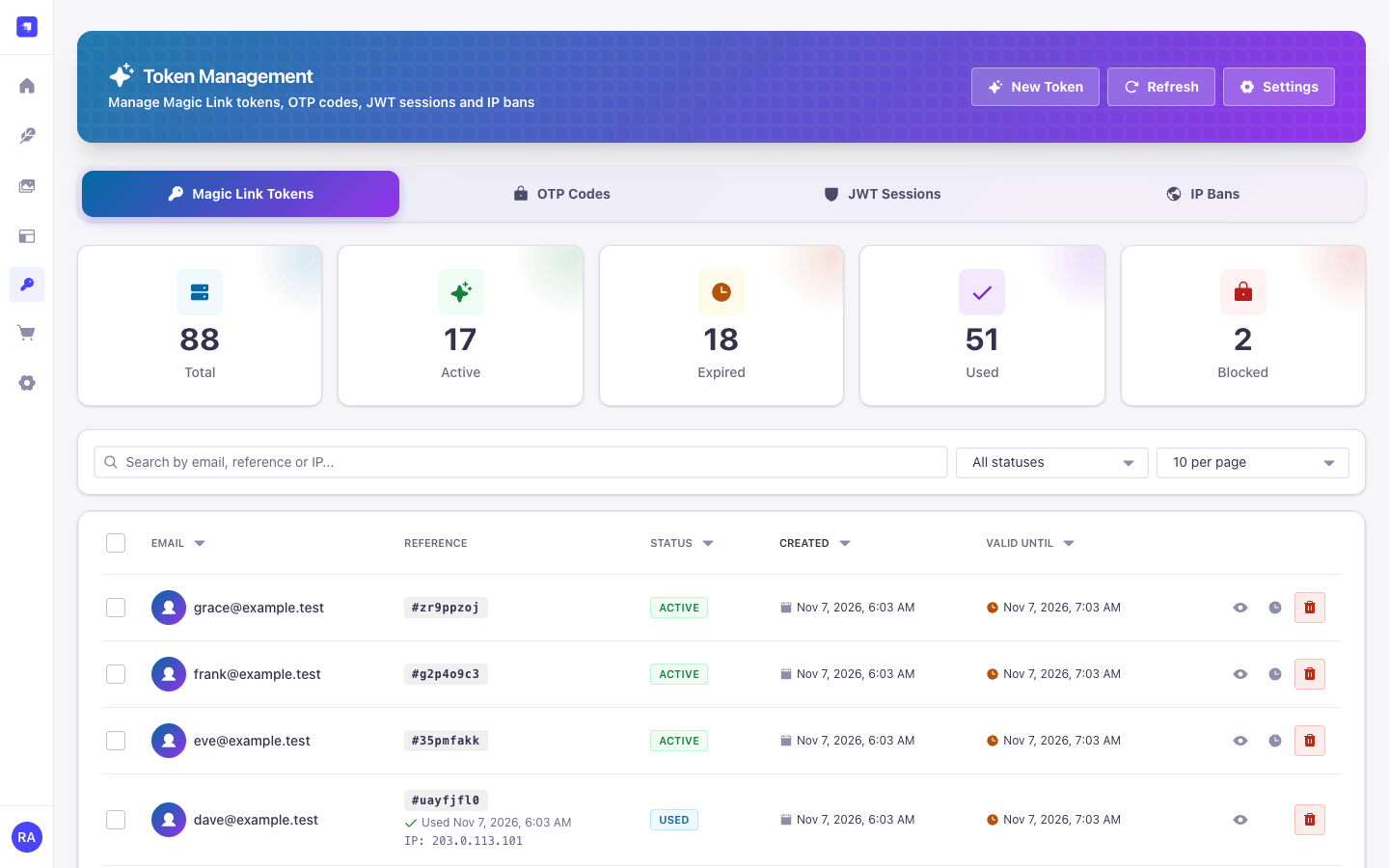
- Pages for tokens, OTP codes, JWT sessions, IP bans and settings.
- Light and dark mode, translated into English, German, French, Spanish and Portuguese.
- Fine-grained admin permissions, enforced on the server.
Magic Link is e-mail only. WhatsApp and SMS delivery were removed in 6.0.0.
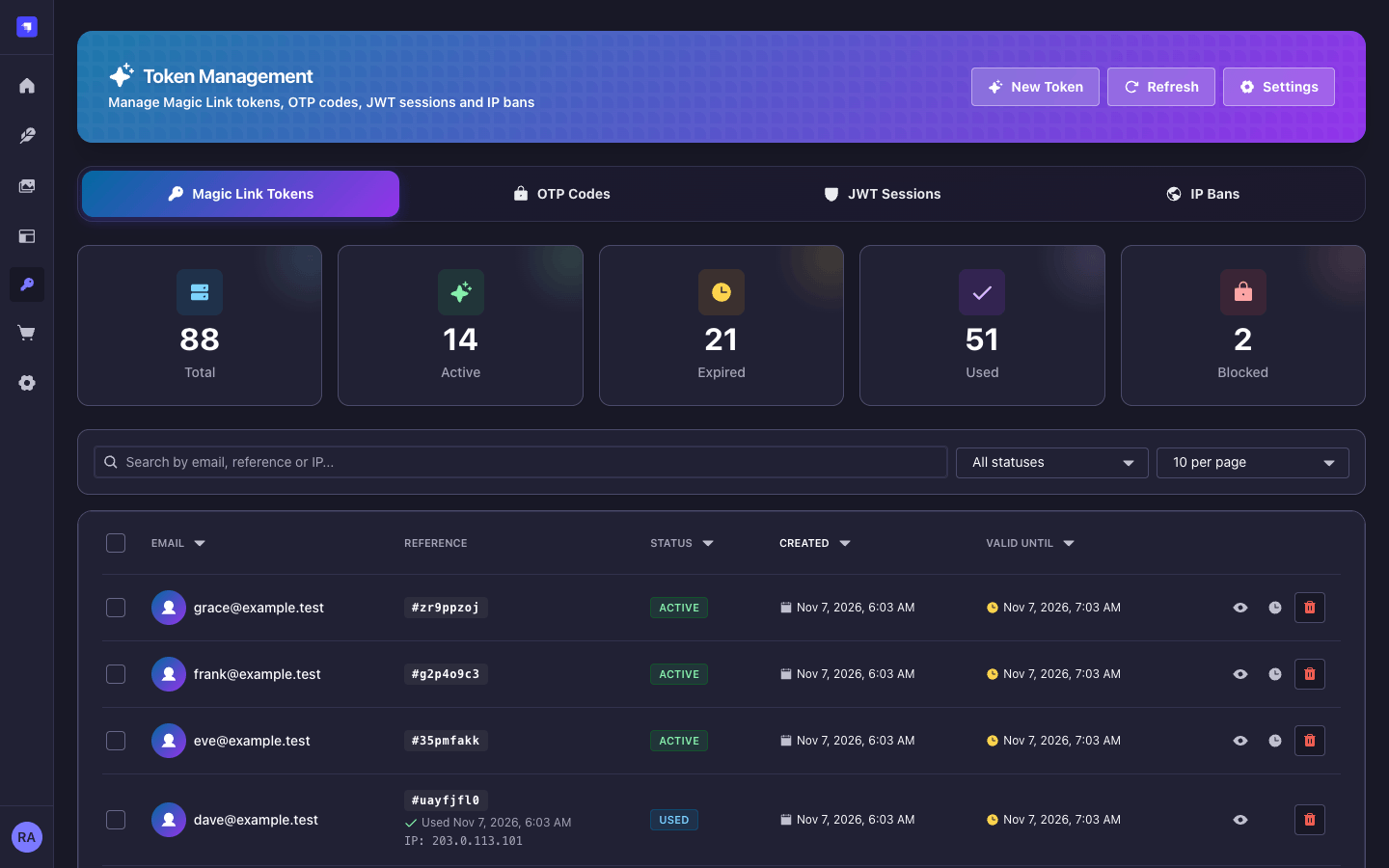
All screenshots use synthetic data (example.test addresses and documentation IP ranges). The full gallery on the docs site also shows IP bans, the general settings and the JWT sessions on a phone.
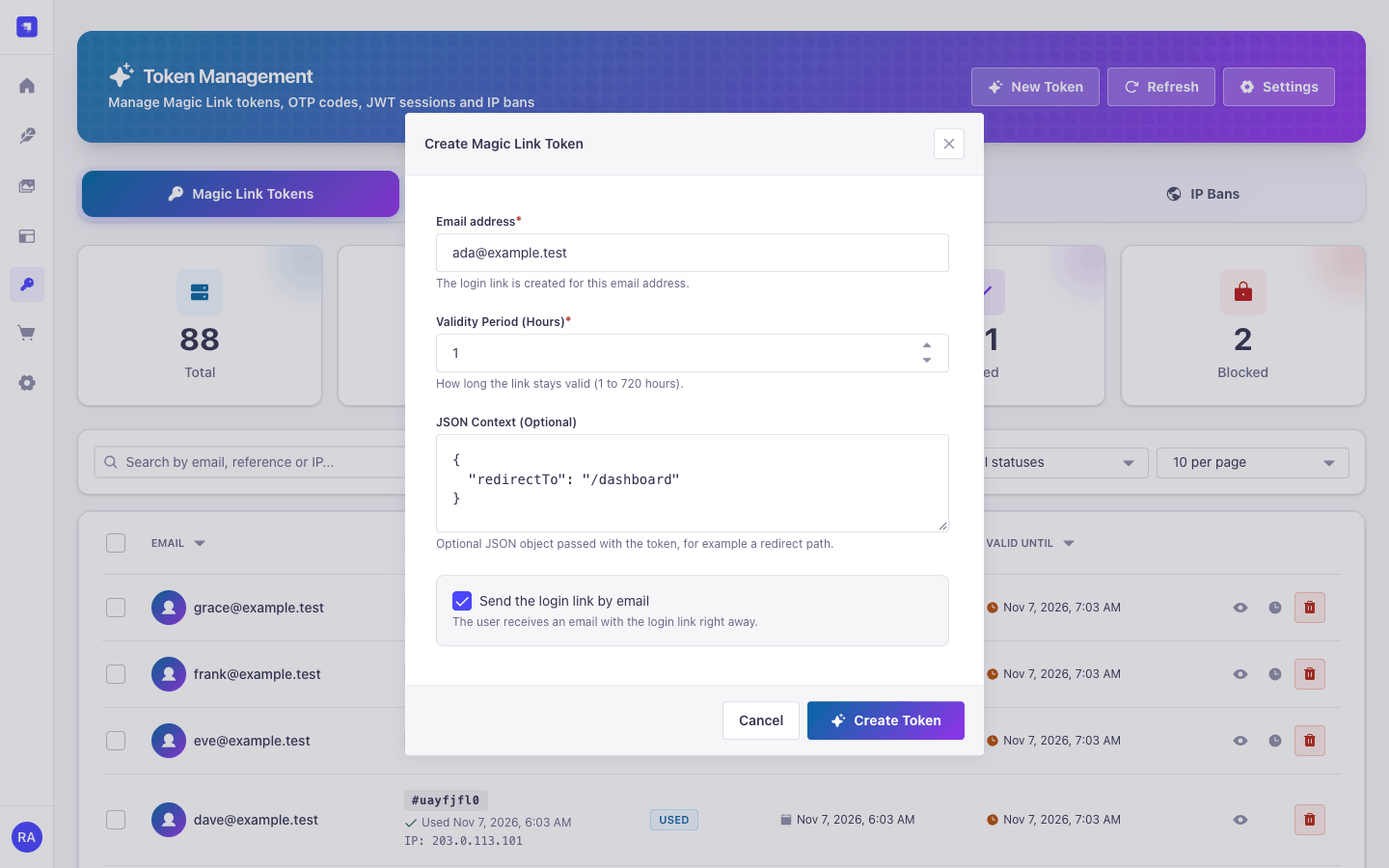
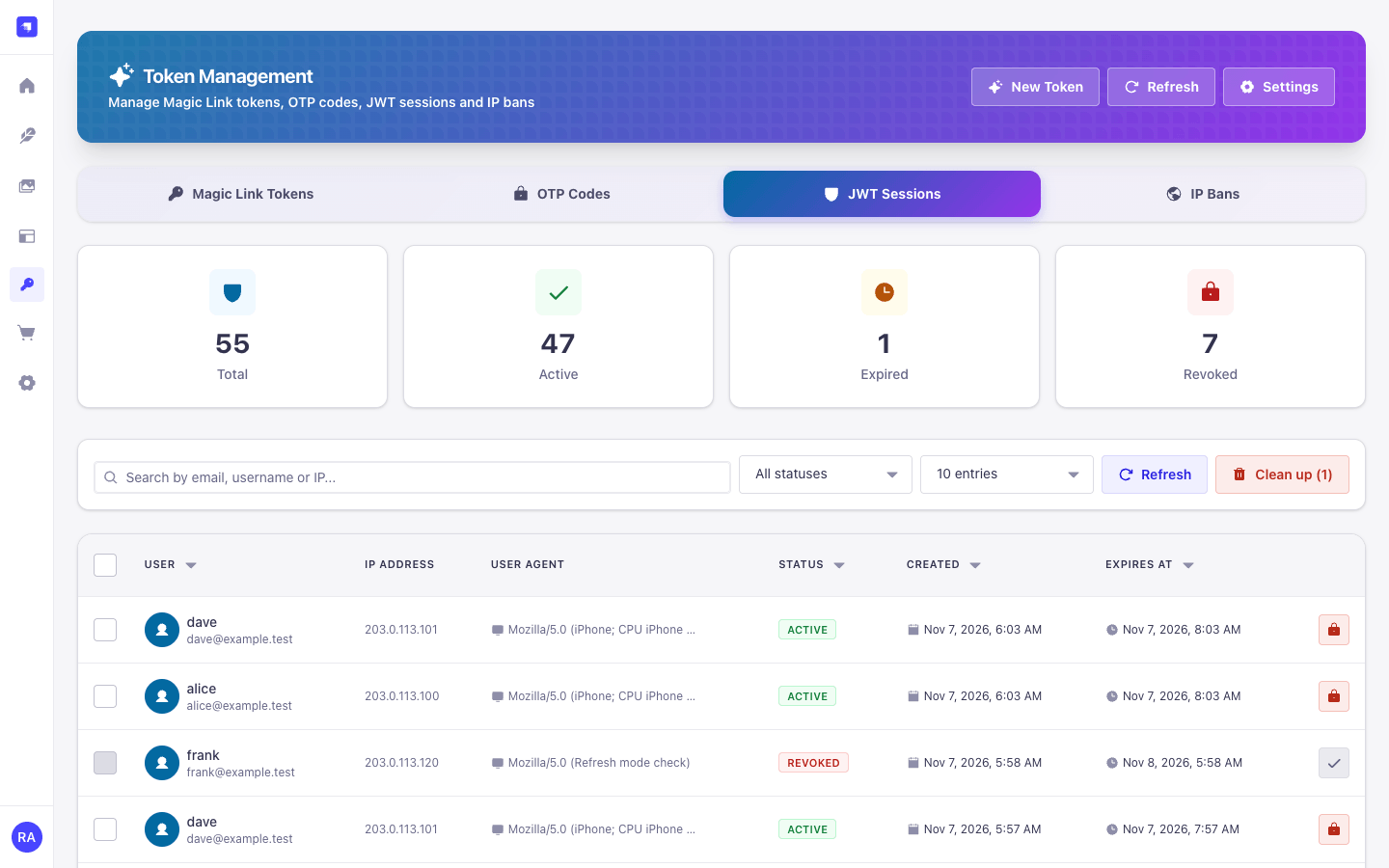
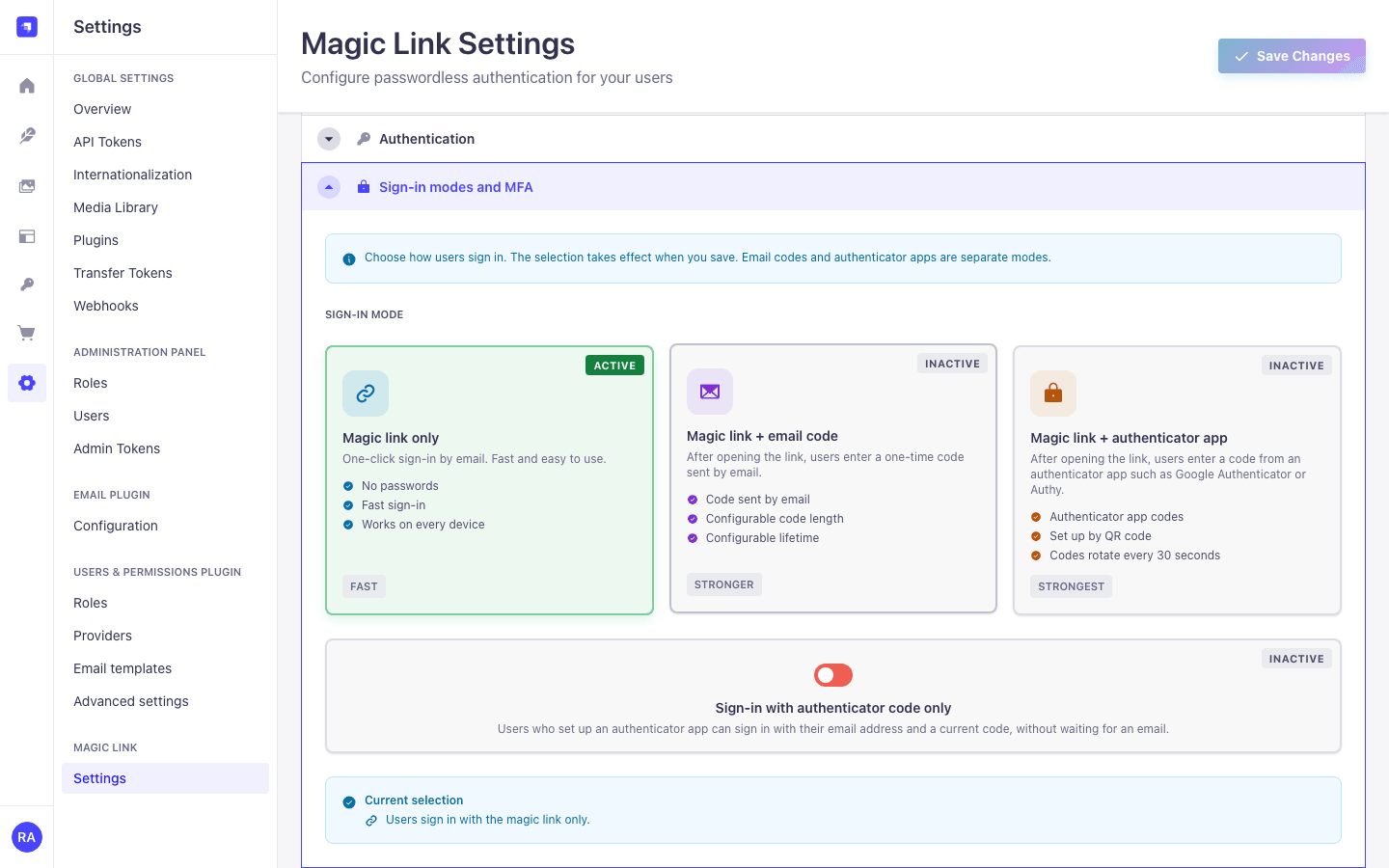
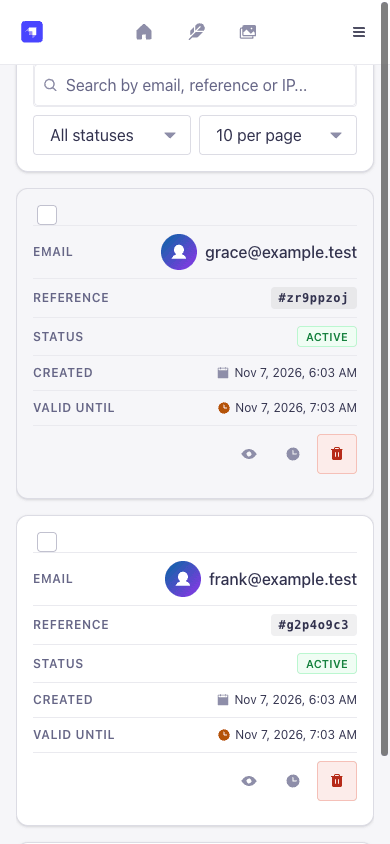
On screens 390 px wide the tables turn into cards.
| Magic Link | Strapi | Node.js | Notes |
|---|---|---|---|
| 7.x | 5.50.0 or newer (acceptance host: 5.63.0) | 22 to 26 | No registration key, no outbound calls of its own |
| 6.x | 5.24.0 or newer | 22 to 26 | Security release; see Upgrading from 5.x |
| 5.x | 5.0.0 or newer | 18 to 22 | Releases come from main only; upgrade to 7.x |
What the host needs:
| Component | Version |
|---|---|
| Strapi | 5.50.0 or newer |
| Node.js | 22 to 26 (the range Strapi 5.63 supports) |
| Users & Permissions | Installed (default in Strapi 5) |
| A configured Strapi e-mail provider, or Magic Mail | |
| Environment | MAGIC_LINK_ENCRYPTION_KEY and MAGIC_LINK_OTP_PEPPER, 32+ characters each (see below) |
| Database | SQLite, PostgreSQL or MySQL/MariaDB, as supported by Strapi |
The admin panel uses the Design System, icons and react-intl that every Strapi 5 admin already ships. They are optional peer dependencies, so npm, yarn and pnpm install the plugin into a fresh Strapi 5 project without peer warnings.
npm install strapi-plugin-magic-link-v5The plugin refuses to start without them, also in development:
# .env, generate each value with:
# node -e "console.log(require('crypto').randomBytes(32).toString('hex'))"
MAGIC_LINK_ENCRYPTION_KEY=<64 hex characters>
MAGIC_LINK_OTP_PEPPER=<64 hex characters>
For a throwaway local setup you can set MAGIC_LINK_ALLOW_DEV_SECRETS=true instead. It is ignored when NODE_ENV=production.
Any Strapi e-mail provider works. Example with Nodemailer in config/plugins.js:
module.exports = ({ env }) => ({
  email: {
    config: {
      provider: 'nodemailer',
      providerOptions: {
        host: env('SMTP_HOST'),
        port: env.int('SMTP_PORT', 587),
        auth: { user: env('SMTP_USERNAME'), pass: env('SMTP_PASSWORD') },
      },
      settings: {
        defaultFrom: 'login@example.com',
        defaultReplyTo: 'support@example.com',
      },
    },
  },
});npm run build && npm run developIn the admin panel, open Settings > Magic Link > Settings > General:
- Frontend base URL:
https://app.example.com - Frontend login path:
/auth/magic-link
Links now look like https://app.example.com/auth/magic-link?loginToken=.... URLs must use https; http is accepted only for localhost.
curl -X POST http://localhost:1337/api/magic-link/send-link \
  -H 'Content-Type: application/json' \
  -d '{"email":"ada@example.com"}'
{ "email": "ada@example.com", "username": null, "sent": true, "delivery": "email" }The answer is the same whether or not the account exists, so nobody can use it to find out who has an account. By default only existing users get a link; see auto-registration to create accounts on first login.
The public routes need no role configuration. They are open by design (auth: false) and protected by rate limits and IP bans.
A complete login has three parts: a form that requests the link, a landing page that exchanges the token, and a place to keep the JWT.
// Login form, framework-agnostic
const API = 'https://api.example.com/api/magic-link';

export async function requestMagicLink(email) {
  const response = await fetch(`${API}/send-link`, {
    method: 'POST',
    headers: { 'Content-Type': 'application/json' },
    // Optional context comes back in the login response (see below).
    body: JSON.stringify({ email, context: { redirectTo: '/dashboard' } }),
  });
  if (response.status === 429) {
    throw new Error('Too many requests. Please wait a moment and try again.');
  }
  if (!response.ok) {
    const { error } = await response.json();
    throw new Error(error?.message || 'The link could not be requested.');
  }
  // Always "sent": tell the user to check their inbox.
}The landing page receives ?loginToken=.... Send the token to Strapi with POST, so it never shows up in access logs, caches or Referer headers, then react to the answer.
// /auth/magic-link page
async function post(path, body) {
  const response = await fetch(`${API}${path}`, {
    method: 'POST',
    headers: { 'Content-Type': 'application/json' },
    credentials: 'include', // only needed for the httpOnly refresh cookie
    body: JSON.stringify(body),
  });
  const data = await response.json();
  if (!response.ok) throw Object.assign(new Error(data.error?.message), { data });
  return data;
}

export async function completeMagicLink() {
  const loginToken = new URLSearchParams(location.search).get('loginToken');
  history.replaceState(null, '', location.pathname); // drop the token from the address bar

  const result = await post('/login', { loginToken });

  if (result.requiresOTP) {
    // An e-mailed code is required. Ask the user for it, then:
    const code = await askUser('Enter the code from your e-mail');
    return post('/otp/verify', { email: result.email, code, magicLinkToken: result.loginToken });
  }

  if (result.requiresTOTP) {
    // The user has an authenticator. A backup code works too: { loginToken, backupCode }
    const totpCode = await askUser('Enter the code from your authenticator app');
    return post('/verify-mfa-totp', { loginToken: result.loginToken, totpCode });
  }

  if (result.requiresTOTPSetup) {
    // MFA is required and the user has no authenticator yet: enrol now.
    const { data } = await post('/totp/enroll', { loginToken: result.loginToken });
    showQrCode(data.qrCode); // data URL; data.secret for manual entry
    const totpCode = await askUser('Scan the QR code and enter the code');
    const session = await post('/totp/enroll/confirm', { loginToken: result.loginToken, totpCode });
    showBackupCodesOnce(session.backupCodes);
    return session;
  }

  return result; // { jwt, user, context, expires_at, refreshToken? }
}askUser, showQrCode and showBackupCodesOnce stand for your own UI.
The jwt is a normal users-permissions JWT. Send it as Authorization: Bearer <jwt>.
const session = await completeMagicLink();
sessionStorage.setItem('jwt', session.jwt); // or keep it in memory
location.assign(session.context?.redirectTo || '/');

// Later
const me = await fetch('https://api.example.com/api/users/me', {
  headers: { Authorization: `Bearer ${sessionStorage.getItem('jwt')}` },
}).then((r) => r.json());
Anything in web storage can be read by a script injected into your page. If that matters for you, keep the JWT in memory and use refresh mode with the refresh token in an httpOnly cookie.
GET /api/magic-link/login?loginToken=... still works. You can point confirmationUrl straight at it, but the token then ends up in server logs, so prefer the POST exchange.
The link builder uses the first match:
frontend_url+frontend_login_path(recommended)confirmationUrl<server.url><api prefix>/magic-link/login(the API route itself)
Existing query strings are kept and loginToken is appended.
send-link accepts a small context object, for example { "redirectTo": "/billing" }. It comes back in the login response. Rules:
- at most 20 keys;
- the
context_whitelist/context_blacklistsettings apply; - reserved keys that carry authentication state (
otpVerified,mfaVerified,userId,exp, ...) are rejected with 400.
Choose the mode in Settings > Magic Link > Settings > Sign-in modes and MFA.
| Mode | Setting | What the user does after clicking the link |
|---|---|---|
| Link only | defaults | Nothing, the link logs them in |
| Link + e-mail OTP | otp_enabled: true |
Enters a 6-digit code sent in a second e-mail |
| Link + TOTP, optional | mfa_mode: "optional" |
Users with an authenticator enter a code; others log in |
| Link + TOTP, required | mfa_mode: "required" |
Everyone enters a code; users without one enrol on the spot |
| TOTP only | totp_as_primary_auth: true | Calls POST /login-totp { email, totpCode }, no e-mail |
A user with an active authenticator always gets the TOTP step, even when e-mail OTP is also enabled.
Switching to required while nobody is enrolled. The settings API refuses mfa_mode: "required" (or the legacy mfa_require_totp: true) with 400 and error.details.key: 'settings.mfa.noEnrolledUsers' while no end user has an active authenticator, because a frontend without the enrolment step would lock everyone out. Start with optional so users can enrol, or, if your landing page handles requiresTOTPSetup, send acknowledgeNoEnrolledUsers: true with the update ({ "settings": { "mfa_mode": "required" }, "acknowledgeNoEnrolledUsers": true }). The flag is never stored. The admin panel blocks the option in the same situation.
- During sign-in (required MFA).
/loginanswersrequiresTOTPSetup. The landing page callsPOST /totp/enroll { loginToken }, shows the QR code and finishes withPOST /totp/enroll/confirm { loginToken, totpCode }, which returns the session plus ten backup codes (see the frontend example). - From the account (self-service). The
/totp/*routes use the users-permissions JWT. Grant the Magic-link > totp actions to the Authenticated role. Setup needs an e-mailed code, so a stolen JWT alone cannot add, replace or remove an authenticator.
The self-service guide has the full request sequence.
- Ten 16-character codes (
XXXX-XXXX-XXXX-XXXX), shown once. - Stored as keyed hashes bound to their owner.
- Each code works once wherever a TOTP code is accepted after a magic link (
backupCodeinstead oftotpCode). - The response reports
backupCodesRemaining.
Algorithm, digits and period are stored with each enrolment, so changing the TOTP settings only affects new enrolments. Each accepted time step is recorded, so a code cannot be replayed.
With jwtManagement: 'refresh' in the users-permissions config, Magic Link logins behave like /api/auth/local: the response carries a short-lived jwt and a refreshToken (or an httpOnly cookie), you renew with POST /api/auth/refresh and log out with POST /api/auth/logout. Revoking a session in Magic Link > JWT Sessions ends the whole refresh family. Configuration, cookie behaviour and version notes are in the refresh mode reference.
In the default legacy-support mode the JWT lifetime comes from the plugin setting jwt_token_expires_in (for example 15m, 12h, 30d).
All routes are under /api/magic-link (or your api.rest.prefix). Every answer from these route handlers sends Cache-Control: no-store and Referrer-Policy: no-referrer (a request refused by the IP-ban check is answered before the handler runs). Unknown body fields are rejected with 400.
| Method | Path | Auth | Body | Success response |
|---|---|---|---|---|
POST |
/send-link |
none | { email, username?, context?, delivery? } |
{ email, username, sent: true, delivery: "email" } |
POST |
/login |
none | { loginToken, deviceId? } |
session, or a challenge (requiresOTP, requiresTOTP, requiresTOTPSetup) |
GET |
/login?loginToken= |
none | (query) | same as POST /login |
POST |
/otp/send |
none | { email, magicLinkToken } |
{ success, message, expiresIn, type: "email" } |
POST |
/otp/resend |
none | { email, magicLinkToken } |
{ success, message, expiresIn }, after otp_resend_cooldown |
POST |
/otp/verify |
none | { email, code, magicLinkToken } |
session with otpVerified: true |
POST |
/verify-mfa-totp |
none | { loginToken, totpCode } or { loginToken, backupCode } |
session with mfaVerified: true |
POST |
/login-totp |
none | { email, totpCode } |
session with loginMethod: "totp" (TOTP-only mode) |
POST |
/totp/enroll |
none (loginToken) | { loginToken } |
{ data: { secret, qrCode, otpauthUrl, algorithm, digits, period, expiresAt } } |
POST |
/totp/enroll/confirm |
none (loginToken) | { loginToken, totpCode } |
session plus backupCodes |
GET |
/totp/status |
users-permissions | { data: { configured, enabled, ..., mfaMode } } |
|
POST |
/totp/setup |
users-permissions | {} or { totpCode } when already enrolled |
{ data: { secret, qrCode, ..., emailCodeSent: true } } |
POST |
/totp/confirm |
users-permissions | { totpCode, emailCode } |
{ data: { enabled: true, backupCodes } } |
POST |
/totp/disable |
users-permissions | { totpCode } or { backupCode } |
{ data: { enabled: false } } |
POST |
/totp/backup-codes |
users-permissions | { totpCode } |
{ data: { backupCodes } } |
magicLinkToken is the loginToken from the /login challenge. It is required while otp_strict_binding is on (the default).
Every successful login answers like this:
{
  "jwt": "eyJhbGciOi...",
  "user": {
    "id": 7,
    "documentId": "abc123",
    "username": "ada",
    "email": "ada@example.com",
    "confirmed": true,
    "blocked": false
  },
  "context": { "redirectTo": "/billing" },
  "expires_at": "2026-12-07T10:00:00.000Z",
  "refreshToken": "only in refresh mode, unless the cookie is used"
}- The user object passes Strapi's content-API sanitizer, so private fields are never returned.
- Second-factor logins add
otpVerified: true,mfaVerified: true(plusbackupCodesRemainingafter a backup code) orloginMethod: "totp". - With
use_jwt_token: falseno token is minted: the body hasuser,contextandjwtIssued: false.
{ "requiresOTP": true, "message": "OTP verification required", "email": "ada@example.com", "loginToken": "...", "expiresIn": 300 }
{ "requiresTOTP": true, "message": "TOTP verification required for MFA", "email": "ada@example.com", "loginToken": "..." }
{ "requiresTOTPSetup": true, "message": "Set up an authenticator app to continue", "email": "ada@example.com", "loginToken": "...", "enrollEndpoint": "/api/magic-link/totp/enroll" }
Opening the same link again while a challenge is pending returns the same challenge. It does not send a new e-mail while the code is still valid.
| Action | Grants |
|---|---|
plugin::magic-link.read |
Menu entry and Tokens page: tokens, OTP codes, JWT sessions, IP bans |
plugin::magic-link.manage |
Create, block, extend, delete tokens; revoke sessions; ban IPs; cleanups |
plugin::magic-link.tokens.issue |
Create links without e-mail (impersonation). Grant sparingly. |
plugin::magic-link.settings.read |
Settings page |
plugin::magic-link.settings.update |
Save settings, rate-limit actions |
plugin::magic-link.settings.security |
Change security settings (see below), reset MFA settings |
The server enforces these on every route; the admin pages hide what a role cannot do. Super Admin has all of them.
Role migration from 5.x. 5.x had a single plugin::magic-link.access action. On the first start of 6.0.0, every admin role (and admin API token) that still holds it gets Read and Manage, and the old permission is removed. tokens.issue, settings.read, settings.update and settings.security are never granted automatically. After the upgrade, open each role and grant Settings > Read to roles that need the Settings page. If Strapi already dropped the unknown access action before the migration ran, there is nothing to migrate: grant the new actions by hand.
Security settings need settings.security in addition to settings.update: link targets, templates, sign-up and MFA rules, code and rate-limit rules, and the sender identity. A role with settings.update only can still save the rest. settings.security is never granted automatically; grant it only to roles that may decide where login links point. The field list is in the reference.
- Public: nothing to grant. The login routes are public (
auth: false) and protected by rate limits and IP bans. - Authenticated: grant the Magic-link > totp actions if users should manage their authenticator themselves.
- Login links are stored as salted hashes, expire, and a single-use link is consumed atomically, so parallel clicks yield one session.
send-linkanswers the same way for known and unknown addresses, so it cannot be used to discover accounts.- Code checks (TOTP, backup and e-mail codes) are limited per account even with rate limiting off; TOTP secrets are encrypted with AES-256-GCM.
- Revoked JWTs stay blocked until they would have expired; the check fails closed (503) on Content API routes.
- Every admin route checks its permission on the server. Settings that can redirect login links need
settings.security. - No telemetry, no update check, no registration server. Plugin logs contain no e-mail addresses, tokens or token URLs.
The full security model and the list of outbound connections are in the reference. Report vulnerabilities privately through GitHub security advisories.
The detailed reference lives in docs/reference.md so this page stays short:
- Errors: the error envelope, every
keyand the answers without one - Admin API: every admin route with its permission, plus request examples
- Configuration reference: every setting, the plugin config, environment variables and auto-registration
- E-mail templates and the Magic Mail outbox
- Delivery status and bounce and complaint feedback
- Security model, privacy and outbound connections and performance
- Running behind a proxy and running several instances (Railway replicas, pm2 cluster)
- Migrating from strapi-plugin-passwordless
The docs site has the same topics as an overview.
Does it replace the Strapi admin login? No. Magic Link signs in the users of your app (Users & Permissions accounts). The Strapi admin login stays as it is.
Do I need a frontend?
Yes, for a good experience: a form that calls send-link and a landing page that posts the token to /login. Any framework works (Next.js, Nuxt, SvelteKit, plain HTML). Without a frontend you can point confirmationUrl at GET /api/magic-link/login, but then the token shows up in server logs.
Can new users sign up with a link?
Yes, when createUserIfNotExists, allow_magic_links_on_public_registration and the users-permissions sign-ups are all on. See Auto-registration.
Does it work with GraphQL? The login routes are REST. The JWT they return works for GraphQL like any users-permissions JWT, and revoked tokens are rejected there too. The plugin's internal content types are hidden from GraphQL.
Can I keep password login?
Yes. /api/auth/local keeps working. Note that the Magic Link MFA settings only apply to Magic Link logins (see Security model).
Is there a paid version or a key to unlock features? No. Every feature is in the npm package and works without registration. 7.0.0 removed the old optional key field and deletes a stored key on its first start.
Which mail providers work? Any Strapi e-mail provider (Nodemailer, SendGrid, Mailgun, Amazon SES, Postmark and others), Magic Mail, or Email Designer 5 templates. Bounce feedback is available for SendGrid, Mailgun, SES and Postmark.
Can I run several Strapi instances? Yes. All state is in the database and shared safely; see Running several instances.
Where are the translations?
The admin panel ships English, German, French, Spanish and Portuguese. API error messages use the same languages, chosen by ?locale= or Accept-Language.
| Symptom | Fix |
|---|---|
| Strapi does not start: "MAGIC_LINK_ENCRYPTION_KEY ..." | Set both secrets (32+ characters) or MAGIC_LINK_ALLOW_DEV_SECRETS=true locally |
send-link says sent but no e-mail arrives |
The address has no account (and auto-registration is off), or the e-mail provider failed. Check the Strapi log for [magic-link] lines. |
Link opens but answers token.invalid |
The link expired, was already used, was blocked, or the token was cut off by the mail client |
/otp/send answers 400 "magicLinkToken is required" |
Call /login first and pass its loginToken as magicLinkToken |
| Settings refuse my URL | Use https:// (http only for localhost), and check allowedLinkOrigins |
| Everyone shares one rate limit / bans hit the proxy | Configure server.proxy (proxy guide) |
403 with IP_ADDRESS_BLOCKED |
The IP is banned. Unban it in Magic Link > IP Bans. |
| 400 "Only e-mail delivery is supported" | Remove phoneNumber, phone, via and non-e-mail delivery from the request |
Users cannot reach /totp/status (403) |
Grant the totp actions to the Authenticated role |
Saving settings answers 403 settings.security.forbidden |
The role lacks Settings > Security for the listed fields |
| Admins see no Magic Link menu after upgrading | Grant Read (and Manage) to their role; see the upgrade guide |
- From 6.x to 7.0.0: removes the optional registration key. Most installs only update the package and restart.
- From 5.x to 6.0.0: security release with new secrets, split admin permissions and e-mail-only delivery. Work through the numbered list.
Every release and its changes are listed in the CHANGELOG and on the releases page.
Using Magic Link in production? Add your company to the "Used by" section of the documentation site. The form asks for the company name, the website, a logo (PNG, JPEG or WebP, uploaded to the issue) and an optional one-line description.
A maintainer reviews every request and approves it with the showcase-approved label. .github/workflows/showcase.yml then validates the issue with .github/scripts/showcase.mjs, converts the logo to a WebP of at most 320 x 160 pixels and opens a docs: pull request that changes docs/site/showcase.json. The logo appears on the site after that pull request is merged. Website links carry rel="ugc noopener". To remove an entry, open an issue that names the company; a maintainer then applies the showcase-remove label.
- Languages. The admin panel follows the admin interface language: English, German, French, Spanish or Portuguese, with English as the fallback. Server error messages use the same five languages.
- License. MIT, see LICENSE. Free and open source, with no registration and no telemetry.
- Support. Report bugs and request features through GitHub issues. Report vulnerabilities privately through GitHub security advisories.
- Maintenance. Actively maintained. Releases are cut by semantic-release from
mainand published to npm with provenance; the supported line is 7.x on Strapi 5.
npm ci --legacy-peer-deps
npm run lint && npm run format:check && npm test
npm run test:admin
npm run build && npm run verify
npm run test:admin renders every admin entry point (the Tokens page with its four tabs and dialogs, the Settings page) inside React.StrictMode with the providers of the Strapi admin, in jsdom with a fake network. It fails on a mutation sent twice, a read repeated without aborting the first one, an interval, listener, connection or observer left after unmount, and any console error or warning. A separate CI job runs the same tests against React 19 for information only: the plugin's peer range is React 18, like the Strapi 5 admin.
Commits follow Conventional Commits. Releases are published by semantic-release with npm provenance.
-
Dependabot opens weekly grouped updates.
-
Patch and minor updates merge automatically only through the auto-merge gate; majors wait for review.
-
React, styled-components, react-intl, react-router-dom and
@strapi/*majors are never proposed, because the Strapi admin host sets those versions. -
npm auditreports GHSA-mrhx-c7xc-m3w5 (zod below 4.6.6, memory exhaustion on oversized collections) through@strapi/utils, which pins zod 4.4.3 (5.61.0 to 5.63.0). Magic Link validates with its own zod 4.6.7. Until Strapi ships a fix, hosts can force the patched zod with npmoverrides:{ "overrides": { "@strapi/utils": { "zod": "^4.6.6" } } }
Dependabot proposes updates weekly, after a cooldown (7 days, 14 for majors). .github/workflows/dependency-auto-merge.yml handles its pull requests with the rules in .github/scripts/dependency-gate.mjs. The script is the same in every Magic plugin repository; its unit tests run with node --test .github/scripts/dependency-gate.test.mjs and in CI.
- Merged automatically (squash merge by
github-actions): an explicit patch or minor update, after the repository's own checks pass, the gate finds nothing below, and every other check on the PR head commit has finished green: every CI job and matrix entry (for example Node versions, peer floor, React 19 StrictMode) and CodeQL where present. The merge is bound to that exact commit (--match-head-commit). - Held for review (label
needs-reviewplus a comment with the reasons, never merged automatically) when:- a changed package's
engines.nodeno longer covers a Node version this plugin supports, or itspeerDependenciesno longer match the installed tree or this plugin's peer floor; - the PR body or release notes mention a breaking change;
- the published surface changes: the
npm packfile list (content hashes ignored),exports,peerDependencies,engines, or the exports of the built entry files; - a runtime dependency on 0.x gets a minor bump;
- dependency review reports a vulnerability of moderate or higher, or a license outside the allowlist (MIT, MIT-0, ISC, BSD, Apache-2.0, 0BSD, BlueOak-1.0.0, CC0-1.0, Unlicense, Python-2.0, Zlib; MPL-2.0 and CC-BY for development dependencies only);
npm audit signaturesreports a missing or invalid registry signature or provenance attestation;- the lockfile adds a package with an install script, more than 15 packages that are new to the tree, or a package that does not resolve from
registry.npmjs.org; - a check fails, or the CI does not finish within 75 minutes.
- a changed package's
- Major updates get the
major-updatelabel and a comment; a person reads the changelog and merges by hand.
The gate script runs from the default branch and reads lockfiles and reports as data; it never runs code from the pull request. Only the surface job installs (without lifecycle scripts) and builds the pull request, with a read-only token. Merges made with GITHUB_TOKEN do not start release.yml, so a dependency update ships with the next regular release.