


English · 简体中文
Overview · Quick start · Product tour · Features · Usage · Docs · Development
hero.mp4
Turn any running web page into a workspace for your coding agent.
Click the thing you want changed and tell your agent what to do, right on the page: Pick, Chat and Artifacts, driven by the agent CLI already on your machine (Claude Code, Codex, Cursor Agent, CodeBuddy Code, OpenCode). For feedback only, --no-agent keeps just Pick and Notes; run it with no URL and you get a home page with a ✦ Page-Harness bookmarklet that works on any site.
Describing UI in a terminal is painful: "the second button in the card on the left, make it a bit softer". With page-harness you just click the thing on the page and talk to your agent right there. It writes the code, your dev server reloads, you see the result on the same page.
One line. Point it at your dev server:
npx page-harness http://localhost:5173 --project ./my-app
npx page-harness --no-agent http://localhost:5173   # review only: Pick and Notes, no agent CLI
npx page-harness                                    # no URL: home page with a bookmarklet
Open http://127.0.0.1:17990. That is your app as usual, plus a dock in the bottom-right corner.
- Needs Node.js 20.11+ and at least one signed-in agent CLI on
PATH(see below). - The target can be a bare port (
3000),host:portor a full URL. HMR (Vite, webpack, Next.js…) keeps working through the proxy. - No sandbox, no accounts, no changes to your app. Everything stays in
<project>/.page-harness/.
| Service | URL |
|---|---|
| Your app + dock | http://127.0.0.1:17990 |
| Panel / API (control port) | http://127.0.0.1:17991 |
| Chat history | http://127.0.0.1:17991/__ph/history |
| Bookmarklet home (no URL) | http://127.0.0.1:17991 |
| Option | When to use it |
|---|---|
npx page-harness <url> |
The standard setup above: your app behind the proxy, with Pick, Chat and Artifacts driven by an agent CLI |
--no-agent <url> |
Feedback only: Pick and Notes, no agent CLI needed (details) |
| no URL | A home page with the ✦ Page-Harness bookmarklet, to leave notes on any site without a proxy (details) |
--share |
Teammates on your network join as reviewers with a link (details) |
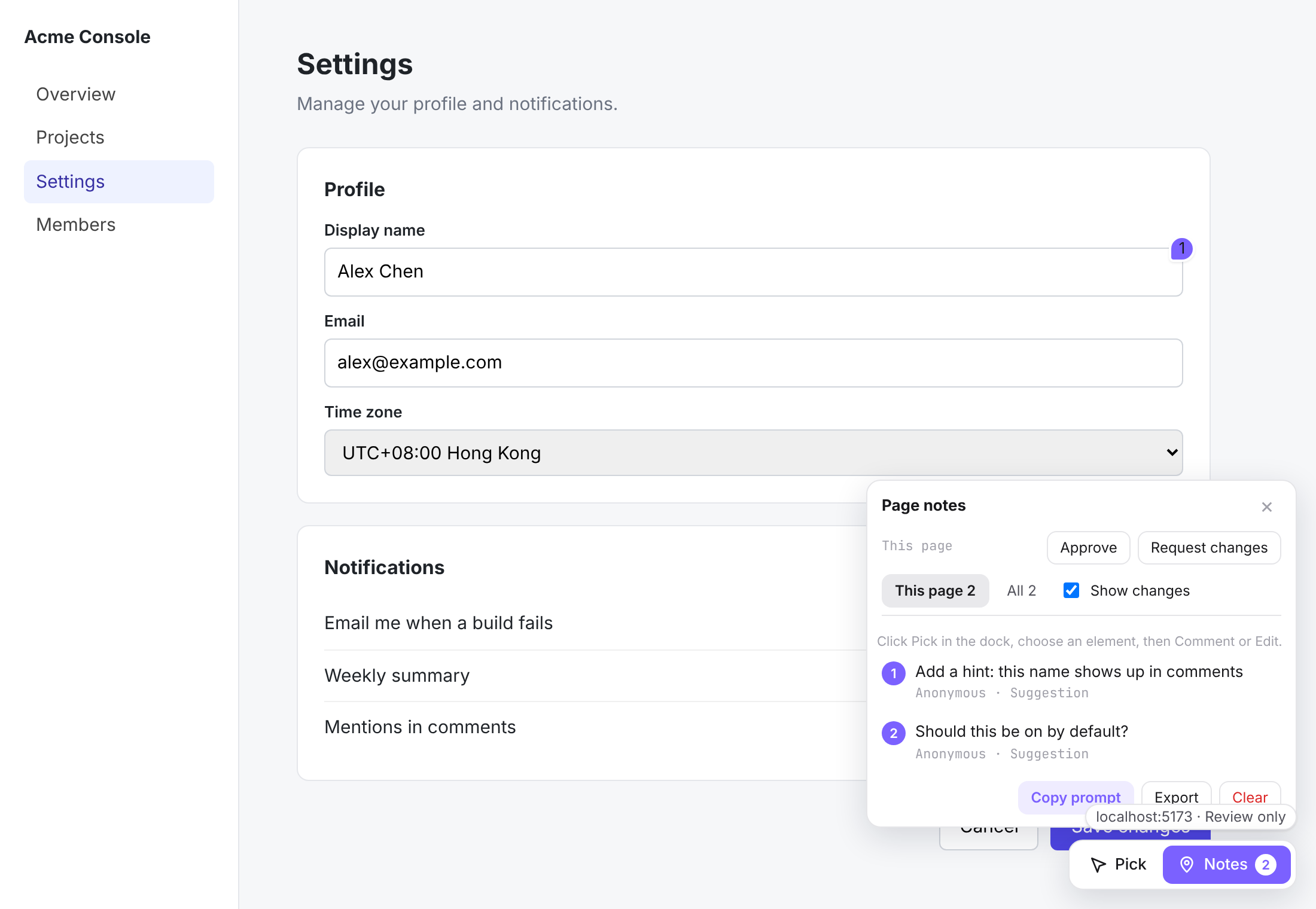
Pick and Notes, nothing else. With --no-agent no agent CLI is started. Pick an element, leave a comment or an edit, reply, resolve and approve per page. Details →
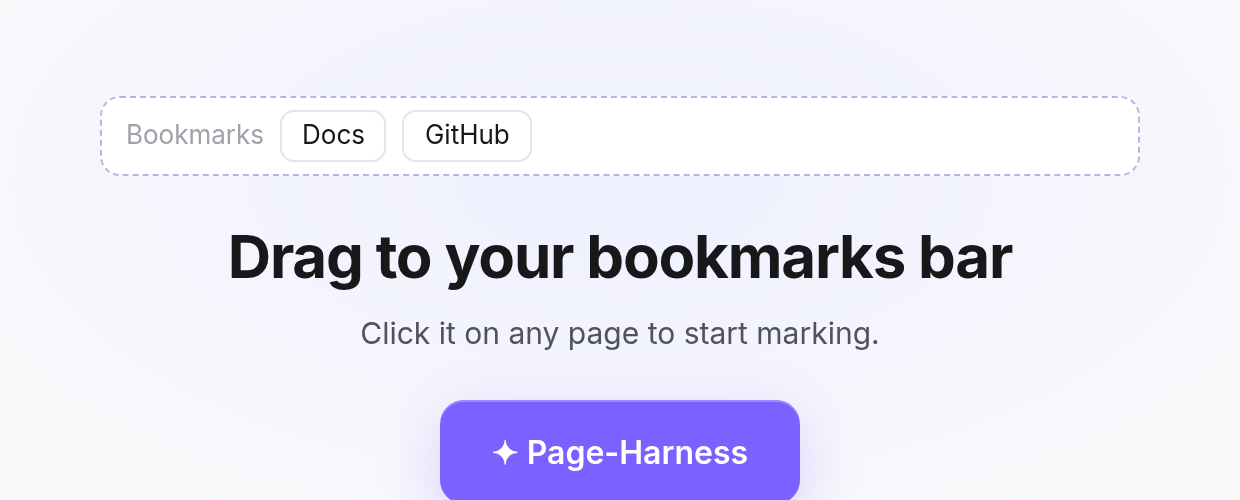
One button to drag. Run npx page-harness with no URL and the home page has a single ✦ Page-Harness button. Drag it to the bookmarks bar. Details →
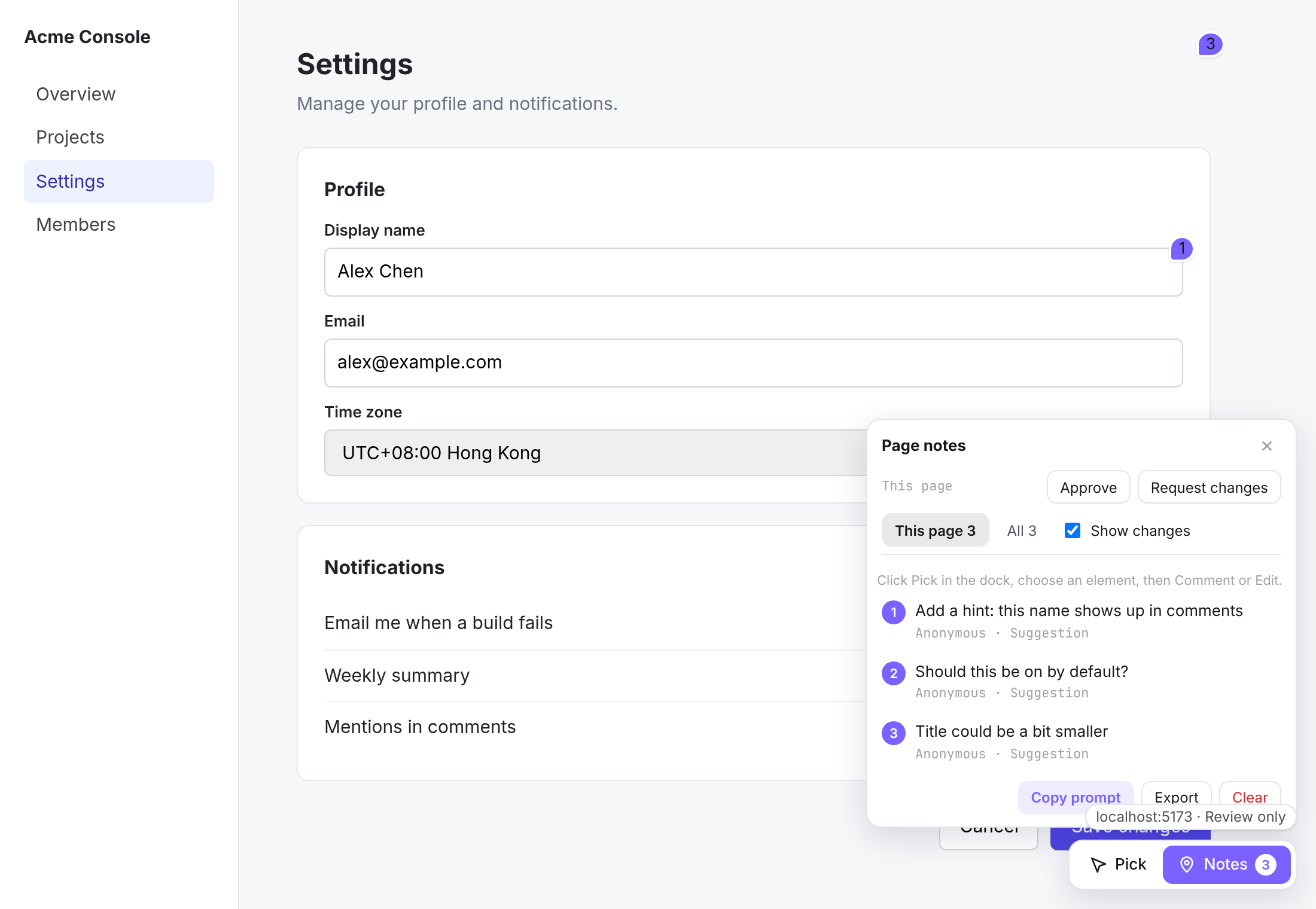
Click the bookmark on any page. The dock is injected into that page in a Shadow DOM, with no proxy, and notes are saved to your local server, grouped by site.
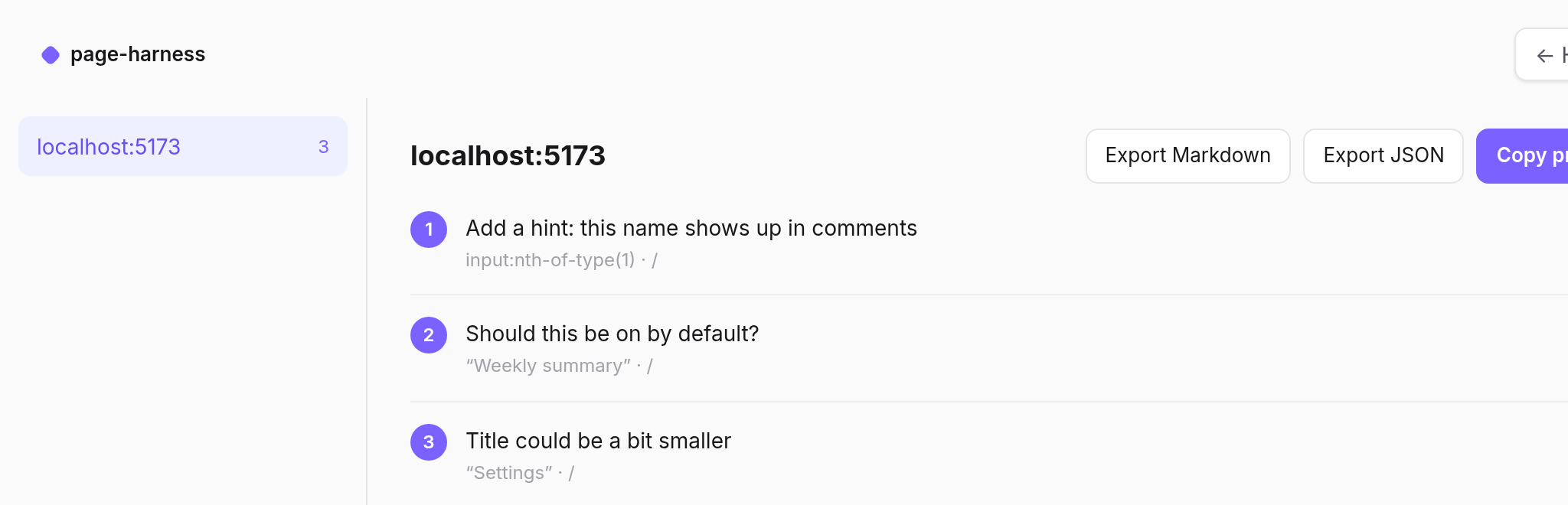
Every site's notes in one place. Sites on the left, that site's notes on the right, with Export Markdown, Export JSON and Copy prompt for your agent.
browser ──► :17990  app port      reverse proxy to your dev server; injects /__ph/overlay.js into HTML
        └─► :17991  control port  panel UI, history page, JSON API, WebSocket, MCP endpoint
                       │
                       └─ spawns the agent CLI per turn (claude -p / codex app-server / cursor-agent -p /
                          codebuddy -p / opencode run --format json)
                          with a local MCP server for page_*, artifacts, questions and Live
- The overlay lives in a Shadow DOM so its styles and your app's styles do not leak into each other. The chat and artifacts windows are iframes from the control port and talk to the page over a
MessagePorthandshake. - Each chat keeps the agent's session id, so follow-up messages resume the same agent session. Messages sent while a turn runs are queued per chat.
- Agents get a short system prompt describing the page context, the MCP tools and the Live protocol. Nothing is written to your project except
.page-harness/(ignored by git through its own.gitignore) and, during Live, temporary candidate markup.
| Tool | Purpose |
|---|---|
page_state, page_click, page_input, page_select, page_scroll |
Read and operate the page (only while the user allows page control) |
write_artifact, read_artifact, list_artifacts, set_artifact_preview |
Versioned artifacts in .page-harness/artifacts |
ask_question, ask_form |
Ask the user and block until they answer (30 minutes) |
live_update |
Report Live candidates as ready / done / failed |
live_patch_variants |
Review mode only: Live candidates as sets of page changes |
page_note, list_review, reply_review, resolve_review, remove_review |
Pin notes on the page, read people's feedback, answer and resolve it |
page_patch |
Review mode only: temporary text, CSS or image change on an element |
For a Live request the agent edits your source so that the element is wrapped like this:
<div data-ph-live="L1a2b3c4" style="display:contents">
  <h1 data-ph-variant="0" hidden>original</h1>
  <h1 data-ph-variant="1" data-ph-variant-label="Bold">…</h1>
  <h1 data-ph-variant="2" data-ph-variant-label="Soft" hidden
      data-ph-params='[{"name":"gap","type":"range","min":0,"max":40,"unit":"px"}]'>…</h1>
</div>
Your dev server reloads, the overlay finds the wrapper and takes over showing and hiding variants (parameters are applied as --ph-<name> CSS variables on the wrapper). Accepting asks the agent to keep the chosen variant and remove the wrapper; discarding restores the original. After every Live or file-editing turn page-harness scans the working tree (git grep) and warns if markers were left behind; --live-guard-hook also blocks commits that contain them.
When the target is a public site (anything that is not localhost, a private IP or a LAN name) there is no source to edit, so page-harness starts in review mode. Force it either way with --review / --source.
- The agent is told not to touch files or build mockups.
write_artifactonly accepts reports (.md,.txt,.json,.csv, images); HTML/SVG mockups are refused. - Findings go on the page instead:
page_notepins a numbered comment (issue / suggestion / info) to an element, andpage_patchchanges its text, CSS or image (src/alt) so you see the suggestion in place. There is no HTML patching. - Both tools check the selector against your open page first (no page-control permission needed), so a wrong selector comes back to the agent instead of silently pinning nothing.
- People can do the same by hand: Pick an element, then Comment to leave a note, or Edit to change its text, color, background, font size and weight, padding, radius or image with a live preview and saves it as a change.
- Live works here too, as page changes: the agent renders 2–4 candidates with
live_patch_variants, each a set of text / CSS / image changes on up to 12 elements. Switch, peek at the original and refine them on the page; accepting keeps the chosen candidate as change items in Notes, discarding puts the page back. There is no side-by-side view, no parameters and no Insert, since those need the source.
Notes work in both modes; hand edits and page_patch only without source.
- Notes belong to the page they were made on (path without hash, trailing slash or tracking parameters) and to the site (
host, hostname plus a non-default port). Proxy mode stores the target host; the bookmarklet storeslocation.host. The overlay only pins notes for the site you are on. This page shows the current page; All groups every page of that site, and clicking a note on another page goes there and opens it. The dock badge counts open notes on the current page and shows a dot when other pages have some. - Each pin opens a thread: author, replies, Resolve / Reopen, compare a change with the original, quote the element into the chat (owner) and delete (author or owner).
- Approve / Request changes records a verdict per page and person.
- Pins are re-attached with a fingerprint (tag, id, stable classes, key attributes, text and its context) when the selector breaks after a re-render or a redesign. If nothing fits well enough the note is shown as not found on the page instead of being pinned to the wrong element. Changes are re-applied after reloads and re-renders; nothing is sent to the site.
- The agent sees people's notes with
list_review, answers withreply_reviewand closes them withresolve_reviewplus a summary. It can only remove its own notes. - Export writes
page-review.md(notes, before → after text, CSS, replies, approvals) to Artifacts.
npx page-harness https://example.com --share
#   Share  http://192.168.1.20:17991/__ph/join?t=…
Send the Share link (also in Settings → Team) to teammates on the same network. Opening it gives them a reviewer session for that browser; they enter a display name once and then see the page with everyone's notes and changes in real time. Reviewers can comment, edit (review mode), reply, resolve and approve. They cannot run or see the agent, chats, history, uploads or page control. Other machines without the link get 403.
| Area | Highlights |
|---|---|
| Pick | Click any element and Quote in chat (selector, text and HTML go along; Shift+click quotes directly), Comment, Edit (sites without source) or start Live candidates. |
| Live candidates | Describe a change and the agent writes 2–4 variants straight into your source. Flip between them on the page, compare side by side, tune parameters, refine one, then accept or discard. |
| Chat | Draggable, resizable window with streaming Markdown, collapsible thinking, tool cards, changed-file lists, image/file attachments, a reorderable per-chat queue, Stop / Retry, multiple chats with per-chat agent and model. |
| Artifacts | The agent writes reports, mockups, JSON and images through MCP. Preview them in tabs with version history; export to PNG or PDF. |
| Page control (off by default) | Let the agent read, click, type, select and scroll on the page. A banner shows while it is on; Stop takes it back any time. |
| Notes & review | Pin threaded comments to elements, resolve them and approve per page. Works on sites you have no source for (review mode). |
| Team review | --share lets teammates on your network join as reviewers with a link. |
| Questions | The agent can ask you multiple-choice questions or a short form and wait for the answer. |
| History | Every chat is an append-only event log on disk; browse, search and export it. |
page-harness drives the CLI you already use and detects which ones are installed:
| Agent | Command | Install |
|---|---|---|
| Claude Code | claude |
see docs |
| Codex | codex |
see docs |
| Cursor Agent | cursor-agent |
see docs |
| CodeBuddy Code | codebuddy |
npm i -g @tencent-ai/codebuddy-code |
| OpenCode | opencode |
npm i -g opencode-ai |
Pick one with --agent claude|codex|cursor|codebuddy|opencode (default: the first one installed). Non-standard locations: --claude-path, --codex-path, --cursor-path, --codebuddy-path, --opencode-path.
| Claude Code | Codex | Cursor Agent | CodeBuddy Code | OpenCode | |
|---|---|---|---|---|---|
| Streaming text / thinking | ✓ | ✓ | ✓ | ✓ | per block¹ |
| Tool cards, changed files | ✓ | ✓ | ✓ | ✓ | ✓¹ |
| Resume a chat | ✓ | ✓ | ✓ | ✓ | ✓ |
| Model list | ✓ | ✓ | ✓ | ✓ (from --help) |
✓ (opencode models) |
| Reasoning effort | – | ✓ | – | ✓ (--effort) |
✓ (--variant) |
| Image attachments | ✓ | ✓ | file path in prompt | ✓ | ✓ (--file) |
¹ opencode run --format json reports text, reasoning and tool calls once each part has finished, so replies arrive a block at a time and a tool card opens and closes together.
page-harness [frontend-url] [options]

  --project <dir>        Project the agent works in (default: current directory)
  --agent <id>           claude | codex | cursor | codebuddy | opencode (default: first one installed)
  --model <name>         Default model for new chats
  --port <n>             App port: the proxied frontend (default 17990)
  --control-port <n>     Panel / API port (default: app port + 1, or 17991 with no URL)
  --host <addr>          Listen address (default 127.0.0.1)
  --allow-host <name>    Extra Host header to accept (repeatable), e.g. a LAN name
  --keep-host            Forward the browser's Host header to the target
  --public-scheme <s>    http | https: scheme browsers use to reach both ports (default http);
                         https behind a load balancer that terminates TLS on the same ports
  --open                 Open the browser
  --live-guard-hook      Install a git pre-commit hook that rejects Live candidate markers
  --review / --source    Force review mode (no source) or source mode; default is by host
  --no-agent             Review only. Do not detect or start an agent CLI.
                         The dock is Pick and Notes. Implied when no URL is given.
  --lang <zh|en>         Home page and dock language. Omit it and each browser keeps its own.
  --share                Let teammates on your network join as reviewers (listens on 0.0.0.0)
  --verbose / --quiet
<frontend-url> can be a bare port (3000), host:port or a full URL. Omit it to start the bookmarklet home page. Dev-server HMR (Vite, webpack, Next.js…) keeps working through the proxy, including WebSockets.
npx page-harness --no-agent http://localhost:5173No agent CLI is detected or started, and MCP is refused. The dock is Pick and Notes only: comment, edit, reply, resolve and approve. Chat, Artifacts, Live, page control and questions are not shown. Notes are still saved in the project's review.json, under the target site's host (not the proxy's 127.0.0.1:17990).
npx page-harness
# Home  http://127.0.0.1:17991
This starts only the control server, always in review-only mode. The home page is one button, ✦ Page-Harness: drag it to the bookmarks bar, open any site and click it. Having trouble? on the home page lists the usual reasons it does nothing. The bookmark only works for this run; drag it again after a restart. The overlay is injected into that page (no reverse proxy) inside a Shadow DOM, so the host page's CSS does not restyle the dock. The script always loads from this server: http://127.0.0.1:<control-port>/__ph/overlay.js.
--lang zh or --lang en sets the home page and the dock (including exported Markdown and the copied prompt). Omit it and each browser uses its saved choice, or the browser language.
Notes are written to this local server and grouped by site (location.host, including a non-default port). My notes (n) at the top right opens the notes view: sites on the left, that site's notes on the right, with Export Markdown, Export JSON and Copy prompt. The copied prompt calls this control server and includes host= so an agent only pulls that site:
GET http://127.0.0.1:17991/__ph/api/review?scope=all&path=%2F&page=1&pageSize=20&host=shop.example.com
The same host query works on the paging API when you want one site. Omit it and the API still returns every site, as before.
Limits. An https page usually blocks a script loaded from http://127.0.0.1 (mixed content), and saving a note still calls that http control port. Chrome generally allows 127.0.0.1 and may ask for local-network access; the server answers Access-Control-Allow-Private-Network on the bookmarklet routes. Firefox and Safari often block that request as mixed content. A host page CSP that forbids connections to 127.0.0.1 blocks saving too. When the bookmarklet cannot reach the control port, use page-harness <url> --no-agent and review through the proxy instead. The bookmarklet carries a per-run token (X-PH-Token). It is visible in the bookmark and on pages where you click it; other sites cannot read or write notes without it. The unauthenticated paging API (GET /__ph/api/review) does not send CORS headers, so a random page cannot read notes through it.
There is no login: it is a local developer tool and binds to 127.0.0.1 by default. Internally every surface is locked down:
- Two origins. Your app (and any script on it) runs on the app port; the panel, API and agent endpoints are on the control port, so page scripts cannot read them.
- Owner and reviewers. Without
--shareonly this machine can connect and everything behaves as one user. With--share, the owner session is only issued to loopback requests; other machines need the invite link, which sets signed (HMAC) reviewer cookies for the panel and the app port; without them both ports answer403. Reviewers are limited to the review actions on the WebSocket and to reading artifacts; everything else returns403. Name the owner in Settings → Team. - Session cookie. The panel gets an
HttpOnly,SameSite=Strictcookie scoped to/__ph; the cookie is stripped before requests are forwarded to your dev server. - API. Reads require a same-origin
Sec-Fetch-Site; writes require a matchingOriginplus a customX-PHheader. The WebSocket checks the cookie andOrigin. The bookmarklet is the exception: cross-origin review reads and writes need the per-runX-PH-Token, and the response reflects that page'sOrigin(never*).GET /__ph/api/reviewstays callable from curl without CORS headers. - MCP. Every agent turn gets its own bearer token (passed through an environment variable or a private temp file, never on the command line) that is revoked when the turn ends. Browser requests to the MCP endpoint are rejected.
- Host allow-list. Requests with unexpected
Hostheaders get421(DNS rebinding). Add names with--allow-hostif you expose it on a LAN. - Framing. The panel may only be framed by the app origin; the history page cannot be framed at all.
- Artifacts. HTML and SVG artifacts are served with a
sandboxCSP and shown in iframes withoutallow-same-origin. - Page control is opt-in per browser, shown with a banner, and password values are never sent to the agent.
Agents run with their CLI's non-interactive permissions (e.g. Claude Code --permission-mode bypassPermissions, Codex with approvals off, Cursor Agent --force, CodeBuddy Code --permission-mode bypassPermissions, OpenCode run --auto) inside --project. Only point page-harness at projects you would let the agent edit.
Everything lives in <project>/.page-harness/:
chats/<id>/meta.json        title, agent, model, session id
chats/<id>/events.jsonl     append-only event log (prompts, deltas, tools, results)
artifacts/<name>/v<n>       artifact versions + index.json
uploads/                    attachments
live.json                   Live sessions
review.json                 notes, page changes, replies and approvals
team.json                   invite token, signing key and reviewer names (mode 600)
Delete the folder to start over.
Do I need to change my app? No. page-harness is a reverse proxy that injects one script into HTML responses. Your code is untouched unless the agent edits it.
Does it work on sites I don't have the source for?
Yes. Public URLs start in review mode: the agent leaves notes and temporary page changes instead of editing files. Force it with --review / --source.
Which model does it use? Do I need an API key? Whatever your agent CLI is signed in with. page-harness has no accounts or keys of its own; pick the model per chat.
Is it safe to expose?
It binds to 127.0.0.1 with no login by default. --share opens it to your network with signed reviewer links. Agents run with non-interactive permissions inside --project, so only use it on projects you'd let the agent edit.
What if Live markers end up in my code?
page-harness scans the working tree after every Live or file-editing turn and warns you; --live-guard-hook installs a pre-commit hook that rejects them.
How do I reset?
Delete <project>/.page-harness/.
| Start here | |
|---|---|
| Quick start | Install and the first run |
| Usage | All CLI options, review only and the bookmarklet |
| How it works | Proxy, overlay, MCP tools, Live candidates, review mode |
| Security model | What is locked down and how |
| Data | What is stored in .page-harness/ |
| FAQ | Common questions |
| Homepage | Product tour and install |
| npm package | Released versions |
npm install
npm run dev            # rebuild client bundles and the CLI on change
node dist/cli.js http://localhost:5173 --project ../some-app

npm run lint
npm run typecheck
npm test               # unit + server integration tests (scripted agent)
npx playwright install chromium
npm run build && npm run test:e2e   # browser tests against a fixture app
PH_FAKE_AGENT=1 adds a scripted fake agent used by the tests; it drives the real MCP endpoint, so the whole pipeline is exercised without an LLM.
Issues and pull requests are welcome at Tencent/page-harness.
- Process: Fork → create a branch → commit → open a PR
- Before you push:
npm run lint,npm run typecheckandnpm test; for UI changes alsonpm run build && npm run test:e2e
MIT. Bundled third-party code is listed in THIRD_PARTY_LICENSES.md.