
A tiny Flutter widget that avoids the flash of shimmer for fast futures.
Loading spinners and shimmers make sub-second UIs feel slower than they are.
StaggeredLoader renders nothing for a configurable deadline and only
shows a loader if the future is still pending when the deadline elapses.
If the future resolves before the deadline, the loader is skipped entirely
and the content appears immediately.
Perceived performance is dominated by a few well-studied thresholds. The default deadline is chosen from that literature rather than intuition.
| Threshold | Value | Source | What it means |
|---|---|---|---|
| Instantaneous | ~100 ms | Nielsen (1993), Miller (1968) | User feels the system is reacting instantly. No indicator needed. |
| Productivity plateau | ~400 ms | Doherty & Thadhani, IBM (1982) | Below ~400 ms, users stay in flow; productivity climbs sharply. |
| Uninterrupted flow of thought | ~1000 ms | Nielsen — Response Times: The 3 Important Limits | User still feels connected to the action, but notices the delay. Above this, feedback is required. |
| Attention limit | ~10 s | Nielsen | User loses focus without progress feedback. |
Shimmer/skeleton screens themselves introduce cognitive cost — they draw the eye, hint at motion, and force a visual transition when they eventually get replaced. Multiple field studies (Facebook 2013, Google Material) recommend not showing a loader for waits shorter than ~1 s.
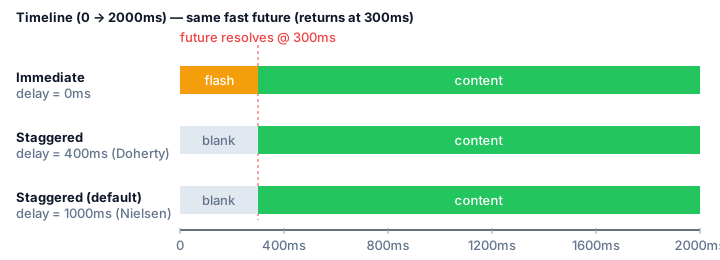
StaggeredLoader default delay is 1 s (Nielsen threshold). A useful
alternative is 400 ms (Doherty) when your product feels sluggish and you
want feedback earlier.
Immediate shows a shimmer that is immediately replaced by content. Users
perceive this flash as slower, not faster, than showing nothing.
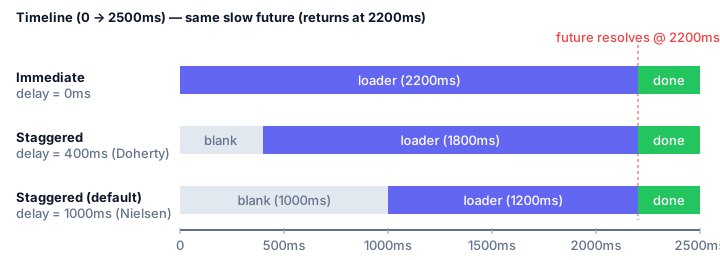
Once the deadline elapses, StaggeredLoader renders the loader. Users get
progress feedback exactly when they need it.
| Time | Future state | Widget shown |
|---|---|---|
t < delay |
pending | placeholder (blank) |
t < delay |
resolved | builder(data) |
t >= delay |
pending | loader |
t >= delay |
resolved | builder(data) |
| any | rejected | errorBuilder(err) |
dependencies:
staggered_loader: ^0.0.1import 'package:staggered_loader/staggered_loader.dart';
StaggeredLoader<List<Item>>(
future: api.fetchItems(),
// Nielsen default. Pick 400ms (Doherty) if you want more aggressive feedback.
delay: const Duration(seconds: 1),
placeholder: const SizedBox.shrink(),
loader: const Center(child: CircularProgressIndicator()),
errorBuilder: (context, error, _) => Text('$error'),
builder: (context, items) => ListView(
children: [for (final item in items) ItemTile(item)],
),
)StaggeredLoader<T>({
required Future<T> future,
required Widget Function(BuildContext, T data) builder,
Widget? placeholder, // shown while waiting under `delay`
Widget? loader, // shown once `delay` elapses
Widget Function(BuildContext, Object error, StackTrace? stack)? errorBuilder,
Duration delay = const Duration(seconds: 1),
Key? key,
})placeholderdefaults toSizedBox.shrink()(blank).loaderdefaults toCircularProgressIndicator.errorBuilderdefaults to a plainText('Error: $error').
| Use case | Suggested delay |
Rationale |
|---|---|---|
| General content loads (default) | 1000 ms |
Nielsen 1 s — user's flow of thought stays uninterrupted. |
| Tight interactive product surfaces | 400 ms |
Doherty productivity plateau. Best when 95th-percentile response is well under 1 s. |
| Instant-feeling controls | 100 ms |
Nielsen "reacting instantly". Rarely a good default — use only for cached/local reads. |
| Background jobs / never-fast | 0 ms |
Traditional loader from the first frame. |
See example/ for a runnable demo app with:
- configurable mock API response times (200 ms → 3 s)
- configurable loader deadlines (instant → 2 s in 100 ms steps)
- shimmer loader, error state, and 5 integration-test scenarios.
cd example
flutter run                                 # interactive demo
flutter test integration_test -d macos # full integration suiteThe package ships with 7 widget tests and 5 integration tests covering the fast, slow, and borderline paths.
flutter test # package widget tests- Jakob Nielsen — Response Times: The 3 Important Limits (1993).
- Robert B. Miller — Response time in man-computer conversational transactions (1968).
- Walter J. Doherty & Ahrvind J. Thadhani — The Economic Value of Rapid Response Time, IBM (1982).
- Bill Chen et al. — Perceived performance of skeleton screens, Facebook Design (2013).
- Google Material Design — Progress indicators usage guidance.
MIT — see LICENSE.