Skip to content

feat(web): chat-first Studio with one chat across pages - #8417

Open
rafavalls wants to merge 5 commits into
mainfrom
t3/one-chat-across-pages
Open

rafavalls wants to merge 5 commits into
mainfrom
t3/one-chat-across-pages

Conversation

@rafavalls

@rafavalls rafavalls commented Nov 10, 2026 •

Copy link
Copy Markdown
Collaborator

What is this contribution about?

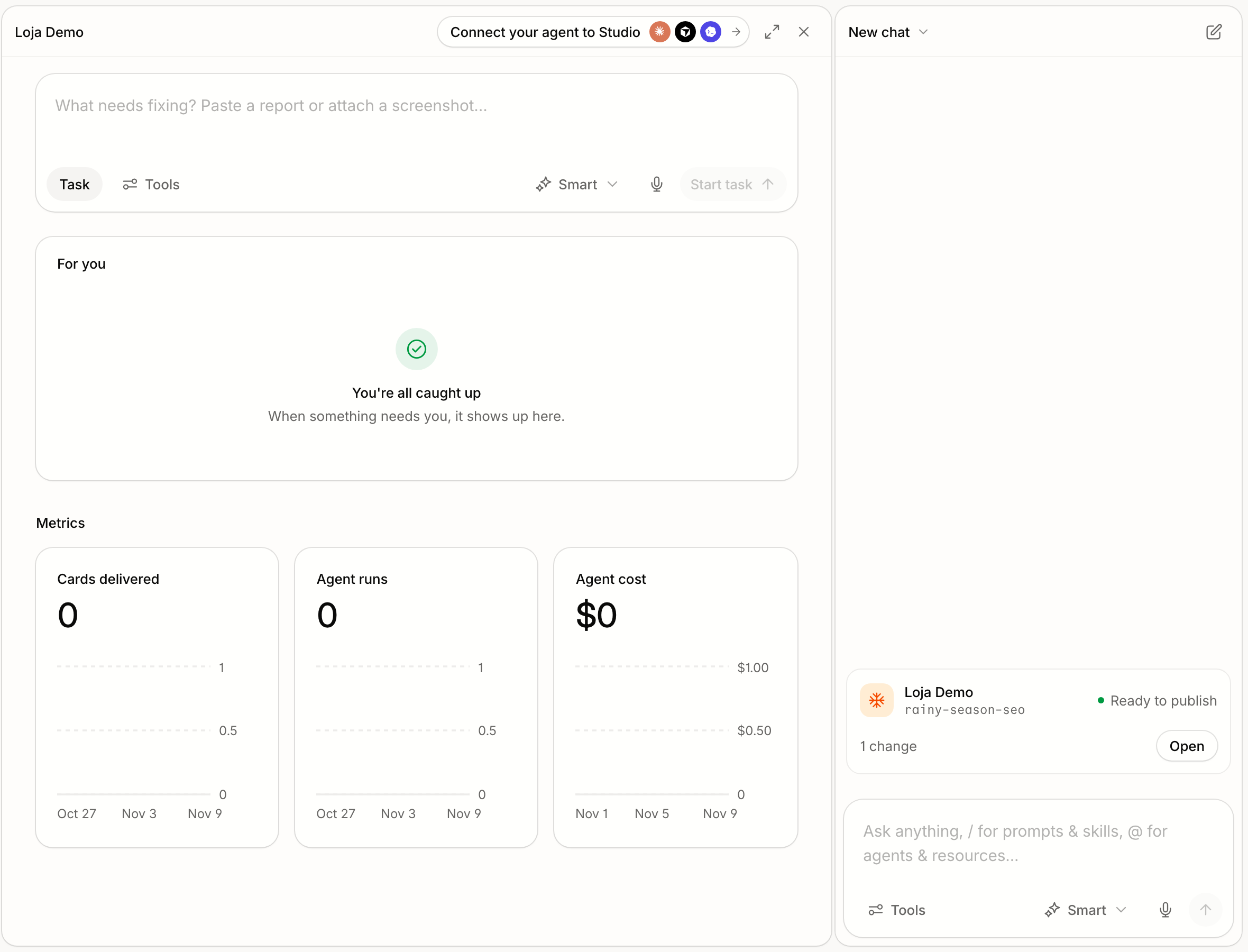
Studio becomes chat-first. The chat is always there, and every other screen opens beside it. There is one chat across the whole workspace: the page you're on is context for the chat, not its owner. This also cleans up the page headers, the task board toolbar and the chat list.

This replaces #8404, which is folded in here.

Front end only. Every change is in apps/web. There are no API, schema, tool or migration changes. Server-side work this behavior will need is listed under "Expected next".

Premises

  1. The chat is always open. It stays the same across refreshes, page changes and project changes. The main panel can expand over it, which is the only way it hides.
  2. The chat is not a project. There is one assistant, and what you're looking at is context for it, so it knows what "this" refers to.
  3. Work shows up where it happened. When the chat changes something, such as a site draft, that work appears in the conversation as a card, not in a header or a side list.
  4. People manage changes, not machines. Sandboxes are plumbing. Nobody starts, stops or "removes" one. People decide what happens to the changes: publish, discard or keep as a draft.

Expected UX

Layout

  • The chat sits on the right and never closes.
  • The main panel header has ⤢ Expand, which hides the chat, and ✕ Close, which closes the main panel. Expanded, the button reads "Show chat".
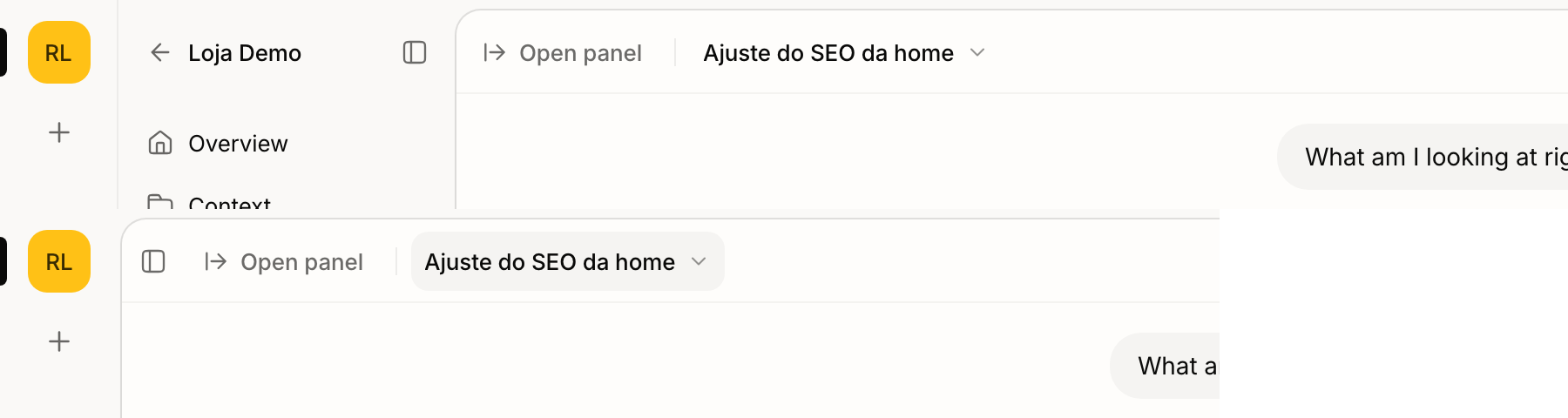
  • With the main panel closed, an "Open panel" button sits at the left of the chat header, followed by a divider and the chat title. A collapsed sidebar can also be reopened from there.
  • Expanding is a per-person preference that persists across pages and visits.
  • Dragging the divider stops at 320px. It never closes a panel.
  • The project setting "open the chat when opening this project" is honored again. Unset means open. Projects imported from deco.cx are created with it on.

One chat

  • The chat stays the same everywhere. Going from the home to a project, to Monitor, Execute or Context, and reloading keeps the same conversation open. Entering a project never switches or creates a chat.
  • Opening the app resumes your latest chat. If you have none, the chat is empty and ready to type.
  • New chat always starts a chat with the org's assistant, whatever page you're on.
  • Older project chats still work. They open from the chat list and keep running as their project.

The page as context

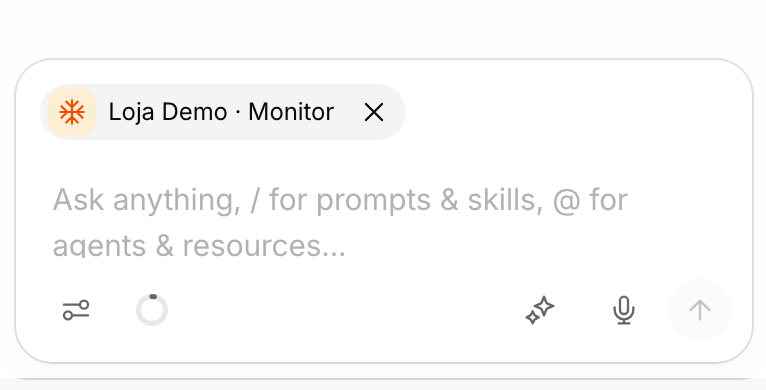
  • A chip in the composer names what you're looking at, such as "Store · Monitor" with the project icon. It follows you as you navigate.
  • The assistant knows the page. Its prompt gets a "Current Page" section with the project, so "create a task here" lands in that project.
  • The chip can be dismissed for one message when the page is irrelevant to the question.

Messages

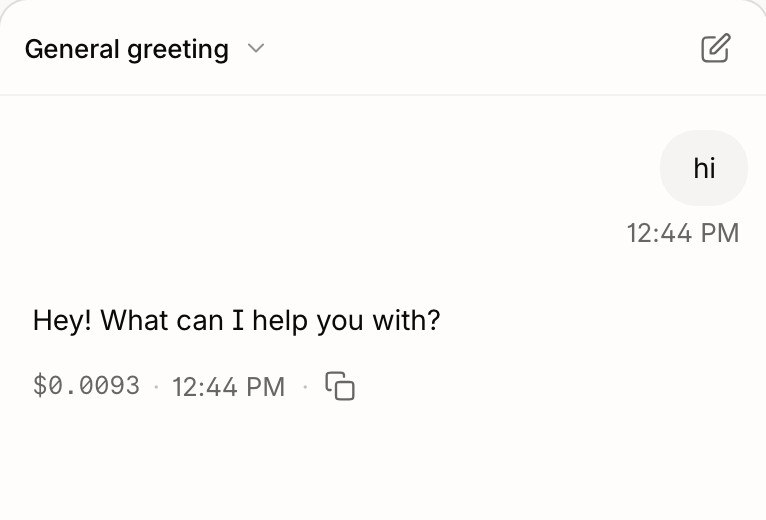
  • User messages are right-aligned bubbles, 85% max width and not sticky.
  • Queued messages are dashed bubbles with their time, Send now (first in queue only) and ✕.
  • The reply's time sits on the same line as its cost.
  • User and agent text are both 14px, and all times share one size and color.
  • The Thought block is a light, single line until expanded.

Cards in the conversation

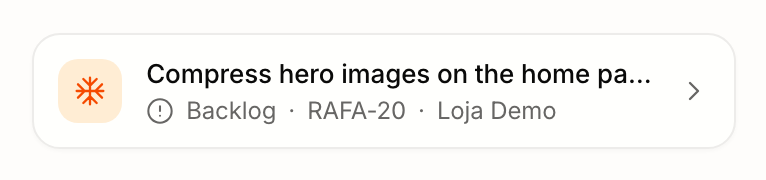
  • Created task: a compact row with the project avatar, the title, and a meta line (status · key · project). The whole row opens the task on its project's board, including a task created seconds ago.

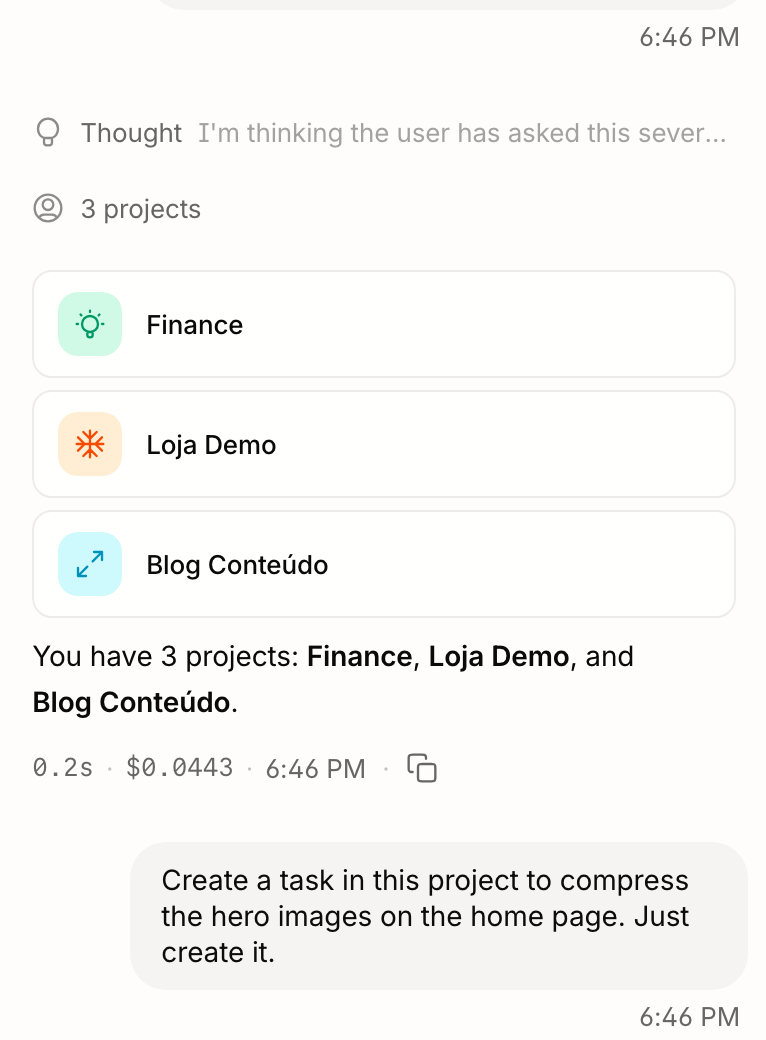
  • Projects list: shows real projects only, not the org's built-in agents.

  • Draft card: when the chat's thread has a hosted (Blocks v8) draft with at least one change against main, the conversation shows a card with:

    • the project;
    • the draft name;
    • Editing / Ready to publish;
    • the change count;
    • Open, which goes to the project's Site Editor on that draft.

    It appears after the first answer that used a tool. The changes are read from the hosted draft every 15s, so the card doesn't depend on the editor's runtime.

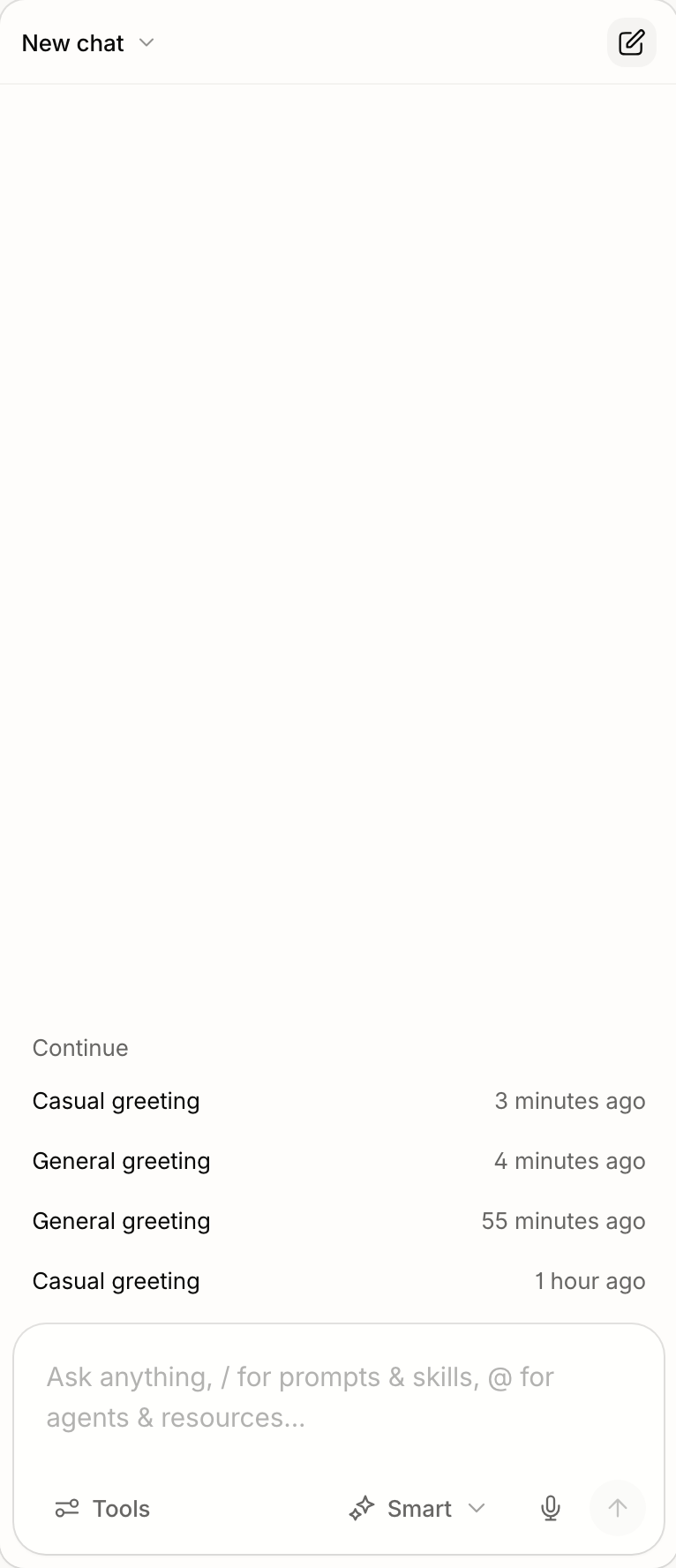
  • The empty chat is just the composer and a "Continue" list of recent chats. A dot marks chats with a pending draft. The agent identity screen and the ice-breaker prompts are gone.

Page headers

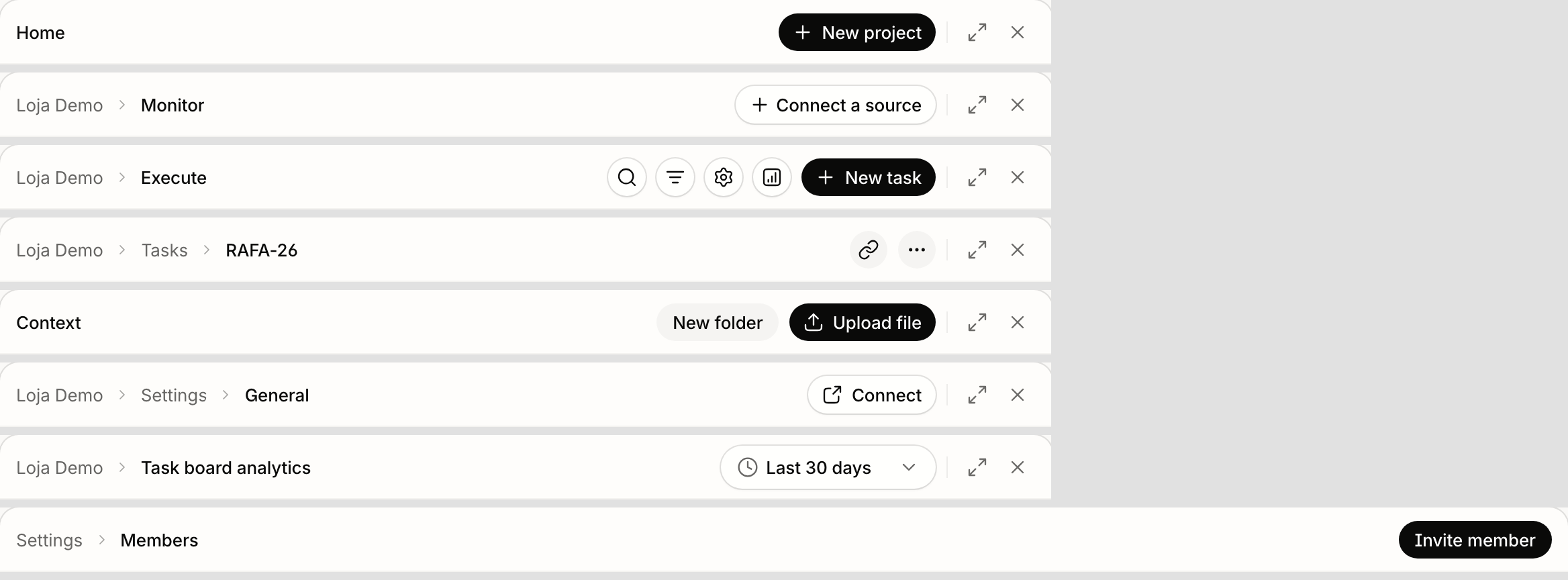
  • One filled (black) action per screen, such as New task, New project or Upload file.
  • Every other action is an outlined button, with a label or icon only.
  • A thin divider separates the page's actions from ⤢ Expand and ✕ Close.
  • The rule is the same on every page. Context's "New folder" and refresh, and the task page's link and ⋯ buttons, now use the outline like the rest.

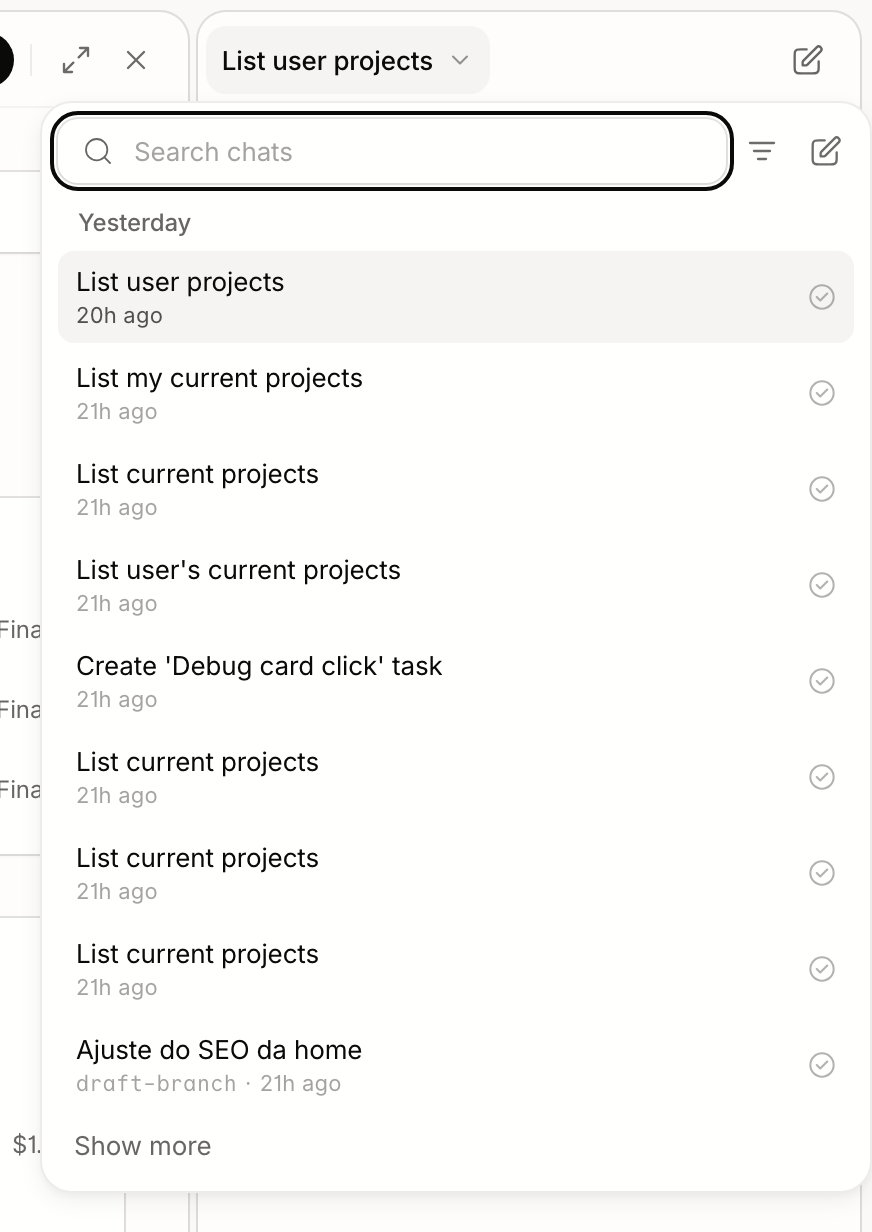
Chat list

  • Opens from the chat title at the top of the chat.
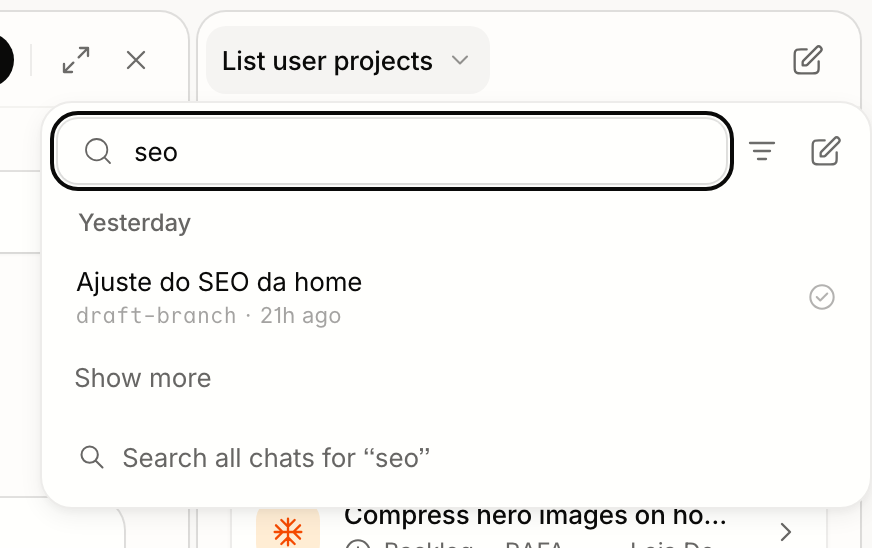
  • A search field sits at the top, focused on open. It narrows the loaded chats by title as you type. "Search all chats for …" below the list, or Enter when nothing matches, opens the org-wide search with the same text.
  • Chats are grouped under date headings: Today, Yesterday, Previous 7 days, Previous 30 days, Older.
  • Rows show the title and when it last changed, plus the draft branch when there is one. No agent icon.
  • Automation runs are not listed. The list is people's own conversations.
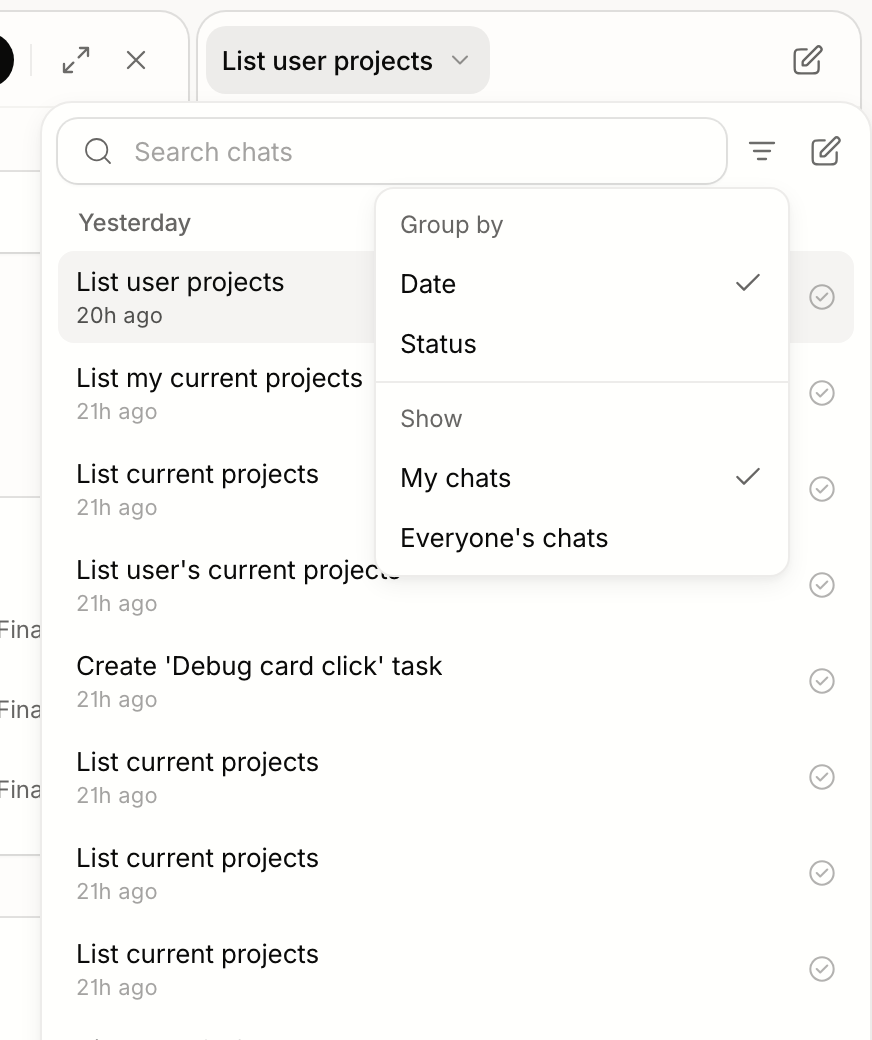
  • The menu beside the search groups by Date or Status, and shows My chats or Everyone's chats.
  • New chat from this menu starts a chat with the org's assistant, like every other New chat.
  • The menu is wider (416px) and the list taller (up to 70% of the screen).

Execute (task board)

  • Header: Search, Filter, Board settings, Analytics (icon), New task.
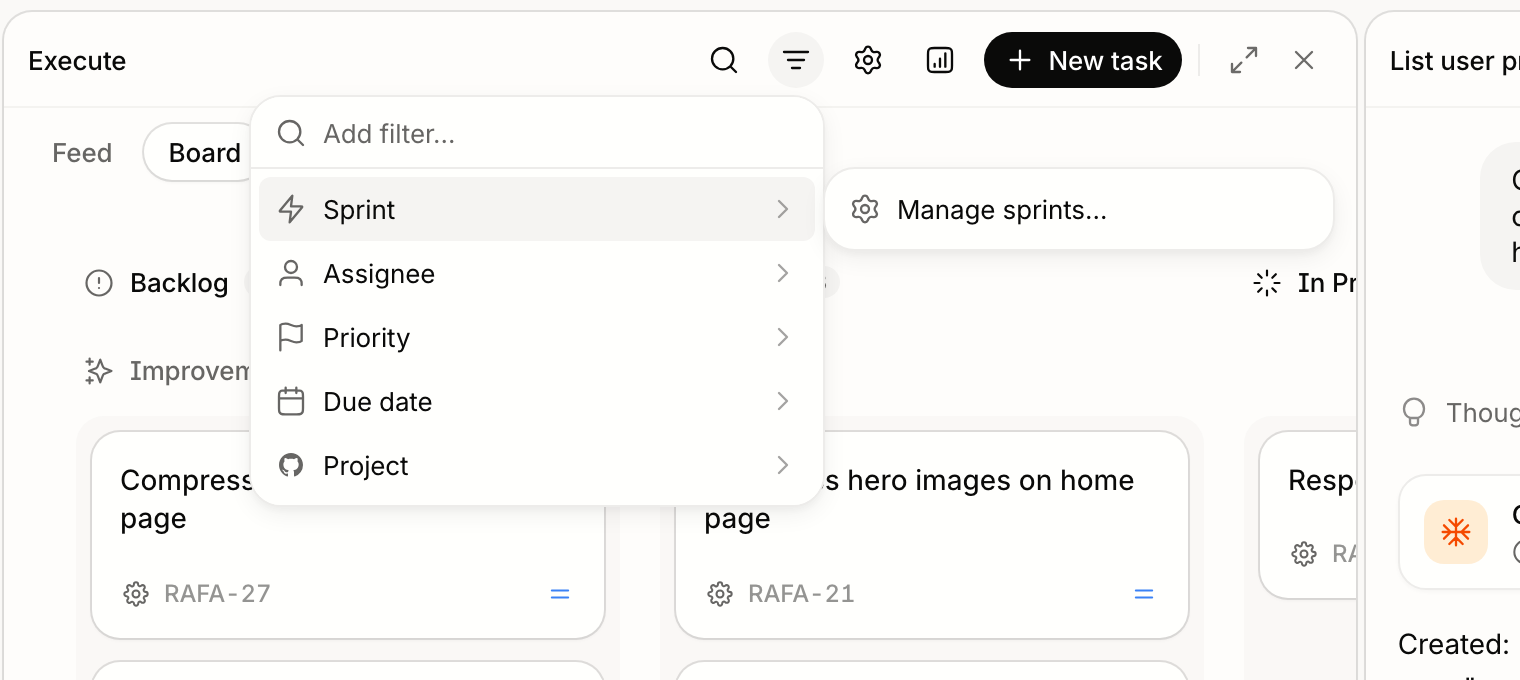
  • Sprint lives in the Filter menu, as its first field. Its submenu lists the backlog and the sprints, and ends with Manage sprints…. The standalone sprint button is gone.
  • The board opens on the running sprint, shown as a chip in the filter bar ("Sprint is …"). Removing the chip, or Clear, shows every sprint.
  • The Columns button is gone from the toolbar. Lanes are still hidden and shown from the board.
  • When the header gets narrow, New task and Analytics fold to icons with a tooltip. The tooltip only shows while folded.

Monitor

  • Deploys is a toggle button at the start of the header, pressed when deploy markers are on the chart.

Composer

  • Text is 14px, the same as messages. Phones keep 16px so iOS doesn't zoom on focus.
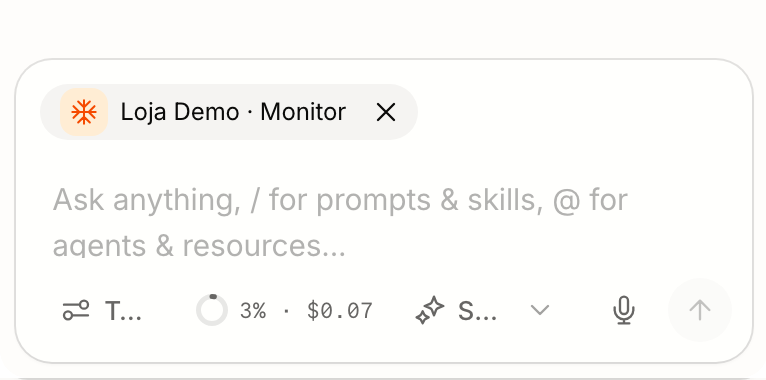
  • Below 480px wide, the toolbar shows icons only instead of truncated labels.

Home

  • "Connect your agent to Studio" is a banner at the top of the home, no longer in the header. It goes away once the organization has a key created from Settings › Connect.

Breadcrumbs

  • Breadcrumbs collapse to "…" only when the header is really out of room (under 200px).

Expected next (not in this PR)

  • Sandbox on the first change:

    • Attach on the first change, not on the first message. Reading (analytics, files, context) never needs a sandbox. The first time the chat edits a project, it opens a fresh draft there.
    • Don't ask first, but say so. A draft changes nothing live, so the conversation gets a line ("Working on Project in draft name") and the draft card appears. Booting takes a while, so the chat shows a "Preparing…" state meanwhile.
    • One draft per project per chat. A chat can touch several projects, each in its own draft. Later edits to the same project reuse that draft and update its card.
    • The sandbox lifecycle is invisible. It starts when needed, sleeps when idle and wakes when needed again. Stopping it is never a user action.

    Today a thread is stamped cms or sandbox at creation and can't change, so a chat started in one mode can't edit in the other.

  • Publish / Discard / Keep as draft on the draft card. Publish (or open a PR) and Discard collapse the card to one line. Keep as draft lets the chat let go while the draft stays in the project. Today these live in the Site Editor header, which Open leads to.

  • Draft cards for git (sandbox) drafts. Only hosted (v8) drafts show a card today.

  • Content edits without a sandbox. Editing site content (Blocks v8, the hosted draft) works without a sandbox, so a content-only change shouldn't wait for one to boot. Today every agent edit goes through a sandbox, because there's no agent tool that writes to the hosted draft.

  • The projects list comes from the server. The card hides built-in agents, but the tool still returns them, so the assistant can still mention them as projects.

  • When the target is unclear, the assistant asks. If the chat worked on one project and you're looking at another, "change the title" gets a question back, not a guess.

  • The home banner detects OAuth connections. It can't today, so it keeps showing until a key exists.

  • E2E specs that assume entering a project opens that project's chat, or the old left-side chat toggle, need updating.

  • Docs: the chat guide describes one chat with page context.

How did you verify your code works?

  • bun run fmt, bun run lint and bun run knip pass. tsc --noEmit passes for apps/web and packages/ui.
  • Task board unit tests: bun test src/layouts/task-board passes (292). The sprint chip tests now cover the new rule: any sprint, including the running one, is a chip, and clearing it shows every sprint.
  • Full web unit run (bun test --parallel src), after merging main: 5227 pass, 647 fail. Main alone gives 647 failures, and the list of 629 distinct failing tests is identical. They leak globals between files.
  • Layout tests: use-chat-layout-state.test.ts passes. The project setting is asserted as honored, including ?sidepanel=true overriding it, and an unset setting opens the chat.
  • Manual checks, in the browser against a local Studio:
    • Layout: Expand ↔ Show chat, Close ↔ Open panel, and reopening a collapsed sidebar with the panel closed.
    • Draft card: it shows the real change count after one block was changed on the draft.
    • Chat persistence: the chat keeps the same id across the home, a project, Monitor, Execute and a reload.
    • Context: "create a task in this project" from a project page creates it there.
    • Task card: opening a just-created task's card opens the task.
    • Headers: checked across the pages in the screenshot.
    • Filter menu: the Sprint field opens Manage sprints.
  • Not run:
    • The full bun run verify test step, which also runs API integration tests against local services.
    • The sprint filter with real sprints. The local org has none, so only the Manage sprints entry was exercised.

Screenshots/Demonstration

Layout and the draft card. Expand and close are on the main panel; the chat stays on the right with the draft it changed.
Main panel with expand and close; chat with a draft card

Main panel expanded
Expanded main panel with Show chat

Messages
User bubble on the right; reply with cost and time on one line

Home banner
Connect banner at the top of the home

Headers. One filled action, outlined secondary actions, a divider before ⤢ ✕. From the top: Home, Monitor, Execute, a task, Context, project Settings, Analytics, Members.
Page headers

Sprint in the Filter menu
Sprint filter

Chat list. Date headings, then search with the org-wide fallback, then the grouping menu.
Chat list
Chat list search
Chat list menu

Task card
Task card

Projects list. Real projects only.
Projects list

Closed panel. "Open panel", with the sidebar open and collapsed.
Open panel

Composer. Narrow on top, wide below.
Composer narrow
Composer wide

Context chip
Context chip

Empty chat
Empty chat

How to Test

  1. Open the home. The chat is on the right. Click ⤢ on the main panel: the chat hides and the button reads Show chat. Click it and the chat returns. Reload: the choice is kept.
  2. On a Blocks v8 project, change something in the Site Editor on the chat's draft, then return to the chat. A card shows the project, the draft and its change count, and Open goes back to that draft.
  3. Start a chat on the home, then open a project and a few of its pages. The chat stays the same, and the composer chip follows the page. Reload: the chat is still there.
  4. On a project page, ask the chat to create a task "in this project". The task card appears. Click it and the task opens.
  5. Ask which projects you have. The card lists only projects.
  6. Visit Home, Monitor, Execute, a task and Context. Each header has one black action, outlined buttons for the rest, and ⤢ / ✕ after a divider.
  7. On Execute, open Filter › Sprint. Pick a sprint, then remove its chip to see every sprint. Open Manage sprints… from the same submenu.
  8. Open the chat list from the chat title. Type part of a title: the list narrows, and "Search all chats" finds older ones. Automation runs don't appear.
  9. Close the main panel, then reopen it from "Open panel" in the chat header.
  10. Narrow the window. New task and Analytics fold to icons with tooltips, and the composer toolbar shows icons only.

Migration Notes

  • No migrations, no API changes.
  • Projects that saved "open the chat" as off now really open with the chat hidden; before, the setting was ignored.
  • Entering a project no longer switches to that project's chat. Old project chats stay in the chat list and open as before.
  • New chats started on a project page belong to the org's assistant, with the project as context.
  • Automation runs no longer appear in the chat list, and its Type filter is gone.
  • The task board no longer has a standalone sprint button. Sprint is a filter, and a sprint board shows its sprint as a chip.

Review Checklist

  • PR title is clear and descriptive
  • Changes are tested and working
  • Documentation is updated (if needed): the chat guide should describe one chat with page context
  • No breaking changes: see Migration Notes; E2E specs that assumed a project's own chat need updating

🤖 Generated with Claude Code

rafavalls and others added 2 commits November 9, 2026 13:20
The chat is the constant surface: it stays open beside every page and
only hides when the main panel expands over it. Layout controls live on
the main panel (expand, close), the chat reopens a closed panel, and a
project's "open the chat" setting is honored again, defaulting to open.

The empty chat no longer presents an agent identity: a project is
context, not someone you talk to. A chat that changed a site shows its
draft as a card in the conversation, with a strip above the composer
while it is pending.

Also restyles messages (right-aligned user bubbles, dashed queued
messages, time beside the cost) and moves the connect prompt to a home
banner that leaves once an agent is connected.

Co-Authored-By: Claude Opus 5.5 <noreply@anthropic.com>
The chat now follows the person across the home, projects and pages instead
of switching to a project's own chat, and the page is context for it. New
chats belong to the org's assistant. Also: page headers keep one filled
action and drop outlines from the rest, a recent-chats empty state, context
chips, a compact task card, and composer/header fixes.

Co-Authored-By: Claude Opus 5.5 <noreply@anthropic.com>
@github-actions github-actions Bot added the claude PR authored by a coding agent label Nov 10, 2026
Co-Authored-By: Claude Opus 5.5 <noreply@anthropic.com>
@rafavalls rafavalls changed the title feat(chat): one chat across pages, quieter headers feat(web): one chat across pages, consistent headers, sprint in filters Nov 10, 2026
Co-Authored-By: Claude Opus 5.5 <noreply@anthropic.com>
@rafavalls rafavalls changed the title feat(web): one chat across pages, consistent headers, sprint in filters feat(web): one chat across pages Nov 10, 2026
@rafavalls rafavalls changed the title feat(web): one chat across pages feat(web): one chat across pages, chat list, consistent headers Nov 10, 2026
@rafavalls rafavalls changed the title feat(web): one chat across pages, chat list, consistent headers feat(web): chat-first Studio with one chat across pages Nov 10, 2026
@rafavalls
rafavalls changed the base branch from t3/chat-first-persist-fullscreen to main November 10, 2026 19:09
# Conflicts:
#	apps/web/src/components/import-from-deco-dialog.tsx
#	apps/web/src/components/monitor/monitor-page.tsx
#	apps/web/src/hooks/use-preferences.ts
#	apps/web/src/layouts/library/index.tsx
#	apps/web/src/layouts/route-page-header.tsx
#	apps/web/src/layouts/task-board/index.tsx
#	apps/web/src/routes/thread-session/route.tsx

This branch has not been deployed

No deployments
Sign up for free to join this conversation on GitHub. Already have an account? Sign in to comment

Labels

claude PR authored by a coding agent

Projects

None yet

Development

Successfully merging this pull request may close these issues.

1 participant