







Never use a lousy schematic editor again!
SKiDL is a Python package that lets you describe electronic circuits using code instead of schematic editors. Write your circuit as a Python program, and SKiDL outputs a netlist for PCB layout tools. It's "infrastructure as code" for electronics.
- Free software: MIT license
- Documentation: http://devbisme.github.io/skidl
- User Forum: https://github.com/devbisme/skidl/discussions
Text-Based Circuit Design git, diff, branching, and code review work on it like any other source.
Compact & Powerful: Describe complex circuits in a fraction of the space. No more tracing signals across multi-page schematics.
Hierarchical Design: Mix linear, hierarchical, and modular design approaches as needed.
Reusable Design: Share circuit modules on PyPI and GitHub. Create parametric "smart" circuits that adapt based on requirements.
Design Automation: Build circuits algorithmically. Generate repetitive structures, automatically size components, and create design variants programmatically.
Electrical Rules Checking: Catch common mistakes like unconnected pins, drive conflicts, and power connection errors.
One Description, Many Outputs Generate netlists, XML BOMs, SVG or DOT diagrams, or editable KiCad schematics (KiCad 6–10) from the same source. KiCad today; other backends can be added.
Python Ecosystem: Leverage Python's vast ecosystem for simulation, analysis, documentation, and automation.
Here's a simple voltage divider that demonstrates SKiDL's syntax:
from skidl import *

# Create input & output voltages and ground reference
vin, vout, gnd = Net('VI'), Net('VO'), Net('GND')

# Create two resistors with values and footprints
r1, r2 = 2 * Part("Device", 'R', dest=TEMPLATE, footprint='Resistor_SMD.pretty:R_0805_2012Metric')
r1.value, r2.value = '1K', '500'

# Connect the circuit elements.
vin & r1 & vout & r2 & gnd

# Or connect pin-by-pin if you prefer
# vin += r1[1]
# vout += r1[2], r2[1]
# gnd += r2[2]

# Check for errors and generate netlist
ERC()
generate_netlist(tool=KICAD9)
For a more complex example, here's a two-input AND gate built from discrete transistors:
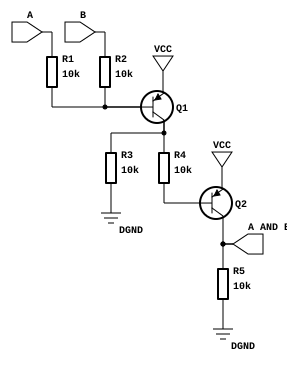
from skidl import *

# Create part templates
q = Part("Device", "Q_PNP_CBE", dest=TEMPLATE)
r = Part("Device", "R", dest=TEMPLATE)

# Create nets
gnd, vcc = Net("GND"), Net("VCC")
a, b, a_and_b = Net("A"), Net("B"), Net("A_AND_B")

# Instantiate parts
gndt = Part("power", "GND")             # Ground terminal
vcct = Part("power", "VCC")             # Power terminal
q1, q2 = q(2)                           # Two transistors
r1, r2, r3, r4, r5 = r(5, value="10K")  # Five 10K resistors

# Make connections - notice the readable topology
a & r1 & q1["B C"] & r4 & q2["B C"] & a_and_b & r5 & gnd
b & r2 & q1["B"]
q1["C"] & r3 & gnd
vcc += q1["E"], q2["E"], vcct
gnd += gndt

generate_netlist(tool=KICAD9)Hierarchical design. Nest subcircuits to build large systems from blocks; the hierarchy carries through to the generated net lists and schematics.
Part and net classes. Attach design rules, manufacturing requirements, and electrical specs to sets of parts or nets.
Smart Part Libraries: Search parts by function, automatically assign footprints, and access any KiCad library.
Multiple Output Formats: Generate netlists for KiCad, XML for BOMs, or go directly to PCB layout.
Visual Output: Create SVG schematics, editable KiCad schematic files (KiCad 6–10), or DOT graphs for documentation.
SPICE Integration: Run simulations directly on your SKiDL circuits.
pip install skidlSet up KiCad library access (optional but recommended):
# Linux/Mac
export KICAD_SYMBOL_DIR="/usr/share/kicad/symbols"

# Windows
set KICAD_SYMBOL_DIR=C:\Program Files\KiCad\share\kicad\symbols- Learn the basics: Check out the documentation for comprehensive tutorials
- Try examples: Explore the
tests/examples/directory in the repository - Get help: Join discussions in our user forum
- Convert existing designs: Use the
netlist_to_skidltool to convert KiCad designs to SKiDL
SKiDL needs to know where your KiCad symbol libraries are. If KICAD_SYMBOL_DIR is not
set or points to the wrong path, parts won't resolve.
Find your KiCad symbol library path:
# Linux (package manager install)
ls /usr/share/kicad/symbols/

# Linux (Flatpak)
ls /var/lib/flatpak/app/org.kicad.KiCad/current/active/files/share/kicad/symbols/

# macOS (Homebrew)
ls /Applications/KiCad/KiCad.app/Contents/SharedSupport/symbols/

# Windows (typical)
dir "C:\Program Files\KiCad\8.0\share\kicad\symbols"
Set the environment variable:
# Linux/macOS — add to ~/.bashrc, ~/.zshrc, or ~/.zprofile
export KICAD_SYMBOL_DIR="/usr/share/kicad/symbols"

# Windows PowerShell
[System.Environment]::SetEnvironmentVariable("KICAD_SYMBOL_DIR", "C:\Program Files\KiCad\8.0\share\kicad\symbols", "User")
Verify it works:
python -c "from skidl import Part; r = Part('Device', 'R'); print(f'Found: {r.name}')"SKiDL supports KiCad 5 through 10. If you see parsing errors with newer KiCad library files, make sure you're running the latest version of SKiDL:
pip install --upgrade skidl