
A professional desktop music player, for playing music the way a mixing engineer or a DJ does
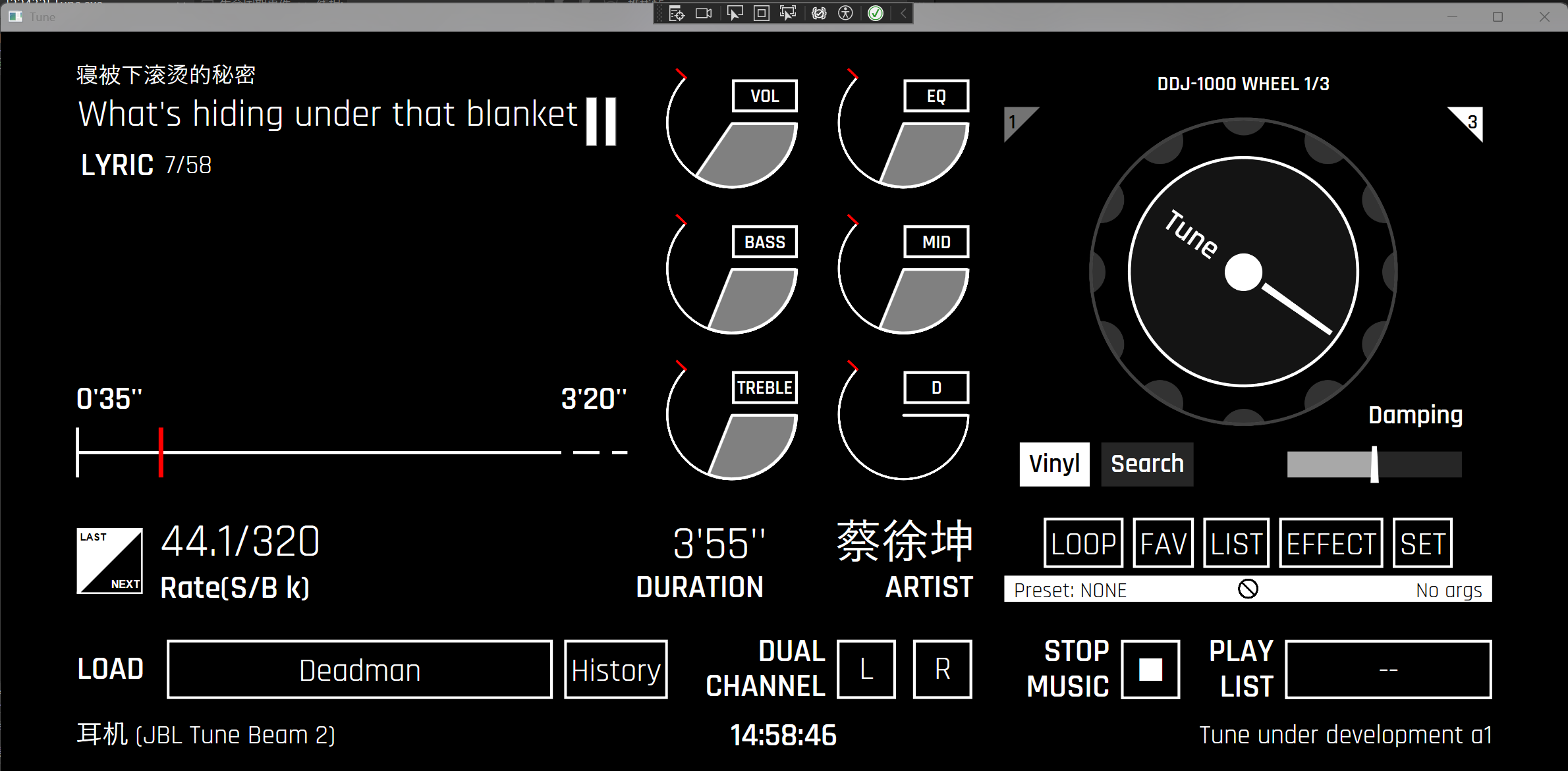



Tune is an extensible music player built on .NET. The move to Avalonia for cross-platform support has to wait for TuneII, or for TuneLite, the C++ version.
简体中文的 README 在 English 版本结尾处。
Windows 10 or newer and the .NET 10 SDK. A sound card with WASAPI or DirectSound is recommended; the player uses the system default output device.
git clone https://github.com/f13T2ach/Tune.git
cd Tune
dotnet build Tune.slnx -c Release
dotnet run --project Tune/Tune.csproj
To publish:
dotnet publish Tune/Tune.csproj -c Release -p:PublishProfile=FolderProfileThe main screen is the player. The buttons along the bottom open the current playlist, the
playlist library, the sound tools and the settings page. The panel area on the right of the main
screen shows the extra components available as ExView. Two triangles in its corners turn the
pages, and the header shows the name of the current panel and where it sits in the set. A plugin
can register an ExView to add a page of its own.
Press the button next to LOAD to choose a file. It shows the title of the current track and opens the picker again when clicked. The button labelled STOP MUSIC unloads the track and leaves the player with nothing loaded.
The loop button steps through no loop, list loop, single loop and shuffle. The small icon in the white strip under the buttons shows the current mode; clicking it resets the player to no loop.
The button marked LIST opens the current playlist, the one the player is playing from. The wide button at the bottom right, showing the playlist name, opens the playlist library. They are two different pages, and easy to confuse.
Each cover in the library has two targets. Clicking the cover only opens that playlist without starting it; the play key in the corner starts it and sets the loop mode to list loop. The empty cover at the end is the exception: its cover opens the new playlist dialog, and its play key clears playback and falls back to the history playlist.
The button next to the track title opens the history playlist. It does not appear in the library and fills itself: each track played moves to the front, one entry per track. Starting playback from the history page makes the history the current playlist.
On the current playlist page, + adds a track from a file or from what is playing. Hovering a
row reveals its action buttons. Delete moves the track out of the playlist and saves it; the
other three are not connected yet. The buttons that play, rename, update or delete the playlist
itself are idle as well.
The equalizer page has two tabs: the ten-band equalizer, and a second tab that is still empty. The left panel edits the current preset. The pencil turns the name into an input box with confirm and cancel; Save writes the current gains to storage and only lights up once a band has moved; Remove applies to saved presets only; New starts an empty preset.
The picker under the name lists the saved presets plus one empty entry. Choosing the empty entry switches the equalizer off without losing a preset. The faders on the right are the bands, with a scale beside them for gain and centre frequency. The range of the faders follows the band limits in the settings page.
The effects page is a rack. Audio enters at the top and leaves at the bottom; the list in between
is the order the effects run in. Selecting a node shows its parameters on the right, each with a
control that suits its type. The row buttons move it up, down or out, and the checkbox bypasses
it. Pick an effect in the list under the rack and press + to add it.
The equalizer is not one of these nodes. It is a fixed processor and stays in the chain even when the rack is empty. The ON/OFF button in the toolbar bypasses the whole chain, equalizer included, which is the fastest way to hear the difference your changes make.
Put a .lrc file in the same folder as the audio and give it the same name; Tune loads it by
itself. Up to three lines can be shown at once, parsed as the main lyric, the secondary lyric
(translation) and the third lyric (reading).
- The analysis, song and help pages have no content yet, and neither does the second tab of the equalizer page.
- Sound analysis: tempo, key and repeated sections.
- Separating a track into stems and remixing it. The approach is written down in Demucs_RemixEngine_ImportSolution.md.
- Folder playlists. The playlist type exists; the import button does not.
- The playlist page needs play, rename, update and delete.
- The track row needs play next, add to playlist and more information.
- Errors and confirmations still open a message box. In-app notices would sit better in this interface.
- The project has no test project. Playlists, lyrics and equalizer presets are the first places worth covering.
Fork the repository, work on a branch and open a pull request. Follow the style of the code
around you (see CRITICAL.md), avoid new build warnings, and add tests for new behaviour where
it is practical.
MIT. See LICENSE.txt.
Modified versions and distributed versions must credit the author Sokasne Redmaple in the
source code, and the interface of modified and distributed versions must carry a clear
attribution, or an author notice that is easy to reach.
Repository: https://github.com/f13T2ach/Tune Issues: https://github.com/f13T2ach/Tune/issues Email: f12fds@163.com
像调音师或 DJ 一样播放音乐的专业桌面播放器


Tune 是一款专业的可拓展音乐播放器,基于 .NET,到 Avalonia 的跨平台迁移需要等待 TuneII 或者 基于 C++ 的 TuneLite。
需要 Windows 10 或更新版本,以及 .NET 10 SDK。建议声卡支持 WASAPI 或 DirectSound;播放器使用系统默认输出设备。
git clone https://github.com/f13T2ach/Tune.git
cd Tune
dotnet build Tune.slnx -c Release
dotnet run --project Tune/Tune.csproj
发布命令:
dotnet publish Tune/Tune.csproj -c Release -p:PublishProfile=FolderProfile主界面就是播放器。下方按钮分别打开当前歌单、歌单库、声效工具和设置。主界面右侧的面板区展示了可用额外组件 ExView。用两角的三角形翻页,标题会显示当前面板的名字和位置。插件可注册一个ExView来加入额外组件页面。
点 LOAD 旁边的按钮选择文件。这个按钮显示当前曲目名,再点一次会重新打开选择框。标着 STOP MUSIC 的按钮会卸载曲目,让播放器回到空载状态。
循环按钮依次切换不循环、列表循环、单曲循环、随机播放。按钮下方白色条里的小图标始终显示当前模式,点击它会把模式复位成不循环。
标着 LIST 的按钮打开当前歌单,也就是播放器正在播放的那一份。右下角那个显示歌单名的宽按钮打开歌单库。 这是两个页面,容易混淆。
歌单库里的每个封面有两个交互点。点封面只打开那一份歌单,不开始播放;右下角的播放键才开始播放,并把循环 模式切成列表循环。末尾的空封面是例外:点封面会打开新建歌单的对话框,点它的播放键则清空播放,退回 历史歌单。
曲目名旁边的按钮打开历史歌单。它不出现在歌单库里,会自己积累:每播放一首就移到最前,同一首歌只留 一条。从历史页开始播放会把历史设为当前歌单。
在当前歌单页,+ 可以从文件或正在播放的曲目添加一首。鼠标移到列表某一行上会露出操作按钮。删除会
把曲目移出歌单并保存,另外三个还没接上。歌单本身的播放、重命名、更新、删除按钮同样还没有动作。
均衡器页有两个标签页:第一个是十段均衡器,第二个暂时是空的。左侧面板编辑当前预设。铅笔按钮把名字 变成输入框,带确认和取消;保存把当前增益写进存储,只有某个频段动过才会亮起;删除只对已保存的预设 有效;新建会开一份空预设。
名字下方的下拉框列出已保存的预设和一个空项。选空项等于关掉均衡器,预设本身不会丢。右侧推子是各 个频段,旁边的标尺给出增益与中心频率。推子的量程跟着设置页里的频段上下限走。
效果器页是一条机架。音频从上方进入、下方离开,中间列表就是效果的执行顺序。选中一个节点后,右侧会
出现它的参数,每种参数用各自合适的控件。行上的按钮负责上移、下移和移除,复选框是旁通。在机架下方
的下拉框里选中效果,按 + 添加。
均衡器不在这些节点里。它是固定处理器,机架空着也照样在链路中。顶栏的 ON/OFF 按钮旁通整条链,包括 均衡器,想听改动前后的差别时用它最快。
把 .lrc 文件和音频放在同一目录、取同一个名字,Tune 会自动加载。支持最多三行的同时歌词,分别解析为主歌词,副歌词(翻译),第三歌词(读音)。
- 分析页、歌曲页和帮助页还没有内容,均衡器页的第二个标签页也是。
- 声学分析:速度、调性、重复段落。
- 把曲目分离成音轨再重混,方案见 Demucs_RemixEngine_ImportSolution.md。
- 目录歌单。类型已经有了,导入按钮还没有。
- 当前歌单页需要播放、重命名、更新、删除。
- 曲目行需要下一首播放、加入歌单、更多信息。
- 报错和确认还在用消息框,这种界面里更适合应用内提示。
- 项目没有测试工程。歌单、歌词和均衡器预设是最值得先覆盖的地方。
Fork 仓库,在分支上修改,然后提交 Pull Request。跟随附近的代码风格(参照CRITICAL.md),不要引入新的编译警告,新增行为尽量带上测试。
MIT,见 LICENSE.txt。
要求修改版和分发版必须在源代码署作者名 Sokasne Redmaple,并在修改版和分发版的 UI 必须有明显署名或者不复杂可达的作者提示。
仓库:https://github.com/f13T2ach/Tune 问题反馈:https://github.com/f13T2ach/Tune/issues 邮箱:f12fds@163.com