







sharpit is an open-source developer console and pytest plugin for FastAPI and Starlette applications, with Flask
supported for test gates. One call, sharpit.install(app), mounts a local web console at /sharpit that shows your
configuration and where each value came from, every route, every SQL statement with the request that ran it, N+1
queries, exceptions, HTTP exchanges and health. pytest --sharpit turns the same capture into CI gates for N+1
queries, query budgets and swallowed exceptions. A command-line client and an MCP endpoint let scripts and AI coding
agents query the running app.
Security is built in, both ways. sharpit is safe to run inside your app: it fails closed, answers loopback callers only, refuses cross-site requests and masks secrets in every output. It also finds security problems in your app: a security advisor ported from BootUI reviews authentication, sessions, CORS, OAuth2/JWT and transport settings; an in-process probe checks HTTP security headers and CORS preflight responses; and an on-demand scan checks installed packages against OSV with EPSS exploit scores.
sharpit is a Python port of BootUI by Julien Dubois (Apache-2.0), the Spring Boot developer console: the same design goals, JSON contract and test cases, with a new UI. If you have used Spring Boot Actuator or BootUI, sharpit gives a FastAPI app the same kind of runtime view.
-
Install sharpit and the FastAPI development server:
pip install "sharpit[fastapi]" "fastapi[standard]" # or: uv add "sharpit[fastapi]" "fastapi[standard]"
fastapi[standard]providesfastapi devand uvicorn. Leave it out if your project already has a server. -
Save this as
app.py:from fastapi import FastAPI import sharpit app = FastAPI() @app.get("/hello") def hello() -> dict[str, str]: return {"message": "hello"} # Register your application middleware first, then mount sharpit: sharpit.install(app) # mounts /sharpit and /sharpit/api
-
Run it with a dev signal and open http://127.0.0.1:8000/sharpit/:
fastapi dev app.py # or: uvicorn app:app --reload
sharpit is off unless a dev signal turns it on: fastapi dev, uvicorn --reload, a dev profile such as APP_ENV=dev,
or SHARPIT_ENABLED=ON. A plain uvicorn app:app, or uvicorn.run(..., reload=True) called from a script, answers
404 under /sharpit. See Activation.
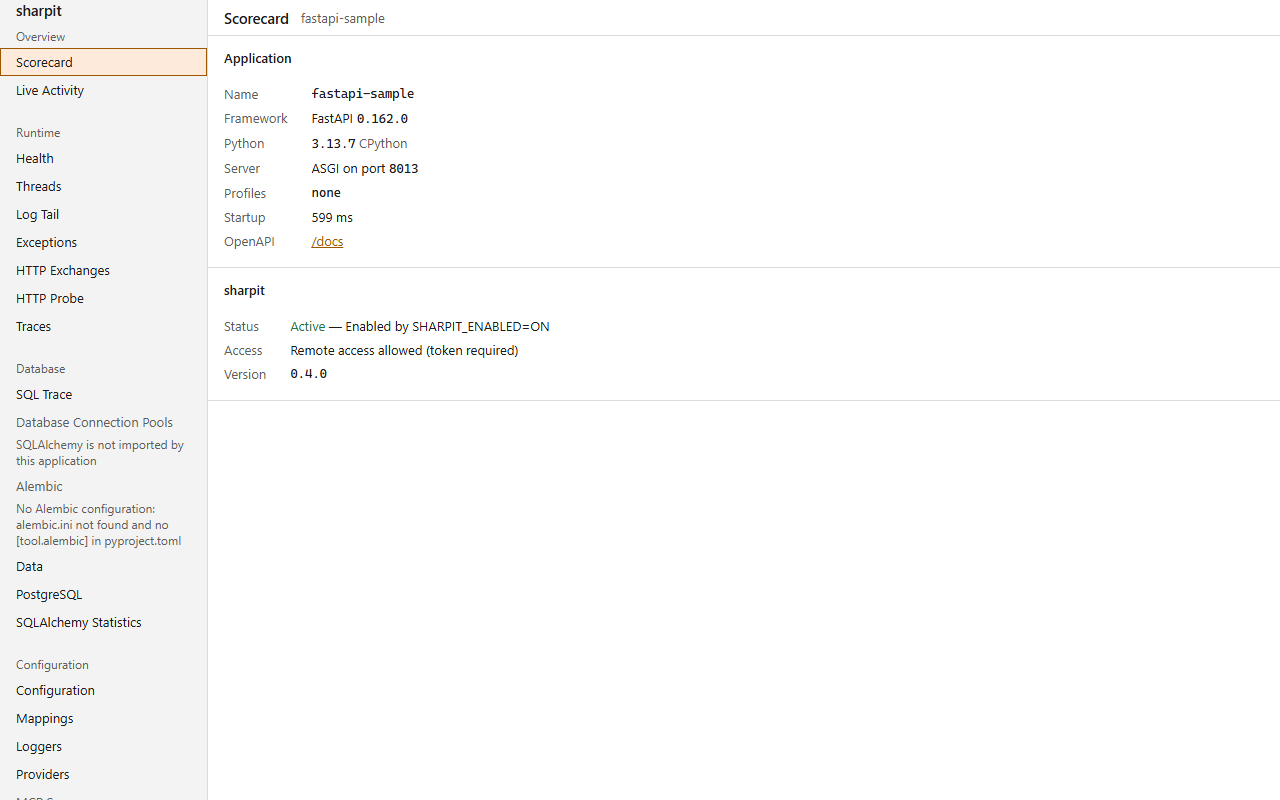
What you get: 47 panels. Change a logger's level while the app runs, spot N+1 queries per route, and scan your installed packages for known vulnerabilities when you ask for it. Every panel in light and dark: screenshot catalog.
Then gate CI on it: pytest --sharpit fails a test that goes over its query budget, triggers an N+1 query or
swallows an exception, and runs the REST API advisor over your routes. When capture cannot see enough to judge, the
run fails closed.
Status: alpha (0.10.0, FastAPI and Starlette console; Flask supported for test gates). Django is not supported. See CHANGELOG.md.
- Off unless a dev signal turns it on (
fastapi dev,uvicorn --reload, or a dev profile). Otherwise every path under/sharpitanswers 404. - Loopback callers only. A forwarding header never grants trust, and remote access needs an explicit opt-in
(
SHARPIT_ALLOW_NON_LOCALHOSTorSHARPIT_TRUSTED_PROXIES) plus a token. - Cross-site requests are refused on every method (
Sec-Fetch-Site: cross-site, or a mismatchedOrigin), even when the app allows any origin throughCORSMiddleware. - A browser trades the token for an
HttpOnly; SameSite=Strictsession cookie. When remote access is enabled withoutSHARPIT_AUTHENTICATION_TOKEN, a token is generated per process. - Secret-looking names and values are masked by default. Showing them takes an explicit switch
(
SHARPIT_EXPOSE_VALUES=FULL, or SQL parameter capture), and sharpit warns at startup when one is on. URLs that carry userinfo, such as DSN keys, are masked too. - Reading a panel makes no network call, writes no file and changes no logger level. Network calls happen only in two actions you trigger: the vulnerability scan (OSV and EPSS) and the GitHub refresh.
- If an app ships with
sharpit.install(app)still in it, aprodorproductionprofile, or no dev signal, makes sharpit inert: every path under/sharpitanswers 404 and no listener is attached. A test pins this behaviour.
See the Safety model and the security policy, which has a private reporting route.
| Panel or gate | What it checks |
|---|---|
| Security advisor | A ruleset ported from BootUI's Security advisor: password hashing (passlib, bcrypt work factor), HTTP Basic without HTTPS, session cookies and secret length, CORS, CSRF, OAuth2 and OpenID Connect URLs, PyJWT decoding without audience checks, trusted hosts and proxy headers, FastAPI(debug=True) and hard-coded secrets in the source. It reads middleware, route security schemes and the app's source without running any of it. Rules |
| FastAPI Security | The middleware stack and each route's fastapi.security schemes |
| Pentesting | An in-process probe of HTTP security headers (HSTS, CSP, framing, MIME sniffing) and CORS preflight responses, without opening sockets |
| Vulnerabilities | Installed distributions checked against OSV and scored with EPSS, on explicit request |
pytest --sharpit-http-security |
Checks the responses your tests receive through a sharpit_http_observed(app) client against the headers and statuses you require per route (--sharpit-required-response-header, --sharpit-expected-status). Details |
| Area | What sharpit shows or checks |
|---|---|
| Configuration | Every setting and the source it came from (pydantic-settings), with secrets masked |
| Routes | Every route with its handler and dependency providers; the REST API advisor |
| SQL | Every statement from SQLAlchemy (sync and async) or raw sqlite3, with the request that ran it; N+1 candidates per route and the slowest statement |
| Databases | PostgreSQL and MySQL panels read on request, Alembic migrations, SQLAlchemy models |
| Requests and errors | HTTP exchanges, unhandled exceptions and swallowed exceptions |
| Runtime | Health checks, connection pools, and loggers whose level you can change while the app runs |
| Security | The security advisor, per-route authentication schemes, an HTTP security header and CORS probe, and an OSV/EPSS vulnerability scan (see Security) |
| CI | pytest --sharpit: query budgets, N+1 queries, swallowed exceptions, baselines, JSON and JUnit reports, a GitHub Action |
| Automation | The sharpit command-line client with exit codes for scripts; an MCP endpoint for AI coding agents, off by default |
| Tool | Built for | Choose it when |
|---|---|---|
| sharpit | A local console and pytest gates inside a FastAPI or Starlette app, in development and CI | You want to see the configuration, routes, SQL and errors of the app on your machine, and fail CI on N+1 queries, query budgets or swallowed exceptions |
| fastapi-debug-toolbar | A FastAPI debug toolbar based on django-debug-toolbar | You want per-request panels in the browser and do not need CI gates |
| nplusone | N+1 detection for SQLAlchemy, Peewee and the Django ORM, by logging or raising | You need N+1 detection only, or you use Django |
| Bandit, Semgrep | Static analysis of the source code | You want source-wide security linting; sharpit's advisor adds what only the running app knows (its middleware stack and each route's security schemes) and flags a project that declares no static analyzer |
| pip-audit | Checking dependencies against vulnerability databases from the command line | You want a dependency audit in CI; sharpit adds EPSS exploit scores and shows the result in the dev console |
| Logfire, Sentry, OpenTelemetry | Traces, errors and metrics from deployed services, sent to a backend | You observe production; sharpit is a development tool and stays off without a dev signal |
pytest --sharpit turns runtime capture into test gates. It tracks SQL
statements and observable exceptions per test, detects N+1 queries, checks query budgets, and runs
the REST API advisor over your app's routes. If a test exceeds its query budget, triggers an N+1 query, or swallows an
unhandled exception, the build fails. When capture cannot see enough to judge, the run status is
unknown and fails closed.
pytest --sharpit --sharpit-report=sharpit-report.json --sharpit-junit=sharpit-junit.xmlsharpit finds your app on its own: the one FastAPI, Starlette or Flask app defined in the modules your tests already imported.
It never imports a module to look. Pass --sharpit-app module:attr when there are several. With none, several, or one
without routes, the REST API advisor is SKIPPED and a clean suite still passes; --sharpit-require-app makes that
unknown. Pass --sharpit-http-security to gate the responses seen through a sharpit_http_observed(app) client against the
headers and statuses you require per route. The terminal gate counts: lists only findings that fail the gate; --sharpit-verbose (or -vv)
lists every one. The JSON report and JUnit file always hold every finding.
The terminal also adds a swallowed exceptions: block grouped by except clause; a clause includes the test-double
note when a test double raised the swallowed exception.
Start without breaking the build, then freeze what is already there:
pytest --sharpit --sharpit-report-only                      # report everything, fail on nothing but blindness
pytest --sharpit --sharpit-write-baseline=sharpit-baseline.json   # after a complete run: record today's findings
pytest --sharpit --sharpit-baseline=sharpit-baseline.json # in CI: only new findings fail- Report-only (
--sharpit-report-only, inisharpit_report_only = true) runs every gate and advisor and writes the report, but findings do not fail tests or the session. An unknown reason still exits 1 unless--sharpit-allow-unknown: report-only relaxes findings, never blindness. - Baselines match findings by fingerprint. A listed finding is
existingand never fails, an unlisted one isnewand gates as usual. A listed test-runtime finding not seen isfixedonly when its test ran and completed, the run's evidence was whole and the test no longer shows it; otherwise it isinconclusive, with its reason ininconclusiveFindings, and a rewrite keeps it. A count gate that grows past its baselined count isnew. Vulnerability findings are not baselined, and INFO findings never fail. --sharpit-write-baseline=PATHis the only way a baseline is written. It refuses a partial run (-k,-m, node ids,--lf,--deselect,-xstopping early, an interrupt) and a run with any unknown reason.- A missing or malformed baseline never switches sharpit off: the session runs and the baseline becomes an unknown reason, which fails the run. Own the baseline file in CODEOWNERS, or a PR can baseline its own findings.
See The safety gate for exit-status behavior and the baseline workflow.
The repository root is a composite action (action.yml) that runs pytest with sharpit and writes a findings summary to
the job summary. Pin it to a release tag:
- uses: ffroliva/sharpit@<release tag>
  with:
    pytest-args: "-q tests/"
    baseline: sharpit-baseline.json
Inputs: pytest-args (split with Python shlex), report-only (default "true": findings are reported, never fail the
build), baseline, fail-on (lowest severity that fails), report-path (default sharpit-report.json), install
(pip installs the pinned sharpit; none when your project already depends on it, in which case python must be
able to import sharpit) and runner (default python -m pytest, for example uv run pytest). Set report-only: "false"
to gate. The pytest exit code is never masked: the summary step runs if: always() and only warns if it fails. The
summary is rendered by python -m sharpit.report summary <report.json>. On Windows runners runner and pytest-args
are split in non-POSIX mode so backslashes in paths survive.
Run by sharpit's author with sharpit 0.6.0 from PyPI against gflow-cli's develop branch on 2026-11-13 (a public
FastAPI daemon using raw sqlite3; see sharpit's own report),
sharpit ran across 6,804 tests in 3 min 21 s with -n 4 (4 failed by sharpit gates):
- 0 unattributed SQL statements across ~58k statements executed (25,772 attributed + 32,583 filtered);
- 0 N+1 findings (the 0.3.0 run reported 6 N+1 findings on the suite of the time);
- 4 swallowed exceptions fail the gate, at three places where gflow-cli's telemetry deliberately ignores a broken telemetry database without logging it; 114 more are reported as INFO;
- No production code was changed to get these numbers.
Python 3.12+. Runtime dependencies are only starlette>=0.44 and packaging>=23.
Optional extras:
| Extra | Adds | Why |
|---|---|---|
sharpit[fastapi] |
fastapi>=0.115 |
the supported host |
sharpit[settings] |
pydantic-settings>=2.4 |
the Config panel shows which source each value came from |
The fastapi extra does not install a server. Add fastapi[standard] for fastapi dev, or uvicorn.
Call sharpit.install(app) after adding your own middleware. Starlette builds middleware from the outside in, so
calling install() last ensures sharpit's capture middleware sits outside your application middleware. This lets sharpit
measure total request durations and record unhandled errors correctly.
Keyword arguments for sharpit.install():
engines: optional sequence of SQLAlchemyEngineorAsyncEngineinstances to monitor in connection pools and health checks (e.g.engines=[engine]). If omitted, engines are discovered automatically on first connection.health_checks: optional mapping of check names to zero-argument callables (e.g.health_checks={"cache": ping_cache}).alembic_config: optional path toalembic.ini(default"alembic.ini").settings: optional pydantic-settings instance or sequence of instances to show configuration provenance.models: optional SQLAlchemy 2.0 declarative base, registry, or a list of them or of mapped classes, for the Data panel (e.g.models=Base). sharpit never configures mappers or runs SQL to read them.
With a PostgreSQL engine, the PostgreSQL panel reads vital signs, sessions, statements, indexes, tables, vacuum,
replication and settings on an explicit POST /sharpit/api/postgresql/read: one read-only transaction with statement
and lock timeouts, a read budget and row limits, query text masked. GET returns the last read and never touches the database.
The sqlalchemy-statistics panel (BootUI's hibernate-statistics; GET {api}/sqlalchemy-statistics, MCP
get_sqlalchemy_statistics) shows statement counts from SQL Trace's lifetime totals, the slowest statement and N+1
candidates per route. SQLAlchemy reports SQL statements, not ORM sessions or entities, so the Hibernate-only counters
(sessions, flushes, transactions, entity and collection counts) are null, each with a reason. It needs SQL Trace, and
reports statistics.warnings when SQL Trace recording is paused.
Other options are keyword arguments or environment variables, see Settings.
If /sharpit answers 404, read Activation: sharpit stays off unless a dev signal turns it on.
The sharpit package includes the sharpit console script, allowing a running application to be queried from a terminal or script without extra dependencies.
sharpit overviewGlobal options configure the connection and output format:
--url <url>: application base URL (defaulthttp://localhost:8000, envSHARPIT_URL).--api-path <path>: sharpit API path (default/sharpit/api, envSHARPIT_API_PATH).--token <token>: bearer authentication token.--tokenoverrides theSHARPIT_TOKENenvironment variable; usingSHARPIT_TOKENis recommended so credentials are not exposed in host process listings.--timeout <seconds>: request timeout in seconds (default60).--json: emit raw JSON instead of human-readable text, preserving server bytes except where the token is redacted for safety. Output piped to another program is JSON without the flag.--no-color: disable ANSI colors in terminal output (also honoursNO_COLOR).-v,--verbose: print verbose error details.
Commands that produce findings or evidence also take --fail-on <severity>, which gates the exit code on them.
Examples:
# Read application overview
sharpit overview

# Run a security scan and fail on high or critical findings
sharpit security scan --fail-on high

# Inspect runtime insights and fail if evidence is insufficient
sharpit insights list --fail-on insufficient
Exit codes follow BootUI 2.5.0 (ExitCodes):
0: success (the command completed and any gate passed).1: error (network or HTTP error, invalid argument, gate cannot be evaluated); a refused MCP toggle exits 1.2: refused tool action (endpoint or panel is disabled, or a tool action is rejected by read-only policy).3: threshold (findings reached or exceeded the--fail-onseverity, or evidence was insufficient).
sharpit has an MCP endpoint that a coding agent can query: routes, configuration, SQL, exceptions and health of the
running app. It is off until you set SHARPIT_MCP_ENABLED=ON. Install the plugin and the agent gets the sharpit skill and the
connection in one step:
/plugin marketplace add ffroliva/sharpit        # Claude Code
/plugin install sharpit@sharpit
The same plugins/sharpit directory is listed for Cursor (.cursor-plugin/marketplace.json) and Codex
(.agents/plugins/marketplace.json). The plugin points at http://127.0.0.1:8000/sharpit/api/mcp; if your app listens on
another port, set SHARPIT_MCP_URL (Claude Code). Other clients, and what was tested, are in
MCP for AI agents. For guided investigations, see the application-improvement playbooks in skills/sharpit/references/playbooks/ and the AI agents guide.
sharpit ports BootUI feature by feature: 0.6.0 targets BootUI 2.3.0, 0.7.0 targets BootUI 2.4.0, and 0.8.0 targets BootUI 2.5.0; 0.9.0 stays on BootUI 2.5.0 and closes recorded gaps.
| sharpit 0.5.0 | sharpit 0.6.0 | sharpit 0.7.0 | sharpit 0.8.0 | sharpit 0.9.0 | sharpit 0.10.0 | BootUI 2.3.0 | BootUI 2.4.0 | BootUI 2.5.0 | |
|---|---|---|---|---|---|---|---|---|---|
| MCP/CLI tools | 54 | 71 | 71 | 73 | 73 | 74 | 116 | 116 | 116 |
| Tools under BootUI's exact names | 45 | 62 | 62 | 64 | 64 | 65 | - | - | - |
| Panels | 31 | 48 (46 listed in the console) | 48 (46 listed in the console) | 49 (47 listed in the console) | 49 (47 listed in the console) | 49 (47 listed in the console) | 65 (Spring) | 65 (Spring) | 65 (Spring) |
| Runtime insight kinds that evaluate | none | 8 of 28 registered | 10 of 28 registered | 11 of 29 registered | 11 of 29 registered | 11 of 29 registered | 28 | 28 | 29 |
| Applicable BootUI GET fixture cases served | not measured | 33 (5 shape-identical, 28 partial) | 33 (5 shape-identical, 28 partial) | 33 (5 shape-identical, 28 partial) | 33 (5 shape-identical, 28 partial) | 41 across 38 routes (5 shape-identical, 36 partial) | 65 | not captured | 56 |
The sharpit 0.10.0 column describes the 0.10.0 release. The increase from 33 to 41 reflects an inventory
correction for existing routes. Most cases marked n-a are served with fixtures that cannot establish parity.
How each row is counted, the insight kinds that evaluate, and what comes next: ROADMAP.md.
Why does /sharpit answer 404? sharpit fails closed. It turns on only for fastapi dev, uvicorn --reload, a dev
profile (APP_ENV=dev) or SHARPIT_ENABLED=ON. See Activation.
Can it stay installed when the app is deployed? It is a development tool. Without a dev signal every path under
/sharpit answers 404, and a prod or production profile switches it off unless SHARPIT_ENABLED=ON is set
explicitly. Even then it answers loopback callers only; remote callers need an explicit opt-in and a token. See the
Safety model.
What security problems does it find in my app? The security advisor flags weak or plain-text password hashing,
HTTP Basic or session cookies without HTTPS, short session secrets, permissive CORS, missing CSRF protection on
cookie-authenticated routes, OAuth2 and OpenID Connect URLs over plain HTTP, PyJWT decoding without an audience,
FastAPI(debug=True), missing TrustedHostMiddleware and hard-coded secrets. The Pentesting panel checks the
security headers your responses actually carry, and the vulnerability scan checks installed packages. See the
security advisor rules.
Which frameworks are supported? The console runs in FastAPI and Starlette apps. The pytest gates also run against Flask apps. Django is not supported.
Which databases does it trace? SQLAlchemy 2.0 (sync and async engines) and raw sqlite3. PostgreSQL and MySQL
engines get their own panels. See SQL sources.
Does it work with AI coding agents? Yes. The MCP endpoint at /sharpit/api/mcp is off until
SHARPIT_MCP_ENABLED=ON; the sharpit CLI works from any agent that can run a shell command.
How does it relate to BootUI? sharpit is a Python port of BootUI, the Spring Boot developer console. It follows BootUI's JSON contract and, where it has the same tool, BootUI's tool name. The intentional differences are listed in Deviations from BootUI.
The full documentation is at https://ffroliva.github.io/sharpit/:
- Activation: when sharpit turns on, and why a plain
uvicorn app:appgives 404 - Panels: what each panel shows
- Pytest plugin: CI gates for queries, N+1, exceptions, and advisors
- Test report: the
sharpit-report/1JSON schema and JUnit XML - SQL sources: tracing SQLAlchemy and raw
sqlite3 - MCP for AI agents: the MCP endpoint and its tools
- AI agents: improvement playbooks, CLI and MCP workflows, and runtime recipes
- Settings: every environment variable and
install()keyword - Safety model: local-only guard, tokens, masking, proxies and workers
- How it works and Deviations from BootUI
Apache License 2.0. See LICENSE and NOTICE. sharpit is derived from BootUI, Copyright Julien Dubois.