


dyco takes eddy covariance raw data files as input and produces lag-compensated raw data files as
output, ready for flux calculation software such as EddyPro.
The method is pre-whitening with block-bootstrap (PWB), following Vitale et al. (2024). An AR(p) filter strips the serial autocorrelation out of both series before the cross-correlation is computed, which sharpens a peak that turbulence would otherwise smear. The lag is then re-estimated on block-bootstrap resamples, so each detection carries a 95% uncertainty interval instead of a bare number. The PWBOPT decision rule reads that interval, discards the detections it cannot trust, and puts a reliable neighbouring lag in their place. This is what makes low-SNR gases such as N2O and CH4 workable.
| Installation | Requirements, and how to run it without your own data |
| The terminal UI | Start here. The recommended way to run dyco |
| Command reference | All four commands and every option, generated from the parsers |
| What a run writes | Output folders, the summary CSV, log.txt |
| The PWB method | Pre-whitening, block-bootstrap, PWBOPT, and the validation against RFlux |
| Motivation and background | Why low-SNR gases need this, and the literature |
| Migrating from v2 | What replaced what, and why the old method went |
| Library API | The file splitter, wind rotation, flux detection limit |
v3 has a single way of finding the time lag between the vertical wind W and a scalar S: PWB. The
covariance-maximization method that dyco shipped up to v2 was removed; CHANGELOG.md records what
went and why, and pip install dyco==2.0.3 still has it.
Requires Python 3.12 or 3.13.
pip install dycodyco has no dependency on diive. Everything it needs is bundled. See
Installation for a checkout, and for how to
run the whole pipeline on data that ships with the repository.
dyco tui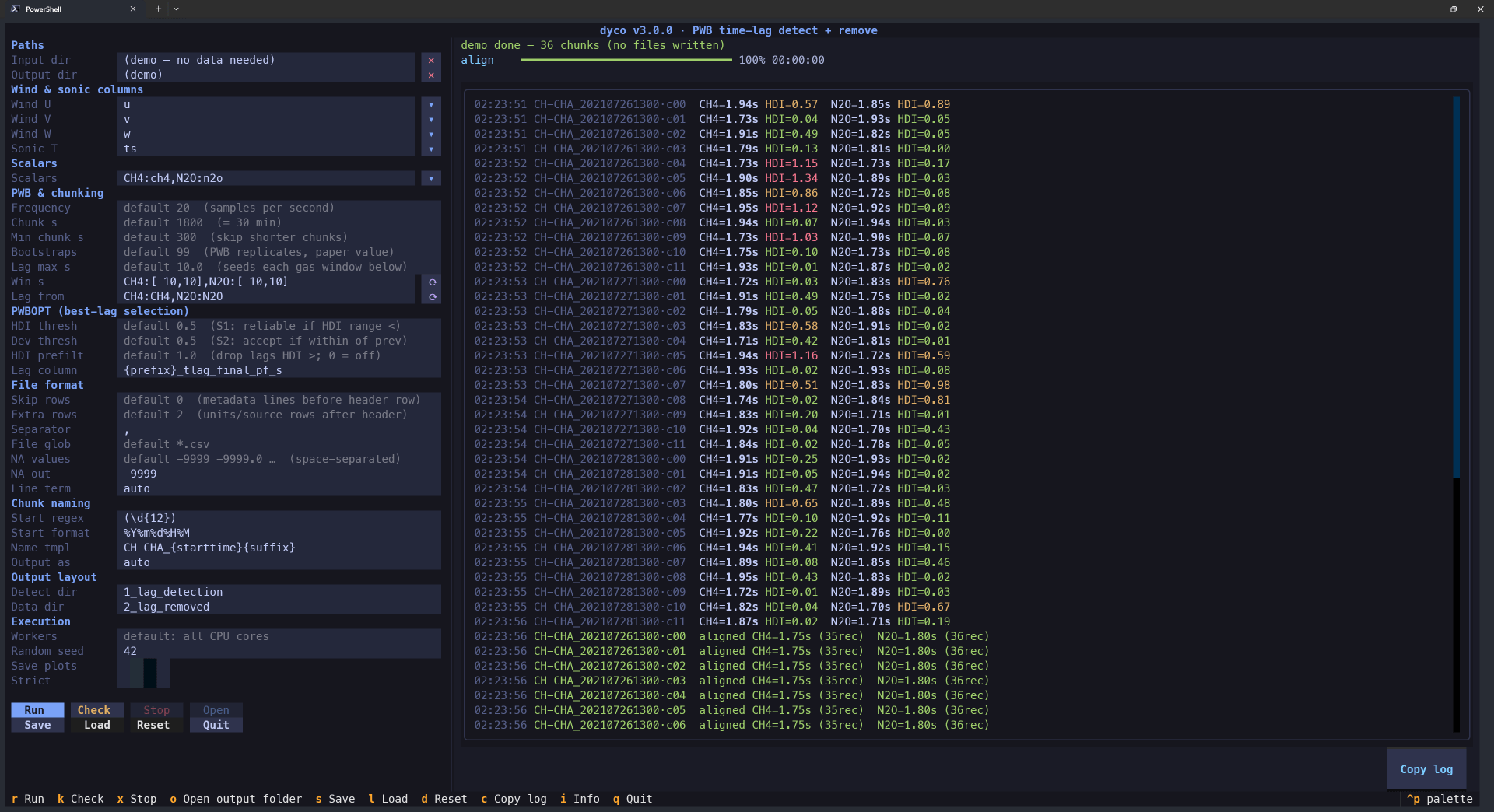 Settings on the left, the run on the right. This is
 dyco tui --demo, which needs no data.
This is the recommended way to run dyco. A detect-and-remove run takes on the order of thirty settings: column names, file format, chunk length, search windows per gas, PWBOPT thresholds. Getting one of them wrong is easy on a command line and obvious in a form. The TUI validates as you type, scans your first file so you can pick column names from a list instead of typing bracketed names by hand, and runs a preflight Check that reads a real file and reports what it found before anything is processed.
dyco tui --demo explores the interface with no data at all. More in
The terminal UI.
Everything is reachable through one command:
dyco                    # list the workflows
dyco <command> --help # options for one of them| Command | Does | When |
|---|---|---|
dyco tui |
detect-remove behind a form, with live validation and a preflight check. |
Start here. |
dyco detect-remove |
The main command. Split long raw files into averaging-period chunks, rotate, detect the lag per chunk, then remove it. One pass, one output folder. | Almost always. Scripting, or when you prefer a command line. |
dyco pwb-batch |
Detect only, on files that are already split into averaging periods. Writes tlag_results.csv and stops. |
Step 1 of the two-step route. |
dyco apply-batch |
Remove lags listed in an existing tlag_results.csv. Detects nothing. |
Step 2 of the two-step route. |
Each also exists standalone: dyco-detect-remove, dyco-detect-remove-tui, dyco-pwb-batch,
dyco-apply-batch.
A gas too noisy to locate its own lag can borrow one from a reference gas in the same tube, per
period, with --scalar "N2O:N2O_DRY_[QCL-C2]@lagfrom=CO2" — paired with --max-carry, which says
how long the gas's own lag stays good before borrowing is the better answer. See
Taking a gas's lag from another gas.
Every run explains itself: detect_and_remove_tlag_decisions.txt names the lag applied to each
output file and why it was chosen, and {gas}_lag_applied_s in the summary CSV is the lag that
actually reached the data.
Important: downstream flux processing must run with time-lag maximization disabled. The lag has already been removed.
A real 1-hour raw file from CH-LAE (Lägeren) ships with the repository, so the primary pipeline can be run without supplying data:
uv run python examples/detect_remove_tlag_realdata.pyThat detects and removes the tube delay for CO2 and H2O across two 30-minute
chunks, and prints what was detected against what was actually applied. Expect about a minute.
examples/detect_remove_tlag.py is the synthetic counterpart, where the lag is known in advance and
can be checked.
flowchart TD
    RAW["Raw EC file<br/>unrotated delimited text, plain or compressed<br/>--input-dir, --file-pattern"]
    RAW --> SPLIT["Cut into fixed-length chunks<br/>--chunk-seconds 1800<br/>boundaries snap to :00 / :30<br/>a remainder under --min-chunk-seconds writes nothing"]

    subgraph P1["Phase 1: detect (nothing is written yet)"]
        direction TB
        ROT["Double rotation<br/>in memory only, never reaches disk"]
        PW["Pre-whitening<br/>AR(p) filter, order chosen by AIC<br/>all three series differenced first if any fails the unit-root test"]
        BS["Block-bootstrap the CCF<br/>--n-bootstrap, --block-length<br/>4 combinations of W / T_SONIC"]
        EST["Lag for this chunk<br/>mode + 95% HDI<br/>a peak pinned to the window edge is a failure, not a lag"]
        ROT --> PW --> BS --> EST
    end

    SPLIT --> ROT

    EST --> PRE["Drop detections wider than --hdi-prefilter<br/>default 1 s, 0 disables<br/>stops S2 accepting a wide lag that merely sits close<br/>the unfiltered series is also computed and kept in the summary"]
    PRE --> OPT{"PWBOPT, per gas<br/>all chunks together, in time order"}
    OPT -->|"S1: HDI narrower than --hdi-thresh"| KEEP["trust the chunk's own lag"]
    OPT -->|"S2: close to the last trusted lag"| KEEP
    OPT -->|"S3: neither"| SUB["carry the last trusted lag forward<br/>--max-carry bounds how far"]

    KEEP --> GAP
    SUB --> GAP

    subgraph P3["Still no lag? fill the gap, best source first"]
        direction TB
        GAP{"any period still without a lag"}
        GAP -->|"its own trusted lag is within reach"| BFILL["fill backward from it<br/>--max-carry bounds this too"]
        GAP -->|"--scalar ...@lagfrom=CO2"| DONOR["take that period's lag from the other gas"]
        GAP -->|"nothing else left"| MED["median of this gas's raw detections<br/>(all of them rejected, a last resort)"]
    end

    BFILL --> APPLY
    DONOR --> APPLY
    MED --> APPLY

    subgraph P2["Phase 2: remove"]
        direction TB
        APPLY["Shift each scalar in the UNROTATED chunk<br/>by round(tlag * hz) records"]
        WRITE["Write one file per chunk<br/>header rows and column order intact<br/>--output-suffix picks .csv / .csv.gz / .zip"]
        APPLY --> WRITE
    end

    WRITE --> OUT["2_lag_removed/<br/>lag-compensated raw files<br/>-> flux software, lag maximization OFF"]
    EST -.-> CSV["1_lag_detection/<br/>summary CSV incl. {gas}_lag_source,<br/>checkpoints, plots if --save-plots"]
    WRITE -.-> LOG["log.txt<br/>what ran, and what it decided"]
Detection and removal are separate phases because PWBOPT cannot decide anything about one chunk until it has seen the whole sequence. The PWB method walks through each step.
Covariance maximization works for compounds with high signal-to-noise ratio such as CO2.
For N2O and CH4 the cross-covariance function is noisy, fluxes are biased toward
larger absolute values, and flux software falls back to a constant nominal lag that also fails when
the raw data contain systematic time shifts. dyco gives every detection an explicit uncertainty
interval, substitutes a trustworthy neighbouring lag where a period's own detection cannot be trusted,
and can carry a high-SNR reference gas's lag over to a low-SNR target in the same analyzer.
Motivation and background has the full argument, two real sites where it matters, and the references.
uv sync --extra docs
uv run sphinx-build -b html -W -j auto docs docs/_build/html
-W and -j auto are what Read the Docs runs. The command reference is generated from the
argparse parsers, so it cannot drift from --help.
Contributions of code, bug reports, comments and general feedback are welcome and credit is always given. See CONTRIBUTING.md, or the issue tracker.
For direct questions the maintainer can be reached by email with the title "dyco": holukas@ethz.ch
This work was supported by the Swiss National Science Foundation SNF (ICOS CH, grant nos. 20FI21_148992, 20FI20_173691) and the EU project Readiness of ICOS for Necessities of integrated Global Observations RINGO (grant no. 730944).
Cite the software by its Zenodo DOI,
10.5281/zenodo.4964067. That is the concept DOI: it
resolves to the latest version and is the one to use for all versions. Zenodo also mints a DOI for
each individual release, if the work depends on a particular one. CITATION.cff carries the full
metadata.
dyco was first published in 2021 and has kept developing since. The
JOSS paper describes v1.1.2, released for that
publication on 16 Jun 2021, and documents the covariance-maximization method — which v3 removed.
What the paper describes is not what this version does. See CHANGELOG.md, and
Migrating from v2.
