You signed in with another tab or window. Reload to refresh your session.You signed out in another tab or window. Reload to refresh your session.You switched accounts on another tab or window. Reload to refresh your session.Dismiss alert
Using the BRAT plugin: Add Beta Plugin → kh4f/flexplorer
Manually: downloadmanifest.json, main.js, styles.css into vault/.obsidian/plugins/flexplorer/
🕹️ Usage
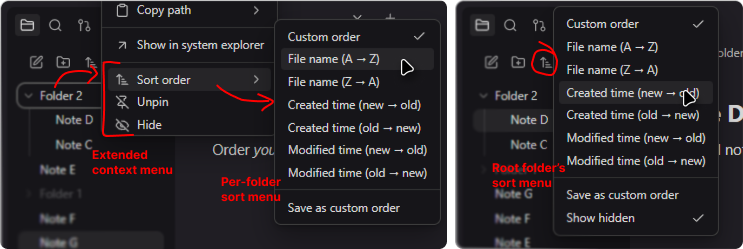
Per-folder sorting: for regular folders, select Sort order from the context menu. For the root folder, use the Change sort order button at the top of the file explorer.
Custom sorting: select Custom order for the folder, then drag and drop items to rearrange them. On touch devices, long-press an item first.
Pinning: select Pin / Unpin from an item's context menu.
Hiding: select Hide / Unhide from an item's context menu, or configure Hide patterns in the plugin settings. To reveal all hidden items, select Show hidden from the root folder's sort menu.