
Showcase Your Music Taste, Right on Your Profile.
The official Listune Discord Profile Widget. Display your real-time music statistics directly on your Discord profile card.


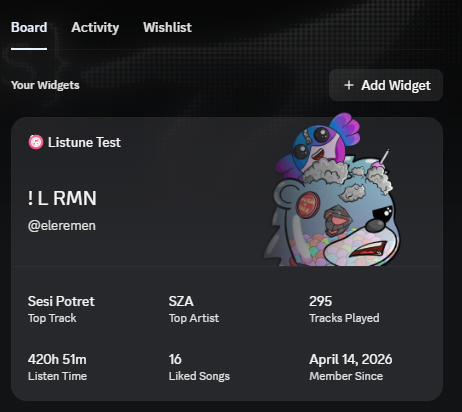
This project is a custom Discord profile widget integration specifically built for Listune. It essentially "hijacks" Discord's native User Application Profile (gaming) widget system to display beautiful Listune music statistics directly on a user's Discord profile card.
- Discord Slash Commands: Fully integrated slash commands for setup, refresh, status checks, and custom images (
/widget setup,/widget refresh,/widget status,/widget image,/widget scripts). - Listune API Integration: Safely fetches real-time music statistics from the main Listune API.
- Dynamic Widget Payload Builder: Maps Listune data (e.g., Top Track, Liked Songs) into Discord's expected gaming widget schema (
rank_name,total_games, etc.). - Rich Display Data: Shows the user's Display Name, Username, Custom/Discord Avatar, Top Track, Top Artist, Tracks Played, Listen Time, Liked Songs, and Top.gg Vote status.
- Lightweight JSON Storage: Uses a local JSON file to securely store Discord OAuth tokens and refresh metadata without needing a heavy SQL database.
- Unified Startup: Runs both the Discord bot client and the Express/HTTP web server on a single Node.js process using a combined command.
- Health Endpoint: Exposes HTTP endpoints for OAuth callbacks and health monitoring.
The entire flow bridges the gap between Discord's rigid UI and Listune's dynamic data:
- User runs
/widget setup: The bot responds with an OAuth Link Account button. - Account Linking: The user authorizes the application, and the internal HTTP server captures the Discord OAuth token.
- Data Fetching: The project calls the Listune API to retrieve the user's music stats.
- Payload Normalization: The stats are mapped into Discord's specific JSON schema structure.
- Widget Generation: The bot patches the user's Application Profile identity on Discord.
- Script Execution: The user runs
/widget scripts, copies the provided JavaScript snippet, and pastes it into their Discord browser console to officially "pin" the widget to their profile layout. - Subsequent Refreshes: The user can run
/widget refreshanytime to pull fresh data from the Listune API and update their profile card.
graph TD
    A[Discord User] -->|/widget setup| B(Profile Widget Bot)
    B -->|OAuth Link| C{HTTP Server}
    C -->|Fetch Stats| D[Listune API]
    D -->|Queries| E[(Listune DB)]
    D -.->|Returns JSON| C
    C -->|Builds Payload| B
    B -->|PATCH Identity| F[Discord Profile API]
    A -->|/widget scripts| G[Browser Console Script]
    G -->|Pins Widget| F
src/index.ts: The unified entry point. Initializes storage, starts the HTTP server, and starts the Discord bot.src/api/server.ts: The Express HTTP server handling the Discord OAuth callback and token refreshing.src/bot/index.ts: The Discord client setup and slash command registrar.src/bot/commands/widget.ts: The core slash command handlers (setup,refresh,scripts,image,status) and the payload builder logic.src/config/script.js: The raw JavaScript snippet that users must paste into their browser console to pin the widget.src/config/widget-layout.ts: Constants mapping Listune fields to Discord's internal gaming widget fields.src/database/store.ts: Read/write handlers for the localwidget-store.jsonfile.src/services/discord.service.ts: Handles Discord OAuth token exchanges and Application Profile patching.src/services/listune.service.ts: Handles fetching and normalizing user stats from the Listune API.data/widget-store.json: The persistent JSON database (created automatically).
This widget does not query the main database directly. It strictly acts as a consumer of the Listune API.
- The URL is defined via
LISTUNE_API_BASE_URL. - It authenticates with the Listune API using the
LISTUNE_API_SECRET. - If the user is missing stats, the service automatically implements safe fallbacks (e.g.,
"No data yet"or0) to prevent the widget from crashing or displaying undefined values.
The widget maps standard music stats into Discord's profile schema.
- Display Name & Username: Fetched from the Listune API.
- User Avatar: Uses a custom image set via
/widget image, the user's Discord avatar, or a fallback Listune logo. - Top Track: Only displays the #1 most played track.
- Top Artist: Only displays the #1 most played artist.
- Tracks Played: Total cumulative scrobbles.
- Listen Time: Displayed in rounded hours.
- Liked Songs: Total songs saved by the user.
- Member Since: Date of joining Listune.
Copy .env.example to .env and fill in the required credentials.
| Variable | Required | Description |
|---|---|---|
DISCORD_TOKEN |
Yes | The bot token from the Discord Developer Portal. |
DISCORD_CLIENT_ID |
Yes | The application Client ID. |
DISCORD_CLIENT_SECRET |
Yes | The application Client Secret (for OAuth). |
DISCORD_REDIRECT_URI |
Yes | OAuth callback (e.g., http://localhost:3000/oauth/discord/callback). |
DISCORD_API_BASE_URL |
Yes | Discord API URL (usually https://discord.com/api/v10). |
LISTUNE_API_BASE_URL |
Yes | Base URL of the deployed Listune API. |
LISTUNE_API_SECRET |
Yes | Must match ADMIN_SECRET in the Listune API project. |
WIDGET_BOT_AVATAR_URL |
No | Fallback avatar image URL. |
JSON_DB_PATH |
No | Path to the JSON database (defaults to ./data/widget-store.json). |
PORT |
Yes | Port for the HTTP server (e.g., 3000). |
AUTO_REFRESH_DAILY |
No | Set to true to auto-refresh all linked users every 24h. |
This project utilizes Node.js and standard NPM packages.
npm install- Create a
.envfile based on.env.example. - Fill in your Discord Developer credentials and the Listune API secret.
- Start the unified process (compiles TypeScript on the fly in dev mode):
npm run dev(This command will simultaneously spin up the HTTP web server on your designated PORT and log in the Discord bot).
Defined in package.json:
npm run start: Runs the compiled JavaScript fromdist/index.js.npm run dev: Runs the full project in development mode with hot-reloading (tsx watch).npm run dev:server: Runs only the HTTP server in development mode.npm run dev:bot: Runs only the Discord bot in development mode.npm run start:prod: Compiles the TypeScript project and starts it (npm run build && npm run start).npm run build: Compiles the TypeScript source into thedist/folder usingtsc.npm run typecheck: Validates TypeScript typings without emitting files.
The bot registers the following /widget slash subcommands:
/widget setup- Purpose: Initiates the account linking process.
- Result: Provides a button containing the personalized Discord OAuth URL.
/widget scripts- Purpose: Retrieves the manual installation script.
- Result: Provides a safe JavaScript snippet for the user's browser console.
/widget refresh- Purpose: Manually forces an update of the user's profile widget.
- Result: Pulls fresh data from the Listune API and pushes it to Discord.
/widget status- Purpose: Checks the current linking status and last refresh timestamp.
- Result: Displays an embed with connection health.
/widget image- Options:
url(String, Required) - Purpose: Overrides the default avatar image displayed on the widget.
- Result: Saves the custom image URL and triggers an immediate refresh.
- Options:
Caution
This script is intentionally designed to run locally. It does not transmit the user's token to our servers. However, because it relies on internal Discord Webpack structures, it is susceptible to breaking if Discord updates their web client architecture.
The project communicates strictly with the external Listune API to retrieve user statistics.
- Base URL:
LISTUNE_API_BASE_URL - Authentication: Requires
Authorization: Bearer <LISTUNE_API_SECRET> - Endpoints Used:
GET /v1/widget/users/:discordId(Compact stats)GET /v1/users/:discordId/stats(Full detailed stats)
Example Expected Response:
{
  "success": true,
  "data": {
    "userId": "123456789",
    "displayName": "Music Lover",
    "username": "musiclover99",
    "tracksPlayed": 14500,
    "listenTime": "450h 30m",
    "likedSongs": 120,
    "topTracks": [{ "name": "Blinding Lights" }],
    "topArtists": [{ "name": "The Weeknd" }]
  }
}