Playground (pg) runs a coding playground in your terminal -- an environment for quickly writing
and executing a program in any language. The program is opened in your editor and automatically
executed on save. The output is displayed in a separate tmux
pane, under or to the side of the editor.
demo.mov
Bug reports and feature requests are welcome. Please open an issue if you find something that does not work as expected, or if there is a feature you would like to see added.
For why I've built this, see the motivation section.
- Use whichever editor you like
- Templates define how the playground is set up:
- A template is just a directory with a
main.*andrun.shfile in main.*is opened in your editorrun.shis executed when you save- All other files are included in the playground
- A template is just a directory with a
- A number of built-in templates included or you can define your own
- Named playground sessions are persistent and can be resumed later
- Anonymous playground sessions are temporary but can be saved on exit
- Sessions are created in a configurable location
- Shell completion for bash, zsh, and fish
playground requires tmux, therefore only runs where tmux is supported.
The simplest way to install pg is run the installation script:
curl -fsSL https://raw.githubusercontent.com/marcuscaisey/playground/HEAD/scripts/install.sh \
    | sudo sh
This installs the latest version of pg, the pg man page, and the pg shell completion scripts.
To install a different version, pass the -v flag:
curl -fsSL https://raw.githubusercontent.com/marcuscaisey/playground/HEAD/scripts/install.sh \
    | sudo sh -s -- -v 1.2.3
By default, everything is installed under /usr/local. To install under a different directory, pass
the -d flag:
curl -fsSL https://raw.githubusercontent.com/marcuscaisey/playground/HEAD/scripts/install.sh \
    | sudo sh -s -- -d /opt/pg
See uninstallation for how to uninstall.
See https://github.com/marcuscaisey/playground/releases for the release tarballs.
To install the latest version, run:
go install github.com/marcuscaisey/playground/cmd/pg@latestTo install a specific version, run:
go install github.com/marcuscaisey/playground/cmd/pg@v1.2.3To install from the head of the main branch, run:
go install github.com/marcuscaisey/playground/cmd/pg@mainIf you installed pg using the installation script, you can uninstall it by
running:
curl -fsSL https://raw.githubusercontent.com/marcuscaisey/playground/HEAD/scripts/uninstall.sh \
    | sudo sh
If you installed pg to a non-default directory, pass the -d flag:
curl -fsSL https://raw.githubusercontent.com/marcuscaisey/playground/HEAD/scripts/uninstall.sh \
| sudo sh -s -- -d /opt/pgFor detailed documentation, open the man page by running:
man pgTo view the man page from the source repository, run:
man docs/pg.1To view the man page online, see the markdown man page.
I do pretty much everything in the terminal, usually in a tmux session. As I'm writing code, I find myself creating small programs under ~/scratch. Either to explore some aspect of a module/package/API/whatever or, at work, as a teaching tool to help explain a concept to a teammate.
At a past job, we used the please build system which meant that to play around with internal code, I needed to create a program in a special "experimental" directory in the repo and create a build file to build the program. This was not terribly onerous, but I did it frequently enough that I created an internal tool go-playground which set up a Go (our main language) program in the experimental directory and removed it on exit. To execute the program, I used my Neovim plugin please.nvim which executes the program in a popup inside Neovim. The combination of go-playground and please.nvim proved quite effective.
At some point, I stumbled upon hsandbox. From the introduction:
The Hacking Sandbox, or hsandbox for short, is a tool to facilitate experimentation with snippets of code written in any of several different programming langauges. When hsandbox is executed, your favorite text editor will be run with a template for the given language. You just have to input the logic you intend to experiment with and write down the sandbox file, and the file will be automatically run and its output exposed next to the code itself, in a different screen region.
And a screenshot:
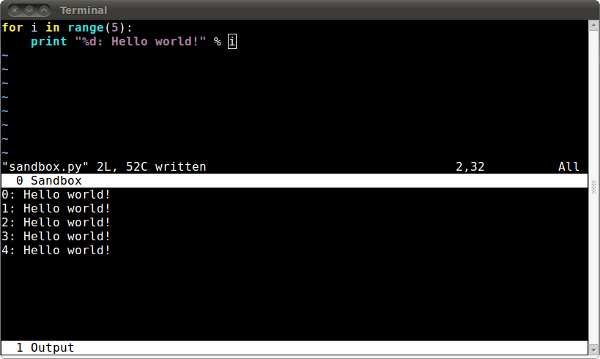
After seeing this, I thought to myself: "this is what I'm actually looking for". So I downloaded it.
I tweaked the shebang to get it to run (it's a Python 2 script) and found that it would crash after I saved the program for the second time. As it turns out, the fix was easy (https://github.com/niemeyer/hsandbox/pull/15/changes). However, I found there were various other behaviours I didn't like:
- The available languages are hardcoded into the program -- I don't want to modify the program to add a new language.
- Each language can only have a single template -- I want different templates for the same language for different use cases. For example "regular go program" and "go program built with please".
- Templates only contain a single file -- I want as many files as I need in the template. For example a template might require a build file or a package.json or whatever.
- Only the last sandbox can be resumed -- I want to resume any previous sandbox that I thought was worth saving.
- Sandboxes are always created under ~/.hsandbox -- I sometimes want to run the sandbox from another directory. For example when using code from an internal repo.
- It always starts a new tmux session, even if you're already in one -- nested tmux sessions can be awkward to interact with.
I realised that though the model of "editor in one tmux pane and output in another" is definitely what I was looking for, a lot of the other behaviours were not. So I wrote my own thing instead!
playground is licensed under the terms of the GNU General Public License v3. See the license file for more details.
Third-party licenses and copyright notices can be found in the LICENSES directory.