
This plugin sends a WordPress site's PHP errors, JavaScript errors, failed logins and scanner probes to ovos codesafe, which ranks what broke, proposes the fix, and reads the attacks on your site as a map of your weak spots. You get your own codesafe instance — run for you by ovos, or set up on your own infrastructure for larger organisations. The plugin is the client, and it is free — GPL-2.0, no telemetry of its own. Talk to us about getting an instance, or try the live demo first.
Roughly half of what a public WordPress site reports is not a bug — it is scanners looking for a way in. codesafe counts those apart from real errors, folds them into attack waves, matches your installed plugins against the vulnerability feeds so "vulnerable and being probed" is something you see rather than guess, and, for a CVE with no patch out yet, lets this plugin shield the site against the exploit's request shape until the update lands.
- Requirements · Quick start · Recommended settings · APCu
- Settings reference · What leaves the site · Updates · Troubleshooting
- What codesafe does with it · Advanced · For developers · Talk to us
- The long version of every feature: docs/FEATURES.md
- WordPress 6.0+ and PHP 8.3+ — the
Requires PHPheader keeps older hosts from activating it. - An ovos codesafe instance reachable from this site (HTTPS). One instance serves all your sites and services.
- APCu — optional, but worth having. Traffic rollups need it; nothing else does. See APCu.
-
Install. Download
ovos-console.zipand upload it under Plugins → Add New Plugin → Upload Plugin, or:wp plugin install https://github.com/ovos/console-client-wordpress/releases/latest/download/ovos-console.zip --activate
The plugin is not on wordpress.org; it updates itself from this repository afterwards (Updates).
-
Create the project in codesafe. On the PROJECTS tab, add a project for this site and note its secret api_key and public js_key. For browser errors, switch JS errors on for the project and allowlist this site's exact origin (
https://www.example.com). -
Connect. In wp-admin go to Settings → ovos codesafe: enter the instance URL in Console URL, the two keys, tick Enabled, save.
-
Test. Click Send test error. The page reports codesafe's answer, and the error is in the grid within a second.
-
Turn on the switches below — every one is off until you say so.
Prefer code? Each setting has a wp-config.php constant that wins over the page and locks the field:
wp config set OVOS_CONSOLE_ENABLED true --raw
wp config set OVOS_CONSOLE_URL https://codesafe.example
wp config set OVOS_CONSOLE_API_KEY 'the project api_key'
wp config set OVOS_CONSOLE_JS_KEY 'the project js_key'

Turn on everywhere. None of these blocks anything or changes the site; each says exactly what it sends.
| Setting | Set it to | Why |
|---|---|---|
| Enabled | on | the master switch |
| Log level | 4 — warning (the default) |
warnings and worse; 3 — error for a noisy legacy site, 5 — notice when you want more |
| Report 404s | on | scanner and broken-link traffic, counted apart from errors and never turned into issues — this is the probe signal |
| Security events | on | failed logins, the login that succeeded after failures, rejected nonces, forbidden REST calls, sensitive admin changes — usernames masked, 60 per minute at most |
| Software inventory | on, and the project's CVE switch in codesafe | your plugin and theme versions against the vulnerability feeds; "vulnerable and being probed" needs this |
| Exploit detection | on | pulls the exploit rules for the CVEs you run and reports matches; blocks nothing |
| Integrity scan | on, weekly | a read-only walk for files nobody shipped and the site's hardening posture; press Scan now once right after installing |
| Report JavaScript errors | on, with the JS key | window errors, unhandled rejections, failed fetch/XHR calls from the browser |
| Trace correlation | on (the default) | a failed browser request and the PHP error behind it share one trace id; off only if a firewall rejects the extra header |
| Request body | structure (the default) |
the failing request's body, parsed and cleaned of credentials, so codesafe can replay it |
Turn on when it applies.
| Setting | When | Why |
|---|---|---|
| Traffic rollups | when the APCu line says available — and tick Traffic rollups on the project in codesafe | error and probe counts become rates against real traffic, and the PERFORMANCE panel gets its response-time trends |
| Auto-update probed vulnerable plugins | on sites that let WordPress update plugins anyway | a plugin that is vulnerable and probed gets WordPress' own auto-update switched on — the one virtual patch WordPress supports natively; sites with a release pipeline update through it instead |
| Block detected exploits | after a week of detection, once codesafe shows what the rules matched — and the project's blocking switch in codesafe | 403 on a request matching a rule a person marked PROVEN; observe rules never block, unticking acts on the next request, and codesafe alarms if a rule starts refusing real visitors (the Shield) |
| Release label | when you deploy with a version or a commit | every report carries it, and codesafe compares a release against the one before |
| Environment | on staging and test sites | staging shows as a badge beside the project name; blank sends WordPress' own WP_ENVIRONMENT_TYPE |
| Tags | when one instance serves many tenants or regions | one filter per tag in codesafe |
| DOM snapshot | when you want to see the page a browser error happened on | a masked snapshot (inputs and scripts stripped) with the first error per page load |
Leave off unless you know why: Inline styles into snapshots (bigger uploads), Also load in wp-admin (noisier, admin-side JavaScript errors), and the Shield's OVOS_CONSOLE_SHIELD_KILL constant, which is for a host that must never call home.
Some switches have a second half in codesafe, on the project: the rollups switch, the CVE switch, the Auto-update switch, the JS origins allowlist and, for blocking, the project's own blocking switch. Either half off keeps the feature inert, so the order you enable them in does not matter.
APCu is PHP's shared memory between requests. On this page it matters for one switch:
- Traffic rollups need it. The per-minute counters accumulate in APCu and one request per minute ships them. Without APCu the switch collects nothing and sends nothing — deliberately silent, because a host without shared memory could only produce wrong numbers. The Shield's per-rule hit counters ride the same memory, so they are missing too.
- Everything else works without it. Errors, security events, the inventory, the integrity scan and the Shield's matching itself — the Shield keeps its rules in
wp-content/ovos-console/shield.jsonwhen there is no APCu.
How to tell: the settings page says so on the APCu line right above Traffic rollups — available or NOT available on this server's PHP. Ask your host to enable the apcu extension for the web server's PHP (mod_php or PHP-FPM); on your own server that is apt install php-apcu or the equivalent, then a restart of PHP. The command line's php -m does not count: CLI PHP usually has APCu off even when the web server has it on.
Every value lives under Settings → ovos codesafe, or as a constant in wp-config.php — a defined constant wins and locks the field.
| Setting | Constant | Default | |
|---|---|---|---|
| Enabled | OVOS_CONSOLE_ENABLED |
false |
master switch for PHP and browser reporting |
| Console URL | OVOS_CONSOLE_URL |
— | the codesafe instance's base URL, e.g. https://codesafe.example |
| API key | OVOS_CONSOLE_API_KEY |
— | the project's secret api_key (PHP errors) |
| Log level | OVOS_CONSOLE_LOG_LEVEL |
4 |
send errors with syslog priority ≤ this (0 emergency … 7 debug) |
| Report 404s | OVOS_CONSOLE_REPORT_404 |
false |
front-end not-found requests as access events — rate-limited, static assets ignored, never issues |
| Traffic rollups | OVOS_CONSOLE_ROLLUPS |
false |
anonymous per-minute request counters and duration histograms; needs APCu and the project's rollups switch |
| Security events | OVOS_CONSOLE_SECURITY_EVENTS |
false |
refused actions and sensitive admin changes as security events; 60/min at most |
| Software inventory | OVOS_CONSOLE_INVENTORY |
false |
installed plugin/theme/core versions, daily and on change; needs the project's CVE switch |
| Auto-update probed vulnerable plugins | OVOS_CONSOLE_AUTO_UPDATE_VULNERABLE |
false |
WordPress' own auto-update, switched on for a plugin that is vulnerable and probed; needs the inventory and the project's Auto-update switch |
| Exploit detection | OVOS_CONSOLE_SHIELD_DETECT |
false |
pull this site's exploit rules every five minutes and match every request before WordPress runs; matches are reported, nothing is blocked; fails open |
| Block detected exploits | OVOS_CONSOLE_SHIELD_ENFORCE |
false |
403 on a request a PROVEN rule matches; inert without detection; read per request |
| — | OVOS_CONSOLE_SHIELD_KILL |
false |
constant only: the whole Shield off, no network |
| Integrity scan | OVOS_CONSOLE_SCAN |
false |
the background read-only walk for files nobody shipped; Scan now works without it |
| Scan interval | OVOS_CONSOLE_SCAN_INTERVAL |
7 |
days between background passes (1 or 7) |
| Release label | OVOS_CONSOLE_RELEASE |
— | deploy label on every report, announced to codesafe once when it changes |
| Environment | OVOS_CONSOLE_ENVIRONMENT |
— | deployment stage; blank sends WP_ENVIRONMENT_TYPE |
| Tags | OVOS_CONSOLE_TAGS |
— | comma list on every report (shop, eu, tenant:acme); lowercase, up to ten |
| Report JS errors | OVOS_CONSOLE_JS_ENABLED |
true |
loads the bundled browser client on the front end |
| JS key | OVOS_CONSOLE_JS_KEY |
— | the project's public js_key (browser errors) |
| Trace correlation | OVOS_CONSOLE_JS_TRACE |
true |
W3C traceparent header on the page's same-origin fetch/XHR calls |
| Request body | OVOS_CONSOLE_REQUEST_BODY |
structure |
off — none; structure — parsed, credentials dropped, 8 KB; full — the raw body, 16 KB |
| DOM snapshot | OVOS_CONSOLE_SNAPSHOT |
false |
masked DOM snapshot with the first error per page load |
| Inline snapshot styles | OVOS_CONSOLE_SNAPSHOT_STYLES |
false |
embed the page's CSS so snapshots render styled |
| Load in wp-admin | OVOS_CONSOLE_JS_ADMIN |
false |
also report browser errors from wp-admin and the login page |
Example wp-config.php block:
define('OVOS_CONSOLE_ENABLED', true);
define('OVOS_CONSOLE_URL', 'https://codesafe.example');
define('OVOS_CONSOLE_API_KEY', '...');
define('OVOS_CONSOLE_JS_KEY', '...');
define('OVOS_CONSOLE_RELEASE', '2026.09.24');
define('OVOS_CONSOLE_ENVIRONMENT', 'production');Every report is reduced in the plugin before it is sent; codesafe redacts again on its side as a backstop.
- Errors travel with their request context: the URL, method, headers and variables, the logged-in user id, WordPress version, active theme, and which plugin or theme the failing file belongs to. Credentials are dropped by field name wherever they stand — passwords in every spelling, tokens, keys, cookies, authorization headers and CSRF nonces — usernames are masked to every fourth character and e-mail addresses keep only their domain. The request body is parsed and cleaned the same way (
structure), or not sent at all (off). - Security events carry the refused action's kind, the masked username or the option's name, never a value.
- Traffic rollups are counts under names WordPress defines — never a URL, an address, a user agent or a cookie.
- The inventory is the list of what is installed with versions — never paths, options or user data.
- The integrity scan sends paths, sizes and dates — never a file's content — and changes nothing on the site.
- The Shield sends the matched fragment of a flagged request, capped at 200 bytes, and reads the request body only while a body rule is live.
- Browser reports strip input values and scripts from a DOM snapshot before upload.
The full account, per feature, is in docs/FEATURES.md.
The plugin updates itself from this repository through WordPress' own update flow: new versions appear under Dashboard → Updates and install like any directory plugin, one click or unattended (Enable auto-updates on the Plugins screen, or wp plugin auto-updates enable ovos-console). Every release is signed, and the plugin verifies the signature before WordPress installs a byte; a package that does not verify is refused, a release without a signature is not offered. Details, and how to pin a version, in docs/FEATURES.md.
- "Console unreachable — check the URL." The site could not reach the instance: a typo in the URL, a firewall between the host and codesafe, or a self-signed certificate — see Advanced for the TLS switch.
- "Console rejected the key." The API key is not the project's api_key, or belongs to another project. Copy it again from the project in codesafe.
- Browser errors do not arrive. Report JavaScript errors on, the JS key set, JS errors switched on for the project, and this site's exact origin (
https://www.example.com, no path) in the project's JS origins. - Traffic rollups show nothing. The APCu line above the switch says NOT available, or the project's rollups switch in codesafe is off. Cached pages served before WordPress boots are never counted, by design.
- No CVE findings. The inventory needs the project's CVE switch in codesafe; the first report goes out at the next request after saving, and the matching runs nightly.
- Shield status says "no ruleset yet". The first request after saving pulls it; "off — …" names which switch is missing. A rule exists only while codesafe has an open CVE finding for this site, so an empty ruleset on a fully updated site is the normal state.
- A blocking rule refuses a real visitor. Untick Block detected exploits — it acts on the very next request — and demote the rule in codesafe; the INBOX will already carry its alarm.
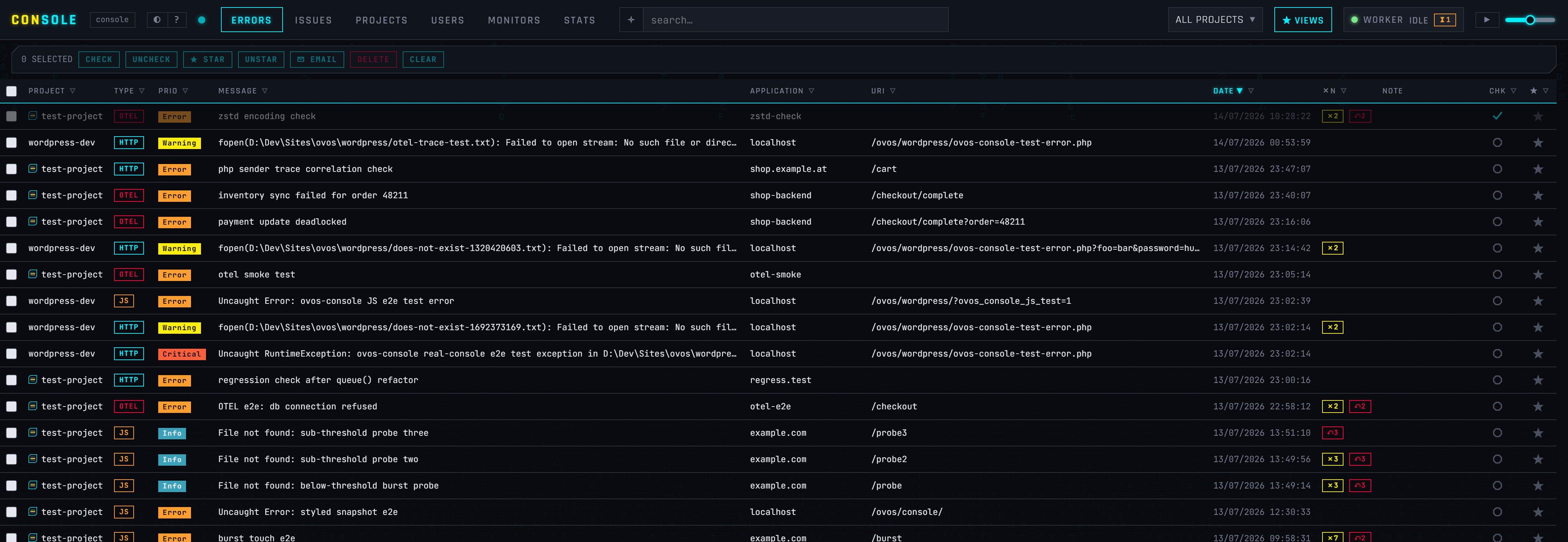
Try the live demo → — a public instance filled with synthetic errors, no login. One codesafe for everything you run:
- Issues, not noise — the same error a thousand times is one row with a count and an open → resolved → regressed lifecycle; a failed browser request and the PHP error behind it share one trace id.
- The INBOX — one list of what needs a person now, across issues, attack campaigns, probed CVE findings, files nobody shipped, late monitors, releases and the Shield's alarms, most urgent first, each with its one ready action.
- Security — probes folded into waves and cross-site campaigns, an address reputation, a blocklist export for your edge, CVE findings with a PROBED count, and the Shield's rules — drafted from the CVE's fix, published to the sites that carry the finding, promoted to blocking only by a person.
- Releases and performance — a release compared against the one before it; response-time trends from the rollups.
- Alerting — throttled mail and chat per project; policies that notify, ticket or assign by themselves.
- Ask your AI — point Claude or any MCP client at codesafe, or hit
◇ AI EXPLAINon a row for a root-cause read.
Your own instance, not a shared tenancy — run for you by ovos in Vienna, or on your own infrastructure when the data has to stay there. More on the product page.
A self-signed certificate on the instance (intranet setups) — TLS verification of the ingest call is on by default; disable it from an mu-plugin or your theme:
add_filter('ovos_console_sslverify', '__return_false');The integrity scan's checksum lists come from wordpress.org over TLS; behind a proxy that re-signs traffic, that verification has its own switch: add_filter('ovos_console_sslverify_wporg', '__return_false');
Manual captures from theme or plugin code — safe to call unconditionally, no-ops while the plugin is disabled:
ovos_console()->captureException($e, ['orderId' => 7]);
ovos_console()->captureMessage('checkout step skipped', 4); // priority 4 = warning
Pinning or rolling back to one version, for a fleet:
wp plugin install https://github.com/ovos/console-client-wordpress/releases/download/v0.6.6/ovos-console.zip --forceFrom git — clone into wp-content/plugins/ovos-console (the directory name matters), activate, update with git pull, and leave auto-updates off for that copy: an update from wp-admin replaces the whole directory with the release zip.
- The repository root is the plugin directory — junction or symlink it into
wp-content/plugins/ovos-console. assets/console-client.jsis a byte-identical copy of codesafe's browser client (intentionally ES5), andsrc/Shield/Kernel.phpof its request-side kernel; both are synced from the console repository, never edited here.php tests/shield.php ../console/client-php/Shield.phpchecks the kernel copy and smokes a judge without WordPress.tests/holds the plugin's own checks, run by hand and kept out of the release zip: the updater, the Shield harness, andtests/sanitizer.php, which drives a WooCommerce checkout through the plugin's real request path so no password, e-mail, cookie or nonce leaves the site raw.- The product is codesafe; the identifiers stay: the
ovos-consoleslug and directory, the text domain, theOVOS_CONSOLE_*constants, theovos_console_*filters and theovos-console.zipasset every install URL and updater knows. - Releasing:
docs/RELEASE.md— the four version spots, the changelog, onev*tag; the workflow verifies, builds, signs and publishes.
codesafe is built and run by ovos in Vienna. We use it on our own client sites every day, which is why it is shaped the way it is.
- Questions about the plugin, or a bug in it — open an issue.
- Want codesafe for your sites? Write to office@ovos.at. You get your own instance: we run it for you, or for larger organisations we set one up on your own infrastructure. Happy to just answer whether it fits what you have.
- Try it first — the live demo needs no login.
This plugin is GPL-2.0-or-later and always will be — it is a WordPress plugin and a client, and you can read, fork and audit every line of what runs on your site.
The ovos codesafe it talks to is a commercial product — your own instance, run for you by ovos or set up on your infrastructure. It is not covered by this licence.