
Catch what slips past group-based enumeration, move it. 🐾




- TL;DR
- Why MovementHound?
- How it works
- Techniques & modules
- Requirements
- Installation
- Usage
- Extending BloodHound
- Output
- Roadmap
- Detection & defensive notes
- Credits & acknowledgements
- Disclaimer
- License
MovementHound is a PowerShell tool that performs active enumeration of lateral movement capabilities on Windows, based on the effective rights a principal actually holds not on the group it happens to belong to.
Most tooling decides "can this user move here?" by checking group membership (Administrators, Remote Management Users, Distributed COM Users, …). That is fast, quiet and unreliable in any environment where DACLs and security descriptors have drifted from the defaults (which, in the real world, is most of them). MovementHound trades stealth for reliable, unambiguous results: it probes the target the way an operator would, surfaces the access you really have, and can feed the result straight back into BloodHound Legacy as new edges.
One script, one consistent output, every overlooked path in one pass.
Group membership is a poor proxy for what a principal can do. Windows bases almost all of its access control on DACLs and security descriptors, and those get rewritten constantly by administrators papering over "how does a non-admin start a service?", and by third-party installers silently loosening descriptors so their service accounts work.
That gap is inherent to any enumeration approach that infers access from group membership rather than probing it directly, for example:
- A custom per-AppID launch/activation ACE grants DCOM execution without Distributed COM Users membership.
- An Execute (Invoke) ACE on the PowerShell endpoint SDDL grants PSRemoting without Remote Management Users membership.
- On modern systems, enumerating remote group membership itself requires local admin on the target, so group-based checks go blind precisely on the machines where you don't already have admin, which are the interesting ones.
If you have valid credentials for a user that isn't in the Administrators group, or you lack readable/writable shares, it is always worth investigating further. MovementHound is what does the investigating.
A second reason this matters: many of these minimal rights primitives double as persistence. During an assessment of a previously breached environment, MovementHound helps you verify whether such low privilege footholds were left behind.
Naming note: switching to
PersistenceHoundwas on the table, but the primary use during assessments is still lateral movement, so the name stays.
A final reason is that several tools rely on different techniques. During an engagement, having an all‑in‑one script that handles all of this can be convenient, so you don’t risk forgetting one.
Reliability over OPSEC by design.
MovementHound was built for controlled environments and authorized assessments, where sacrificing stealth to get a definitive answer is not only acceptable but often the whole point. Rather than inferring access from group membership, it attempts the operation (or the exact handle/access-mask request that the operation needs) and reports what actually succeeds.
A few design consequences worth knowing up front:
- It is active and therefore noisy. It opens handles, touches named pipes over SMB, and probes endpoints. This is intentional. (An OPSEC-leaning mode is on the roadmap.)
- It runs modules in parallel to keep runtimes sane, but reliability still costs time. Expect total runtime to scale primarily with the number of hosts in scope, leave it running.
- It requests the minimum access mask each technique needs, not
*_ALL_ACCESS. That is what lets it see paths that admin-centric checks (which probe forSC_MANAGER_ALL_ACCESS,0xF003F, and friends) report as "no access".
MovementHound consolidates a set of standalone scripts (Find-SCMAccess, Find-DCOMLocalAdminAccess, and others) into a single unified collector. The table below lists what it enumerates, with the effective rights each path really needs, the part that admin/group checks miss.
| Module | Technique | Effective rights it checks for (the part you'd miss) |
|---|---|---|
| SCM Create | Remote service creation, bypassing the OpenService call |
SCM 0x0003 = SC_MANAGER_CREATE_SERVICE + SC_MANAGER_CONNECT |
| SCM Reconfig ⭐ | Service reconfiguration (ChangeServiceConfig) |
SCM 0x0001 (SC_MANAGER_CONNECT) + service 0x0002 (SERVICE_CHANGE_CONFIG) |
| WMIMAN ⭐ | WMI over WSMAN | Remote Management Users group membership and WBEM_REMOTE_ENABLE(0X20) |
| WMI | WMI over DCOM | COM_RIGHTS_EXECUTE, _EXECUTE_REMOTE (0x5) and WBEM_REMOTE_ENABLE(0X20) |
| DCOM | DCOM exec via MMC20, ShellWindows, ShellBrowserWindow, Excel |
Per-AppID Launch/Activation ACEs, not just Distributed COM Users |
| WinRM / WinRS | PSRemoting (Microsoft.PowerShell SDDL) and WinRS (RootSDDL) |
Execute (Invoke) on the endpoint SDDL / service RootSDDL , checked separately, because one can work when the other doesn't |
| Remote Registry ⭐ | winreg + AllowedPaths, plus service / Task Scheduler (GhostTask) / Autorun / COM-Hijack / Network-provider keys |
SetValue / CreateSubKey (also via WriteOwner/WriteDAC) on the target key (+ winreg ACL or an AllowedPaths exemption) |
| RDP [beta] | CanRDP (interactive logon) |
Remote Desktop Users and SeRemoteInteractiveLogonRight, evaluated as effective, including Remote Credential Guard |
| RDP Shadow [beta] ⭐ | Session shadowing (mstsc /shadow) |
RDP-Tcp / console 0x00011 = WINSTATION_QUERY + WINSTATION_SHADOW (full control not required) |
| SSH | OpenSSH, with Plink fallback (incl. GSS-API) |
valid creds + AllowUsers / AllowGroups / DenyUsers / DenyGroups evaluation |
| URA [soon] | User Right Assignment abuse | abusable rights (e.g. paths to SYSTEM) read from GptTmpl.inf in SYSVOL, enumerable from any low priv domain account |
⭐ = frequently overlooked during assessments. Common/well-known techniques are also covered even where they aren't starred. For the protocol-level detail behind each one, read the series.
- Windows host to run from (operator box or beachhead).
- PowerShell 5.1 or PowerShell 7+.
- Valid domain credentials/sessions (the whole point is that they need not be admin).
- Line of sight to the targets over the relevant transports (SMB/445, RPC/135 + ephemeral, WinRM/5985-5986, RDP/3389, SSH/22, …) depending on the modules you run.
# 1) Grab the script
git clone https://github.com/pol4ir/MovementHound.git
cd MovementHound

# 2) Allow it to run for this session (adjust to your policy)
Set-ExecutionPolicy -Scope Process -ExecutionPolicy Bypass -Force

# 3) Dot-source it
. .\MovementHound.ps1IEX (New-Object Net.WebClient).DownloadString('https://raw.githubusercontent.com/pol4ir/MovementHound/main/MovementHound.ps1')Install-Script -Name MovementHound
. (Get-Command MovementHound).Source
# Enumerate access across the domain using all techniques
Invoke-MovementHound

# Same, but also emit BloodHound Legacy edges
Invoke-MovementHound -bloodhoundPick a method with -p and let it run:
# Enumerate SSH access across the domain
Invoke-MovementHound -p "ssh,wmi"

# Same, but also emit BloodHound Legacy edges
Invoke-MovementHound -p "ssh,wmi" -bloodhound
-p selects the technique to probe: service creation (SCM) and reconfiguration, DCOM, WinRM/WinRS, WMI / WMIMAN, Remote Registry, RDP, SSH, and more. Targets are discovered from the domain by default.
A typical run looks like this:
PS C:\tmp> Invoke-MovementHound -p wsman -bloodhound
[BH] Attacker node : WINRMC5@MINI.LAB (S-1-5-21-806080553-794624409-3422704536-2609)
[+] dc.mini.lab - Local Admin access via WinRM/WSMAN
[BH] Building BloodHound Legacy output...
[BH] ZIP saved : C:\tmp\MovementHound_BH_20260623_084015.zip
[BH] Edges     : 1  Computers: 1
[BH] Edge map  :
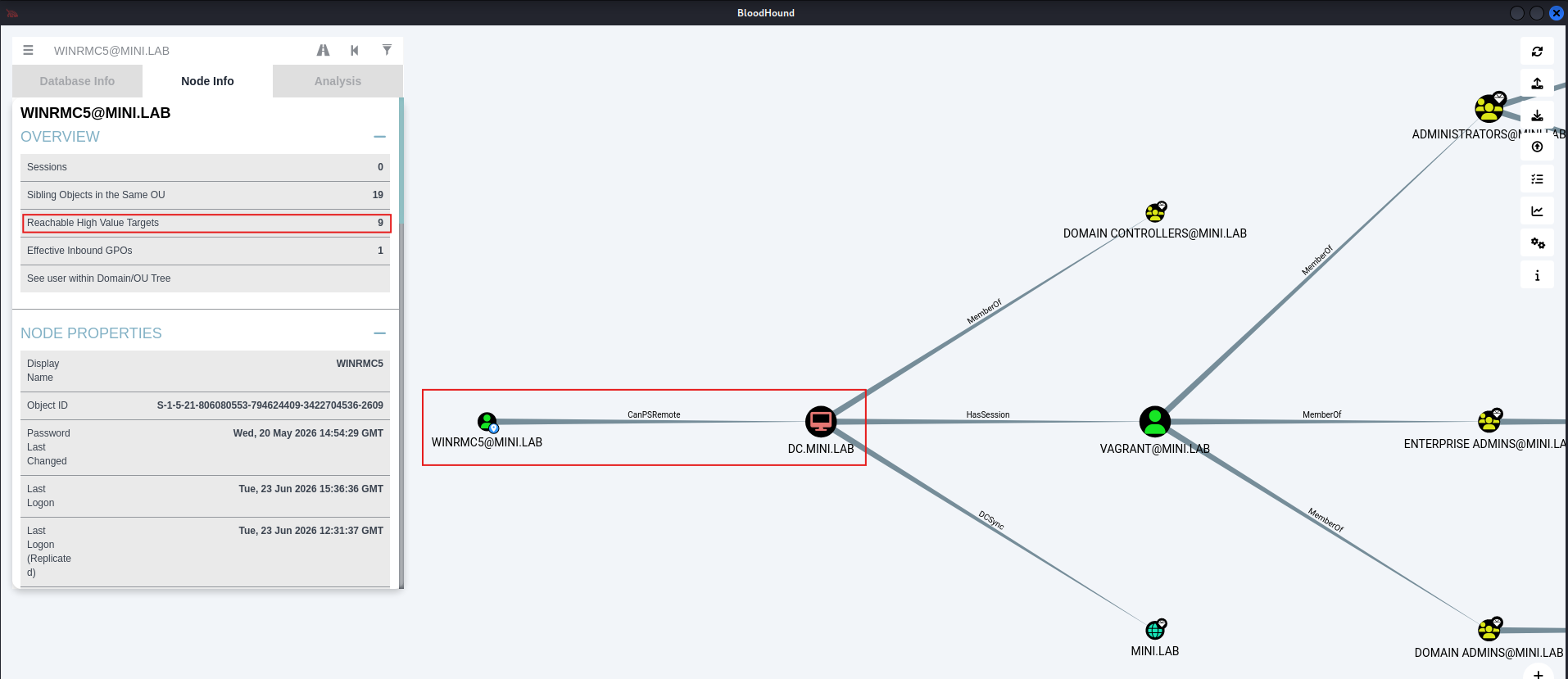
        WINRMC5@MINI.LAB --[CanPSRemote (WinRM/CIM)]--> dc.mini.lab
[BH] Drag-and-drop the ZIP into BloodHound Legacy to import.
The -bloodhound switch turns MovementHound into a collector for BloodHound Legacy, extending the graph with the effective access edges it discovers. It writes a timestamped ZIP (e.g. MovementHound_BH_20260623_084015.zip) that you drag and drop into BloodHound Legacy to import.
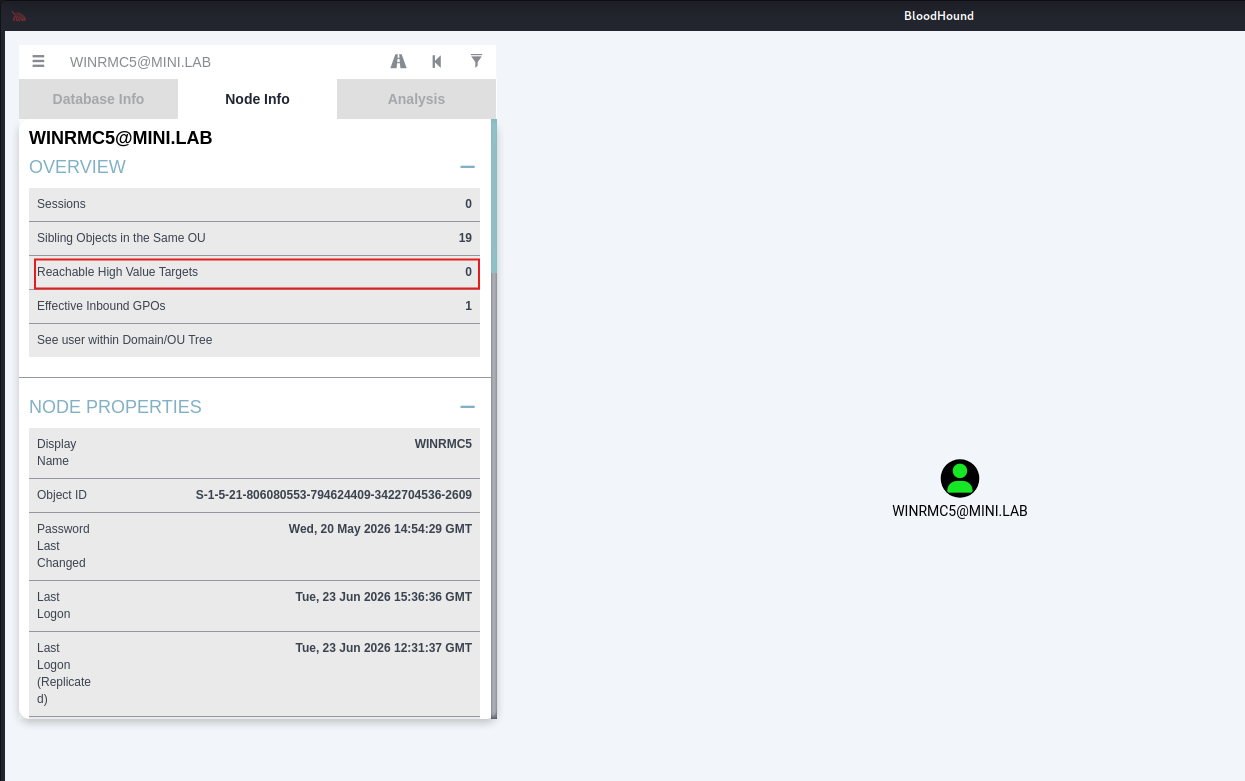
The point is the before / after. For example:
| BloodHound (group-based) | BloodHound + MovementHound | |
|---|---|---|
User not in Remote Management Users, but granted Execute (Invoke) on the endpoint SDDL |
❌ no CanPSRemote edge |
✅ CanPSRemote edge appears |
User with a custom per-AppID DCOM ACE, not in Distributed COM Users |
❌ no ExecuteDCOM edge |
✅ edge surfaced |
| Target where you aren't local admin | ❌ CanRDP invisible (remote group enum needs admin) |
✅ access determined by probing, not membership |

- Human-readable console output (
[+]for hits) for live triage. - A BloodHound Legacy ZIP when
-bloodhoundis set, ready for drag-and-drop import.
In no particular order:
- Python implementation (to leverage Impacket and friends) with Unix-like compatibility.
- OPSEC mode, skip active enumeration where possible, prefer RPC over TCP/IP instead of named pipes over SMB.
- Session 0 support for RDP and RDP shadowing via raw network protocols.
- More registry-based techniques (sticky keys, RDP-shadowing keys,
LocalServer32, …). - Performance e.g. use
winregstatus checks to skip unnecessary Remote Registry scans. - Legacy support,
shadow.exefor RDP shadowing on older systems. - Accurate RDP detection, distinguish authentication success (NLA/CredSSP OK) from real authorization (an actual interactive session).
- Credential support via parameters.
PRs welcome, this opened up to the community precisely so it can grow. I'm happy to integrate new techniques rather than reinvent wheels.
The same checks that surface lateral movement paths for red teams give blue and purple teams a concrete list of misconfigurations to close and detections to validate. The examples below are just a starting point.
Things to hunt for
- Service creation / change: Event ID 7045 (service installed) and 7036 (state change); System log and Service Control Manager events.
- Named-pipe access over SMB to
\pipe\svcctl,\pipe\winregand more. - WinRM/WSMAN sessions spawning
wsmprovhost.exe; WMI activity underwmiprvse.exe; scheduled-task hosttaskhostw.exe. - RDP-shadowing artifacts:
RdpSa.exeinbound on dynamic ports,mstsc /shadowusage.
Things to fix (the root cause)
- Audit the SCM security descriptor and individual service DACLs for over permissive ACEs granting non-admins create/reconfigure/start. Remember the Win10 1709 / Server 2016 1709 policy that blocks non-admin SCM callers, verify it's effective (registry exemptions can quietly disable it).
- Review the
winregkey ACL and theAllowedPaths\Machineexemption list underSecurePipeServers. - Tighten the WinRM RootSDDL and the
Microsoft.PowerShellendpoint SDDL. - Audit per-AppID DCOM launch/activation permissions.
- Audit WinStation descriptors (
RDP-Tcp,ConsoleSecurity,DefaultSecurity) for strayWINSTATION_SHADOW. - Review User Right Assignments in GPOs for principals that shouldn't hold escalation capable rights.
This tool includes other people's work:
-
Nikhil Mittal (@samratashok): research and scripting work, some of which is integrated here.
-
SpecterOps & the BloodHound team: for BloodHound and the whole
*Houndecosystem this plugs into.
MovementHound is intended exclusively for authorized security testing, research, and defensive use. Run it only against systems you own or for which you have explicit, written permission to test. Because it performs active enumeration, it is inherently intrusive and may be logged, may trip detections, and may affect target systems. You are solely responsible for how you use it and for complying with all applicable laws and contracts. The author(s) accept no liability for misuse or for any damage caused. If you do not have authorization, do not run this.
Released under the GPL-3.0 license — see LICENSE.