
Easy real-time object detection you can actually ship. Train in PyTorch, run anywhere with OpenVINO — CPU, GPU or NPU — and label, train and test in a browser. Apache-2.0 from the code to the model you export.




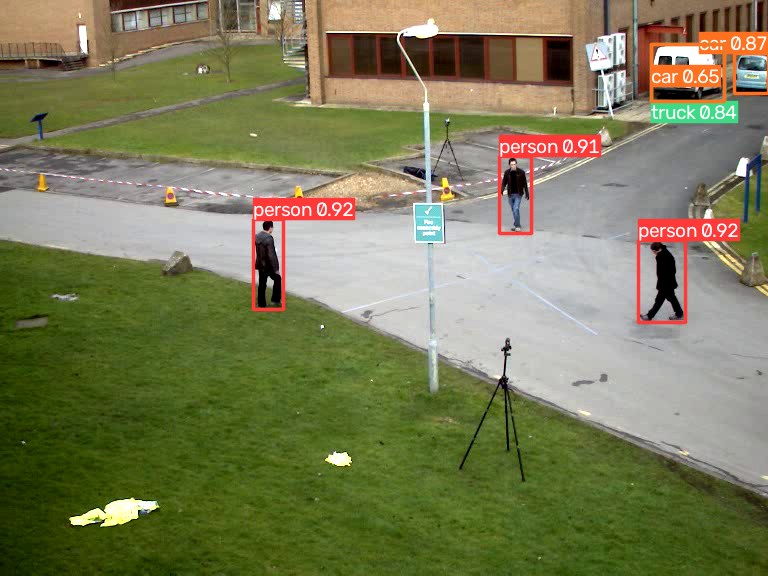
- Three lines to a detector.
Detector("ed-s"), point it at a picture, read the boxes. The same object trains, validates and exports. - One licence, all the way down. Apache-2.0 code, Apache-2.0 COCO weights, Apache-2.0 exports — nothing to clear with legal before it goes into a product or a classroom.
- Accurate for its size. The ed detectors are real-time DETRs: ed-s scores 48.5 COCO mAP with 10M parameters.
- Runs on the machine you have. OpenVINO runs it on a CPU, an Intel GPU or an Intel NPU; ONNX Runtime on any CPU, a Raspberry Pi included. No CUDA needed to deploy. A GPU makes training quick.
- No NMS to tune. ed is trained to give each object one box. The odd second box on the same object — one vehicle as both truck and car — is dropped by a fixed overlap filter (IoU 0.7, any class), so there is no threshold to tune and a crowded frame costs no extra time.
pip install easydetect              # inference: OpenVINO and ONNX Runtime
pip install "easydetect[train]"     # + training (PyTorch)
Inference never needs PyTorch. Both runtimes come with the plain install and
return the same boxes; Detector uses OpenVINO unless you pass
backend="onnxruntime". OpenVINO is the faster one on an Intel CPU (ed-s at
640 on a 4-core Xeon: 49 ms against 132 ms) and the only way to an Intel GPU or
NPU; ONNX Runtime is the smaller one, for a box where every megabyte counts:
pip install --no-deps easydetect && pip install numpy pyyaml opencv-python onnxruntimefrom easydetect import Detector
model = Detector("ed-s") # COCO weights, downloaded on first use
r = model("photo.jpg", conf=0.5)[0]
r.boxes.xyxy, r.boxes.conf, r.boxes.cls # plain numpy
r.names[int(r.boxes.cls[0])] # "person"
r.plot(); r.save(); r.show()Point it at an image, a folder, a glob, a video, an RTSP stream, a webcam index, or a numpy array. Long sources stream, so memory stays flat:
for r in model.predict(0, stream=True, show=True):   # webcam, q or Esc quits
    print(r.boxes.xyxyn)

model.track("clip.mp4")        # adds r.boxes.id
model = Detector("ed-s", device="NPU")            # AUTO, CPU, GPU, NPU
A webcam viewer with an FPS counter is in examples/webcam.py
— python examples/webcam.py --track.
model = Detector("ed-s")
model.train(data="data.yaml", epochs=50, imgsz=640, batch=16, device=0)
model.val(data="data.yaml").box.map50
model.export(format="openvino")       # best.xml + best.bin + labels.txt
# data.yaml
path: /data/cans
train: images/train
val: images/val
names: {0: can, 1: bottle}Labels are one .txt per image, cls cx cy w h normalised — the layout every
labelling tool already exports. A YOLO-format download (Roboflow's included)
trains as it comes; training.md
lists the variations it accepts. Training starts from the COCO weights and saves
an average of the weights (EMA) as the checkpoint; freeze="backbone" trains
faster on a small set, and resume=True picks a killed run back up with
the settings it had. A class named like one of COCO's (apple, 사과) starts
from the row that already detects it.
easydetect lab is a web app on top of this package, in its own repository: drop images in, label them (the model drafts the boxes, you correct them), queue a training run, watch the curve, then run the result over a folder, a video or your webcam — on one machine, with nothing leaving it. A finished run hands you copy-ready code and a Hugging Face folder whose model card is written from the run.
git clone https://github.com/themakerrobot/easydetect-lab
cd easydetect-lab
pip install -r requirements.txt     # easydetect[train] from PyPI, and the web server
python run.py                       # http://<this machine>:8080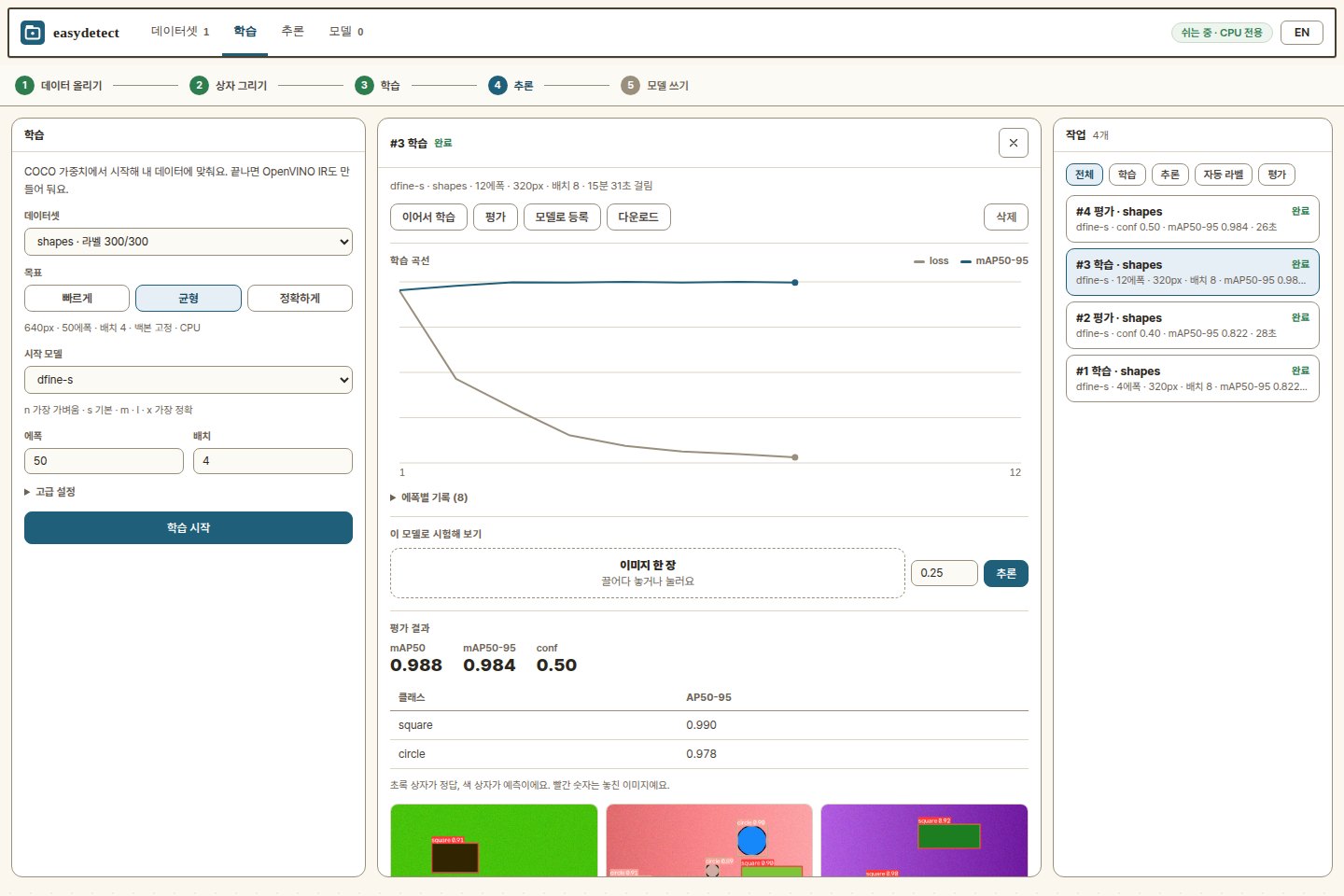
| name | backbone | params | COCO mAP50-95 |
|---|---|---|---|
ed-n |
HGNetv2-B0 | 4M | 42.8 |
ed-s |
HGNetv2-B0 | 10M | 48.5 — the default |
ed-m |
HGNetv2-B2 | 19M | 52.3 |
ed-l |
HGNetv2-B4 | 31M | 54.0 |
ed-x |
HGNetv2-B5 | 62M | 55.8 |
COCO numbers are the original authors' for these checkpoints (640 px, val2017).
ed-s at 640 on one desktop — a Core Ultra 5 250K Plus with an RTX 5090 —
whole pipeline (resize, inference, decode), median of 30 calls, from
python tools/bench.py:
device= |
latency | FPS |
|---|---|---|
"CPU" |
36 ms | 28 |
"NPU" |
38 ms | 26 — and the CPU stays free |
"GPU" (the RTX 5090 through OpenCL) |
14 ms | 72 |
The GPU returns the CPU's boxes exactly, the NPU to a mean IoU of 0.98. performance.md covers measuring your own machine and what makes it faster.
Published COCO val2017 numbers at 640 px, as each project reports them — not re-measured here. Both models are NMS-free; YOLO26 also publishes a score with NMS added, shown second.
| n | s | m | l | x | |
|---|---|---|---|---|---|
| ed mAP50-95 | 42.8 | 48.5 | 52.3 | 54.0 | 55.8 |
| YOLO26 mAP50-95 (no NMS / with NMS) | 40.1 / 40.9 | 47.8 / 48.6 | 52.5 / 53.1 | 54.4 / 55.0 | 56.9 / 57.5 |
| ed params | 4M | 10M | 19M | 31M | 62M |
| YOLO26 params | 2.4M | 9.5M | 20.4M | 24.8M | 55.7M |
Keypoints (OKS AP, COCO val2017, scored with pycocotools; the whole pipeline — people found by the detector, then their keypoints):
| s | m | l | |
|---|---|---|---|
| easydetect (ed-s, then the keypoint model of that size) | 66.3 | 71.6 | 73.4 |
| YOLO26-pose | 63.0 | 68.8 | 70.4 |
Read it plainly:
- Detection is a draw. ed is ahead at the small sizes (n, s), YOLO26 at the large ones (l, x), and lighter there.
- Keypoints: easydetect is about 3 points ahead at each size. The price is speed with crowds: YOLO26-pose places everyone's keypoints in one pass, here each person found is a second (small) pass.
- Masks without mask labels. YOLO-seg learns masks from polygon labels.
Here
task="segment"outlines whatever the detector finds — a model trained on boxes alone gets masks with no polygon drawn — and polygons, when you have them, fine-tune the mask decoder (COCO polygons: mean IoU 0.752 → 0.810). - The licence. Ultralytics YOLO is AGPL-3.0: a product that ships it, or serves it over a network, must publish its source or buy a commercial licence. Everything here — code and weights — is Apache-2.0.
- Where YOLO fits better: pose and segmentation trained end to end, more tasks (oriented boxes, classification, depth), and a far larger ecosystem.
COCO is a guide, not your answer. What matters is the model you get from a
few hundred pictures of your own. tools/bench_finetune.py fine-tunes
ed (easydetect 0.7.5) and YOLO26 (Ultralytics 8.4) on the same public
datasets, each with its own trainer's defaults (100 epochs, 640 px, batch 16,
one RTX 5090), and scores both with one evaluator on the val split.
mAP50-95, YOLO26 → ed at each size:
| dataset | train pictures | n | s | m |
|---|---|---|---|---|
| african-wildlife | 1,052 | 0.817 → 0.848 | 0.830 → 0.869 | 0.814 → 0.890 |
| construction-ppe | 1,132 | 0.300 → 0.293 | 0.289 → 0.297 | 0.298 → 0.307 |
| brain-tumor | 893 | 0.417 → 0.449 | 0.357 → 0.470 | 0.360 → 0.466 |
| signature | 143 | 0.975 → 0.985 | 0.984 → 0.985 | 0.967 → 0.997 |
| medical-pills | 92 | 0.797 → 0.794 | 0.801 → 0.800 | 0.797 → 0.812 |
| african-wildlife, 100 at random | 100 | 0.711 → 0.802 | 0.674 → 0.837 | 0.613 → 0.858 |
| a picture on the CPU (OpenVINO, Core Ultra 5 250K, 640 px) | 8–9 → 10 ms | 23–25 → 28–32 ms | 66 → 55–65 ms |
- ed is ahead on 15 of 18; the three it is not are within 0.007 (construction-ppe and medical-pills at n, medical-pills at s).
- The fewer the pictures, the larger the lead: on 100 pictures for four classes, +0.09 (n), +0.16 (s), +0.25 (m); on brain-tumor's two look-alike classes, +0.03 to +0.11.
- Speed: YOLO26 runs 15–25% faster at n and s; at m ed is the faster one. YOLO also trains faster.
- mAP50-95 counts a box for every class it scores, as each project scores itself. Each cell is one run; how much a small dataset moves from one run to the next is measured below.
On a Raspberry Pi the input shrinks to 320 or 416 px, and there the 640 px
COCO weights lose most of what they know. tools/long_run.py fine-tunes them
on COCO at the smaller size (with 100 decoder queries, which the Pi runs
faster) and scores everything here on all 5,000 val2017 pictures with one
evaluator — OpenVINO on the CPU, one class a box, up to 100 boxes a picture.
YOLO is Ultralytics' own export at each size. mAP50-95:
| input | ed-n, 640 px weights | ed-n, fine-tuned at that size | ed-s, 640 px weights | ed-s, fine-tuned at that size | YOLO11n | YOLO26n | YOLO11s | YOLO26s |
|---|---|---|---|---|---|---|---|---|
| 320 | 0.100 | 0.322 | 0.239 | 0.381 | 0.283 | 0.297 | 0.365 | 0.381 |
| 416 | 0.270 | 0.361 | 0.389 | 0.415 | 0.328 | 0.341 | 0.408 | 0.421 |
| 640 | 0.416 | 0.410 | 0.472 | 0.465 | 0.381 | 0.397 | 0.453 | 0.471 |
Raspberry Pi 4B, 4 threads, easydetect benchmark (OpenVINO; a fine-tuned
model runs as fast as the original of the same size and queries):
| 320 | 320, 100 queries | 416 | 416, 100 queries | 640 | |
|---|---|---|---|---|---|
| ed-n | 190 ms | 122 ms | 252 ms | 183 ms | 479 ms |
| ed-s | 508 ms | 347 ms | 697 ms | 536 ms | 1,323 ms |
- Fine-tune at the size you will run. ed-n at 320: 0.100 → 0.322; ed-s at 320: 0.239 → 0.381. At 640 the original weights stay better.
- Against YOLO at the same size: ed-n is ahead of both YOLO n models at every size; ed-s matches YOLO26s at 320 and is within a point at 416.
- 100 queries cost almost nothing in accuracy (0.323 → 0.322 at 320) and save a third of the time on the Pi. YOLO11s at 320 through ONNX Runtime, as the Pibo robot runs it, took 218 ms on the same Pi.
- The fine-tuned 320 and 416 columns were trained with 100 queries; 640 with all 300 (it did not beat the original either way).
- These fine-tuned checkpoints are not on the mirror yet;
tools/long_run.pymakes them (about a day on one RTX 5090). - Our evaluator puts ed-n at 640 at 0.416 where its authors report 42.8: one class a box and 100 boxes a picture count fewer boxes than COCO's own tool.
A dataset with a few dozen val pictures moves by several points from one
run to the next, so tools/long_run.py trains every benchmark with three
seeds. ed-n against YOLO26n at 320 px, 30 epochs, batch 8 (easydetect
0.7.5, mean ± spread of three runs):
| dataset | train pictures | YOLO26n | ed-n |
|---|---|---|---|
| african-wildlife | 1,052 | 0.786 ± 0.007 | 0.812 ± 0.004 |
| construction-ppe | 1,132 | 0.270 ± 0.002 | 0.234 ± 0.004 |
| brain-tumor | 893 | 0.364 ± 0.005 | 0.365 ± 0.010 |
| signature | 143 | 0.957 ± 0.010 | 0.959 ± 0.009 |
| medical-pills | 92 | 0.754 ± 0.005 | 0.722 ± 0.003 |
| african-wildlife, 100 at random | 100 | 0.649 ± 0.004 | 0.572 ± 0.033 |
A small dataset wants more epochs. The lab's classroom settings — backbone frozen, 100 queries — on the three smallest sets (YOLO26n with the same epochs beside it):
| dataset | 30 epochs | 70 epochs | 100 epochs | YOLO26n, 100 epochs |
|---|---|---|---|---|
| african-wildlife, 100 at random | 0.628 | 0.730 | 0.751 | 0.679 |
| signature | 0.885 | 0.938 | 0.960 | 0.976 |
| medical-pills | 0.554 | 0.693 | 0.746 | 0.780 |
So the lab's classroom preset now picks the epochs from the dataset — about 1,000 steps, 35 epochs for 300 pictures up to 100 for a few dozen — which keeps a laptop run near the same 10–15 minutes.
easydetect predict model=ed-s source=photo.jpg conf=0.5
easydetect train   model=ed-s data=data.yaml epochs=50
easydetect val     model=best.pt data=data.yaml
easydetect export model=best.pt format=openvino half=true- Using the model — sources, results, tracking, saving
- Training — datasets, validation, export, CLI
- easydetect lab — the browser app: labelling, jobs, sharing
- Weights — the mirror, building it, offline use
- Performance — measuring speed and improving it
- Deploying — an HTTP server, the
.onnxcontract, other runtimes - Design — architecture and provenance
- Development — tests, releases
Masks and keypoints come from separate models on the detector's boxes: masks are not trained on your data, and keypoints are COCO's 17 for people only. No classification. One training process, one machine; multi-GPU and distributed training are out of scope. Inference runs on OpenVINO or ONNX Runtime; for a CUDA deployment, take the exported ONNX to TensorRT from there.
from easydetect import Detector

model = Detector("ed-s")                # COCO 사전학습 가중치 자동 다운로드
model("photo.jpg", conf=0.5)[0].save()     # 결과 이미지 저장
model.train(data="data.yaml", epochs=50)   # 내 데이터로 학습
model.export(format="openvino")            # 배포용 IR + labels.txt
세 줄이면 물체 검출이 됩니다. 모델은 ed(실시간 DETR)이고, 코드와 가중치가 모두 Apache-2.0이라 상용 제품이나 교육 현장에 그대로 쓸 수 있습니다.
설치는 두 가지입니다. pip install easydetect는 추론용으로 OpenVINO와 ONNX
Runtime이 함께 들어가고 PyTorch는 없습니다. pip install "easydetect[train]"은
학습까지 합니다. 기본 엔진은 OpenVINO(인텔 CPU·GPU·NPU)이고,
Detector("ed-s", backend="onnxruntime")로 ONNX Runtime(모든 CPU, 라즈베리파이
포함)을 쓸 수 있습니다. 두 엔진의 결과는 같습니다.
라벨링부터 학습·추론까지 브라우저로 하려면 easydetect lab. 가중치 캐시는
~/.easydetect/, 사내 미러는 EASYDETECT_ASSETS_URL 환경변수로 지정합니다.
라즈베리파이처럼 작은 기기에서는 입력을 320~416으로 줄이는데, 640으로 학습된 COCO 가중치는 이 크기에서 성능이 크게 떨어집니다(ed-n 320: 0.100). 그 크기로 COCO를 다시 학습하면 0.322로 올라 같은 크기의 YOLO11n·YOLO26n보다 높고, 라즈베리파이 4B에서 쿼리 100개로 122밀리초입니다. 사진이 적은 데이터는 에폭을 늘릴수록 좋아져서 (100장: 30에폭 0.628 → 100에폭 0.751), easydetect lab의 수업용 설정은 데이터 크기에 맞춰 에폭을 정합니다. 자세한 표는 위의 "Small inputs and small computers"와 "Small datasets" 절에 있습니다.
The detector and its COCO weights come from D-FINE (Apache-2.0, arXiv:2410.13842), which builds on RT-DETR. This package adapts that network and loss, and adds its own training loop, inference stack and tooling — see NOTICE.