


Browser-to-browser screen sharing for a small group on a network you already trust — a Tailscale tailnet, for instance. No TURN, no SFU, no accounts, no media server. The server does three things: serve the page, relay signaling, answer STUN. The video goes straight from one browser to another.
Published on npm as @thoth-dev/tailcast (screen-share still works as an
alias).
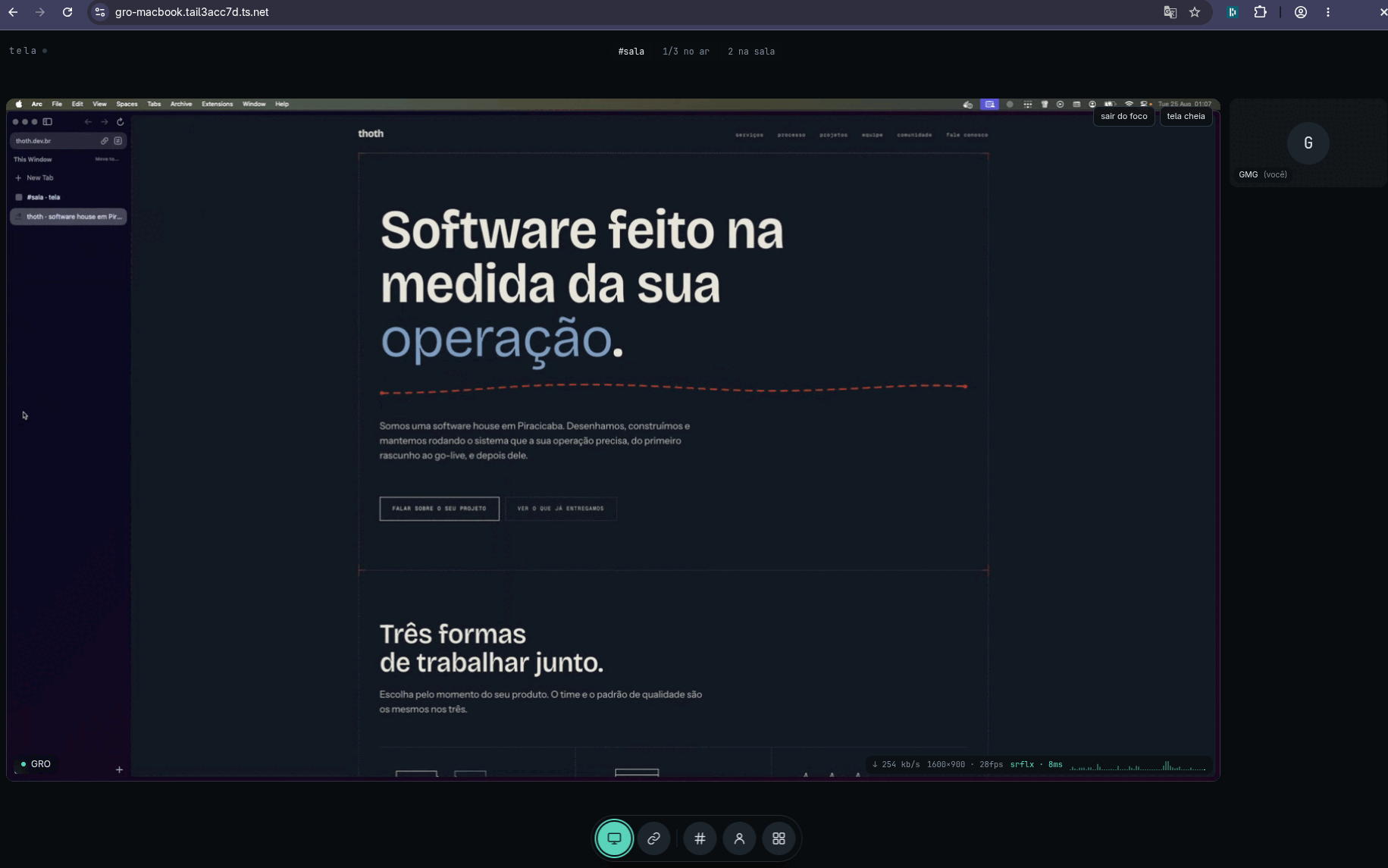
A real session between two machines. The shared screen is focused and takes the
whole stage, whoever is not transmitting sits in the presence rail on the right,
and the pill at the top names the room and its occupancy. The line worth reading
is the telemetry over the frame: 254 kb/s 1600×900 · 28fps srflx · 8ms. An
srflx path means the video is going straight from one browser to the other,
with nothing relaying it.
Needs Bun on the machine that runs the server. The package
ships bin/cli.ts, server.ts and stun.ts exactly as written, with no build
step and no dist/, and Bun runs them directly.
bunx @thoth-dev/tailcastThat brings up HTTP plus the signaling WebSocket on :3000, and STUN on UDP
:3478. npx @thoth-dev/tailcast also works if Bun is already installed:
the published entry point is a small Node launcher that finds bun (on PATH,
in $BUN_INSTALL/bin or in ~/.bun/bin, which covers a non-login shell that
never read the install rc) and hands the run over. Without Bun it prints what is
missing, why the server needs it, and the one line that installs it, then exits.
Three things have to be true before a call happens: the server is up, everybody
can open the page over HTTPS (or localhost), and the browsers can reach a
STUN server over UDP. The first is the command above. The other two are
the whole difference between the three paths below.
| what you want | how you serve it | extra flags |
|---|---|---|
| a group inside your tailnet | tailscale serve |
none |
| one call with somebody outside it | ngrok, cloudflared | --ice, and it is not optional |
| a look at the interface | localhost |
none |
Whichever it is, what you send people is a link with the room in the hash:
https://…/#retro. See Rooms.
The case this was built for, and the only one where nothing else needs configuring.
bunx @thoth-dev/tailcast     # HTTP + signaling on :3000, STUN on udp/3478
tailscale serve --bg 3000    # https://<machine>.<tailnet>.ts.net
serve puts a real Let's Encrypt certificate in front of the same machine the
STUN socket is on, reachable only from inside the tailnet. This step is not
optional: getDisplayMedia exists only in a secure context. And because the
page's hostname is that machine, the client derives
stun:<machine>.<tailnet>.ts.net:3478 by itself and the derivation is correct —
which is why --ice does not appear here.
Two things have to be in place:
- HTTPS enabled on the tailnet (admin console, DNS → Enable HTTPS).
Without it
tailscale certanswersHTTPS cert support is not enabledand serve never comes up. - 3478/udp reachable, if your ACLs are restrictive.
tailscale serveproxies TCP only, so browsers hit100.x:3478directly for STUN.
serve --bg persists across restarts; from then on only the Bun process needs
restarting.
For somebody who is not on your tailnet. It works, and it costs the two things this section is about.
bunx @thoth-dev/tailcast --ice "stun:stun.l.google.com:19302,stun:stun.cloudflare.com:3478"

ngrok http 3000                                  # or
cloudflared tunnel --url http://localhost:3000
--ice is not optional here, and leaving it out fails in a shape that looks
like a working call. A tunnel puts HTTPS in front of your port, and what it
forwards to the browser is TCP; none of them forward UDP. The page arrives from
a hostname that answers HTTPS and nothing else, so the STUN url the
client derives from it — stun:<subdomain>.ngrok-free.dev:3478 — is a UDP port
that does not exist, and no srflx candidate ever forms. What that renders is a
black tile, not connecting…: signaling is the half a tunnel carries
perfectly, so the SDP crosses, ontrack fires, and a <video> is attached to a
track that will never receive a packet. Read it backwards next time —
connecting… means the SDP never arrived, black means it arrived and the media
did not.
So --ice points the browsers at public STUN instead, which is what those two
urls are. The server's own STUN server goes unused in this mode: the peers are
on different networks, and a 100.x address is of no use to either of them.
stun: only. A turn: url is refused with a line on stderr rather than
accepted quietly, because TURN needs credentials and a relay this project does
not have. That is also the honest limit of this path: with no relay, two peers
behind symmetric NATs (mobile carriers, plenty of corporate networks) have no
route to each other at all, and there is nothing here to fall back to.
Two more things bite behind a tunnel:
- Its own warning page. Free ngrok puts one in front of the first visit;
click through it. If the page still cannot read
/configit retries three times and then says so, instead of starting a call that cannot connect — an interstitial or a 502 is HTML with a status, which is exactly the shape that read fails in. - There is no authentication. A tunnel is a public URL in front of a room
whose name is the only partition that exists: whoever opens the link is in the
call.
--icemakes it work, it does not make it safe. Pick a room nobody would guess, treat the link as the secret it is, and close the tunnel when the call is over. See Security.
bunx @thoth-dev/tailcast
# then http://localhost:3000
localhost is a secure context by definition, so capture works there with
nothing in front of it. Good for trying the interface out; no use for a call,
since it is the one address every other machine resolves to itself.
http://192.168.1.20:3000 and http://100.64.x.y:3000 are not secure
contexts. The page loads and the room fills up, but getDisplayMedia is
absent from navigator.mediaDevices there, so nothing can be captured — the
share button stays where it is, disabled, with the reason in its tooltip,
because on an insecure origin the capability exists and the fix is yours. That
fix is HTTPS, by one of the two paths above. Not a self-signed certificate.
bunx @thoth-dev/tailcast [flags]| flag | env | default | what it does |
|---|---|---|---|
-p, --port <n> |
PORT |
3000 | HTTP and signaling WebSocket |
--stun-port <n> |
STUN_PORT |
3478 | STUN UDP port |
--peers <n> |
MAX_PEERS |
5 | peers per room; the 6th gets denied and stays out |
--sharers <n> |
MAX_SHARERS |
3 | how many transmit at once; the 4th attempt gets share-denied |
--pixels <n> |
MAX_CAPTURE_PIXELS |
1440000 | capture pixel budget (1600×900) |
--ice <urls> |
ICE_URLS |
comma-separated stun: urls, overriding the one derived from the page's hostname. only needed behind a tunnel |
|
--bg |
run in the background | ||
--stop |
stop whatever runs in the background on the same port | ||
--force |
with --stop, kill even when the process can't be confirmed as ours |
||
-h, --help |
print the help | ||
-v, --version |
print the version |
The CLI only forwards these to server.ts through the environment, which keeps
bun run server.ts working on its own. The server stays the sole authority over
the room limits: it is the only place that sees a whole room, so two simultaneous
clicks on different machines can only be serialized there.
With --bg, the pidfile and the log live in $XDG_RUNTIME_DIR/tailcast/ as
tailcast-<port>.{pid,log}, falling back to a 0700 tailcast-<uid>/ in the temp
dir. The command reports success only once the child's own /config answers,
which means after it actually bound the port rather than merely after it was
spawned.
GET /config is where the browser reads the ones it needs: stunPort,
maxPeers, maxSharers, maxCapturePixels and iceUrls, that last one empty
unless --ice was given.
The room comes from the URL hash: /#retro, /#pair. With no hash it falls back
to room. Anyone opening the same link lands in the same place, and a room
exists only while somebody is inside it.
Your name is chosen once, in the entry dialog, and is required (3 characters minimum, 24 maximum): whoever is on the other side needs to know whose screen they are looking at. It is a label and nothing more — there is no login and no identity behind it.
Chrome hides private-IP host candidates behind mDNS names (.local), and a
Tailscale address falls in the CGNAT range 100.64/10, which it treats as private.
mDNS needs multicast, multicast does not cross the tailnet, the remote peer never
resolves the name, and ICE fails in silence.
A STUN server inside the tailnet returns the peer's 100.x as an srflx
candidate, which is not obfuscated. It is about 50 lines in stun.ts, and it is
what makes the thing connect.
Star per sharer, not mesh. Whoever shares opens one RTCPeerConnection per
viewer. With 1 sharer and 4 viewers that is 4 connections and an upload of
4 × bitrate; the cap is 1.5 Mb/s per peer, so roughly 6 Mb/s of upload.
The sharer's CPU cost is a step, not a curve. There is one encoder per
PeerConnection, and it was measured: with 4 destinations, capturing at 1920×1080
eats 10.1 cores out of 12 and delivers 6–9 fps, while 1600×900 costs 2.0 cores at
a full 30 fps. The cause is thread oversubscription, not pixel cost. That is why
the capture budget exists (--pixels, 1,440,000 by default): the client scales
the captured track down to fit it once at the source, preserving the real aspect
ratio, so 1920×1200 becomes 1518×948. Raising it past 2,073,600 brings the step
back.
Notice which limit drives which cost. A sharer opens one PC per destination —
that is --peers - 1 encoders — and that number does not change when a second
person also starts transmitting. What --sharers controls is how many streams
each machine decodes, and decoding is cheap: 0.18 core per stream. What
deserves care is the number of people in the room, not the number of
transmitters; if --peers ever grows much it turns into N² and you need an SFU.
Every number here, with the run that produced it: docs/measurements.md.
- The telemetry over each tile shows bitrate, resolution, fps, candidate type and
RTT.
hostinstead ofsrflxmeans both peers are on the same physical LAN and STUN was never needed;relaywould mean the direct path failed. - On your own tile it shows the captured resolution, and if the encoder is
sending less than that, the real one appears beside it
(
1600×900 → 640×360 · 30fps bandwidth): a correct capture with the output one rung down is the whole diagnosis. If the encoding policy did not take in your browser,policy refused,policy not confirmedorno encodingsshows up in place of the path field. - Your
↑reads sent / available: the second number is congestion control's estimate for the tightest destination.400 kb/s of 3.4 Mb/sis an encoder not asking for what is there;400 of 450is a link with nothing left to give. Only Chromium reports it, and it starts around 300 kb/s and climbs, so the first seconds are not a verdict. - The screen and the camera can be on air together, and each dock button toggles its own source: stopping the camera leaves the screen up. They are two slots, so a full room can be full because of one person. A third button flips front to back, and exists only while a camera is on air on a device with more than one.
- The dock only offers the sources that exist. On a phone there is no screen
button, because no browser on iOS or Android gives a web page the screen —
by any API, over wifi or cable. That is measured per browser, never guessed
from the user agent. An insecure origin is the one case that keeps the button,
disabled with the reason in its tooltip, because there the capability exists
and the fix is yours. To put a phone's actual screen in a room, mirror it to
a desktop (AirPlay,
scrcpy) and share that window. - The quality button picks which trade the encoder makes, since it cannot see whether it is sending a terminal or a video: Text, Sharp (the default) and Motion. Switching mid-share reopens no picker and renegotiates nothing, and the menu stays open after a choice so you can try the three against the screen you are actually sharing. If code on a shared screen arrives unreadable, this is the button.
- The default trades frames for pixels on purpose: a shared screen is read, not watched. Full resolution at 15fps costs about half of what 30fps does and, when the link tightens, loses frames instead of letters.
- The bar meter is the last minute of bitrate, one bar per second. A link going bad shows up there before the instantaneous number explains why.
- Anyone in the room who is not transmitting appears as a monogram in a rail
below the screens; with nobody transmitting, the monograms inherit the stage.
Whoever asked to share and is still negotiating reads
connecting…. - Click a screen (or its focus button) to give it the whole stage; the others
become thumbnails.
escleaves focus, andfullscreenhands the frame to the browser's own fullscreen. - Wheel zooms the tile you are pointing at, drag pans, double-click resets. This is receiver-side and costs the sender nothing. Page zoom is not a substitute: it was measured, and it makes the picture worse.
- Sounds mark someone joining, leaving and starting to share. The dock button mutes them; nothing plays while the tab is in the background.
- The page never scrolls. The stage takes the height that is left and every tile is fitted inside it at the real aspect ratio of the shared screen. Nothing is cropped.
The page is a PWA. On Chrome and Edge an install button appears as the last one in the dock, and the app then opens in its own window, with no tab and no address bar. Once installed the button is gone for good. On iPhone and iPad there is no install event — the path is Share → Add to Home Screen, in Safari. It is for watching only: no mobile browser captures a screen.
Some Chromium browsers ship the API without the install UI — Arc is one, and says so in its own documentation. There the button appears and the click cannot do anything, so it explains that in its tooltip. Chrome, Edge and Brave install normally.
This rides on the same HTTPS as everything else: a service worker, like
getDisplayMedia, only exists in a secure context. The worker is network-first
for everything and the cache is only a safety net. There is no real offline mode
— without signaling there is no room. What it fixes is a network drop mid-call,
which now shows the page that was already loaded, reconnecting on its own,
instead of the browser's error screen.
JSON over WebSocket at /ws, discriminated by t. The server never looks inside
data — that rule is what allows the WebRTC negotiation to change without
touching the backend. Full wire format:
docs/protocol.md.
There is no authentication, and that is deliberate: the tailnet is the auth layer. Do not add Funnel, port forwarding or a public bind without real auth first. Outside the tailnet, peers also stop sharing a network, which breaks the STUN premise and starts requiring TURN.
bun install
bun run server.ts       # then http://localhost:3000

(bun run server.ts > /tmp/s.log 2>&1 & echo $! > /tmp/p); sleep 2; \
  timeout 90 bun run test.ts; kill $(cat /tmp/p)     # 100 assertions, needs the server
bun test                                             # the CLI's own suite
bun run format                                       # biome; also runs on commit
test.ts covers static files, signaling, the room cap, sharer arbitration and
the STUN wire format, all headless. bench/layout.ts drives real Chrome over CDP
for the layout, the presence rail, the entry gate and receiver-side zoom.
WebRTC itself is covered by neither: ICE closing over 100.x addresses can
only be verified with two real machines on the tailnet — which has been done, and
is recorded in docs/measurements.md.
MIT.