Repository navigation
Windows UI redesign — Phase 6 follow-up: Comparator 2×2 and multi-row layouts #116
Description

한국어 — Comparator 2×2 / 1×4 배치 후속 작업
이 이슈는 하나의 일관된 패널 배치 변경이므로 별도의 1개짜리 작업 묶음을 추가하지 않고 선택적인 개별 후속 작업으로 유지합니다. 기존 순서도는 구조 참고용입니다.
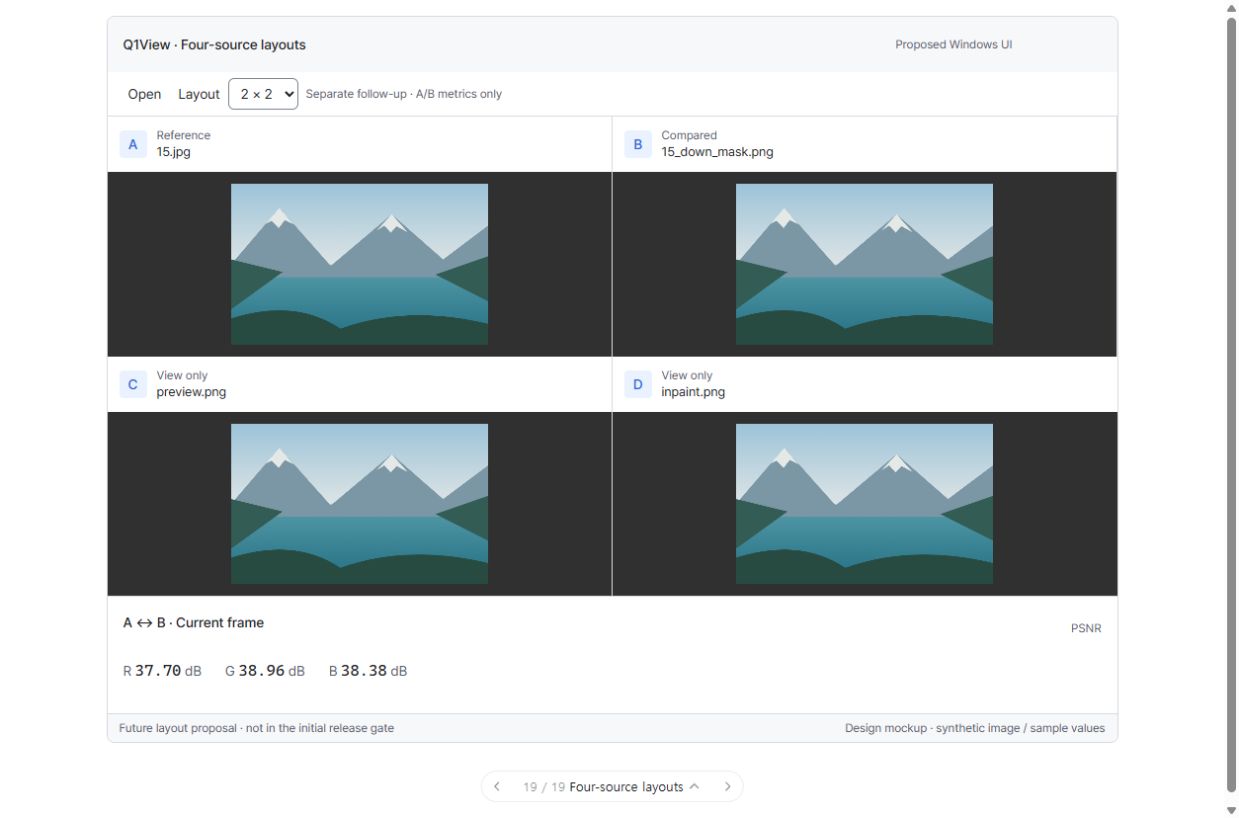
입력 4개의 2×2 배치
명시적으로 선택 가능한 1×4 호환 배치
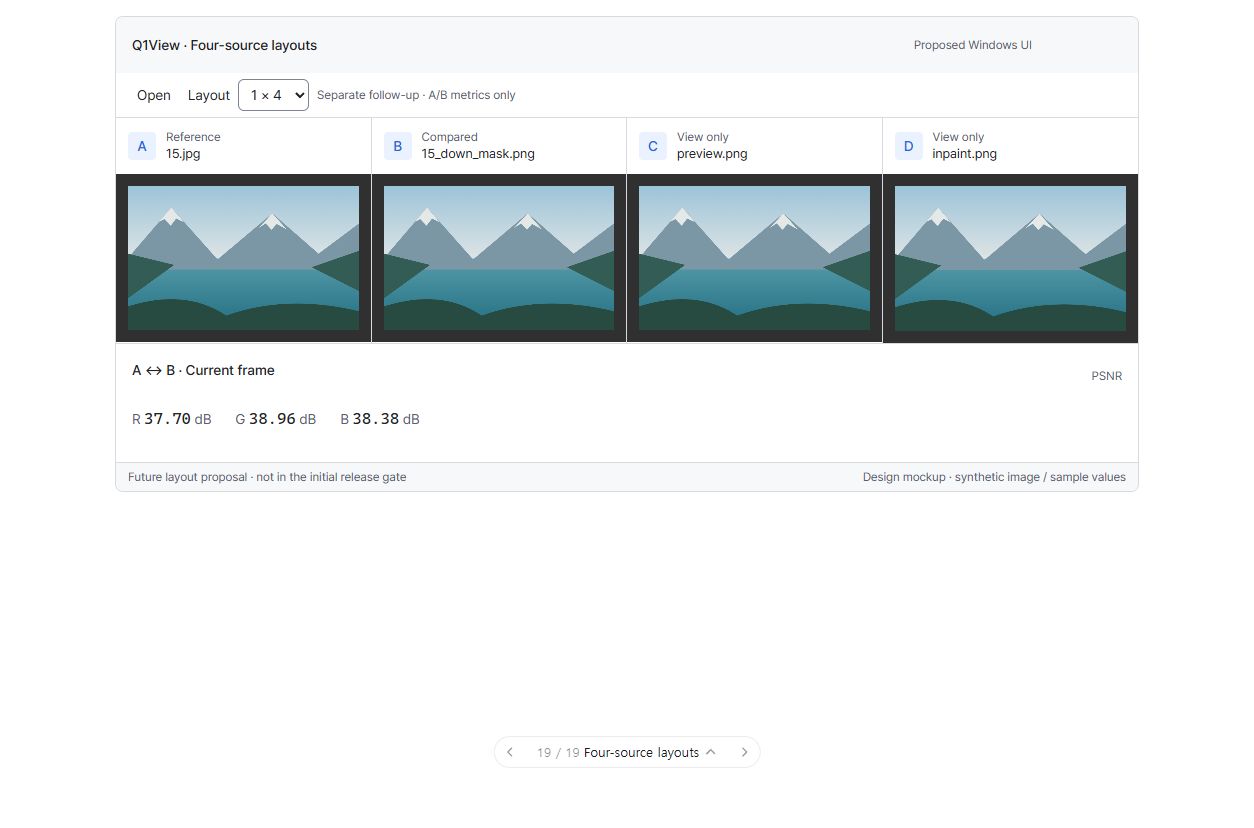
합성 이미지 기반의 제안 화면이며 실제 Windows 빌드 스크린샷이 아닙니다. 두 배치 모두 측정 대상은 A/B이고 C/D는 보기 전용입니다. 이 작업은 최초 재설계 릴리즈의 필수 조건이 아닙니다. 검토 선행 작업: #117, #118, #119, #129, #130, #132, #133, #134. 입력 3개의 배치는 구현 전에 별도로 논의하며 이 4개 시안으로 결정된 것이 아닙니다.
검토 상태: 논의 대기. 미리보기 배치 전환은 이 작업의 승인이 아닙니다.
시각적 설명과 논의
별도로 나중에 진행할 배치 변경입니다. 4개 입력은 균형 잡힌 2×2를 사용할 수 있고 넓은 화면용 1×4도 유지합니다. 패널 배치를 바꿔도 측정 엔진의 A/B 범위는 늘어나지 않습니다.
아래 도식은 구조와 동작을 설명합니다. 정확한 픽셀 배치·글꼴 렌더링이나 구현된 Windows 앱 스크린샷이 아닙니다.
flowchart TD
  CHOOSE["명시적인 배치 선택"] --> GRID["2 × 2 제안<br/>윗줄: A 기준 | B 비교 대상<br/>아랫줄: C 보기 전용 | D 보기 전용"]
  CHOOSE --> ROW["1 × 4 호환<br/>A | B | C | D<br/>넓은 화면에서 유용"]
  GRID --> GEOMETRY["정확한 패널 영역·파일 드롭·포커스·ROI·동기화 확대/이동"]
  ROW --> GEOMETRY
  GEOMETRY --> SCOPE["측정은 A ↔ B만<br/>C/D 픽셀을 어둡게 하거나 바꾸지 않음"]
구현 전에 결정할 질문
- 4개 이미지의 기본 배치는 2×2로 하고 1×4를 명시적 선택으로 유지할까요?
- 주 도구 모음을 복잡하게 만들지 않으면서 배치 선택을 어디에 두면 찾기 쉬울까요?
- 입력 3개 배치는 별도로 논의합니다. 임의 측정 쌍도 별도의 엔진 설계가 필요합니다.
검토 상태: 논의 대기. 시안과 질문을 논의하고 합의한 내용을 기록한 뒤 구현합니다. 다음 단계로 자동 진행하지 않습니다.
상위 이슈·의존성
상위: #110. #111, #114, #115에 의존하는 별도 구조 후속 작업이며 최초 재설계 릴리즈를 막지 않습니다.
목표
유용한 4입력 2×2와 명시적 1×4를 지원하면서 실제 A/B 전용 분석 의미를 유지합니다.
구현 범위
- 배치 버튼을 더하기 전에 패널 좌표·배치·클릭 대상 판정을 일반화합니다. 4패널 기본은 2×2이며 충분히 넓은 화면에서는 사용자가 선택한 1×4를 유지합니다.
- 입력 헤더, 패널 파일 드롭, 선택·포커스, ROI 그리기·좌표 변환, 동기화 확대·이동, 프레임 조작, 크기 조절 영역, 읽을 수 있는 최소 패널 크기를 점검합니다.
- 구현 검토에서 입력 3개의 위치를 정의합니다. C가 더 높은 분석 우선순위를 갖는 것처럼 보이는 비대칭 배치를 임의로 추가하지 않습니다.
- 사용자 선택을 안정적으로 유지하고 창 크기·DPI·텍스트 크기·리소스 재생성 후 패널 좌표를 적절히 복원합니다.
- 측정·차이 스캔은 A ↔ B만 유지합니다. C/D는 보기 전용이고 이미지를 바꾸지 않습니다.
- 임의 쌍 선택, Swipe/Blink/Heatmap, 새 측정 알고리즘은 별도 설계·승인 없이는 추가하지 않습니다.
완료 조건
- 2×2와 1×4를 쉽게 찾고 접근할 수 있으며 창 크기 경계에서 깜빡임·진동 없이 선택을 유지합니다.
- 2/3/4패널에서 모든 좌표·드롭·포커스·ROI·동기화 조작이 올바른 입력을 대상으로 합니다.
- 표시 영역 변경이 비교 입력이나 표시된 측정 범위를 몰래 바꾸지 않습니다.
- 작은 창, 서로 다른 DPI·텍스트 크기, 넓은 모니터, 키보드/UIA, GPU 재생성 검사를 통과합니다.
- A/B 계산이 정확하고 C/D가 명시적인 보기 전용이며 색을 입히거나 어둡게 하지 않습니다.
- 병합 전에 회귀 검증 증거를 기록하고 적절한 때에 이 구조 확장을 별도로 릴리즈합니다.
실행·완료 규칙
Windows MFC Viewer/Comparator만 대상이며 상위 설계와 AGENTS.md를 따릅니다. 최신 origin/master에서 작업 범위에 맞는 브랜치를 만들고 관계없는 변경을 보존합니다. 기존 명령 ID와 렌더링·데이터 경로를 재사용합니다. 관련 자동·수동 검사를 수행하고 공통 코드 또는 릴리즈에 민감한 코드 변경에는 로컬 CoreRegressionTests 및 두 Windows Release 빌드도 수행합니다. 브랜치/PR, 검증 증거, 남은 한계, 회귀 수정 내용을 기록합니다. 목업 또는 빌드 성공만으로 완료 처리하지 않습니다. 이 구현 단계에서는 릴리즈를 태그하거나 게시하지 않습니다.
English original — 영어 원문 펼치기
Proposed UI screens for this one layout job
This issue already represents one coherent geometry change, so it remains an optional leaf job rather than receiving a redundant one-item epic. The older flowchart is retained as a structural reference.
Four sources in 2×2
Explicit 1×4 compatibility
These are synthetic screen proposals, not native build screenshots. Metrics remain A/B-only; C/D are View only in both layouts. This job does not block the initial redesign release. Review prerequisites: #117, #118, #119, #129, #130, #132, #133, #134. Discuss three-source placement before implementation; it is not decided by these four-source pictures.
Review status: awaiting discussion. Switching the preview layout does not approve this job.
Visual walkthrough and discussion
This is a separate later layout change. Four-source comparison can use a balanced 2×2 grid, while 1×4 remains available for wide screens. Changing geometry does not expand the metric engine's A/B scope.
Schematic only: these diagrams explain structure and behavior, not exact pixel geometry, font rendering, or an implemented Windows screenshot.
flowchart TD
  CHOOSE["Explicit layout choice"] --> GRID["2 × 2 proposal<br/>Top row: A Reference | B Compared<br/>Bottom row: C View only | D View only"]
  CHOOSE --> ROW["1 × 4 compatibility<br/>A | B | C | D<br/>Useful on wide screens"]
  GRID --> GEOMETRY["Correct pane bounds, file drops, focus, ROI, and synchronized zoom/pan"]
  ROW --> GEOMETRY
  GEOMETRY --> SCOPE["Metrics remain A ↔ B only<br/>C/D pixels are not dimmed or altered"]
Discuss before implementation
-
Is 2×2 your preferred default for four images, while keeping 1×4 as an explicit option?
-
Where should the layout choice appear so it is easy to find without crowding the main toolbar?
-
Discuss three-source placement separately before implementation; arbitrary metric pairs still need their own engine design.
Review status: awaiting discussion. Look at this stage's picture, discuss the questions below, and record the agreed choices before implementing it. Do not automatically proceed to the next stage.
Parent and dependencies
Parent: #110. Depends on #111, #114, #115. Separate structural follow-up; does not block the initial redesign release.
Goal
Support a useful four-source 2×2 layout while retaining explicit 1×4 compatibility and honest A/B-only analysis semantics.
Implementation scope
- Generalize panel geometry/layout and hit testing before adding another layout button. Four panes default to 2×2; retain a user-selected 1×4 option for sufficiently wide screens.
- Audit source headers, panel file-drop targets, selection/focus, ROI drawing/mapping, synchronized zoom/pan, frame controls, resizers, and minimum readable pane size.
- Define three-source placement in the implementation review; do not add an asymmetric layout that accidentally implies C has higher analysis priority.
- Retain stable user choices and recover geometry appropriately after window resize, DPI/text scaling, and resource recreation.
- Metrics/difference scanning remains A ↔ B only. C/D is View only, with unaltered images.
- Keep arbitrary pair selection, Swipe/Blink/Heatmap, and new metric algorithms outside this task unless separately designed and authorized.
Acceptance criteria
- 2×2 and 1×4 layouts are discoverable, accessible, and retain the intended choice without flickering/oscillation at breakpoints.
- All panel coordinates/drop/focus/ROI/synchronization operations target the correct source in two/three/four-pane cases.
- No viewport change silently changes comparison inputs or displayed metric scope.
- Small-window, mixed-DPI/text-scale, wide-monitor, keyboard/UIA, and GPU-recreation scenarios pass.
- A/B calculations are correct; C/D remains explicitly view-only and is not tinted/dimmed.
- Record regression evidence before merge; release this structural extension separately when appropriate.
Execution and completion rules
Windows MFC Viewer/Comparator only; follow the parent specification and existing AGENTS.md. Start a focused branch from current origin/master and keep unrelated changes intact. Reuse existing command IDs and rendering/data paths. Run relevant automated/manual checks plus local CoreRegressionTests and both Windows Release builds for changes affecting shared or release-sensitive code. Record the branch/PR, verification evidence, remaining limitations, and any regression fixes. A mockup or build alone is not completion. Do not tag/publish a release in this implementation step.
Activity