Repository navigation
Windows UI redesign: Add coherent appearance themes without changing image pixels #118
Description

한국어 — 이미지 픽셀을 바꾸지 않는 일관된 테마
화면 시안
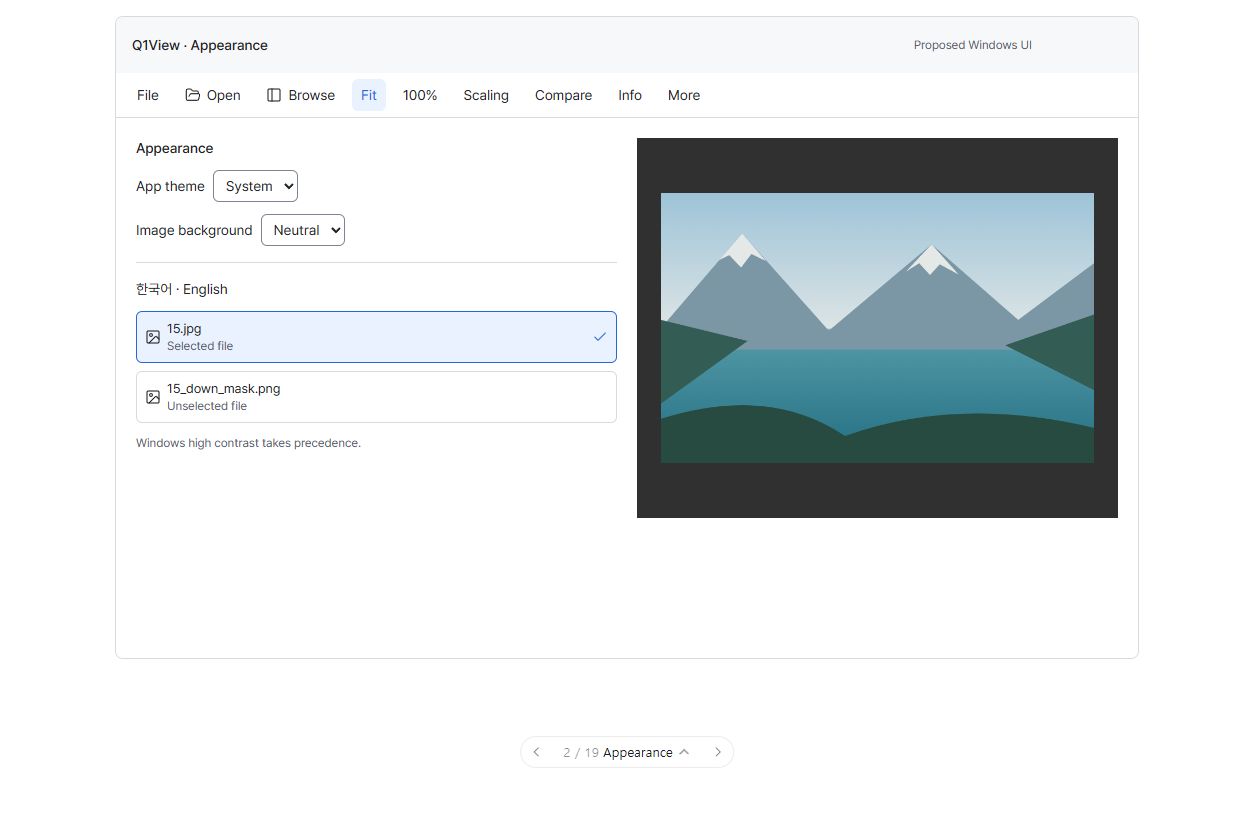
이미지를 클릭하면 크게 볼 수 있습니다. 순서도나 구현된 Windows 앱 스크린샷이 아닌 UI 화면 제안입니다. 이미지는 합성이고 수치는 설명용 예시입니다. 주변 조작 요소는 전체 계획의 맥락이며 이번 작업에서는 아래 범위만 구현합니다. 현재 빌드의 실제 변경 전·후 화면이라는 뜻이 아닙니다.
Dark 테마 예시
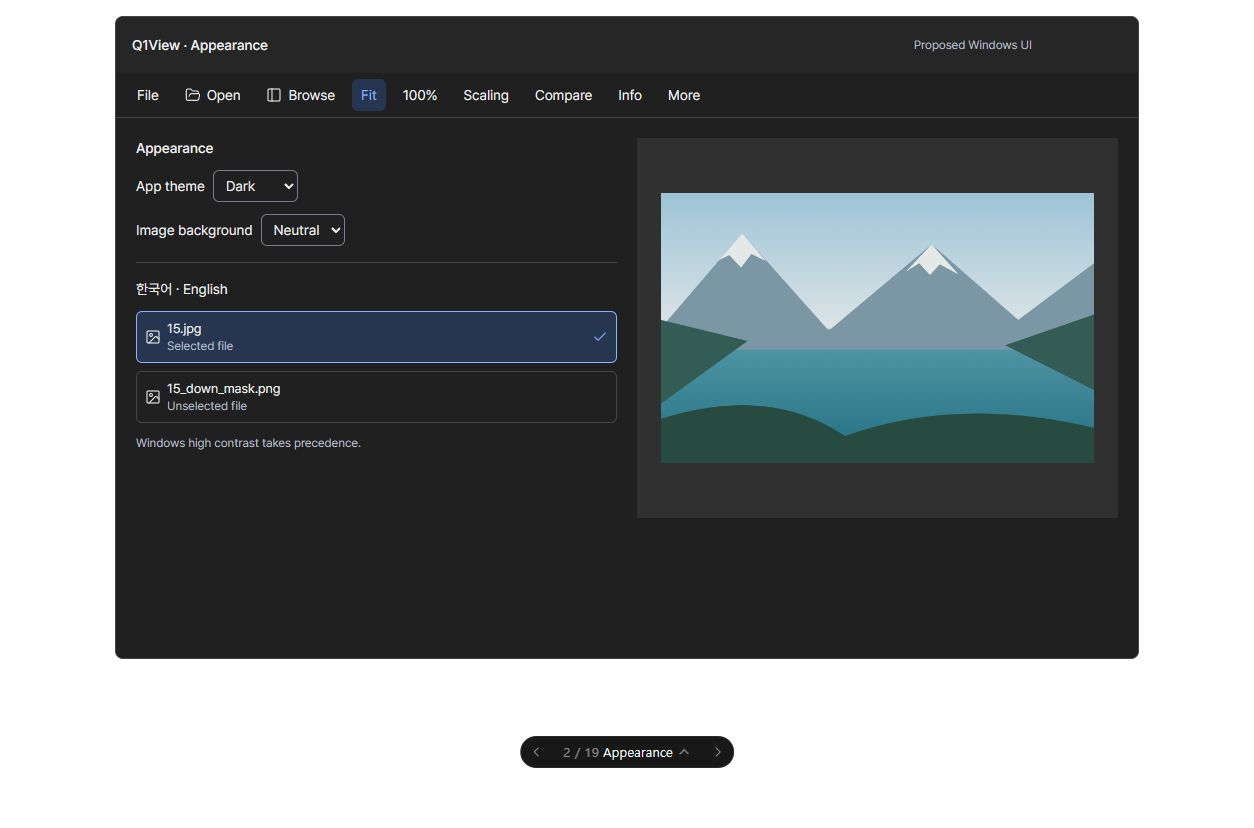
이번 작업의 목표
Viewer의 Options → Theme → System / Light / Dark에서 공통 테마를 설정합니다. Comparator에는 별도 테마 메뉴를 두지 않고 같은 저장값을 자동으로 따릅니다. 프로그램 UI와 이미지 주변 배경 밝기를 함께 변경하며 이미지 자체의 픽셀은 바꾸지 않습니다.
작업 묶음: #111. 전체 설계와 반드시 유지할 기존 동작: #110.
선행 작업: #117
이번에 변경할 것
-
공통 Light/Dark/System 테마에 패널·텍스트·포커스·피드백 색상 규칙을 적용합니다.
-
테마 메뉴는 Viewer에만 둡니다. Comparator는 같은 저장값을 읽고 실행 중에도 변경을 자동 반영합니다. 시스템 테마 변경을 감지하며 고대비 설정을 우선합니다.
-
Light는 밝은 UI와 밝은 회색 이미지 주변 배경(#ECECEC), Dark는 어두운 UI와 짙은 회색 배경(#181818)을 함께 적용합니다. 별도 Appearance / Image background 메뉴는 없애며, 이미지에 색을 입히거나 디코더·비교 계산을 다시 시작하지 않습니다.
이번 작업에서 하지 않을 것
글꼴 교체, Mica 필수 도입, 새 브랜딩, 이미지 렌더링 변경.
완료 조건
-
System/Light/Dark 및 고대비 전환 후에도 열린 파일과 분석 상태가 유지됩니다.
-
레이블과 필수 조작 요소가 #110의 대비 목표를 충족합니다.
-
Viewer의 Options → Theme에만 System / Light / Dark가 표시되고 Comparator에는 중복 테마 메뉴가 없습니다. 하나의 공통 선택으로 실행 중인 두 앱의 UI와 이미지 주변 배경이 함께 바뀝니다.
먼저 함께 결정할 질문
사용자는 Comparator만 사용할 때 테마 변경을 위해 Viewer를 열어야 한다는 단점을 확인한 뒤, 메뉴 간소화를 위해 Viewer에만 테마 메뉴를 두고 Comparator가 설정을 공유하는 방식에 합의했습니다. 기본값은 System입니다. 아래 이전 합의는 최종 수정 합의로 대체되었습니다.
검토 상태: 구현 완료, Draft PR #138에서 네이티브 화면 검토 대기. 구현 전에 사용자가 합의한 선택과 수정된 시안을 이 이슈에 기록합니다. 다른 작업 검토, 목업 조작, 이슈 등록은 이 작업의 승인이 아닙니다. 다음 작업으로 자동 진행하지 않습니다.
구현·검증 규칙
Windows MFC Viewer/Comparator만 대상입니다. #110과 AGENTS.md를 따르고 최신 origin/master에서 해당 작업용 브랜치를 시작합니다. 관계없는 변경은 보존하고 기존 명령·렌더링 경로를 재사용합니다. 영향을 받는 실제 앱 작업 흐름을 검증하고 공통 코드 또는 릴리즈에 민감한 변경에는 관련 로컬 핵심 테스트·빌드를 실행합니다. 실패는 수정하고 해당 검사를 반복한 뒤 PR/커밋, 실제 증거와 한계를 기록합니다. 목업 검사는 실제 Windows 앱 검증이 아닙니다. 이 작업은 릴리즈 태그·Store 게시·버전 증가를 승인하지 않습니다.
English original — 영어 원문 펼치기
Proposed UI screen
Click the image for full-size details. This is a UI screen proposal, not a flowchart or a screenshot of an implemented native build. Images are synthetic and values are illustrative. Surrounding controls are roadmap context; implement only this job's changes below. This is not a literal before/after claim about the current build.
Dark example
One job, one outcome
Use Viewer's Options → Theme → System / Light / Dark to configure one shared theme. Comparator follows the saved choice and live changes without a duplicate theme menu. Change UI and exposed image-surround brightness together without altering source pixels.
Coordination epic: #111. Overall design and unchanged behavior contracts: #110.
Prerequisites: #117.
Changes in this job
-
Resolve shared Light/Dark/System surfaces, text, focus and feedback colors.
-
Keep the Theme menu in Viewer only; persist one shared choice that Comparator reads at startup and updates live. Observe system changes and honor high contrast.
-
Light applies bright UI with a light gray surround (#ECECEC); Dark applies dark UI with a dark gray surround (#181818). Remove separate Appearance / Image background menus; do not tint source pixels or restart decoders/metrics.
Explicitly outside this job
Font replacement, Mica dependency, new branding, or image-rendering changes.
Done when
-
System/Light/Dark and high-contrast transitions preserve the open file and analysis state.
-
Labels and essential controls keep the contrast targets from Windows UI redesign: Fluent Inspector design and phased implementation #110.
-
Only Viewer exposes Options → Theme → System / Light / Dark. Comparator has no duplicate Theme menu; one shared preference changes both apps' UI and surround together, including running instances.
Discuss this screen first
The user accepted that Comparator-only users must open Viewer to change the theme and chose a Viewer-only Theme menu for simplicity. Comparator shares the persisted choice and follows live changes. System is the default. This final revision supersedes the earlier dual-menu and independent-preference scopes below.
Review status: implemented in draft PR #138; native visual acceptance pending. Record the user's agreed choices and any revised picture before implementing this job. Reviewing another job, interacting with the mockup, or registering this issue does not approve this one. Do not automatically proceed to the next job.
Implementation and verification rules
Windows MFC Viewer/Comparator only. Follow #110 and AGENTS.md, start a focused branch from the current origin/master, preserve unrelated changes, and reuse existing command/rendering paths. Verify the affected native workflows and run the relevant local core tests/builds for shared or release-sensitive changes. Fix failures and repeat the affected checks; record PR/commit, actual evidence and limitations. Mockup checks are not native-app verification. This job does not authorize a release tag, Store publication or a version bump.
Initial implementation scope — superseded / 초기 합의 (아래 수정 합의로 대체)
The user approved starting this job after reviewing the explanation. Default app appearance: System, with explicit Light/Dark choices. Image canvas brightness remains independent: Neutral (#303030) by default, with Dark (#181818) and Light (#ECECEC) options. Persist both choices, honor Windows high contrast, and react to system appearance changes without reopening files, refitting images, restarting decoders/metrics, resetting ROI/selection/scroll, or changing source/capture/metric buffers. Windows MFC Viewer and Comparator only. Reuse the current menus/layout and fonts; no mockup toolbar/layout migration, new branding, Mica dependency, merge or release is authorized.
사용자 설명 검토 후 구현 시작에 합의했습니다. 기본 System + Light/Dark 선택, 독립적인 중립 회색 캔버스(밝음/어두움 선택)를 저장합니다. 고대비 우선, 데이터·분석·확대·재생 상태 보존, Windows Viewer/Comparator만 대상으로 기존 메뉴/배치를 사용합니다. 이번 승인은 병합/릴리즈 승인이 아닙니다. 작업 브랜치: codex/issue-118-appearance (origin/master cf0c29e).
Earlier coupled-theme revision — superseded / 이전 통합 합의 (아래 최종 합의로 대체)
After reviewing the native apps, the user explicitly approved simplifying the two independent settings to Options → Theme → System / Light / Dark in both Viewer and Comparator. System resolves the UI and surround together from the Windows app theme. Light uses #ECECEC surround; Dark uses #181818. Remove separate Appearance and Image background submenus. Preserve the existing Appearance/Theme preference key; ignore obsolete Canvas values without deleting them. Each app remembers its own theme. Viewer retains View → Image Scaling; Comparator retains Allow Different Resolutions in Options. All image/capture/metric pixels and media, zoom/pan, ROI, selection/scroll and thumbnail caches must remain unchanged. The initial scope and illustrative images above are historical design context, not a claim that the former independent controls remain approved. No merge or release is included.
사용자 화면 검토 후 두 앱 모두 Options → Theme → System / Light / Dark 하나로 통합하기로 명시적으로 합의했습니다. UI와 이미지 주변 배경을 함께 변경하고 별도 Appearance / Image background 메뉴는 없앱니다. 기존 테마 선택은 유지하며 이전 별도 배경값은 읽지 않습니다. 이미지·캡처·비교 점수·확대·재생·선택·캐시는 그대로 보존합니다. 위 초기 합의와 시안은 이전 설계 기록이며 병합·릴리즈는 이번 범위에 포함되지 않습니다.
Final approved scope: Viewer-only theme menu / 최종 합의: Viewer에만 테마 메뉴
The user explicitly chose simpler menus despite the Comparator-only configuration tradeoff. Keep Options → Theme → System / Light / Dark only in Viewer. Remove Comparator's Theme submenu and command handlers, but preserve Allow Different Resolutions and other comparison-specific commands. Both apps read one shared preference (HKCU\Software\Chammoru\Q1View\Appearance\Theme). Viewer imports its legacy choice once if no shared preference exists; Comparator ignores its former independent theme and defaults to System if Viewer has not configured one. Saving in Viewer asynchronously notifies other running instances to reread the shared preference, without reopening media or resetting analysis/selection/zoom/scroll. Activation also reloads the value if a notification was missed. Light/Dark UI and image-surround brightness remain coupled; no separate background setting. Existing legacy values are not deleted. No merge or release is authorized.
사용자는 Comparator만 쓸 때 테마를 바꾸려면 Viewer를 열어야 한다는 단점을 감수하고 메뉴 간소화를 선택했습니다. Viewer에만 Options → Theme를 두고 Comparator는 같은 설정을 자동으로 따릅니다. 비교 전용 옵션은 유지하며 실행 중인 앱에도 변경을 알립니다. 공통 설정이 없으면 Viewer의 이전 선택을 처음 한 번 가져오고, Comparator는 System을 기본값으로 사용합니다. 이미지·캡처·비교 점수·확대·재생·선택·캐시는 보존합니다. 병합·릴리즈는 이번 승인에 포함되지 않습니다.
Accepted delivery — 2026-10-14 / 검토 완료 및 배포 승인
The user reviewed the native UI and explicitly authorized merging PR #138, delivering #139 separately, and releasing 2.8.0. Actual System Light/Dark and Night sky high-contrast transitions preserved loaded media and analysis; full Viewer integration passed 830 checks at native 125/150/175% and startup passed 39 checks at each scale. Active Windows and Q1View settings were restored. Shared buffered painting fixes Help/zoom default-color flashes without moving menu controls. Native 200% and additional OS/text-size combinations remain limited; 192-DPI calculation tests are not described as native display tests. This later approval supersedes the earlier draft-only/no-delivery status, not the documented verification limits.
사용자 화면 검토와 검증 결과 안내 후 #118·#139의 별도 병합 및 2.8.0 릴리즈를 승인받았습니다. 실제 Windows 테마·고대비 전환과 125/150/175% 검사를 완료하고 원복했습니다. 200%는 실화면 미검증 한계로 명시합니다. 이전 설계의 병합·배포 미승인 문구는 당시 기록이며 이번 승인으로 갱신됩니다.
Evidence: native acceptance, theme verification.
Activity
chammoru commentedon Oct 10, 2026
Implementation is available in draft PR #138: #138 (commit
73e83da).System/Light/Dark application appearance and independent Neutral/Dark/Light gray image backgrounds are implemented for Windows Viewer/Comparator. Both preferences are persisted per app. Native Release builds, core/layout/appearance tests, full Viewer gallery/GPU/playback/ROI/capture-cache tests, and Comparer PSNR/SSIM plus four-pane source/rendered-canvas tests passed locally.
Verification record: https://github.com/chammoru/Q1View/blob/codex/issue-118-appearance/docs/verification/issue-118-appearance.md
Native visual review and actual Windows System/high-contrast on/off transitions remain pending because computer-use could not connect to its native pipe (
os error 2). Pure palette/role tests are not live OS-transition evidence. Windows-rendered dialogs, native/unstyled context menus, scrollbars and popup chrome retain their OS appearance. Keep acceptance open until review is completed or limitations are explicitly accepted. No merge or release has been performed; the development version remains0.0.0-dev.한국어: 구현과 로컬 자동 검증은 완료했고 Draft PR #138로 올렸습니다. 실제 메뉴 외관 및 시스템 고대비 전환 확인은 Windows 화면 조작 연결 오류로 남아 있습니다. 이슈는 열어 두었고 병합·릴리즈는 하지 않았습니다. Viewer는 View → Appearance, Comparer는 Options → Appearance에서 테마를 바꾸고, Image background에서 사진 주변 배경 밝기를 별도로 선택할 수 있습니다.
chammoru commentedon Oct 10, 2026
Implemented the approved simplification in commit 304819a, pushed to draft PR #138.
x64/Issue118ThemeReview/directory; local development version stays0.0.0-dev.Evidence: verification note. This issue's bilingual body and PR description now reflect the approved revision. Direct Windows System/high-contrast transitions and native popup border/chevron review remain pending, so the issue stays open and the PR stays draft. No merge, release or CI completion wait was performed.
한국어: 두 앱 모두 Options → Theme 하나로 통합했습니다. Light/Dark는 UI와 이미지 주변 배경을 함께 변경하며, 중복 메뉴는 제거했습니다. 로컬 빌드 및 실제 앱 통합 검사는 모두 통과했습니다. 실제 Windows 시스템 테마·고대비 전환 검토는 남아 있어 Draft 상태를 유지합니다.
chammoru commentedon Oct 11, 2026
Approved Timeline scrollbar follow-up
Implemented in
71b5b19on PR #138 following the user's Dark-mode screenshot and approval. Comparator's Timeline now has a native child SCROLLBAR with palette-matched track/thumb painting and hover/drag feedback. Empty, still-image and fully fitting timelines hide it. Native keyboard/accessibility support remains; Windows high contrast delegates to native painting and mouse handling. No global system colors or private dark-mode APIs are changed.Ordinary/test Comparator Release/x64/v143 builds, CoreRegressionTests, WindowsUiTypographyTests and the expanded full Comparer integration passed. Checks cover real 120-frame RAW fixtures, Light/Dark/System track pixels and hover, nonzero offset retained across theme updates, wheel/keyboard, exact end dragging, anchored geometry, unchanged current media frame, arrow repeat/page clicks, release/cancel capture and native SCROLLBAR/MSAA role. A synthetic 200,000-position range checks full-width tracking beyond 65,535, not huge-video decoding.
Computer-use connected successfully this time. The ordinary Dark empty/overflowing Timeline was visually checked; real mouse drag reached the final rows, Home returned to row 0, and wheel input scrolled without changing source frame 0. Broader Windows System/high-contrast transitions and popup review remain pending. PR stays draft; no merge or release was performed.
한국어
승인한 Timeline 스크롤바 개선을 구현해 PR #138에 올렸습니다. 패널에 맞춘 트랙·썸 색상과 hover/drag 표시를 적용하고, 빈 화면·정지 이미지·모든 행이 들어가는 경우에는 숨깁니다. 키보드·네이티브 접근성 처리를 유지하며 고대비에서는 Windows 기본 처리를 사용합니다.
로컬 빌드, 핵심 회귀 검사, UI 검사, 확장 Comparator 통합 검사가 모두 통과했습니다. 실제 Dark 화면에서도 마우스 드래그·Home·휠 입력과 현재 프레임 유지가 확인됐습니다. 실제 Windows 고대비 전환 등은 별도 검토 항목으로 남겼으며, 병합·릴리즈는 하지 않았습니다.
Detailed evidence: verification note.
Finish shared-theme buffered painting and native acceptance (#118)
Add regression coverage for themed menu painting and stable zoom labe…
Record actual Windows theme, contrast and DPI acceptance limits (#118)
Merge pull request #138 from chammoru/codex/issue-118-appearance