Repository navigation
Windows UI redesign — Foundation epic: three focused jobs #111
Description

완료 정리 / Completion — 2026-10-18
- Windows UI redesign: Unify Korean/English UI typography #117 — Typography / 글꼴 통일 (PR Windows UI: unify typography, help and title/menu frame (#117) #135)
- Windows UI redesign: Add coherent appearance themes without changing image pixels #118 — Shared themes / 공통 테마 (PR Add Viewer-controlled shared Windows themes (#118) #138)
- Windows UI redesign: Make command availability and interaction states consistent #119 — Command availability and states / 명령 상태 통일 (PR Unify Windows command states and release v2.8.1 #141)
이 상위 이슈의 세 개 작업은 모두 구현·검증 기록과 함께 master에 병합되었고 닫혔습니다. #117 → PR #135 (996ac76), #118 → PR #138 (c7a94fa), #119 → PR #141 (ea10a53). 따라서 합의된 개별 작업 범위의 Foundation 단계는 완료로 정리합니다. 아래 단계 전체 설계는 당시 참고 자료이며, 이후 개별 이슈와 사용자 합의가 우선합니다.
검증 한계를 통과로 바꾸지 않습니다. #117에서 사용자가 생략한 실제 200%·다중 모니터·전체 글리프 등은 생략 상태 그대로이며, #118/#119의 실제 OS 조합 한계도 각 검증 기록을 따릅니다. 아래 전체 행렬 체크박스가 모든 환경에서의 실측 통과를 뜻하지 않습니다.
v2.8.1 이후 발견한 비활성 점선 표시·Viewer 이전/다음 자동 재생·변경 없는 메뉴 조회 후속 수정은 로컬 구현·검증을 마쳤지만 이 완료 정리 시점에는 아직 master에 병합되지 않았습니다. 이를 기존 배포에 포함됐다고 주장하지 않으며 별도 후속 변경으로 관리합니다. #120 및 나머지 디자인 단계는 이 이슈 완료에 포함하지 않습니다.
All three focused jobs are merged and closed with implementation/verification evidence: #117 / PR #135, #118 / PR #138, and #119 / PR #141. Close this coordination epic for the agreed leaf-job scope. Historical phase-wide material below is reference, superseded by the later job-level decisions. Waived and untested native environment checks remain waived/untested, not passed. Post-v2.8.1 command-feedback/autoplay/idle-refresh corrections are verified local follow-up changes, not yet merged at this closure. #120 and later roadmap work are separate.
한국어 — 작은 작업별로 진행하는 작업 묶음
이 이슈는 관련 작업을 묶는 관리용 상위 이슈입니다. 한 번에 구현하거나 한꺼번에 설계 승인하는 단일 작업이 아닙니다. 아래 개별 이슈를 각각 검토·완료합니다. 실행 범위와 순서는 개별 이슈의 질문·좁은 범위·선행 작업을 기준으로 정합니다. 아래에 남겨 둔 기존 단계 전체 설계는 참고 자료입니다.
| 개별 작업 | 화면·논의 질문·완료 조건 |
|---|---|
| 한글·영문 UI 글꼴 통일 | #117 |
| 이미지 픽셀을 바꾸지 않는 일관된 테마 | #118 |
| 명령의 사용 가능 여부와 조작 상태 통일 | #119 |
화면 맥락
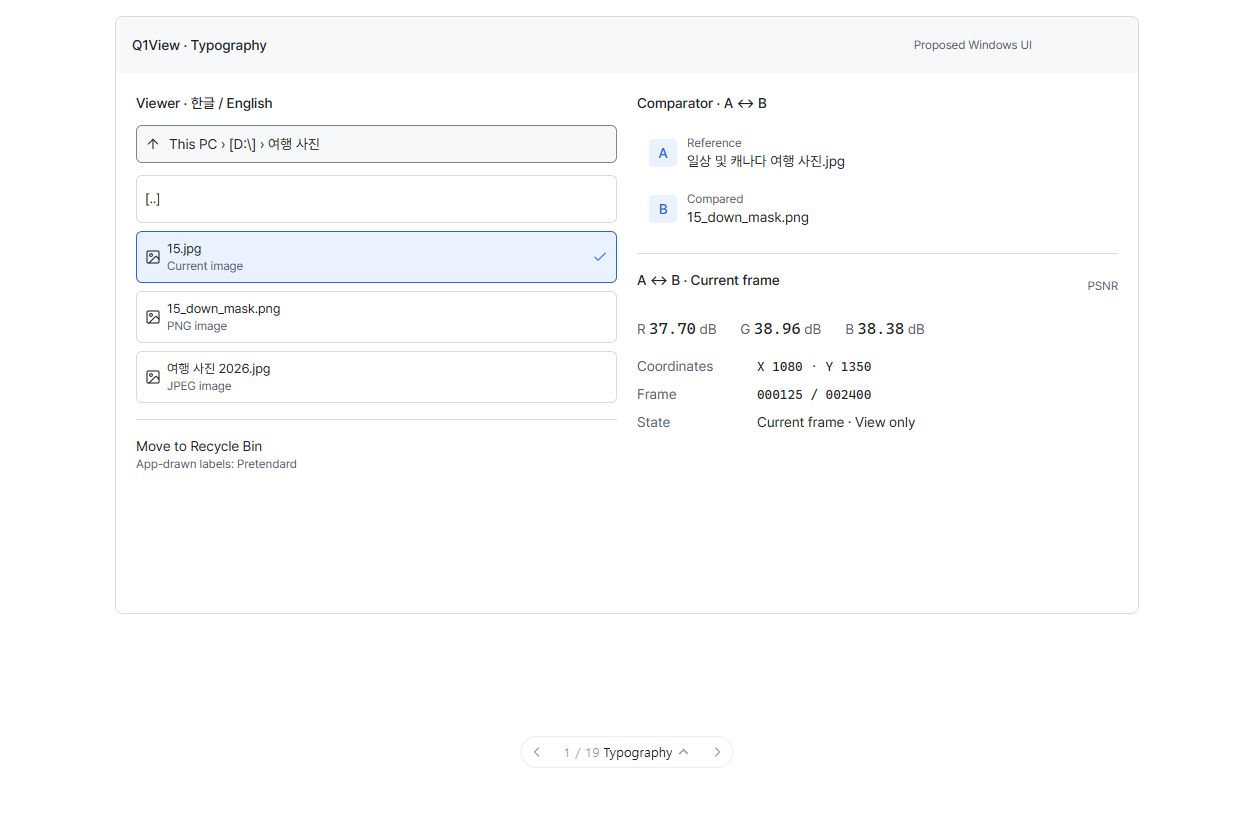
구현된 앱 화면이 아닌 UI 제안입니다. 그림의 모든 주변 요소가 아니라 현재 논의 중인 개별 작업의 범위만 구현합니다.
진행 상태: 합의된 개별 작업 #117·#118·#119 구현·검증 및 병합 완료. 검증 생략·한계와 별도 후속 수정은 맨 위 완료 정리를 따릅니다. 다음 작업과 릴리즈는 자동 진행하지 않습니다.
시각적 설명과 논의
이 작업 묶음은 새 화면 배치가 아니라 두 Windows 앱에서 같은 종류의 글자·버튼·선택·테두리가 일관되게 보이도록 하는 공통 시각 규칙입니다. 기존 Pretendard와 Q1 브랜드를 유지합니다.
아래 도식은 구조와 동작을 설명합니다. 정확한 픽셀 배치·글꼴 렌더링이나 구현된 Windows 앱 스크린샷이 아닙니다.
flowchart TD
  TODAY["현재: 서로 다른 조작 요소·렌더링 경로에 시각 규칙이 적용됨"]
  TODAY --> ROLES["공통 규칙: 색상 · 글꼴 역할 · 간격 · 조작 상태"]
  ROLES --> VIEWER["Viewer: 명령 · 폴더 · Info · 상태"]
  ROLES --> COMPARATOR["Comparator: 파일명 · 역할 레이블 · 측정값"]
  ROLES --> RENDERERS["GDI · DirectWrite · Windows 기본 조작 요소 연동"]
  SCALE["Windows 테마 · DPI · 텍스트 확대 · 고대비"] --> ROLES
  VIEWER --> RESULT["같은 역할 → 같은 외관; 이미지 데이터는 유지"]
  COMPARATOR --> RESULT
  RENDERERS --> RESULT
기존 단계 전체의 논의 질문 — 참고
-
글꼴: 한글·영문 UI에 Pretendard를 유지하고 정렬이 필요한 숫자에만 고정폭 글꼴을 사용할까요?
-
시각적 분위기: 차분한 중립 표면과 절제된 파란 선택·포커스가 좋을까요, 더 따뜻하고 다채로운 UI가 좋을까요?
-
테마: 기본 System, 선택 가능한 Light/Dark, 독립적인 중립 이미지 배경으로 할까요?
참고 자료 상태: 승인은 위의 개별 작업 질문을 기준으로 합니다. 단계 전체의 참고 내용을 한 번에 구현하는 작업으로 취급하지 않습니다.
상위 이슈·의존성
상위: #110. 첫 구현 단계에 해당합니다.
목표
기존 작업 흐름과 이미지 동작을 유지하면서 재사용할 수 있는 Windows UI 규칙을 마련합니다.
구현 범위
- 역할별 Light/Dark/System 및 고대비 색상 규칙을 도입합니다. 패널·약한 표면·마우스 올림·누름, 장식 구분선과 필수 경계, 텍스트, 강조·선택, 의미 있는 피드백을 구분합니다.
- 포함된 Pretendard Variable과 글리프 대체를 재사용합니다. 역할·DPI·텍스트 크기별 GDI 글꼴과 DirectWrite 형식을 캐시하고 숫자 역할에만 Cascadia Mono/Consolas를 사용합니다.
- 상위 설계의 글자 크기/줄 높이를 적용합니다: 본문·명령 14/20 DIP, 파일·폴더명 13/18, 보조 레이블 12/16, 측정값 16/22, 숫자 데이터 13/18. 관련 설정 변경 시 캐시를 재생성합니다.
- 앱 테마와 중립적인 캔버스 밝기를 분리하고 고대비를 우선합니다. Windows 기본 메뉴·대화상자는 문서화된 OS 동작을 유지합니다.
- 기존 MFC ID를 점검하고 메뉴·도구 모음·단축키·도움말에 공통 표시·활성·실행 정보를 정의합니다. 점진적으로 도입하고 명령 전달 전체를 한 번에 교체하지 않습니다.
- Windows 기본 창·Snap과 승인된 Q1 아이콘을 유지합니다. 선택적 창 재질 효과나 새 정식 아이콘 자산은 선행 조건이 아닙니다.
- 검토된 로컬 설계 문서·목업을 적절한 출처 표시와 함께 문서 또는 공통 기반 PR에 포함합니다. 그 전에는 #110이 독립적으로 읽을 수 있는 공개 설계 명세입니다.
기존 단계 전체 완료 조건 — 참고 체크리스트
전체 환경 행렬은 모두 실측 통과한 것이 아니므로 이 과거 체크리스트를 일괄 체크하지 않습니다. 완료 판단은 상단의 합의된 개별 작업 및 검증 한계 기록을 따릅니다.
- Viewer와 Comparator가 GDI/D2D/DWrite에서 같은 역할을 일관되게 표현합니다.
- 필수 조작 요소 경계를 낮은 대비의 장식 구분선 색으로 그리지 않습니다.
- 테마 저장·시스템 변경 감지·고대비 우선 적용이 동작합니다.
- 한글·영문 혼합, 다른 문자 대체, 100/125/150/200% DPI, 텍스트 확대, 모니터 이동에서 글자 잘림이나 클릭 영역 어긋남이 없습니다.
- 테마·글꼴 변경 후 현재 파일·프레임, 확대·이동, ROI, 선택, 캐시, 측정 입력이 유지됩니다. 폴더 전체 디코딩이나 유휴 반복 그리기가 발생하지 않습니다.
- 기존 단축키·Windows 기본 메뉴 탐색이 정확한 명령을 한 번만 실행합니다.
실행·완료 규칙
Windows MFC Viewer/Comparator만 대상이며 상위 설계와 AGENTS.md를 따릅니다. 최신 origin/master에서 작업 범위에 맞는 브랜치를 만들고 관계없는 변경을 보존합니다. 기존 명령 ID와 렌더링·데이터 경로를 재사용합니다. 관련 자동·수동 검사를 수행하고 공통 코드 또는 릴리즈에 민감한 코드 변경에는 로컬 CoreRegressionTests 및 두 Windows Release 빌드도 수행합니다. 브랜치/PR, 검증 증거, 남은 한계, 회귀 수정 내용을 기록합니다. 목업 또는 빌드 성공만으로 완료 처리하지 않습니다. 이 구현 단계에서는 릴리즈를 태그하거나 게시하지 않습니다.
English original — 영어 원문 펼치기
Coordination epic — work through the small jobs
This issue groups related work; it is not one implementation job or one all-at-once design approval. Review and complete the linked leaf issues separately. Their questions, narrow scopes and prerequisites govern execution. The older phase-wide material below is reference context.
| Focused job | UI screen, question and acceptance checks |
|---|---|
| Unify Korean/English UI typography | #117 |
| Add coherent appearance themes without changing image pixels | #118 |
| Make command availability and interaction states consistent | #119 |
Screen context
This is a UI proposal, not an implemented screenshot. Implement only the boundary of the leaf job under discussion, not every contextual element visible in the picture.
Coordination status: agreed jobs #117, #118 and #119 implemented, verified and merged. See the completion record above for waivers, limitations and separate follow-up fixes. No automatic next-job work or release.
Visual walkthrough and discussion
This task is the shared visual rulebook, not a new layout. It makes the same kind of text, button, selection, and border look consistent in both Windows apps. Existing Pretendard and the Q1 brand stay.
Schematic only: these diagrams explain structure and behavior, not exact pixel geometry, font rendering, or an implemented Windows screenshot.
flowchart TD
  TODAY["Today: visual rules are applied through separate control/rendering paths"]
  TODAY --> ROLES["Shared rulebook: colors · font roles · spacing · interaction states"]
  ROLES --> VIEWER["Viewer: commands, folders, Info, status"]
  ROLES --> COMPARATOR["Comparator: filenames, role labels, metric values"]
  ROLES --> RENDERERS["GDI · DirectWrite · native-control integration"]
  SCALE["Windows theme · DPI · text enlargement · high contrast"] --> ROLES
  VIEWER --> RESULT["Same role → same appearance; image data remains unchanged"]
  COMPARATOR --> RESULT
  RENDERERS --> RESULT
Historical phase-level discussion prompts (reference)
-
Typography: keep Pretendard for Korean/English UI, with monospaced numbers only where alignment matters?
-
Visual tone: quiet neutral surfaces with restrained blue selection/focus, or should the UI feel warmer/more colorful?
-
Theme: System by default, with Light/Dark choices and an independent neutral image background?
Reference status: use the focused leaf-job questions above for approval. This phase-wide material is not one implementation job.
Parent and dependencies
Parent: #110. First implementation step.
Goal
Establish reusable Windows UI contracts while keeping existing workflows and image behavior unchanged.
Implementation scope
- Introduce role-based Light/Dark/System and high-contrast token resolution: panel/subtle/hover/pressed surfaces, decorative versus essential borders, text, accent/selection, and semantic feedback.
- Reuse bundled Pretendard Variable and glyph fallback. Cache role/DPI/text-scale-specific GDI fonts and DirectWrite formats; reserve Cascadia Mono/Consolas for numeric roles.
- Apply the parent's type ramp: body/commands 14/20 DIP, file/folder captions 13/18, supporting labels 12/16, metric values 16/22, numeric data 13/18. Recreate caches on relevant settings changes.
- Separate application theme from neutral canvas brightness; high contrast takes precedence. Native menus/dialogs retain documented OS behavior.
- Audit existing MFC IDs and define shared display/enabled/execute metadata for menu, toolbar, shortcuts, and help. Introduce incrementally; do not replace all routing at once.
- Preserve native frame/Snap and the approved Q1 icon. Optional frame material and new production icon assets are not prerequisites.
- Include the reviewed local design documents/mockup in a documentation or foundation PR, with appropriate attribution. Until then, Windows UI redesign: Fluent Inspector design and phased implementation #110 is the self-contained published specification.
Historical phase-wide acceptance checklist
Do not blanket-check untested environment combinations. Closure follows the agreed leaf-job scope and documented verification limits above.
- Viewer and Comparator resolve the same role consistently across GDI/D2D/DWrite.
- Essential control boundaries are not drawn using the low-contrast decorative divider token.
- Theme settings persist, system-theme changes are observed, and high-contrast overrides work.
- Mixed Korean/English, fallback scripts, 100/125/150/200% DPI, text enlargement, and monitor transitions render without clipped text/hit-area drift.
- Theme/font changes preserve current file/frame, image transforms, ROI, selection, caches, and metric inputs; no directory-wide decoding or idle repaint loop.
- Existing shortcuts/native menu navigation still execute exactly one correct command.
Execution and completion rules
Windows MFC Viewer/Comparator only; follow the parent specification and existing AGENTS.md. Start a focused branch from current origin/master and keep unrelated changes intact. Reuse existing command IDs and rendering/data paths. Run relevant automated/manual checks plus local CoreRegressionTests and both Windows Release builds for changes affecting shared or release-sensitive code. Record the branch/PR, verification evidence, remaining limitations, and any regression fixes. A mockup or build alone is not completion. Do not tag/publish a release in this implementation step.
Activity
[-]Windows UI redesign — Phase 1: shared visual, typography, DPI/theme, and command foundations[/-][+]Windows UI redesign — Foundation epic: three focused jobs[/+]