Repository navigation
Windows UI redesign: Make command availability and interaction states consistent #119
Description

한국어 — 명령의 사용 가능 여부와 조작 상태 통일
화면 시안
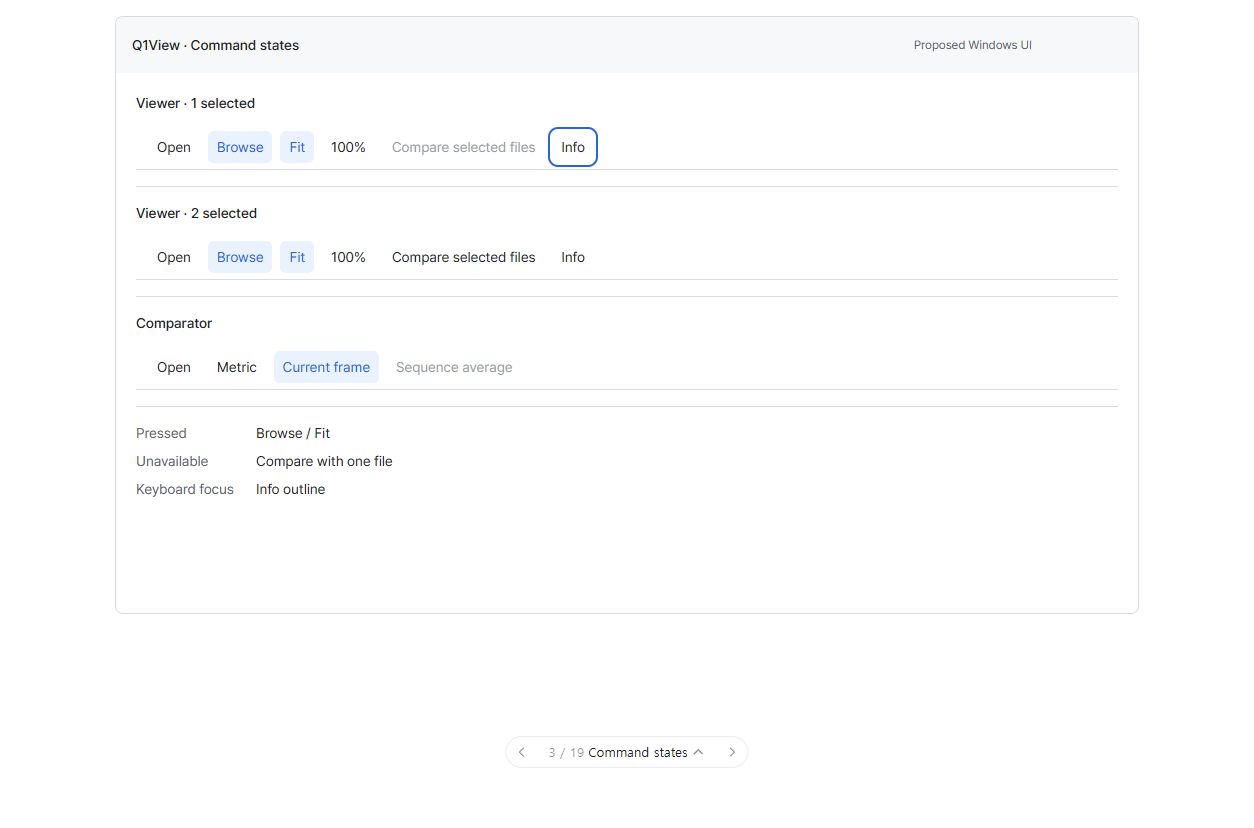
이미지를 클릭하면 크게 볼 수 있습니다. 순서도나 구현된 Windows 앱 스크린샷이 아닌 UI 화면 제안입니다. 이미지는 합성이고 수치는 설명용 예시입니다. 주변 조작 요소는 전체 계획의 맥락이며 이번 작업에서는 아래 범위만 구현합니다. 현재 빌드의 실제 변경 전·후 화면이라는 뜻이 아닙니다.
이번 작업의 목표
동일한 기존 명령이 도구 모음·메뉴·도움말에서 같은 실행 가능 여부와 의미를 갖게 합니다.
작업 묶음: #111. 전체 설계와 반드시 유지할 기존 동작: #110.
이번에 변경할 것
-
기존 MFC 명령 ID를 점검하고 적용 대상·활성 여부·실행에 대한 공통 정보를 점진적으로 도입합니다.
-
마우스 올림·누름·비활성·포커스 표시를 통일하고 DPI에 맞춰 클릭 영역을 실제로 측정합니다.
-
Windows 기본 Alt/메뉴 동작과 승인된 Q1 아이콘을 유지합니다.
이번 작업에서 하지 않을 것
전역 단축키 전달 방식 변경(별도 작업), 새 명령, UI 프레임워크·메뉴 전체 재작성.
완료 조건
-
사용할 수 없는 명령은 다른 진입 경로에서도 실행되지 않습니다.
-
사용자의 한 번 조작으로 기존 명령이 정확히 한 번 실행됩니다.
-
키보드 포커스와 비활성 상태를 색상만 보지 않고도 구별할 수 있습니다.
먼저 함께 결정할 질문
활성·비활성·선택·키보드 포커스 상태를 쉽게 구별할 수 있나요?
검토 상태: 검증 완료 및 병합, v2.8.1 릴리즈 실행 시작. 사용자의 조건부 릴리즈 요청에 따라 최종 일반 빌드 확인까지 완료했습니다. 최종 전달 기록은 맨 아래에 있습니다. 패키징·서명·Store 제출의 최종 성공은 아직 확인하지 않았습니다.
구현·검증 규칙
Windows MFC Viewer/Comparator만 대상입니다. #110과 AGENTS.md를 따르고 최신 origin/master에서 해당 작업용 브랜치를 시작합니다. 관계없는 변경은 보존하고 기존 명령·렌더링 경로를 재사용합니다. 영향을 받는 실제 앱 작업 흐름을 검증하고 공통 코드 또는 릴리즈에 민감한 변경에는 관련 로컬 핵심 테스트·빌드를 실행합니다. 실패는 수정하고 해당 검사를 반복한 뒤 PR/커밋, 실제 증거와 한계를 기록합니다. 목업 검사는 실제 Windows 앱 검증이 아닙니다. 이 작업은 릴리즈 태그·Store 게시·버전 증가를 승인하지 않습니다.
English original — 영어 원문 펼치기
Proposed UI screen
Click the image for full-size details. This is a UI screen proposal, not a flowchart or a screenshot of an implemented native build. Images are synthetic and values are illustrative. Surrounding controls are roadmap context; implement only this job's changes below. This is not a literal before/after claim about the current build.
One job, one outcome
Give one existing command the same enabled/action meaning across toolbar, menu and help.
Coordination epic: #111. Overall design and unchanged behavior contracts: #110.
Changes in this job
-
Audit existing MFC command IDs and introduce shared applicable/enabled/execute metadata incrementally.
-
Use consistent hover/pressed/disabled/focus styling and measured DPI-aware hit targets.
-
Preserve native Alt/menu behavior and the approved Q1 icon.
Explicitly outside this job
Global key-routing changes (separate job), new commands, full framework/menu rewrite.
Done when
-
Unavailable commands cannot execute through an alternate entry point.
-
One user action executes exactly one existing command.
-
Keyboard focus and disabled state are recognizable without color alone.
Discuss this screen first
Are enabled, disabled, selected and keyboard-focused controls easy to distinguish?
Review status: verified, merged, and v2.8.1 release workflow started. Final ordinary-build verification completed under the user's conditional delivery authorization. See the final delivery record below. Packaging/signing/Store publication completion is not yet claimed.
Implementation and verification rules
Windows MFC Viewer/Comparator only. Follow #110 and AGENTS.md, start a focused branch from the current origin/master, preserve unrelated changes, and reuse existing command/rendering paths. Verify the affected native workflows and run the relevant local core tests/builds for shared or release-sensitive changes. Fix failures and repeat the affected checks; record PR/commit, actual evidence and limitations. Mockup checks are not native-app verification. This job does not authorize a release tag, Store publication or a version bump.
Implementation started — 2026-10-18 / 구현 범위 기록
The user's explicit request to proceed authorizes implementation on codex/issue-119-command-states, based on current origin/master 65b53d4. Keep the current commands/IDs, theme, typography, approved Q1 icon and native menu tracking. Introduce a small shared availability policy incrementally for existing Viewer copy/paste/compare and RAW interpretation commands, and Comparator per-source RAW color-space controls and selection clearing. Use the same policy for menu state, execution guards and Windows help explanations. Preconfiguring RAW interpretation with no source remains allowed; decoded fixed-format input must not be reinterpreted through a different entry point. Comparator's existing comparison-canvas resolution policy remains unchanged.
Use real native button semantics for Comparator's source popup control, including enabled/focus/accessibility state, release/Space activation and pointer-leave behavior without hover capture. Apply consistent hover, pressed, disabled and visible keyboard focus treatment with DPI/text-aware measured hit targets to existing controls. No new toolbar, new action, global key-routing/IME changes, Qt changes, render/metric algorithm changes, animations, release or merge is authorized here. Native visual review and any remaining acceptance limits will be recorded separately; implementation approval does not pre-approve an unseen final screen.
사용자의 진행 요청으로 최신 master 기반의 구현을 시작합니다. 기존 명령 ID를 유지하고 복사·붙여넣기·비교·RAW 해석 등의 사용 가능 조건을 메뉴·실행·Windows 도움말에서 재사용합니다. 비어 있을 때 RAW 미리 설정과 Comparator의 비교 캔버스 해상도 기능은 유지합니다. 입력별 색상 메뉴에는 기본 버튼의 키보드·포커스·활성 상태를 적용하고 상태 표시와 실제 클릭 영역을 정리합니다. 새 명령 표시줄·전역 단축키 라우팅·Qt·계산 엔진은 바꾸지 않으며, 최종 화면은 구현 후 별도로 검토합니다. 병합·릴리즈는 포함하지 않습니다.
Re-review and verification — 2026-10-18 / 재검토 및 검증
한국어
설계를 다시 검토한 결과, 새 명령 프레임워크를 추가하지 않고 공통 사용 가능 조건·안내를 기존 MFC 실행 경로에서 재사용하는 점진적 접근을 유지합니다. 모든 앱 명령을 새 정책으로 옮긴 것은 아닙니다. Comparator의 비교 캔버스 해상도 조정은 Viewer의 RAW 전용 해석 제한과 구분하여 유지합니다.
추가로 수정한 사항:
- 전체 화면에서 메뉴가 없어도 Viewer 도움말의 사용 가능 안내가 갱신되도록 수정하고 회귀 검사를 추가했습니다.
- Windows 기본 메뉴 경로에서도 Compare 활성 상태 변경을 다시 그리도록 했습니다. 오른쪽 정렬 여부가 아니라 명시적인 명령 역할로 Compare와 읽기 전용 배율을 구분합니다.
- Comparator 포맷 이름을 갱신해도 DPI 기준 헤더 높이·닫기 버튼·이미지 영역이 바뀌지 않도록 수정했습니다.
- 실제 파일 열기에서 디코딩된 입력의 버튼만 활성 상태로 남는 문제를 발견했습니다. 기존 테스트의 강제 상태 갱신을 제거해 실패(exit 1)를 재현한 뒤, 입력 로드가 끝난 MFC 문서 갱신 알림에서 상태가 반영되도록 고쳤습니다. 상태가 같으면 매 프레임 네이티브 메뉴를 다시 갱신하지 않습니다. 빈 입력·이미지·RAW로 교체·입력 닫기를 강제 갱신 없이 검증합니다.
최종 로컬 결과: Viewer 전체 836 PASS, 빈 창/RAW 시작 44 PASS, Comparator 전체 748 PASS, 공통 Windows UI 테스트·CoreRegressionTests 및 두 일반 Release/x64/v143 빌드 모두 성공했습니다. 로컬 버전은 0.0.0-dev 그대로입니다. 명령 1회 실행, 비활성 우회 차단, 접근성, 2/3/4 입력 배치와 기존 PSNR/LPIPS 경로를 함께 검사했습니다.
실제 일반 Comparator에서 Tab 포커스 왕복, Space 메뉴, 방향키/Enter 선택, Alt+F와 입력별 독립 적용을 확인했습니다. 마지막 수정 후 일반 빌드에서 파일을 열어 화면을 다시 확인하려 했지만 파일 열기 창에서 failed to activate captured window가 발생했고, 창 재선택 후 한 번 재시도해도 같아 추가 UI 입력을 중단했습니다. 최종 수정의 실제 앱 통합 검사는 통과했지만, 이 마지막 로드 후 화면 확인과 사용자 시각 검토는 남아 있습니다. 실제 OS는 96 DPI/텍스트 1.000이며, 전역 배율·텍스트 크기·테마는 변경하지 않았습니다.
작업은 로컬 codex/issue-119-command-states 브랜치에 있으며 아직 커밋/PR/병합/릴리즈하지 않았습니다. 상세 설계 판단·실패와 재검증·한계는 로컬 docs/verification/issue-119-command-states.md에 기록했습니다. 완료 체크박스와 이슈는 최종 검토 전까지 열어 둡니다.
English
The re-review retains a bounded shared applicability/reason policy reused by the existing MFC handlers, not a second command dispatcher or a claim that every command has been migrated. Comparator's canvas-resolution/resizing policy remains separate from Viewer RAW interpretation.
Corrections cover full-screen help updates without a menu, native fallback Compare redraw, an explicit read-only zoom role instead of inferring it from right alignment, and stable DPI-aware source-header/canvas/close geometry. Ordinary-app file opening exposed stale enabled source buttons after decoded input committed. Removing a test-forced refresh reproduced that failure (exit 1); completed document update notifications now synchronize native state only when eligibility changes. Tests cover empty slots, decoded input, replacement with RAW and closing input without forcing state refresh.
Final local results: 836 Viewer PASS, 44 startup/RAW PASS, 748 Comparator PASS; shared Windows UI tests, CoreRegressionTests and both ordinary Release/x64/v143 builds passed. Version remains 0.0.0-dev. Native HWND activation counts, disabled bypass guards, accessibility, 2/3/4-source geometry and existing actual PSNR/LPIPS paths are covered.
Ordinary Comparator inspection observed full format labels, Tab focus/return, Space opening, arrow/Enter selection, Alt+F and source-local A/B behavior. The final loaded-source visual recheck after the last correction was blocked by failed to activate captured window in File Open; fresh selection and one retry failed identically, so further UI input stopped. Final real-app integration is green, but that final visual recheck and user visual acceptance remain pending. Actual OS settings were 96 DPI / text factor 1.000; no global settings changed, and live coverage of every DPI/contrast/Windows version is not claimed.
Changes remain local on codex/issue-119-command-states, uncommitted with no PR, merge or release. Durable design decisions, earlier failed reports, final results and limitations are in local docs/verification/issue-119-command-states.md. Leave the issue and acceptance checkboxes open for final review.
Final delivery — 2026-10-18 / 최종 전달
앞선 검증 대기 기록을 갱신합니다. 최종 일반 빌드를 상대 경로 샘플 두 개로 실행해 이미지 표시, 실제 비활성 BGR888 버튼(접근성 및 점선 표시), PSNR(47.5484) dB를 확인했습니다. 이 과정에서 재현된 상대 경로 시작 오류도 입력 경로 정규화로 수정하고 같은 실행을 재검증했습니다. 최종 자동 검사는 Viewer 836 PASS, 시작/RAW 44 PASS, Comparator 750 PASS이며 공통 UI·CoreRegressionTests 및 양쪽 일반 Release/x64/v143 빌드도 성공했습니다. 파일 대화 상자 자체의 자동화 한계와 실제 검증한 OS 범위는 검증 문서에 그대로 구분해 기록했습니다.
사용자의 “검증까지 성공하면 릴리즈하고 컴퓨터 종료” 요청에 따라 PR #141을 origin/master ea10a5385e83f3372667165d16e3577187e64150에 병합했습니다. v2.8.1 태그를 푸시했고 태그 릴리즈 Actions가 in_progress임을 확인했습니다. 이전 요청대로 서버 작업 완료를 기다리지 않습니다. 이는 게시 완료 확인이 아니라 릴리즈 실행 시작 확인입니다. 로컬 버전은 0.0.0-dev이며 관계없는 로컬 설계 자산은 포함하거나 삭제하지 않았습니다. 검증 문서: issue-119-command-states.md.
This supersedes the earlier pending-verification record. The final ordinary build successfully opened two relative sample paths, displayed both images, exposed disabled BGR888 buttons with dashed cues and native disabled accessibility state, and showed PSNR(47.5484) dB. A relative-path startup error discovered during verification was fixed by normalizing input paths and the identical launch was repeated successfully. Final checks: 836 Viewer PASS, 44 startup/RAW PASS, 750 Comparator PASS, shared Windows UI/CoreRegressionTests and both ordinary Release/x64/v143 builds green.
PR #141 is merged at ea10a53; v2.8.1 was pushed and tagged release run 39053060624 was confirmed in_progress. As requested, do not wait for server-side packaging/signing/Store submission before safe non-forced computer shutdown. Started release automation is not completed publication. Local version remains 0.0.0-dev; unrelated local design assets were preserved and excluded.
Activity