Repository navigation
Windows Browse: Show the current folder path and preserve the view on navigation failure #121
Description

완료 — master 병합 및 v2.8.3 릴리즈 시작 (2026-10-19)
사용자가 실제 Viewer의 경로 헤더 디자인을 검토한 뒤 커밋·푸시·릴리즈를 승인했습니다. PR #143을 master에 병합했으며, 병합 커밋은 e2802de4c894e62140fb378e626473a9f299f0f3입니다. v2.8.3 태그를 푸시했습니다. 이슈 구현은 완료되어 종료합니다.
- 현재 Browse 경로를 중성 배경·중간 굵기 Pretendard·얇은 아래 구분선이 있는 한 줄 헤더로 표시합니다. 목록·그리드 모두 적용하며 전체 경로 접근성·툴팁·키보드 선택/복사와 기존 [..]·드라이브 이동을 유지합니다.
- 비동기 메타데이터 준비 성공 후 경로와 목록을 함께 확정합니다. 실패 시 기존 경로·목록·선택·스크롤·이미지를 보존하고, 직접 이동 실패만 안내하며 오래된 결과와 반복 백그라운드 오류 팝업을 막습니다.
- 최종 Viewer 전체 실제 통합 검사 1,925 PASS, Browse 집중 검사 397 PASS, Comparator 실제 통합 검사 780 PASS (각 exit 0). 코어·공통 UI 검사 및 Viewer/Comparator 일반·검사용 Release x64 v143 빌드도 통과했습니다.
- 이전 Gallery CI의 Comparator 휠 검사가 정상적인 100% 축소 한계를 실패로 판단할 수 있어 테스트 시작 배율을 고정하고 실제 확대/축소 방향을 엄격히 확인하도록 보완했습니다. Comparator 제품 확대/축소 동작은 변경하지 않았습니다.
태그 푸시와 릴리즈 시작은 패키지 게시 또는 Store 반영 완료를 의미하지 않습니다. 사용자 요청대로 Actions 완료까지 계속 대기하지 않습니다. 실제 OS DPI·텍스트 크기·고대비 전환, 실제 작업 드라이브 강제 분리나 사용자 폴더 권한 변경은 수행하지 않았으며, 관련 메트릭/실패 주입 검증의 한계는 기록에 명시했습니다. 아래의 과거 승인·설계 기록 중 검토 대기/미실시 문구는 당시 상태입니다.
English status
Completed and merged via PR #143 at e2802de4c894e62140fb378e626473a9f299f0f3 after explicit user UI review and release approval. Tag v2.8.3 was pushed. Final local evidence: 1,925 full Viewer checks, 397 focused Browse checks and 780 Comparer checks, all passing, plus core/common UI tests and ordinary/instrumented Release builds. The desktop-dependent Comparer wheel test now distinguishes a legitimate 100-percent fit stop from controlled directional wheel checks; production zoom behavior is unchanged. Local version remains 0.0.0-dev. Tagged Actions is authoritative for packaging, signing, Release publication and Store submission; release initiation is not a claim that those steps have finished. Live OS scale/high-contrast transitions and physical provider failures were not newly performed; see the linked evidence and limitations.
구현 승인 — 2026-10-19
사용자가 채팅에서 “#121 진행”으로 아래 축소 설계의 구현·검증을 승인했습니다. 기존 상위/드라이브 이동을 유지하며 경로 줄과 안전한 목록 확정만 구현합니다. 브랜치: codex/issue-121-browse-path-safety (origin/master 155844e 기준). 사용자 검토 전 master 병합·릴리즈·이슈 종료는 하지 않습니다.
Implementation approved in chat on 2026-10-19 for the reduced design below. Work is on codex/issue-121-browse-path-safety from origin/master 155844e. No merge, release or issue closure is authorized by this step. Validation is in progress, not yet reported as passed.
한국어 — Browse에 현재 경로를 표시하고 이동 실패 시 화면 지키기
범위 축소 합의: 2026-10-19. 사용자는 이미 구현된 상위 폴더·드라이브 이동을 다시 만들지 않고, 이 이슈를 아래 두 가지로 축소하는 데 동의했습니다. 이 본문은 그에 따른 상세 설계 제안입니다. 이번 요청은 이슈·설계 갱신이며 앱 구현이나 릴리즈 승인이 아닙니다.
작업 묶음: #112. 공통 유지 조건: #110. 선행 작업 #120은 완료되었습니다.
1. 쉽게 말하면 무엇이 바뀌나요?
폴더나 드라이브를 이동하는 방법은 지금 그대로입니다. 대신 “지금 어느 폴더의 목록을 보고 있는지”를 Browse 위쪽에 표시하고, 열 수 없는 폴더를 선택해도 기존 화면이 사라지지 않게 합니다.
예를 들어 오른쪽에는 A 폴더의 사진을 계속 보면서 왼쪽 Browse만 B 폴더로 이동할 수 있습니다. 이때 새 경로 줄은 사진 파일의 경로가 아니라 왼쪽에서 실제로 탐색 중인 B 폴더를 표시해야 합니다.
| 구분 | 현재 구현과 이번 결정 |
|---|---|
| 일반 폴더·드라이브 루트의 첫 항목 [..] | 이미 구현됨. 유지·회귀 검사만 합니다. |
| 드라이브 루트 위의 [C:], [D:] 목록 | 이미 구현됨. 다시 만들지 않습니다. |
| 마우스·Enter·Backspace·Alt+Up 이동, 기존 UNC 경계 | 이미 구현됨. 기존 동작을 유지합니다. |
| Browse의 현재 경로를 항상 확인 | 이번에 추가할 작업 A입니다. |
| 이동 실패 시 기존 화면 보존과 이유 안내 | 이번에 보완할 작업 B입니다. |
기존 동작은 CHANGELOG v2.7.20/v2.7.23, ThumbnailPane/GalleryGridCanvas와 기존 Gallery 통합 테스트에서 확인했습니다. 이 설계 갱신 과정에서 앱을 새로 실행해 검증했다는 뜻은 아닙니다.
2. 화면 배치 — 작업 A: 읽기 전용 경로 한 줄
아래는 Browse 부분만 설명하는 배치 예시이며 실제 앱 캡처나 픽셀 단위 시안은 아닙니다. 오른쪽 이미지와 기존 상단 메뉴·하단 상태줄은 바꾸지 않습니다.
일반 폴더
┌ Browse ──────────────────────────┐
│ D:\00\_temp                      │ ← 추가: 현재 탐색 경로
├─────────────────────────────────┤
│ [..]                            │ ← 기존 항목 유지
│ [여행 사진]                      │
│ 사진 썸네일 / 파일 목록           │
└─────────────────────────────────┘

드라이브 루트                    드라이브 선택 화면
경로 줄: D:\                     경로 줄: Drives
첫 항목: [..]                    항목: [C:\]  [D:\]  …
“Browse”라는 큰 제목이나 상자 테두리를 새로 추가하라는 뜻은 아닙니다. 그림의 테두리는 영역 구분용입니다.
표시와 조작
- 목록/그리드 바로 위에 작고 고정된 경로 줄 하나를 둡니다. 파일 목록을 스크롤해도 보이고, Browse를 닫으면 함께 사라집니다. 두 보기에서 같은 위치·의미를 사용합니다.
- 정상적으로 열린 Browse 폴더를 기준으로 표시합니다. 이미지 문서 제목이나 현재 선택 파일의 경로에서 추측하지 않습니다.
- 일반 폴더는 전체 경로, 루트는 D:\처럼 표시합니다. 논리 드라이브 목록에서는 Drives로 표시합니다. 아직 탐색 위치가 없는 초기 상태와 실제 드라이브 목록 상태를 혼동하지 않도록 명시적으로 구분합니다.
- 좁을 때는 중간을 …로 줄여 드라이브/UNC 시작과 마지막 폴더명을 우선 남깁니다. 마지막 폴더명 자체가 너무 길면 그 이름도 말줄임할 수 있지만, 글꼴 크기를 임의로 줄이지 않습니다.
- 예: D:\00\매우 긴 상위 폴더\여행 사진 → D:\…\여행 사진. 정확한 전체 문자열은 따로 보존합니다.
- 마우스를 올리면 전체 경로를 툴팁으로 확인할 수 있습니다. 키보드로도 경로 줄에 접근할 수 있어야 합니다. 포커스 시에는 전체 원문을 가진 읽기 전용 텍스트로 확인·선택·복사할 수 있게 하고, 화면 읽기 도구에도 전체 경로와 Current folder라는 이름을 제공합니다.
- 경로는 편집하거나 이동을 실행하는 주소창이 아닙니다. 클릭·포커스만으로 폴더나 이미지를 바꾸지 않습니다. 경로 안의 부분 문자열도 탐색 버튼으로 만들지 않습니다.
- Pretendard와 기존 공통 테마·DPI·Windows 텍스트 크기 처리를 재사용합니다. 높이는 현재 글자 높이와 여백으로 계산합니다. 링크처럼 파랗게 칠하거나 별도 굵은 테두리·새 아이콘을 넣지 않습니다.
- 경로 텍스트에 포커스가 있을 때 Ctrl+A/Ctrl+C는 경로 선택/복사이며 파일 전체 선택/복사가 아닙니다. Esc는 목록으로 포커스만 돌리고 이동하지 않습니다. Browse의 E와 상위 이동 단축키 등 기존 비충돌 단축키는 유지합니다.
상태 변경 예시
| 사용자 동작 | 경로 줄 | Browse 목록 | 오른쪽 이미지 |
|---|---|---|---|
| B 폴더 열기 성공 | B로 갱신 | B의 항목 | 그대로 |
| B 폴더 열기 실패 | 이전 A 유지 | A의 목록·선택·스크롤 유지 | 그대로 |
| 루트의 [..] 활성화 | Drives | 기존 드라이브 목록 | 그대로 |
| [D:] 열기 성공 | D:\ | D:\의 항목, 첫 항목 [..] | 그대로 |
3. 작업 B: 열 수 없으면 이전 상태를 유지
사용자가 보게 될 동작
- 폴더가 삭제됐거나, 드라이브가 분리됐거나, 접근 권한이 없으면 이동하기 전의 경로·목록·선택·스크롤·키보드 포커스 맥락을 유지합니다.
- 오른쪽의 파일, 디코딩된 이미지, 배율·이동·선택 영역, 재생 상태를 건드리지 않습니다. 이전 이미지를 닫았다가 다시 열어 복구하지 않습니다.
- 직접 시도한 이동이 실패한 경우에만 한 번 오류 안내를 표시합니다. 기존 표준 메시지 대화상자 경로를 재사용하고, 확인 후 시도한 Browse 항목으로 포커스를 돌립니다. 상시 오류 패널이나 새 Retry 버튼은 추가하지 않습니다. 사용자가 같은 항목을 다시 활성화하면 재시도합니다.
- 안내에는 실패한 대상 경로, 이해하기 쉬운 이유, 다음 행동을 포함합니다. 예: “D:\자료를 열 수 없습니다. 드라이브가 준비되지 않았습니다. 연결 상태를 확인한 뒤 다시 시도하세요.” 접근 거부에는 권한 확인, 경로 없음에는 삭제·이동 여부 확인을 안내합니다. 알 수 없는 오류는 일반 설명과 실제 Windows 오류 코드를 함께 제공합니다.
- 기존 영문 UI에서는 Can't open folder 제목과 영어 문구를 사용합니다. 이 이슈 때문에 새 언어 설정을 추가하지 않습니다.
- 자동 새로고침/디렉터리 감시 실패에는 반복 팝업을 띄우지 않습니다. 실패 때문에 목록을 비우거나 다른 폴더로 강제 이동하지 않고, 다음 명시적 접근 시 현재 상태를 다시 확인합니다.
- “접근 가능한 빈 폴더”는 성공입니다. 새 경로와 기존 [..]만 있는 목록을 정상 표시해야 합니다.
구현 설계: 읽기에 성공한 뒤 한 번에 교체
기존 Populate는 폴더 열거가 성공하기 전에 목록·선택·캐시 상태를 바꿉니다. NavigateTo/GoToParent의 PathIsDirectory 확인만으로는 권한 오류나 확인 직후의 삭제·연결 해제를 안전하게 처리할 수 없습니다.
- 기존 NavigateTo/GoToParent/드라이브 선택의 명령 진입점은 재사용하고, 대상 경로와 현재 탐색 상태를 분리합니다.
- 대상 폴더의 항목을 임시 결과에 수집합니다. 실제 열거의 성공/실패와 Windows 오류를 확인합니다. 정상 빈 폴더와 접근 불가를 구분하고, 중간 열거 오류로 얻은 일부 목록도 성공으로 취급하지 않습니다.
- 결과가 유효할 때만 현재 폴더·경로 표시·항목을 함께 교체합니다. 기존 정렬, 필터, [..], 부모 이동 후 자식 폴더 선택, 썸네일 세대/캐시·감시자 처리를 유지합니다. 새 폴더용 작업 취소·세대 전환은 확정 단계에 맞춰 수행하고, 실패한 시도 때문에 이전 썸네일을 전부 무효화하지 않습니다.
- 실패하면 현재 탐색 상태를 교체하지 않고 원인만 전달합니다. 예외 경로에서도 기존 목록을 먼저 지우지 않습니다. 최초 열기에서 이전 목록이 없다면 초기 화면을 유지하며 오류를 안내합니다.
- 목록/그리드 전환, 현재 파일 동기화, 디렉터리 새로고침 등 Populate를 호출하는 경로도 함께 점검합니다. 같은 폴더의 새로고침 실패 역시 기존 스냅샷을 보존합니다. 파일 열기 성공은 별도 문서 동작이며, 경로 줄은 실제 Browse 목록을 따라갑니다.
- 느린 장치/UNC 열거가 UI를 오래 멈추게 하지 않도록 준비 작업의 실행 경로를 검토합니다. 비동기 준비가 필요하면 탐색 요청 ID로 최신 요청만 반영하고, 늦은 결과/오류는 무시하며 창 종료 후 접근을 막습니다. 성공 전에는 이전 경로·목록을 유지합니다. 썸네일 디코딩과 불필요한 전체 이미지 읽기를 추가하지 않습니다.
새 파일 탐색기나 이미지 로더를 만드는 작업이 아닙니다. 목록을 안전하게 확정하는 작은 경계와 읽기 전용 경로 표시를 기존 Browse에 추가합니다.
4. 이번에 하지 않을 것
- 이미 동작하는 [..]·드라이브 목록·UNC 탐색 정책의 재구현.
- 별도 상위 버튼, 클릭 가능한 breadcrumb, 주소 입력창, Ctrl+L, 탐색 이력 Back/Forward, 검색 또는 네트워크 검색.
- 폴더 카드·선택 메뉴·휴지통 기능·상단 메뉴 재설계.
- 이미지 확대/이동/맞춤, RAW 해석, 자동 재생, Comparator, Qt 변경.
- 버전 증가, master 병합, 릴리즈 태그 또는 Store 게시. 각각 별도 승인 대상입니다.
5. 작게 구현·검증할 순서와 완료 조건
A를 먼저 검토한 뒤 B를 진행할 수 있게 구현/증거를 구분합니다. 기존 기능은 새 성과가 아니라 회귀 조건입니다.
A — 현재 경로
- 목록·그리드에 같은 현재 탐색 경로를 표시하고, 오른쪽 이미지의 파일 경로와 혼동하지 않습니다.
- 긴 한글·공백·Unicode 경로, UNC, 좁은 Browse, 텍스트 확대에서도 경로와 마지막 폴더를 찾고 전체 원문을 키보드/툴팁/접근성으로 확인할 수 있습니다.
- 경로 복사와 파일 선택 단축키가 포커스에 따라 올바르게 구분되고, 경로 표시 때문에 파일 열기·이미지 변경이 발생하지 않습니다.
B — 안전한 이동과 기존 기능 회귀
- 없는 경로, 접근 거부, 준비되지 않은/분리된 드라이브, 열거 중 실패에서 이전 폴더·목록·선택·스크롤·표시 이미지가 유지되고 직접 시도에는 원인별 안내가 한 번 표시됩니다.
- 접근 가능한 빈 폴더는 실패로 오인하지 않고 정상 진입합니다. 자동 새로고침 실패는 팝업을 반복하지 않습니다.
- D:\00_temp → D:\00 → D:\ → 드라이브 목록 → D:\ 되돌아오기를 마우스·키보드, 목록·그리드에서 기존 방식으로 수행합니다. UNC 경계와 부모 이동 후 자식 항목 선택도 유지합니다.
- Browse 이동/실패 전후의 이미지 파일·표시 픽셀·배율·이동·ROI·재생 상태를 비교합니다. E 전환, Page Up/Down, 썸네일 로딩·GPU 재생성의 기존 회귀 검사도 유지합니다.
- 필요한 경우 비동기 요청의 역순 완료·실패 후 성공·창 닫기·성공 후 늦은 오류를 검사하고, 오래된 결과가 최신 목록을 덮지 않는지 확인합니다.
- 실제 Windows Viewer에서 Light/Dark/고대비 및 지원 DPI·텍스트 확대를 확인하고, 핵심 테스트·영향받는 로컬 빌드·실제 앱 검증 결과와 한계를 기록합니다. 목업 확인은 앱 검증으로 세지 않습니다.
권한·장치 오류는 결정적 실패 주입 테스트로 회귀를 만들고, 안전하게 재현 가능한 임시 폴더/장치에서 실제 경로도 검증합니다. 사용자의 실제 폴더 권한을 바꾸거나 실제 작업 드라이브를 강제로 분리하지 않습니다.
6. 현재 판단과 추적 기준
- 합의됨: 기존 이동 유지, 경로 표시 + 이동 실패 처리로 범위 축소.
- 제안/검토 대상: 위 경로 줄의 세부 조작과 오류 안내 설계.
- 미실시: 이번 축소 범위의 앱 구현·새 검증·병합·릴리즈. 이슈는 열어 둡니다.
- 구현 시 최신 origin/master에서 전용 브랜치를 시작하고 AGENTS.md와 #110의 기존 동작 보존 규칙을 따릅니다. 이 원격 이슈가 이번 작업 범위의 기준이며, 과거 전체 재설계 그림의 추가 버튼/메뉴는 자동 요구사항이 아닙니다.
현재 코드 근거
기존 Browse 이동·목록 확정 코드, 루트·드라이브·없는 경로의 기존 통합 테스트.
이전 넓은 화면 시안 — 이력 참고용, 이번 구현 범위 아님
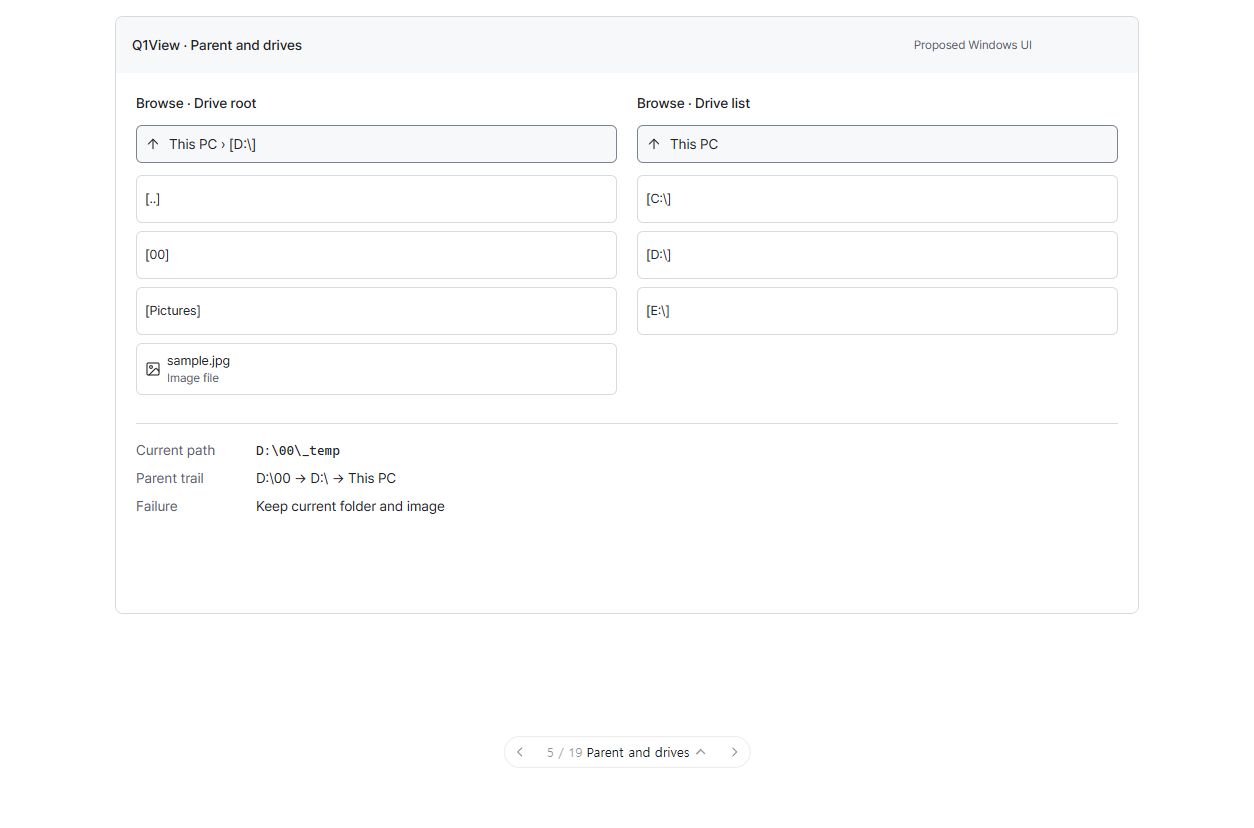
이전 전체 재설계의 합성 UI 제안입니다. 실제 Windows 앱 캡처가 아니며, 주변 메뉴나 breadcrumb·추가 조작 요소의 구현 승인을 뜻하지 않습니다. 이번에는 위의 축소 설계가 우선합니다.
English — matching reduced scope and design
Browse: show the current folder path and preserve the view on navigation failure
Scope decision: 2026-10-19. The user agreed to retain the existing parent/drive navigation and reduce #121 to two changes. This body proposes the detailed design. The current request authorizes updating the issue/design, not implementing, merging or releasing the app.
Coordination: #112. Preservation contracts: #110. Prerequisite #120 is complete.
Plain-language outcome
Keep the current way of navigating folders and drives. Add a small path line above Browse so the user knows which folder the list represents. If a destination cannot be opened, keep the previous view and explain why.
The image may still come from folder A while Browse shows folder B. The path line must identify B, not the image document's folder.
Already implemented: [..] first in real directories including drive/share roots; logical-drive choices such as [C:]/[D:]; mouse, Enter, Backspace and Alt+Up; existing UNC boundaries. These are regression contracts, not new work. The evidence is existing code, changelog v2.7.20/v2.7.23 and Gallery integration assertions; no new native run is claimed for this design update.
A. Read-only path line
Browse region only
┌─────────────────────────────────┐
│ D:\00\_temp                      │ New: current Browse folder
├─────────────────────────────────┤
│ [..]                            │ Existing parent item
│ [Travel photos]                 │
│ Thumbnails / file list           │
└─────────────────────────────────┘

At drive root: path D:\, first item [..]
At drive chooser: path Drives, items [C:\], [D:\], …
This is a layout explanation, not a native screenshot or a requirement to add a boxed card/title.
- One fixed path line above both compact list and grid, hidden with Browse. Do not change the image canvas, top menu or bottom status.
- Derive it from the successfully committed Browse directory, not document title or selected file. Explicitly distinguish uninitialized browsing from the actual logical-drive chooser.
- Show normal directory paths, roots such as D:\ and Drives for the chooser. Middle-elide long paths, prioritizing the drive/UNC prefix and current leaf; elide an oversized leaf only when necessary. Never shrink the font to fit. Preserve the exact full string.
- Hover exposes the full path. Keyboard focus exposes selectable/copyable full text using a read-only text presentation; screen readers receive the full value and Current folder name. This is not an editable address bar or clickable breadcrumb. Clicking/focusing does not navigate or open images.
- Reuse current Pretendard, theme, DPI and Windows text-size services; measure height from text plus padding. No new icon, link-blue treatment or heavy border.
- In the focused path text, Ctrl+A/Ctrl+C select/copy the path, not files. Esc returns focus to the list without navigation. Retain E, parent-navigation and other nonconflicting application shortcuts.
On successful navigation, path and items change together while the image remains unchanged. On failure, both remain at the previous folder. Root [..] shows Drives; successfully opening [D:] shows D:\ and its existing parent item.
B. Preserve state when navigation fails
- Missing/moved folders, access-denied targets and unavailable/disconnected drives must not replace the previous path, entries, selection, scroll or focus context.
- Do not close/reopen the active image or modify its pixels, zoom, pan, ROI or playback state to recover.
- For explicit failed navigation, use one standard error dialog through the existing message path. Include target, readable cause and next action; use Can't open folder in the current English UI, and retain the Windows code for unknown errors. Restore Browse focus after dismissal. No permanent error panel or new Retry button; reactivating the item retries.
- Background/watch refresh failures must not repeatedly open dialogs, empty the view or force navigation elsewhere. Recheck on the next explicit access.
- An accessible empty directory is a successful destination, with its normal [..] item.
Implementation boundary: prepare, then commit
The current Populate changes the old list/selection/cache state before directory enumeration is known to succeed. PathIsDirectory alone cannot handle access denial or deletion/disconnection after preflight.
- Reuse NavigateTo/GoToParent/drive entry points; separate requested destination from committed browsing state.
- Enumerate into a temporary result and capture the actual outcome/error. Distinguish an accessible empty directory from failure. A partially enumerated result with an error is not success.
- Commit directory, path display and entries together only on success. Preserve existing ordering, filtering, parent items, child selection after going up, cache/generation and directory-watch behavior. A failed attempt must not invalidate all previous thumbnail work.
- On failure leave the old snapshot untouched and report the cause. With no previous folder, retain the initial view. Never clear first and reconstruct the previous view as recovery.
- Review other Populate callers: presentation switches, current-file synchronization and directory refresh. Preserve an existing snapshot on refresh failure. Document-open success is independent; the path line must match the actual Browse contents.
- Review slow-device/UNC execution so preparation does not block UI for a long time. If preparation is asynchronous, use navigation request IDs, accept only the latest result, discard stale success/errors and stop publication after destruction. Keep previous contents until success. Do not add full-image reads or overload thumbnail decoding.
This is a small safety boundary plus a path display, not a replacement file browser/image loader.
Out of scope
Rebuilding existing [..]/drive/UNC navigation; an additional Up button; clickable breadcrumbs, address input, Ctrl+L, Back/Forward history, search/network discovery; folder-card/context/recycle/top-menu redesign; image transforms, RAW interpretation or autoplay; Comparator/Qt changes; version bump, merge, release tag or Store submission.
Small implementation/review steps and acceptance
Keep A and B evidence separate so A can be reviewed before B.
- A: consistent path in list/grid, independent of the active image folder.
- A: long Unicode/Korean/space-containing paths, UNC, narrow Browse and enlarged text remain discoverable; full text is available through keyboard, tooltip and accessibility.
- A: path text selection/copy does not select files or trigger image/navigation commands.
- B: missing/access-denied/not-ready/disconnected/mid-enumeration errors preserve previous directory, entries, selection, scroll and image, with one actionable explicit-failure message.
- B: accessible empty folders work; background refresh does not spam dialogs.
- Regression: D:\00_temp → D:\00 → D:\ → drives → D:\ works with mouse/keyboard in list/grid, preserving UNC boundaries and child selection after going up.
- Regression: compare document, displayed pixels, zoom, pan, ROI and playback before/after navigation/failure; retain E, Page Up/Down, thumbnail and GPU-recreation checks.
- If asynchronous: cover out-of-order completion, failure then success, closing the window and late errors after newer success.
- Verify the actual Windows Viewer in Light/Dark/high contrast and supported DPI/text-size cases; run relevant core tests/local builds and record evidence/limitations. Mockups do not count as native verification.
Use deterministic failure injection for permission/device races plus safely reproducible temporary native fixtures. Do not change permissions on the user's actual folders or forcibly disconnect working drives.
Agreed: reduced scope and unchanged navigation. Proposed for review: path-line interaction and error presentation above. Not done in this update: app implementation, new validation, merge or release. Keep the issue open. Start a focused branch from current origin/master when implementation is authorized, following AGENTS.md and #110. This issue takes precedence over controls illustrated in the earlier broader mockup.
Existing population/navigation implementation, existing root/drive/missing-path integration assertions.
Activity
[-]Windows UI redesign: Make Browse parent and drive navigation visible[/-][+]Windows Browse: Show the current folder path and preserve the view on navigation failure[/+]Distinguish Browse location headers and finish validation (#121)
Merge pull request #143 from chammoru/codex/issue-121-browse-path-safety