Repository navigation
Windows UI redesign — Viewer workspace/Browse epic: four focused jobs #112
Description

한국어 — 작은 작업별로 진행하는 작업 묶음
이 이슈는 관련 작업을 묶는 관리용 상위 이슈입니다. 한 번에 구현하거나 한꺼번에 설계 승인하는 단일 작업이 아닙니다. 아래 개별 이슈를 각각 검토·완료합니다. 실행 범위와 순서는 개별 이슈의 질문·좁은 범위·선행 작업을 기준으로 정합니다. 아래에 남겨 둔 기존 단계 전체 설계는 참고 자료입니다.
| 개별 작업 | 화면·논의 질문·완료 조건 |
|---|---|
| Viewer 명령 표시줄과 상태 표시줄 정리 | #120 |
| Browse의 상위 폴더·드라이브 이동을 눈에 보이게 표시 | #121 |
| Gallery 폴더명을 줄바꿈한 뒤 마지막 줄만 … 처리 | #122 |
| 선택 파일과 적용 가능한 메뉴 명령을 명확하게 표시 | #123 |
화면 맥락
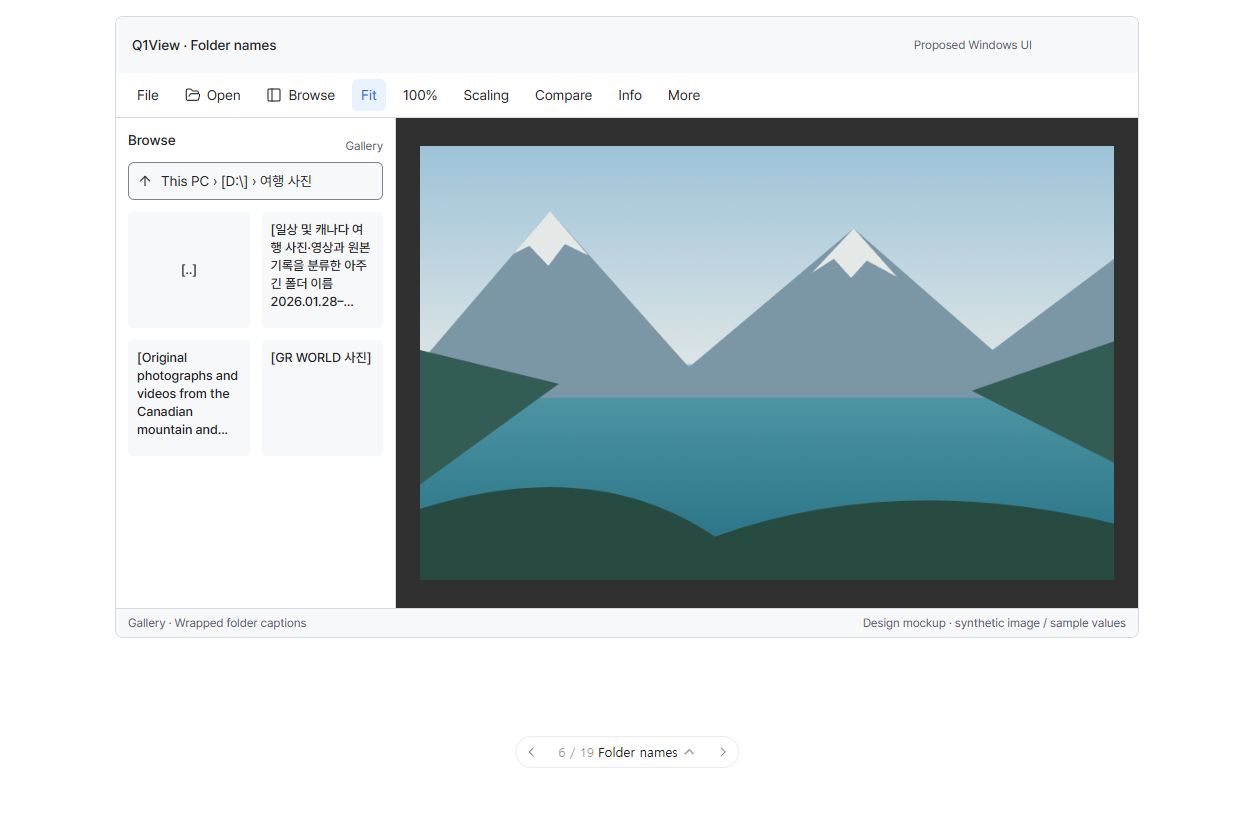
구현된 앱 화면이 아닌 UI 제안입니다. 그림의 모든 주변 요소가 아니라 현재 논의 중인 개별 작업의 범위만 구현합니다.
진행 상태: 개별 작업 논의 대기. 연결된 작업 모두에 실제 구현·검증 증거가 있을 때까지 이 상위 이슈를 열어 둡니다. 전체 계획의 첫 논의는 #117의 글꼴입니다. 다음 작업과 릴리즈를 자동으로 진행하지 않습니다.
시각적 설명과 논의
Viewer는 가운데 이미지, 왼쪽 Browse, 선택적으로 오른쪽 Info, 고정된 명령·상태 줄을 유지합니다. Browse 내부 선택 조작이 주 이미지를 밀어내지 않습니다.
아래 도식은 구조와 동작을 설명합니다. 정확한 픽셀 배치·글꼴 렌더링이나 구현된 Windows 앱 스크린샷이 아닙니다.
flowchart TD
  subgraph WINDOW["제안 Viewer 구조"]
    CMD["상단: File · Open · Browse · Fit · 100% · Scaling · Compare · Info"]
    subgraph WORK["작업 영역"]
      direction LR
      NAV["Browse<br/>상위 이동·경로<br/>List / Gallery<br/>폴더명 줄바꿈<br/>선택 파일 명령"]
      IMAGE["주 이미지<br/>기존 Fit / 수동 확대 규칙<br/>선택 색 입힘·서랍 애니메이션 없음"]
      INFO["선택적 Info<br/>좁은 창에서는 보조 패널 하나"]
      NAV --- IMAGE --- INFO
    end
    STATUS["하단: 실제 형식 · 배율 · 위치"]
    CMD --> WORK --> STATUS
  end
flowchart TD
  SELECT["선택한 작업 대상 파일"] --> COUNT{"몇 개인가?"}
  COUNT -- "1" --> SINGLE["단일 파일 명령"]
  COUNT -- "2–4" --> COMPARE["선택 파일 비교 + 휴지통으로 이동"]
  COUNT -- "5개 이상" --> RECYCLE["휴지통으로 이동; 비교 개수 제한 설명"]
  FOLDER["폴더 또는 [..]"] --> NAVIGATE["이동; 파일 일괄 삭제 대상에서 제외"]
기존 단계 전체의 논의 질문 — 참고
- 명령 순서와 상위 이동·경로 조작을 쉽게 찾을 수 있나요?
- 폴더 카드 크기와 여러 줄 표시가 특히 한글 이름을 충분히 읽게 해 주나요?
- 파란색에만 의존하지 않고 열린 파일·선택 파일·키보드 포커스를 구별할 수 있나요?
참고 자료 상태: 승인은 위의 개별 작업 질문을 기준으로 합니다. 단계 전체의 참고 내용을 한 번에 구현하는 작업으로 취급하지 않습니다.
상위 이슈·의존성
상위: #110. #111에 의존합니다. 선행 작업을 완료·검증한 뒤 진행합니다.
목표
기존 서랍 동작을 보존하면서 콘텐츠 중심 Viewer와 찾기 쉬운 탐색·선택 명령을 제공합니다.
구현 범위
- 1단계 공통 규칙으로 실제 크기를 측정한 한 줄 명령 영역과 읽기 전용 상태 영역을 만듭니다. Open/Browse/Fit/100%/Scaling/Compare/Info 및 File/View/Tools 접근을 유지하고 필요하면 낮은 우선순위 명령을 More로 옮깁니다.
- 파일 연결 시작은 패널을 닫은 이미지 우선 상태로 유지합니다. Windows 기본 제목 표시줄, 전체 화면/Escape 동작을 유지합니다.
- Browse 기본 폭은 280 DIP(240–440)이며 저장한 폭을 존중합니다. 눈에 보이는 상위 이동, 경로, List/Gallery, 썸네일 크기를 제공합니다.
D:\00\_temp → D:\00 → D:\ → 드라이브 목록을 유지합니다. 모든 실제 폴더·드라이브 루트에 첫 항목[..], 최상위에[C:\]/[D:\]를 표시합니다. UNC 루트 정책을 유지하고 이동 실패 시 이전 화면을 보존합니다.- 문자 중심 폴더 카드를 유지합니다. 13/18 글자를 왼쪽·위 정렬하고 사용 가능한 높이에서 줄바꿈한 뒤 마지막 줄만 … 처리합니다. 초기 높이 116 DIP·여백 8은 기본값이며 2줄/5줄 고정 제한이 아닙니다.
- 썸네일 파일명은 기본 2줄입니다. Gallery 표시 대상과 모든 파일의 List 접근, 제한된 캐시, 보이는 항목 우선 로딩, 미리보기 불가 상태를 유지합니다.
- 현재 파일·다중 선택 체크·키보드 포커스를 구분합니다. 한 번 클릭 선택, 두 번 클릭/Enter 열기, Ctrl/Shift 기준점, 폴더의 파일 일괄 삭제 제외를 유지합니다.
- 선택 명령은 Browse 안에 두고 주 캔버스를 변경하지 않습니다. 비교는 대상 파일 2–4개에서만 표시하고 4개 초과는 제한을 설명합니다. 적용 가능한 상황별 명령만 노출하고 휴지통 이동을 정확하게 처리합니다.
완료 조건
- 640×480/960×600/1440×900 DIP 및 텍스트 확대에서 글자를 줄이거나 명령을 자동 2줄로 만들지 않아도 접근할 수 있습니다.
- 긴 한글·영문·공백 없는 이름·혼합 이름의 앞부분을 보존하고 줄바꿈 후 … 처리합니다. 전체 이름에 접근할 수 있습니다.
- 드라이브/UNC 이동, 접근 불가 드라이브, List/Gallery 필터링, 외부 디렉터리 변경, 경로 기반 선택이 정확합니다.
- 1/2/4/5개와 다수 선택의 명령·개수가 맞습니다. 파일 클립보드 작업과 이미지 캡처 작업을 혼동하지 않습니다.
- E가 원자적으로 한 번 전환하고 길게 누른 반복을 무시합니다. 파일·프레임을 넘기지 않고 Fit은 한 번 재계산하며 작은 이미지는 100%, 수동 확대·이동은 검사 지점을 유지합니다.
- 새 선택·포커스 표시가 주 이미지에 색을 입히거나 잘라내거나 과도한 디코딩·그리기를 유발하지 않습니다.
실행·완료 규칙
Windows MFC Viewer/Comparator만 대상이며 상위 설계와 AGENTS.md를 따릅니다. 최신 origin/master에서 작업 범위에 맞는 브랜치를 만들고 관계없는 변경을 보존합니다. 기존 명령 ID와 렌더링·데이터 경로를 재사용합니다. 관련 자동·수동 검사를 수행하고 공통 코드 또는 릴리즈에 민감한 코드 변경에는 로컬 CoreRegressionTests 및 두 Windows Release 빌드도 수행합니다. 브랜치/PR, 검증 증거, 남은 한계, 회귀 수정 내용을 기록합니다. 목업 또는 빌드 성공만으로 완료 처리하지 않습니다. 이 구현 단계에서는 릴리즈를 태그하거나 게시하지 않습니다.
English original — 영어 원문 펼치기
Coordination epic — work through the small jobs
This issue groups related work; it is not one implementation job or one all-at-once design approval. Review and complete the linked leaf issues separately. Their questions, narrow scopes and prerequisites govern execution. The older phase-wide material below is reference context.
| Focused job | UI screen, question and acceptance checks |
|---|---|
| Refine the Viewer command and status bars | #120 |
| Make Browse parent and drive navigation visible | #121 |
| Make Gallery folder names wrap before final-line ellipsis | #122 |
| Clarify selected files and their applicable menu actions | #123 |
Screen context
This is a UI proposal, not an implemented screenshot. Implement only the boundary of the leaf job under discussion, not every contextual element visible in the picture.
Coordination status: awaiting job-level discussion. Keep this epic open until its linked jobs have actual implementation/verification evidence. The first discussion is #117, typography only. No automatic next-job work or release.
Visual walkthrough and discussion
The proposed Viewer keeps the image in the middle, Browse on the left, optional Info on the right, and commands/status in stable rows. Local selection controls do not push the main image around.
Schematic only: these diagrams explain structure and behavior, not exact pixel geometry, font rendering, or an implemented Windows screenshot.
flowchart TD
  subgraph WINDOW["Proposed Viewer structure"]
    CMD["Top: File · Open · Browse · Fit · 100% · Scaling · Compare · Info"]
    subgraph WORK["Workspace"]
      direction LR
      NAV["Browse<br/>Parent and path<br/>List / Gallery<br/>Wrapped folder names<br/>Selected-file actions"]
      IMAGE["Main image<br/>Existing Fit / manual zoom rules<br/>No selection tint or drawer animation"]
      INFO["Optional Info<br/>One side panel at a time in narrower windows"]
      NAV --- IMAGE --- INFO
    end
    STATUS["Bottom: actual format · scale · position"]
    CMD --> WORK --> STATUS
  end
flowchart TD
  SELECT["Selected eligible files"] --> COUNT{"How many?"}
  COUNT -- "1" --> SINGLE["Single-file commands"]
  COUNT -- "2–4" --> COMPARE["Compare selected + Move to Recycle Bin"]
  COUNT -- "5 or more" --> RECYCLE["Move to Recycle Bin; explain comparison limit"]
  FOLDER["Folder or [..]"] --> NAVIGATE["Navigate; never include in file batch deletion"]
Historical phase-level discussion prompts (reference)
-
Are the command order and parent/path controls easy to discover?
-
Is the proposed folder-card size and multiline wrapping readable enough, especially for Korean names?
-
Can you distinguish the currently open file, selected files, and keyboard focus without relying on blue alone?
Reference status: use the focused leaf-job questions above for approval. This phase-wide material is not one implementation job.
Parent and dependencies
Parent: #110. Depends on #111. Complete and verify prerequisites before this stage.
Goal
Provide a content-first Viewer with discoverable navigation and selection commands, preserving all existing drawer behavior.
Implementation scope
- Create a measured one-row command area and read-only status area using Phase 1 roles: Open, Browse, Fit, 100%, Scaling, Compare, Info; retain File/View/Tools access and move lower-priority commands to More when needed.
- File-association startup remains image-first with side panels closed. Keep native title bar and fullscreen/Escape behavior.
- Browse defaults to 280 DIP (240–440), honors saved widths, and includes visible parent navigation, breadcrumb/path, List/Gallery controls, and thumbnail sizing.
- Preserve
D:\00\_temp → D:\00 → D:\ → drive list, with[..]at every real folder/drive root and[C:\]/[D:\]at the top. Retain UNC-root policy; failed traversal preserves the old view. - Keep typographic folder cards. Left/top-align 13/18 captions; use the available card height for wrapping before final-line ellipsis. Initial height 116 DIP/padding 8 is a default, not a fixed two/five-line limit.
- Default thumbnail captions to two lines; preserve Gallery eligibility and full List access, bounded caches, visible-first loading, and unavailable-preview states.
- Distinguish current file, multi-selection checks, and keyboard focus. Preserve single-click selection, double-click/Enter opening, Ctrl/Shift anchors, and folder exclusion from file batch deletion.
- Keep selection actions inside Browse without resizing the main canvas. Show Compare only for 2–4 eligible files; >4 gets a limit explanation. Expose only applicable context commands and accurate Move to Recycle Bin behavior.
Acceptance criteria
- Commands remain accessible at 640×480/960×600/1440×900 DIP and text enlargement without label shrinking or automatic second command rows.
- Long Korean, English, unbroken, and mixed-script folder names show the beginning and wrap before ellipsis; full names remain accessible.
- Drive/UNC traversal, inaccessible drives, List/Gallery filtering, external directory changes, and path-based selection work correctly.
- 1/2/4/5/many selections produce the correct commands and counts; file clipboard and image capture actions are not conflated.
- E toggles atomically, ignores held repeat, never advances file/frame, refits Fit once, keeps small images at 100%, and preserves manual zoom/pan anchors.
- New selection and focus styling does not tint/crop the main image or trigger excess decode/paint work.
Execution and completion rules
Windows MFC Viewer/Comparator only; follow the parent specification and existing AGENTS.md. Start a focused branch from current origin/master and keep unrelated changes intact. Reuse existing command IDs and rendering/data paths. Run relevant automated/manual checks plus local CoreRegressionTests and both Windows Release builds for changes affecting shared or release-sensitive code. Record the branch/PR, verification evidence, remaining limitations, and any regression fixes. A mockup or build alone is not completion. Do not tag/publish a release in this implementation step.
Activity
[-]Windows UI redesign — Phase 2: Viewer shell, Browse navigation, and selection[/-][+]Windows UI redesign — Viewer workspace/Browse epic: four focused jobs[/+]