Repository navigation
Windows UI redesign: Organize Viewer Info into File, Input, Display and Pixel #124
Description

한국어 — Viewer Info를 File/Input/Display/Pixel로 구성
화면 시안
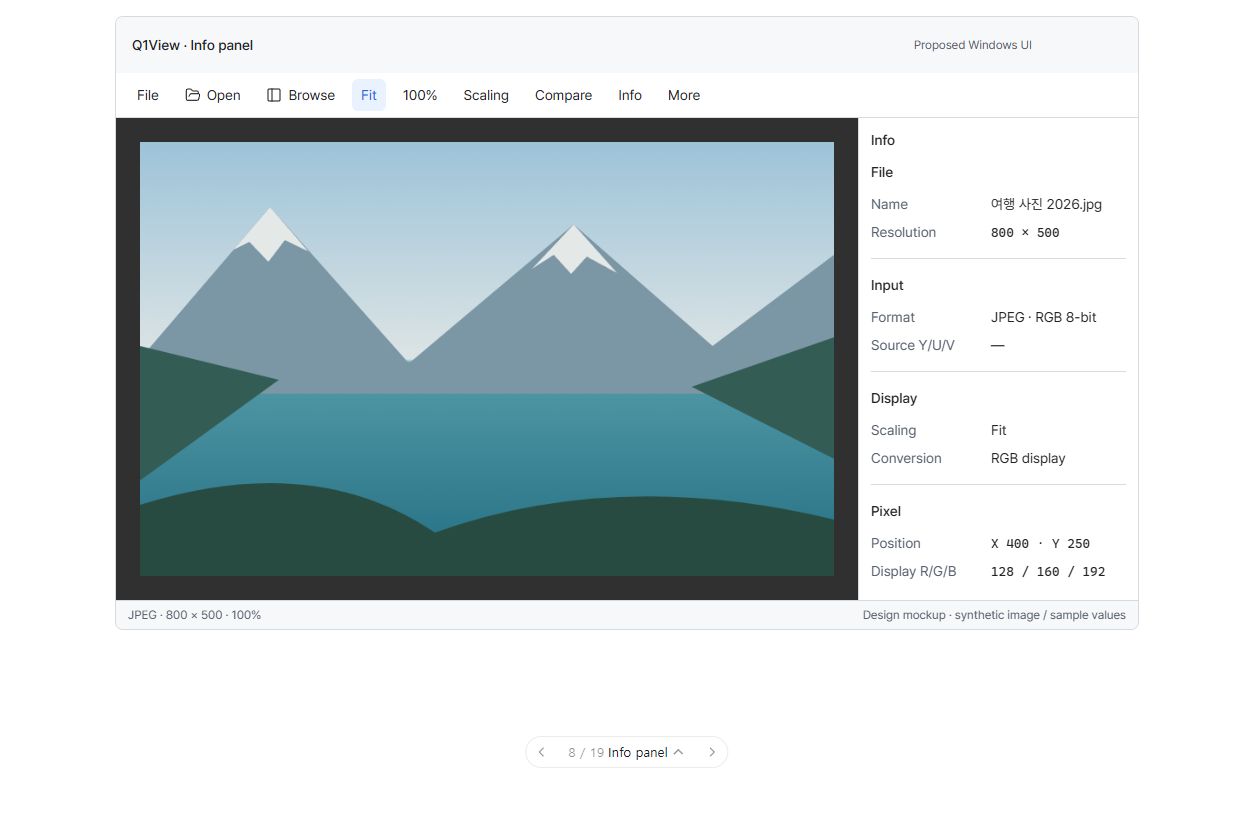
이미지를 클릭하면 크게 볼 수 있습니다. 순서도나 구현된 Windows 앱 스크린샷이 아닌 UI 화면 제안입니다. 이미지는 합성이고 수치는 설명용 예시입니다. 주변 조작 요소는 전체 계획의 맥락이며 이번 작업에서는 아래 범위만 구현합니다. 현재 빌드의 실제 변경 전·후 화면이라는 뜻이 아닙니다.
이번 작업의 목표
원본 데이터와 화면 표시 변환을 혼동하지 않도록 기술 정보를 읽기 쉽게 정리합니다.
작업 묶음: #113. 전체 설계와 반드시 유지할 기존 동작: #110.
이번에 변경할 것
-
File(파일)/Input(입력)/Display(표시)/Pixel(픽셀) 구획을 명확히 나누고 알 수 없는 값은 —로 표시합니다.
-
원본 Y/U/V와 화면 표시 R/G/B를 구분합니다. 픽셀 오버레이는 작게 만들고 검사 지점을 가리지 않습니다.
-
저장한 패널 폭을 유지합니다. 좁은 Windows 창에서는 보조 패널 하나만 표시하고 창 크기를 바꿨다고 패널을 자동으로 다시 열지 않습니다.
이번 작업에서 하지 않을 것
RAW 편집 조작, 재생 타임라인, 렌더링 해석 변경, 새로운 분석.
완료 조건
-
메타데이터와 원본·표시 레이블이 실제 JPEG/RAW/YUV/HDR 상태와 일치합니다.
-
Info 갱신으로 배치가 흔들리거나 캡처·샘플·ROI가 바뀌지 않습니다.
-
알 수 없는 값, 전체 경로, 레이블에 접근할 수 있습니다.
먼저 함께 결정할 질문
이 정보 순서가 유용한가요? 픽셀 상세 정보 대부분을 이 패널에 두는 것이 좋을까요?
검토 상태: 논의 대기. 구현 전에 사용자가 합의한 선택과 수정된 시안을 이 이슈에 기록합니다. 다른 작업 검토, 목업 조작, 이슈 등록은 이 작업의 승인이 아닙니다. 다음 작업으로 자동 진행하지 않습니다.
구현·검증 규칙
Windows MFC Viewer/Comparator만 대상입니다. #110과 AGENTS.md를 따르고 최신 origin/master에서 해당 작업용 브랜치를 시작합니다. 관계없는 변경은 보존하고 기존 명령·렌더링 경로를 재사용합니다. 영향을 받는 실제 앱 작업 흐름을 검증하고 공통 코드 또는 릴리즈에 민감한 변경에는 관련 로컬 핵심 테스트·빌드를 실행합니다. 실패는 수정하고 해당 검사를 반복한 뒤 PR/커밋, 실제 증거와 한계를 기록합니다. 목업 검사는 실제 Windows 앱 검증이 아닙니다. 이 작업은 릴리즈 태그·Store 게시·버전 증가를 승인하지 않습니다.
English original — 영어 원문 펼치기
Proposed UI screen
Click the image for full-size details. This is a UI screen proposal, not a flowchart or a screenshot of an implemented native build. Images are synthetic and values are illustrative. Surrounding controls are roadmap context; implement only this job's changes below. This is not a literal before/after claim about the current build.
One job, one outcome
Make technical information readable without confusing source data and display conversion.
Coordination epic: #113. Overall design and unchanged behavior contracts: #110.
Changes in this job
-
Use clear File/Input/Display/Pixel sections with honest unknown values shown as —.
-
Distinguish source Y/U/V from display R/G/B and keep pixel overlays compact and away from the inspected point.
-
Honor saved panel widths; in narrow native windows show one supplemental panel at a time without reopening it on resize.
Explicitly outside this job
RAW editing controls, playback timeline, rendering interpretation or new analysis.
Done when
-
Metadata and source/display labels agree with actual JPEG/RAW/YUV/HDR state.
-
Info updates do not cause geometry oscillation or modify captures/samples/ROI.
-
Unknown values, full paths and labels remain accessible.
Discuss this screen first
Is this information order useful, and should most Pixel details stay in this panel?
Review status: awaiting discussion. Record the user's agreed choices and any revised picture before implementing this job. Reviewing another job, interacting with the mockup, or registering this issue does not approve this one. Do not automatically proceed to the next job.
Implementation and verification rules
Windows MFC Viewer/Comparator only. Follow #110 and AGENTS.md, start a focused branch from the current origin/master, preserve unrelated changes, and reuse existing command/rendering paths. Verify the affected native workflows and run the relevant local core tests/builds for shared or release-sensitive changes. Fix failures and repeat the affected checks; record PR/commit, actual evidence and limitations. Mockup checks are not native-app verification. This job does not authorize a release tag, Store publication or a version bump.
Activity