Repository navigation
Windows UI redesign — Viewer inspection/input/feedback epic: five focused jobs #113
Description

한국어 — 작은 작업별로 진행하는 작업 묶음
이 이슈는 관련 작업을 묶는 관리용 상위 이슈입니다. 한 번에 구현하거나 한꺼번에 설계 승인하는 단일 작업이 아닙니다. 아래 개별 이슈를 각각 검토·완료합니다. 실행 범위와 순서는 개별 이슈의 질문·좁은 범위·선행 작업을 기준으로 정합니다. 아래에 남겨 둔 기존 단계 전체 설계는 참고 자료입니다.
| 개별 작업 | 화면·논의 질문·완료 조건 |
|---|---|
| Viewer Info를 File/Input/Display/Pixel로 구성 | #124 |
| RAW 입력에만 RAW 해석 조작 표시 | #125 |
| 영상·시퀀스에만 간결한 재생·프레임 조작 표시 | #126 |
| 휴지통 이동 확인과 실제 작업 결과를 안전하게 표시 | #127 |
| 입력 맥락에 맞는 단축키와 접근 가능한 포커스 유지 | #128 |
화면 맥락
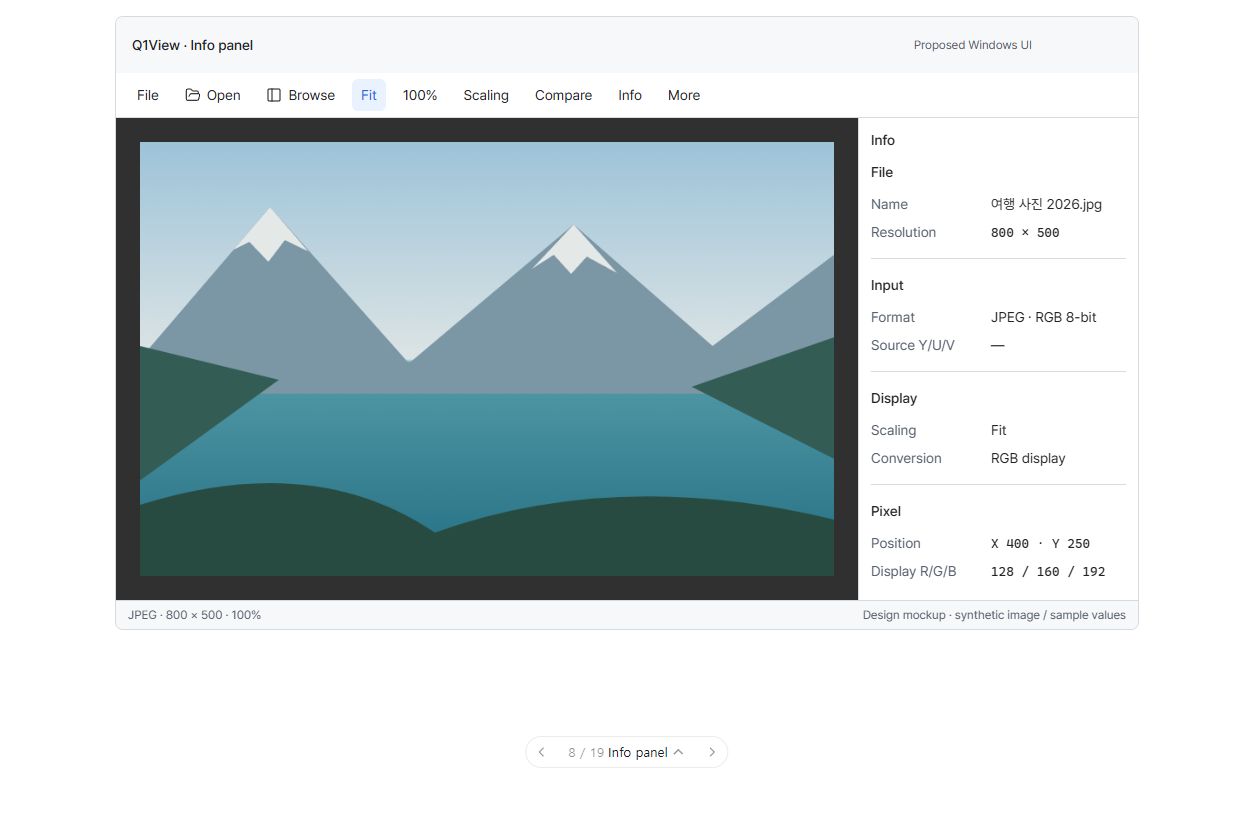
구현된 앱 화면이 아닌 UI 제안입니다. 그림의 모든 주변 요소가 아니라 현재 논의 중인 개별 작업의 범위만 구현합니다.
진행 상태: 개별 작업 논의 대기. 연결된 작업 모두에 실제 구현·검증 증거가 있을 때까지 이 상위 이슈를 열어 둡니다. 전체 계획의 첫 논의는 #117의 글꼴입니다. 다음 작업과 릴리즈를 자동으로 진행하지 않습니다.
시각적 설명과 논의
Info는 파일에 들어 있는 정보와 Q1View가 화면에 표시하는 방식을 구분합니다. 해당 입력의 RAW·영상 조작만 맥락에 맞게 나타납니다. 텍스트 입력과 대화상자의 키를 전역 단축키가 가로채지 않습니다.
아래 도식은 구조와 동작을 설명합니다. 정확한 픽셀 배치·글꼴 렌더링이나 구현된 Windows 앱 스크린샷이 아닙니다.
flowchart TD
  INFO["선택적 Info 패널"] --> FILE["File(파일)<br/>이름 · 경로 · 크기"]
  INFO --> INPUT["Input(입력)<br/>디코딩 형식 또는 해당 RAW 설정"]
  INFO --> DISPLAY["Display(표시)<br/>확대 방식·실제 표시 변환"]
  INFO --> PIXEL["Pixel(픽셀)<br/>위치·값<br/>원본 Y/U/V ≠ 표시 R/G/B"]
  VIDEO["영상 / 시퀀스 입력"] --> PLAY["재생·프레임 타임라인"]
  STILL["정지 이미지 입력"] --> NO_TIME["불필요한 타임라인 없음"]
flowchart TD
  KEY["키 입력"] --> EDIT{"텍스트·IME·모달·팝업 입력인가?"}
  EDIT -- "예" --> LOCAL["해당 입력 맥락에서 키 처리"]
  EDIT -- "아니요" --> FOCUS{"포커스된 목록·조작 요소가 처리하는가?"}
  FOCUS -- "예" --> CONTROL["해당 영역 동작 한 번"]
  FOCUS -- "아니요" --> GLOBAL["사용 가능한 전역 명령 한 번"]
기존 단계 전체의 논의 질문 — 참고
- File/Input/Display/Pixel 구획과 우선순위가 작업에 맞나요?
- 픽셀 정보 대부분은 Info에 두고 검사 지점 근처에는 작은 오버레이만 둘까요?
- 확인 창과 부분 실패 안내가 이해하기 쉽고 안전한가요?
참고 자료 상태: 승인은 위의 개별 작업 질문을 기준으로 합니다. 단계 전체의 참고 내용을 한 번에 구현하는 작업으로 취급하지 않습니다.
상위 이슈·의존성
상위: #110. #111, #112에 의존합니다. 선행 작업을 완료·검증한 뒤 진행합니다.
목표
필요한 때에만 기술 정보와 해당 조작을 노출하고 피드백·키보드 동작을 일관되게 만듭니다.
구현 범위
- File/Input/Display/Pixel 구획의 Info 패널을 기본 280 DIP(260–400)로 만듭니다. 알 수 없는 값은
—, 원본 Y/U/V와 표시 R/G/B는 구분합니다. - RAW 해석 조작은 해당 입력에만, 재생·프레임·타임라인은 영상·시퀀스에만 표시합니다. 렌더링 설정과 외관 설정을 분리합니다.
- 좁은 창에서는 보조 패널 하나만 표시하고 마지막 사용 패널과 저장한 설정을 존중합니다. 창이 커졌다고 패널을 갑자기 다시 열지 않습니다.
- 픽셀 오버레이는 작고 불투명하며 읽기 쉽게 만듭니다. 검사 지점을 가리지 않고 원본 샘플·캡처·비교 버퍼를 바꾸지 않습니다.
- 비어 있음·로딩·미리보기 없음·실패 상태를 일관되게 제공합니다. 경로 실패 시 현재 폴더·이미지를 유지하며 무한 반짝임이나 근거 없는 진행률을 피합니다.
- 일반 휴지통 명령은 중립적으로 표시합니다. 확인 창은 정확한 개수·대표 파일명, 안전한 초기 취소 포커스, 실제 부분 성공·실패 결과를 제공하고 Undo를 약속하지 않습니다.
- 앱이 그리는 메뉴·상태·도움말·설정·대화상자 글꼴을 통일합니다. Windows 기본 메뉴·대화상자와 Alt 탐색은 보존합니다.
- 모달·텍스트·IME 입력을 전역 명령보다 먼저 처리합니다. 입력 중 E 등 문자 단축키를 실행하지 않습니다. 목록·그래프 화살표의 해당 영역 동작을 유지합니다. 사용자 정의 조작 요소에 UIA 이름·역할·상태와 논리적인 Tab 탐색을 제공합니다.
완료 조건
- Info 값·레이블이 RAW/YUV, Pixel Exact, 현재 HDR/HLG 표시 정책을 포함한 실제 입력·표시 상태와 일치합니다.
- 프레임마다 배치가 흔들리지 않고 기존 Fit/수동 규칙 밖의 이미지 이동을 Info가 유발하지 않습니다.
- 빈 폴더·필터 결과·오류·로딩·부분 휴지통 실패 상태가 분명하고 대응 가능합니다.
- 텍스트·IME 조합·대화상자·팝업·목록 포커스·도움말·전역 명령에 적절한 동작이 한 번 전달됩니다.
- UIA가 이름·역할·값·선택·포커스·활성 상태를 제공하며 필수 의미가 색상·마우스 올림만으로 표현되지 않습니다.
- Light/Dark/System/고대비, 동작 줄이기, DPI와 Windows 텍스트 크기의 관련 화면 검사를 통과합니다.
실행·완료 규칙
Windows MFC Viewer/Comparator만 대상이며 상위 설계와 AGENTS.md를 따릅니다. 최신 origin/master에서 작업 범위에 맞는 브랜치를 만들고 관계없는 변경을 보존합니다. 기존 명령 ID와 렌더링·데이터 경로를 재사용합니다. 관련 자동·수동 검사를 수행하고 공통 코드 또는 릴리즈에 민감한 코드 변경에는 로컬 CoreRegressionTests 및 두 Windows Release 빌드도 수행합니다. 브랜치/PR, 검증 증거, 남은 한계, 회귀 수정 내용을 기록합니다. 목업 또는 빌드 성공만으로 완료 처리하지 않습니다. 이 구현 단계에서는 릴리즈를 태그하거나 게시하지 않습니다.
English original — 영어 원문 펼치기
Coordination epic — work through the small jobs
This issue groups related work; it is not one implementation job or one all-at-once design approval. Review and complete the linked leaf issues separately. Their questions, narrow scopes and prerequisites govern execution. The older phase-wide material below is reference context.
| Focused job | UI screen, question and acceptance checks |
|---|---|
| Organize Viewer Info into File, Input, Display and Pixel | #124 |
| Show RAW interpretation controls only for RAW inputs | #125 |
| Show compact playback and frame controls for video only | #126 |
| Make Recycle Bin confirmation and operation results safe | #127 |
| Preserve context-aware shortcuts and accessible focus | #128 |
Screen context
This is a UI proposal, not an implemented screenshot. Implement only the boundary of the leaf job under discussion, not every contextual element visible in the picture.
Coordination status: awaiting job-level discussion. Keep this epic open until its linked jobs have actual implementation/verification evidence. The first discussion is #117, typography only. No automatic next-job work or release.
Visual walkthrough and discussion
Info separates what the file contains from how Q1View displays it. Relevant RAW/video controls appear in their own context. Text input and dialogs keep their keys instead of triggering global shortcuts.
Schematic only: these diagrams explain structure and behavior, not exact pixel geometry, font rendering, or an implemented Windows screenshot.
flowchart TD
  INFO["Optional Info panel"] --> FILE["File<br/>Name · path · dimensions"]
  INFO --> INPUT["Input<br/>Decoded format or relevant RAW settings"]
  INFO --> DISPLAY["Display<br/>Scaling and actual display conversion"]
  INFO --> PIXEL["Pixel<br/>Position and values<br/>Source Y/U/V ≠ Display R/G/B"]
  VIDEO["Video / sequence input"] --> PLAY["Playback and frame timeline"]
  STILL["Still image input"] --> NO_TIME["No unnecessary timeline"]
flowchart TD
  KEY["Key press"] --> EDIT{"Typing, IME, modal, or popup?"}
  EDIT -- "Yes" --> LOCAL["Let that context handle the key"]
  EDIT -- "No" --> FOCUS{"Focused list/control handles it?"}
  FOCUS -- "Yes" --> CONTROL["One local action"]
  FOCUS -- "No" --> GLOBAL["One applicable global command"]
Historical phase-level discussion prompts (reference)
-
Are File / Input / Display / Pixel the right sections and priority for your work?
-
Should the Pixel information live primarily in Info, with only compact overlays near inspection points?
-
Are the proposed confirmations and partial-failure messages understandable and safe?
Reference status: use the focused leaf-job questions above for approval. This phase-wide material is not one implementation job.
Parent and dependencies
Parent: #110. Depends on #111, #112. Complete and verify prerequisites before this stage.
Goal
Expose technical information and relevant controls only when needed, with consistent feedback and keyboard behavior.
Implementation scope
- Implement a default 280 DIP Info panel (260–400) with File / Input / Display / Pixel sections. Unknown data is
—; distinguish source Y/U/V and display R/G/B. - Show RAW interpretation controls only for relevant sources, and playback/frame/timeline controls only for video/sequences. Keep rendering and appearance preferences separate.
- At narrower widths show one supplemental panel at a time; honor the last-used panel and saved preferences. Do not unexpectedly reopen a panel when the window grows.
- Use compact, opaque, readable pixel overlays that avoid the inspected position and do not alter raw samples, captures, or comparison buffers.
- Provide coherent empty/loading/no-preview/failure states; failed paths retain the current folder/image. Avoid indefinite shimmer or made-up progress.
- Keep ordinary Recycle Bin actions neutral. Confirmation names the exact item count/representative files, starts on safe Cancel, and reports partial successes/failures without promising Undo.
- Unify app-drawn menu, status, help, settings, and dialog typography; preserve native OS menus/dialogs and Alt navigation.
- Route modal/text/IME input before global commands; E and other letter shortcuts must not fire while typing. List/graph arrows keep local semantics. Add UIA names/roles/states for custom controls and logical Tab navigation.
Acceptance criteria
- Info values and labels match actual input/display state, including RAW/YUV, Pixel Exact, and current HDR/HLG display policy.
- No per-frame geometry oscillation or inspector-induced image movement outside the established Fit/manual rules.
- Empty/filtered/error/loading/partial-Recycle-Bin states are unambiguous and actionable.
- Text entry, IME composition, dialogs, popup menus, collection focus, help, and global commands receive one appropriate action.
- UIA exposes name/role/value/selection/focus/enabled state; essential meaning is not color-only or hover-only.
- Light/Dark/System/high contrast, reduced motion, DPI and Windows text scaling pass the affected-screen checks.
Execution and completion rules
Windows MFC Viewer/Comparator only; follow the parent specification and existing AGENTS.md. Start a focused branch from current origin/master and keep unrelated changes intact. Reuse existing command IDs and rendering/data paths. Run relevant automated/manual checks plus local CoreRegressionTests and both Windows Release builds for changes affecting shared or release-sensitive code. Record the branch/PR, verification evidence, remaining limitations, and any regression fixes. A mockup or build alone is not completion. Do not tag/publish a release in this implementation step.
Activity
[-]Windows UI redesign — Phase 3: Viewer Info, contextual feedback, and accessible input[/-][+]Windows UI redesign — Viewer inspection/input/feedback epic: five focused jobs[/+]