Repository navigation
Windows UI redesign — Comparator presentation epic: three focused jobs #114
Description

한국어 — 작은 작업별로 진행하는 작업 묶음
이 이슈는 관련 작업을 묶는 관리용 상위 이슈입니다. 한 번에 구현하거나 한꺼번에 설계 승인하는 단일 작업이 아닙니다. 아래 개별 이슈를 각각 검토·완료합니다. 실행 범위와 순서는 개별 이슈의 질문·좁은 범위·선행 작업을 기준으로 정합니다. 아래에 남겨 둔 기존 단계 전체 설계는 참고 자료입니다.
| 개별 작업 | 화면·논의 질문·완료 조건 |
|---|---|
| Comparator 입력 역할과 파일명 명확화 | #129 |
| 실제 측정 범위·값·계산 상태 표시 | #130 |
| 시퀀스 분석 그래프를 맥락에 맞게 정리 | #131 |
화면 맥락
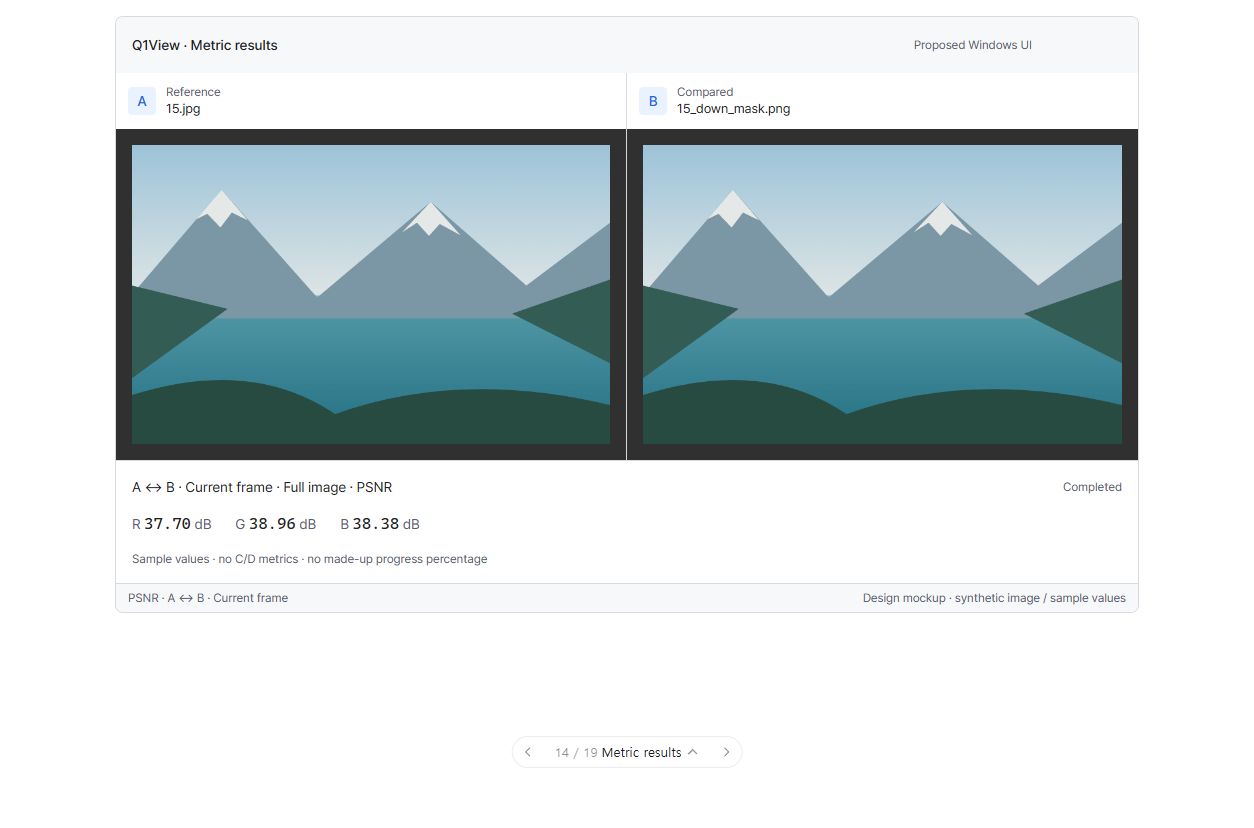
구현된 앱 화면이 아닌 UI 제안입니다. 그림의 모든 주변 요소가 아니라 현재 논의 중인 개별 작업의 범위만 구현합니다.
진행 상태: 개별 작업 논의 대기. 연결된 작업 모두에 실제 구현·검증 증거가 있을 때까지 이 상위 이슈를 열어 둡니다. 전체 계획의 첫 논의는 #117의 글꼴입니다. 다음 작업과 릴리즈를 자동으로 진행하지 않습니다.
시각적 설명과 논의
이 작업 묶음은 새로운 다중 행 배치가 아니라 비교 의미를 읽기 쉽게 만드는 것입니다. 실제 분석 대상은 A와 B입니다. C와 D는 보기 전용이며 그 측정값까지 계산한 것처럼 보여서는 안 됩니다.
아래 도식은 구조와 동작을 설명합니다. 정확한 픽셀 배치·글꼴 렌더링이나 구현된 Windows 앱 스크린샷이 아닙니다.
flowchart TD
  A["A: 기준"] --> METRIC["A ↔ B 분석<br/>현재 프레임 / ROI / 시퀀스 평균<br/>실제 PSNR · SSIM · LPIPS 값"]
  B["B: 비교 대상"] --> METRIC
  C["C: 보기 전용"] --> VIEW["육안 검사할 추가 이미지<br/>C/D 측정을 계산한 것처럼 표시하지 않음"]
  D["D: 보기 전용"] --> VIEW
  METRIC --> STATE["준비 / 계산 / 완료 / 취소 / 오류<br/>이전 값·0을 새 결과로 표시하지 않음"]
  STILL["정지 이미지 비교"] --> COMPACT["간결한 분석; 타임라인 접힘"]
  SEQUENCE["시퀀스 비교"] --> TEMPORAL["프레임 조작·의미 있는 시간 그래프"]
기존 단계 전체의 논의 질문 — 참고
- A/B 파일과 숫자가 나타내는 영역·프레임을 바로 알 수 있나요?
- 정지 이미지에서는 시간 그래프를 접고 시퀀스에서 필요할 때만 열까요?
- 이미지 영역·파일명·측정값 사이의 균형이 적절한가요?
참고 자료 상태: 승인은 위의 개별 작업 질문을 기준으로 합니다. 단계 전체의 참고 내용을 한 번에 구현하는 작업으로 취급하지 않습니다.
상위 이슈·의존성
상위: #110. #111, #112, #113에 의존합니다. 선행 작업을 완료·검증한 뒤 진행합니다.
목표
비교 엔진이나 패널 배치 모델은 바꾸지 않고 입력 역할·측정 범위·분석 상태를 읽기 쉽게 만듭니다.
구현 범위
- Comparator에 공통 글꼴·표면·간격을 적용합니다. 같은 크기의 A/B 패널, 1 DIP 구분선, 최소 48 DIP 입력 헤더, 28 DIP 역할 표식, 전체 파일명 접근을 제공합니다.
- A는 Reference(기준), B는 Compared(비교 대상)로 표시합니다. 실제 상태가 동기화된 경우에만 동기화를 표시합니다.
- 최소 72 DIP 분석 줄에 A ↔ B와 실제 현재 프레임/ROI/시퀀스 평균 범위를 표시합니다. 측정값은 16 DIP 고정폭, 채널·단위 레이블은 12 DIP입니다.
- 실제 PSNR dB·채널 출력과 무한대·계산 불가 상황을 유지합니다. SSIM/LPIPS도 실제 측정값이며 만들어낸 품질 백분율이 아닙니다.
- 준비·대기·계산·오래된 결과·취소·오류·완료를 구분합니다. 0이나 이전 프레임 값을 새 계산 완료 결과로 표시하지 않습니다. 전체 작업량을 모르면 진행 백분율을 만들지 않습니다.
- 정지 이미지에서는 시간 그래프를 처음에 숨깁니다. 시퀀스에는 프레임·진행 조작과 접을 수 있는 그래프(초기 약 144 DIP)를 제공합니다. 단위·프레임/시간 축·현재 위치·미계산 구간을 표시합니다.
- 현재 측정·차이 스캔은 첫 두 패널에만 적용합니다. C/D는 View only(보기 전용)로 표시하고 이미지 렌더링을 유지합니다.
- #107의 같은 폴더 다중 파일 시퀀스 탐지 성능 개선을 유지합니다. 임의 비교 쌍·다중 행·새 알고리즘·디코더 재작성은 이 단계에서 하지 않습니다.
완료 조건
- 표시 역할·프레임/ROI/평균 범위·단위·동기화·대기/오류 상태가 실제 엔진과 일치합니다.
- 측정 대상은 A/B만으로 표시합니다. C/D를 어둡게 하거나 분석된 입력으로 표시하지 않습니다.
- 정지 이미지 비교에는 불필요한 시퀀스 UI가 없고 시퀀스 탐색·그래프 범위는 일치합니다.
- LPIPS 준비·취소·실패, 크기 불일치, 미완료 스캔, 무한대·계산 불가를 정확하게 처리합니다.
- 확대·이동·ROI·픽셀 검사·동기화 조작·키보드/UIA·테마·DPI가 정상 동작합니다.
- 명시적인 다중 이미지 열기에 비싼 폴더 전체 반복 디코딩이 재발하지 않습니다.
실행·완료 규칙
Windows MFC Viewer/Comparator만 대상이며 상위 설계와 AGENTS.md를 따릅니다. 최신 origin/master에서 작업 범위에 맞는 브랜치를 만들고 관계없는 변경을 보존합니다. 기존 명령 ID와 렌더링·데이터 경로를 재사용합니다. 관련 자동·수동 검사를 수행하고 공통 코드 또는 릴리즈에 민감한 코드 변경에는 로컬 CoreRegressionTests 및 두 Windows Release 빌드도 수행합니다. 브랜치/PR, 검증 증거, 남은 한계, 회귀 수정 내용을 기록합니다. 목업 또는 빌드 성공만으로 완료 처리하지 않습니다. 이 구현 단계에서는 릴리즈를 태그하거나 게시하지 않습니다.
English original — 영어 원문 펼치기
Coordination epic — work through the small jobs
This issue groups related work; it is not one implementation job or one all-at-once design approval. Review and complete the linked leaf issues separately. Their questions, narrow scopes and prerequisites govern execution. The older phase-wide material below is reference context.
| Focused job | UI screen, question and acceptance checks |
|---|---|
| Make Comparator source roles and filenames clear | #129 |
| Present honest metric scope, values and calculation states | #130 |
| Make sequence analysis graphs contextual and readable | #131 |
Screen context
This is a UI proposal, not an implemented screenshot. Implement only the boundary of the leaf job under discussion, not every contextual element visible in the picture.
Coordination status: awaiting job-level discussion. Keep this epic open until its linked jobs have actual implementation/verification evidence. The first discussion is #117, typography only. No automatic next-job work or release.
Visual walkthrough and discussion
This phase makes comparison meaning readable, not a new multi-row layout. A and B are the actual analysis pair. C and D remain view-only; the UI must not suggest that their metrics were calculated.
Schematic only: these diagrams explain structure and behavior, not exact pixel geometry, font rendering, or an implemented Windows screenshot.
flowchart TD
  A["A: Reference"] --> METRIC["A ↔ B analysis<br/>Current frame / ROI / sequence average<br/>Actual PSNR · SSIM · LPIPS values"]
  B["B: Compared"] --> METRIC
  C["C: View only"] --> VIEW["Additional images for visual inspection<br/>No advertised C/D metric calculation"]
  D["D: View only"] --> VIEW
  METRIC --> STATE["Preparing / calculating / completed / cancelled / error<br/>Never present an old value or zero as a new result"]
  STILL["Still-image comparison"] --> COMPACT["Compact analysis; timeline collapsed"]
  SEQUENCE["Sequence comparison"] --> TEMPORAL["Frame controls and meaningful temporal graph"]
Historical phase-level discussion prompts (reference)
-
Can you immediately tell which files are A/B and what region/frame the numbers describe?
-
Should the temporal graph remain collapsed for still images and open only for sequences when needed?
-
Is the balance between image area, filenames, and metric values appropriate?
Reference status: use the focused leaf-job questions above for approval. This phase-wide material is not one implementation job.
Parent and dependencies
Parent: #110. Depends on #111, #112, #113. Complete and verify prerequisites before this stage.
Goal
Make comparison roles, metric scope, and analysis status readable without changing the comparison engine or panel layout model.
Implementation scope
- Use shared fonts/surfaces/spacing in Comparator. Keep equal A/B panes with a 1 DIP separator, source headers at least 48 DIP, 28 DIP role markers, and accessible full filenames.
- Label A as Reference and B as Compared. Report synchronization only when the actual state is synchronized.
- Present a minimum 72 DIP analysis row with explicit A ↔ B scope and actual Current frame / ROI / Sequence average. Use 16 DIP monospaced values, 12 DIP channel/unit labels.
- Preserve actual PSNR dB/channel output and infinite/unavailable cases; SSIM/LPIPS remain actual metrics, not invented quality percentages.
- Distinguish preparation/pending/calculating/stale/cancelled/error/completed. Never show zero or an old frame's value as a newly completed calculation; don't invent a percent without a known denominator.
- Hide temporal graphs initially for stills. For sequences, organize frame controls/progress and a collapsible graph (about 144 DIP initial height) with metric units, frame/time axis, current position, and uncomputed regions.
- Current metric/difference scans apply to the first two panes only. Mark C/D View only and keep their image rendering unchanged.
- Retain existing same-folder multi-file sequence-detection performance behavior from Windows Comparator: avoid repeated sequence scans and decoding when opening multiple images from one folder #107. No arbitrary pair selector, multi-row layout, new algorithms, or decoder rewrite in this phase.
Acceptance criteria
- Displayed roles, frame/ROI/average scope, units, synchronization, and pending/error states match the actual engine.
- A/B remains the only advertised metric pair; C/D is not visually dimmed or presented as analyzed.
- Still-image comparison has no unnecessary sequence UI; sequence navigation and graph scope agree.
- LPIPS preparation/cancel/failure, differing sizes, unfinished scans, infinity and unavailable results are handled honestly.
- Zoom/pan/ROI/pixel inspection, synchronized operations, keyboard/UIA, theme and DPI behavior remain correct.
- Explicit multi-image opening does not reintroduce expensive repeated directory decoding.
Execution and completion rules
Windows MFC Viewer/Comparator only; follow the parent specification and existing AGENTS.md. Start a focused branch from current origin/master and keep unrelated changes intact. Reuse existing command IDs and rendering/data paths. Run relevant automated/manual checks plus local CoreRegressionTests and both Windows Release builds for changes affecting shared or release-sensitive code. Record the branch/PR, verification evidence, remaining limitations, and any regression fixes. A mockup or build alone is not completion. Do not tag/publish a release in this implementation step.
Activity
[-]Windows UI redesign — Phase 4: Comparator hierarchy, A/B scope, and analysis states[/-][+]Windows UI redesign — Comparator presentation epic: three focused jobs[/+]